ZIP File Hosting: Turn a ZIP Into a Live Website
Table of Contents
- Turn a ZIP File Into a Live Website
- What ZIP File Hosting Actually Does
- Prepare the Correct Structure for ZIP File Hosting
- Check Asset Paths Before You Upload a ZIP Website
- Upload a ZIP Website and Publish It
- Preview the Site and Understand Static Website Hosting Limits
- Protect the Shareable Website Link and Track Opens
- Replace Files Without Changing the Shareable URL
- Real Uses, Alternatives, and Mistakes to Avoid
- Final Thoughts
- Turn a ZIP File Into a Live Website
- What ZIP File Hosting Actually Does
- Prepare the Correct Structure for ZIP File Hosting
- Check Asset Paths Before You Upload a ZIP Website
- Upload a ZIP Website and Publish It
- Preview the Site and Understand Static Website Hosting Limits
- Protect the Shareable Website Link and Track Opens
- Replace Files Without Changing the Shareable URL
- Real Uses, Alternatives, and Mistakes to Avoid
- Final Thoughts
Turn a ZIP File Into a Live Website
ZIP file hosting solves an awkward problem: clients cannot review a finished website inside a compressed archive. They must download and extract it, find the right file, and hope every asset works.
Instead, upload the ZIP as a shareable website. Revdoku lets you place the site in a private bucket, preview it, choose who can enter, and publish it without setting up a web server. You can track visits, clicks, and downloads or replace files without changing the URL.
TL;DR: ZIP file hosting turns a static site archive into a browser-ready link while preserving its pages, assets, and navigation.
This guide covers:
- The correct ZIP structure
- How
index.htmland relative paths work - Public, password, and email-gated sharing
- Static hosting limits
- Analytics, updates, and common publishing mistakes
What ZIP File Hosting Actually Does
A website ZIP usually contains static files such as HTML, CSS, JavaScript, images, fonts, PDFs, and downloadable assets. ZIP file hosting extracts or accepts that collection while preserving its directory structure, then serves the files over HTTPS.
This differs from an ordinary cloud storage link. A storage service may present the ZIP as a file to download. Static website hosting presents index.html as a web page and lets the browser request the supporting files referenced by that page.
| Method | What the recipient gets | Best fit | Main limitation |
|---|---|---|---|
| Email attachment | A ZIP to download and extract | Internal handoff | No browser preview or activity data |
| Cloud storage | A file or folder interface | General file transfer | Often feels unfinished for client review |
| Developer hosting | A live static website | Production sites and engineering teams | May require Git, DNS, and deployment setup |
| Revdoku bucket | A controlled browser link | Client demos, proposals, and deliverables | Runs static browser code, not server applications |
Revdoku is useful when the website is part of a client conversation. You can publish a PDF or folder as a live link, but a ZIP with its own index.html can retain the design and navigation created by you, an export tool, or an AI website builder.
First, create a bucket, add the ZIP or site folder, inspect it, and publish. API, CLI, and AI-agent workflows can automate repeated publishing.
Prepare the Correct Structure for ZIP File Hosting
Most ZIP website uploads fail because of folder problems, not hosting. The publishing root must contain the entry page and assets at the paths expected by the HTML.
A clean archive commonly looks like this:
client-demo.zip
├── index.html
├── about.html
├── css/
│   └── styles.css
├── js/
│   └── app.js
├── images/
│   ├── logo.webp
│   └── hero.webp
└── files/
    └── proposal.pdf
The important file is index.html. Web servers commonly use that name as the default page when a visitor opens a directory URL, as explained in MDN’s guide to website files. Use lowercase unless your export deliberately uses another case. Hosted file systems can distinguish Logo.png from logo.png, even if your local computer appears more forgiving.
Some tools wrap the site in one extra directory:
client-demo.zip
└── client-demo/
    ├── index.html
    ├── css/
    └── images/
That structure can work if you publish client-demo as the website root. It fails when the host looks for index.html beside the top-level directory instead of inside it. Before uploading, decide whether to publish the archive or the directory containing the site. Avoid several unnecessary wrapper folders.
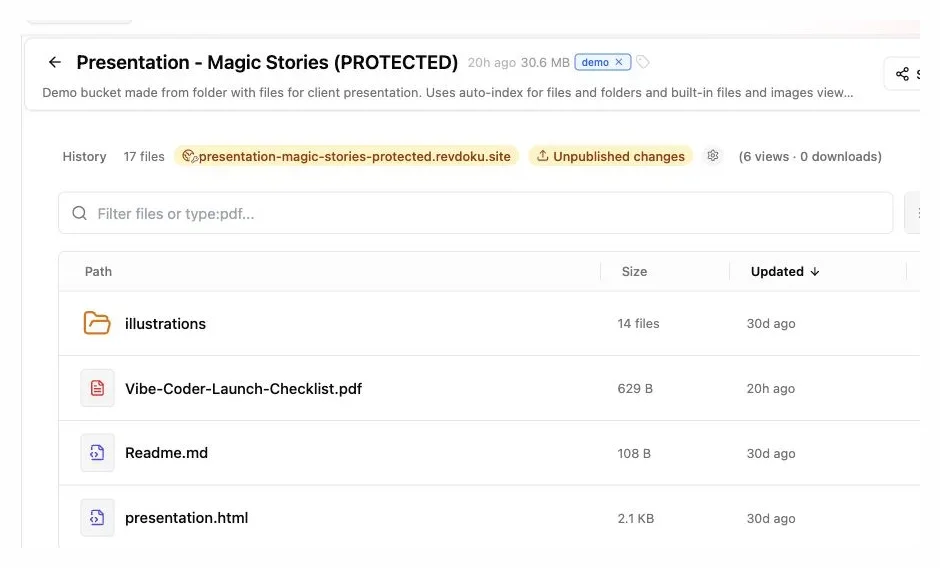
After uploading or extracting a ZIP, confirm that its folders and entry files are in the expected locations before publishing.
Check Asset Paths Before You Upload a ZIP Website
A site may display text without styling when its HTML loads but its CSS, JavaScript, font, or image paths fail.
Relative paths locate assets from the current document. If index.html and the images directory share the same parent folder, this path is portable:
<img src="/assets/hero.webp" alt="Project preview">
<link rel="stylesheet" href="css/styles.css">
<script src="js/app.js"></script>
Check these common path patterns:
images/photo.webplooks inside animagesdirectory below the current location.../images/photo.webpmoves up one directory before looking forimages./images/photo.webpstarts at the published domain root and may break when the site is mounted below another path.C:\Projects\site\image.pngpoints to a local computer and will never work for a remote visitor.file:///Users/name/site/app.jshas the same problem.
For a portable ZIP to website conversion, relative references such as css/styles.css are usually safer than local paths. MDN’s guide to creating links explains how browsers resolve relative and absolute URLs.
Check capitalization, spaces, and special characters. Renaming Sales Deck.pdf to sales-deck.pdf makes links easier to inspect. Do not rename assets after export unless you update every reference to them.
Test the extracted folder with a local static server. Opening index.html directly through a file: URL is less reliable because browser security rules and root-relative paths may behave differently.
Upload a ZIP Website and Publish It
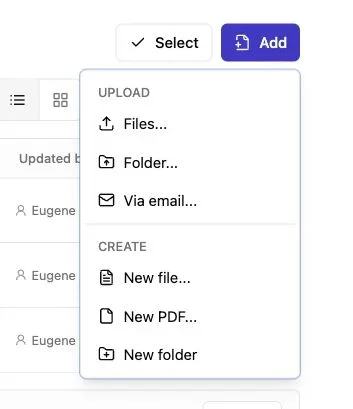
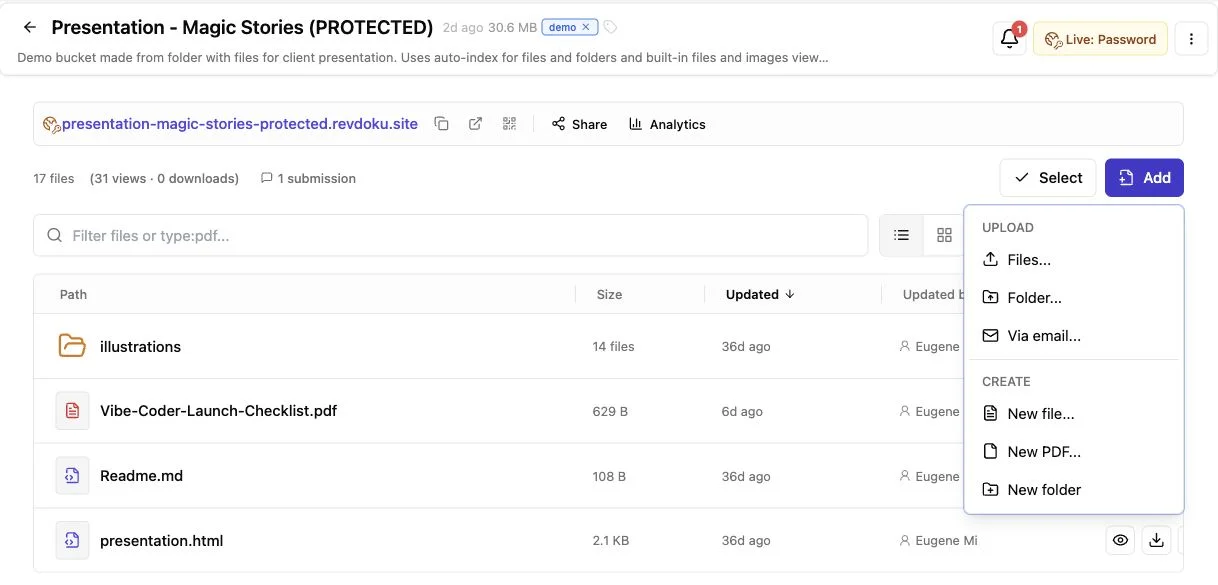
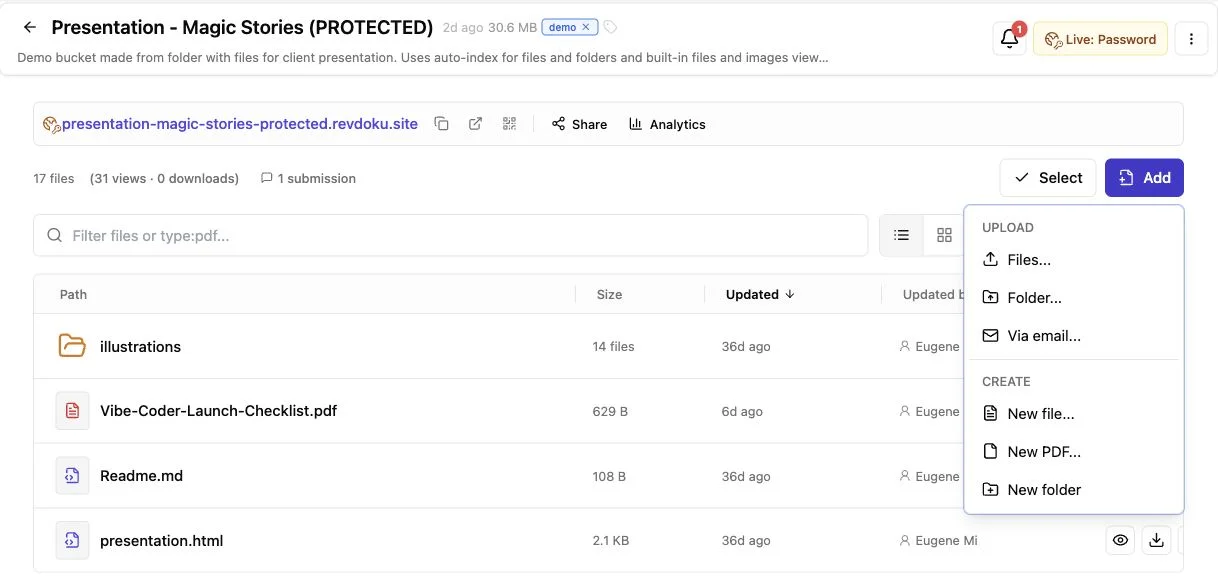
Note: Use the Add menu to upload files or a complete folder.
With a sound structure, publishing should take minutes. Revdoku stores client work in buckets, which remain private until you choose to publish them.
-
Sign in to the Revdoku dashboard and create a new bucket for the project.
-
Drag in the website ZIP, the extracted site folder, or the directory that contains
index.html. Preserve the folder structure, including all images, stylesheets, scripts, fonts, and downloads the HTML requires. -
Confirm in the bucket file tree that
index.htmlis at the intended publishing root. If the archive contains one wrapper directory, select that directory as the root or move its contents up one level. -
Before sharing, preview the main pages, navigation, calls to action, and downloads.
-
Choose an access mode. Publish it publicly, protect it with a password, or require a visitor to verify an email address.
-
Copy the stable URL and send it to the client. Revdoku publishes sites on a
revdoku.siteaddress, with custom-domain options available on eligible plans.
This workflow lets you upload a ZIP website without learning web hosting. A freelancer can publish an exported portfolio. An agency can share a campaign concept. An AI agent builder can send the latest generated interface to a stakeholder.
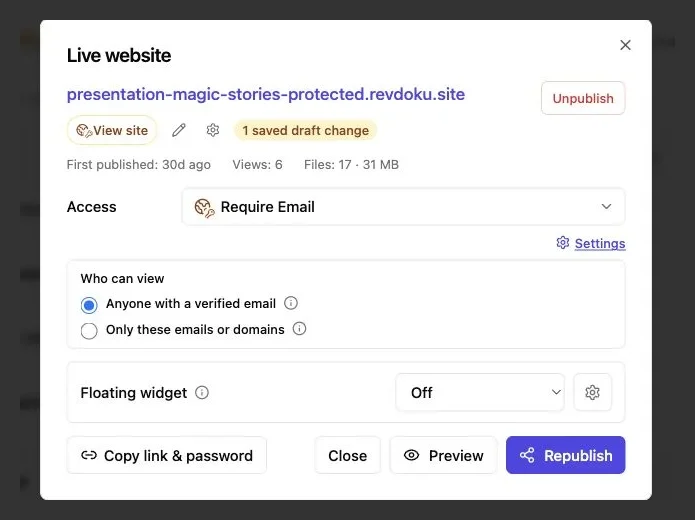
Choose an access mode in the publishing settings. Public, Password Gate, and Require Email are available from the Access menu.
Preview the Site and Understand Static Website Hosting Limits
Preview more than the homepage before sending the link. A polished first screen can hide broken navigation, missing fonts, or a download button that points to your laptop.
| Preview item | What to test | Typical failure |
|---|---|---|
| Navigation | Open every menu item and back link | Wrong relative directory |
| Layout | Check phone and desktop widths | Fixed-width export overflows |
| Media | Load images, video, icons, and fonts | Missing file or case mismatch |
| Downloads | Open PDFs and attachments | Asset omitted from the ZIP |
| Forms | Submit a test response | Form expects an unavailable backend |
| Console | Look for browser errors | Missing script or blocked request |
Keep page weight in mind. The 2025 Web Almanac found that the median mobile home page weighed about 2.56 MB, including 911 KB of images and 632 KB of JavaScript. Among inner pages weighing 5 MB or more, only 42% passed all Core Web Vitals on mobile, compared with 68% of pages under 1 MB. Compressing oversized images is often the easiest fix.
ZIP hosting serves static websites but cannot execute server code. Files such as PHP, Python, Ruby, or Node.js applications will not start a server. Database queries, private environment variables, server-rendered routes, and backend authentication need a compatible application host.
Browser-side HTML, CSS, and JavaScript work. For client responses, Revdoku’s built-in feedback and contact forms can collect input without requiring you to build a backend. Never place API secrets, passwords, private keys, or .env files in a ZIP website.
Protect the Shareable Website Link and Track Opens
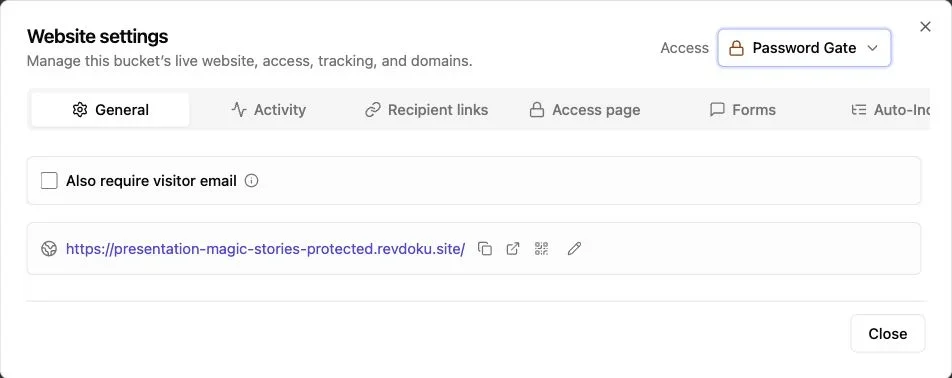
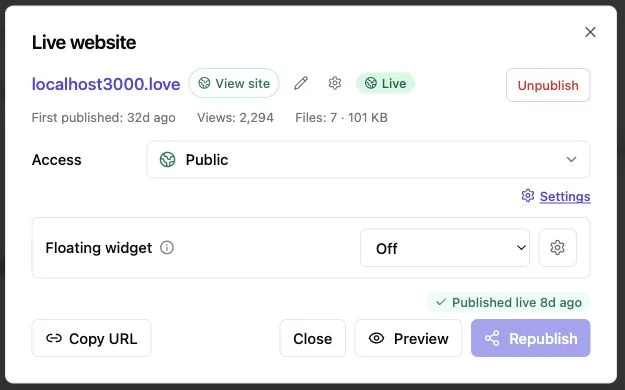
Note: Website settings control the live URL and access mode.
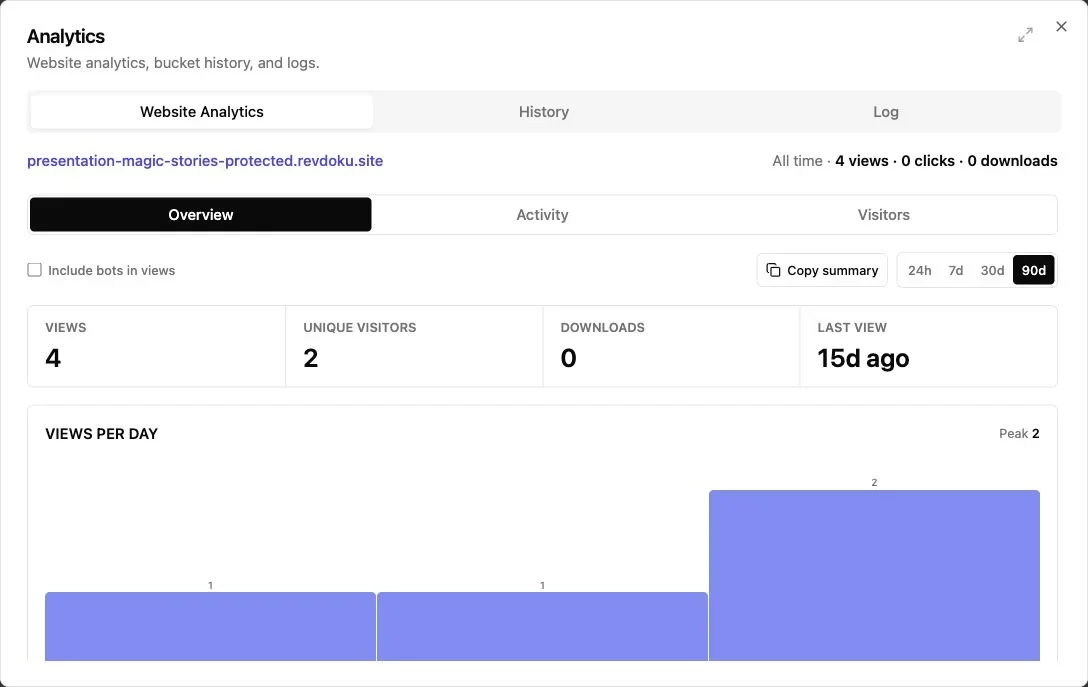
Note: The overview summarizes views, visitors, downloads, and recent activity.
Choose access based on the ZIP’s contents and the activity you need to track.
| Access mode | Use it when | What you can know |
|---|---|---|
| Public | The site is safe for anyone with the URL | Overall visits and activity |
| Password-protected | The work is confidential, but several people may review it | Activity after successful entry |
| Email-gated | Identity and follow-up timing matter | Per-visitor activity tied to a verified email |
| Email allowlist | Only named people or a company domain should enter | Which approved visitor accessed the site |
A public link may suit a public portfolio. For an unreleased campaign, use a password and send it through a separate channel. For a proposal, investor update, or sales demo, an email gate identifies returning prospects that generic visit counts cannot.
Revdoku can record pages viewed, links clicked, and files downloaded by visitor and time.
Protected-link notifications enable timely follow-up by showing when someone enters. If a prospect opened the pricing page twice and downloaded the scope, there is a clear reason to write. If nobody entered, confirm that they received the link.
Lead capture can also turn a shareable website link into a simple distribution page for a ZIP-hosted report or demo. Visitors exchange an email address for access, while the owner keeps the content and activity in the same bucket.
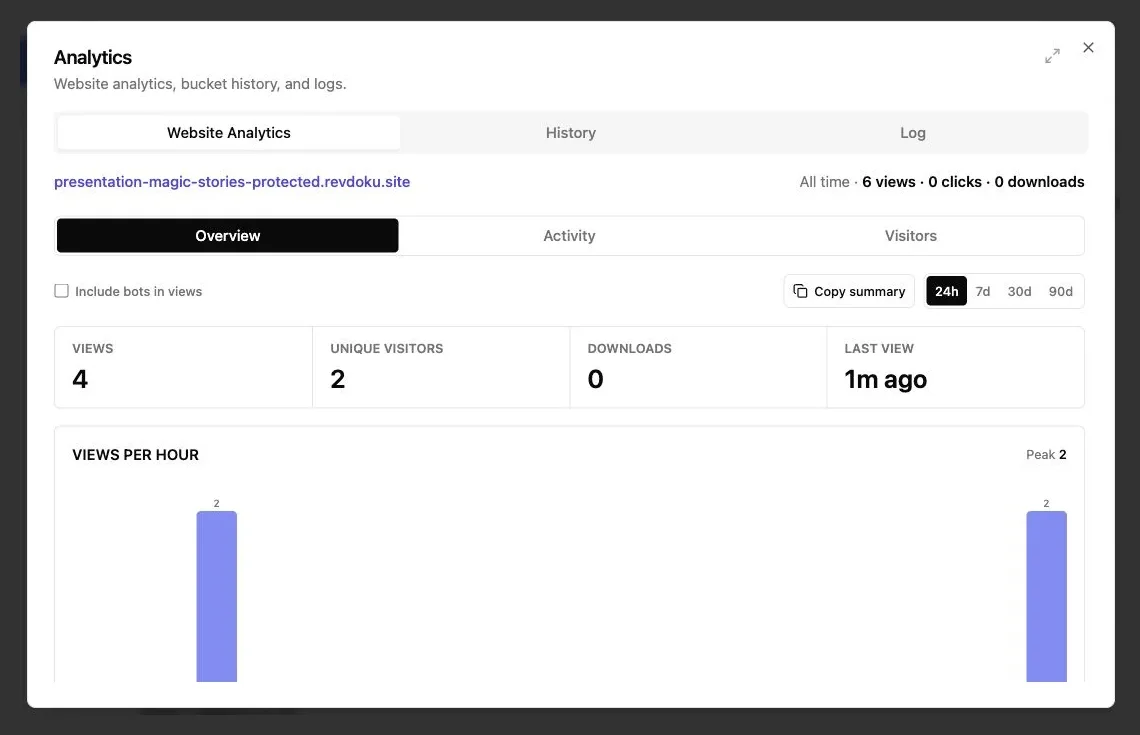
The analytics overview shows views, unique visitors, downloads, and the most recent view; the Activity and Visitors tabs provide more detail when events are available.
Replace Files Without Changing the Shareable URL
Client work changes: headlines get approved, charts need newer numbers, and typos surface after sharing. A new link for every revision confuses email threads and leaves old versions circulating.
With a stable Revdoku URL, the update process is shorter:
- Correct the source project and export a fresh ZIP website.
- Confirm that the new export retains the same root structure.
- Replace the affected files or upload the revised site contents to the existing bucket.
- Preview the updated version, including any pages touched by the change.
- Republish the bucket and verify the existing URL in a private browser window.
The client keeps using the original link. Links in old emails, QR codes, proposals, or project systems can show the current deliverable without redistribution.
Revdoku also supports reviewing versions and rolling back changes from the dashboard.
Replace files carefully. A new export may change hashed asset names, such as app.41af.js, while the old index.html still requests app.19bd.js. Upload the complete build output together when filenames are generated automatically. For a small text or image correction, replacing one matching file may suffice.
Frequent publishers can automate the same bucket workflow through the API, CLI, or an AI agent. Automation is optional.
Real Uses, Alternatives, and Mistakes to Avoid
ZIP file hosting suits reviewable, self-contained work, including these four examples:
- Freelance website concept: A designer exports a five-page static prototype, adds it to a password-protected bucket, and sends one link instead of asking the client to extract a ZIP.
- Agency campaign preview: An agency uses an email gate for an unreleased landing page. The account lead gets an open notification and sees which supporting PDF the client downloaded.
- Founder investor demo: A founder publishes a static product walkthrough with an allowlist for selected investor domains, then updates the screenshots at the same URL after each product release.
- AI-generated report: An agent produces HTML charts and supporting CSV files. A person reviews the output, publishes it to the existing bucket, and checks visitor activity later.
Use a folder-based document website when the files themselves are the experience and no custom index.html is needed. Use a PDF-to-link workflow when one fixed-layout document is the deliverable. Use developer hosting when the project needs server functions, a database, build pipelines, or production-scale application infrastructure.
Before you share a ZIP as a website, check the following:
| Item | What to check | Why it matters |
|---|---|---|
| Entry page | index.html is at the publishing root |
Prevents a blank page or file listing |
| Asset paths | No local computer paths remain | Keeps styling and media available online |
| Secrets | No credentials or .env files are included |
Static files can be exposed to visitors |
| Performance | Images and scripts are reasonably small | Heavy pages load poorly on mobile |
| Access | Public, password, or email gate is intentional | Avoids accidental disclosure |
| Revision | Existing URL works after replacement | Prevents broken client bookmarks |
Final Thoughts
ZIP file hosting turns a packaged website into a browser link clients can use. The reliable path is to keep index.html at the correct root, preserve relative asset paths, upload the complete site, and preview every important interaction.
Revdoku includes controls often missing from ordinary static hosting. You can protect the website, identify verified visitors, receive open notifications, review clicks and downloads, collect feedback, and replace files without changing the URL. The dashboard and drag-and-drop workflow suit most projects; automate later if publishing becomes repetitive.
A ZIP website can run browser-side HTML, CSS, and JavaScript, but not executable server code. A static project needs only a clean folder structure, static hosting, and a deliberate publish step.
Frequently asked questions
Why does my ZIP-hosted website show a blank page or file listing?
The host may not find index.html at the selected publishing root. Check for an extra wrapper folder and either publish that folder as the root or move the site files up one level.
Why are images, styles, or scripts missing after publishing?
Missing assets usually result from incorrect paths, capitalization differences, or files omitted from the ZIP. Use portable relative paths, match filenames exactly, and verify that the complete exported folder structure was uploaded.
Can a ZIP-hosted website run forms or server-side features?
It can run browser-side HTML, CSS, and JavaScript, but it cannot execute PHP, Python, Ruby, Node.js servers, or database queries. Forms require a compatible external service, a built-in hosting feature, or a separate backend.
Which access option should I use for client review?
Use a public link for non-sensitive work, password protection for confidential content shared with a group, or email gating when visitor identity matters. An allowlist is best when access must be restricted to specific people or company domains.
Can I update the website without sending clients a new link?
Yes, replace the files in the existing bucket and republish after previewing the changes. If the export uses generated filenames, upload the entire build so index.html and its referenced assets remain synchronized.
What should I test before sharing the live website?
Open every important page, test navigation and downloads, and check the layout on phone and desktop widths. Also inspect browser errors, confirm protected access works, and ensure no credentials, private keys, or .env files were included.
When should I use developer hosting instead of ZIP file hosting?
Choose developer hosting when the site needs server functions, databases, private environment variables, deployment pipelines, or production-scale infrastructure. ZIP hosting is better suited to static prototypes, portfolios, campaign previews, reports, and other self-contained client deliverables.
Related Articles
ChatGPT Website Hosting: Build, Publish, and Share
Learn how to build, review, and publish ChatGPT-generated websites safely using Revdoku, static hosting, or an application platform.
Claude Website Publishing: Artifact to Live Site
Learn how to review, export, host, test, and update Claude-generated websites for secure client delivery or public publishing.
Host AI-Generated Websites Without Git
Learn to publish static AI-generated websites without Git using direct uploads, protected client links, and simple updates.