Claude Website Publishing: Artifact to Live Site
Table of Contents
- Claude Website Publishing Starts With a File Audit
- 1. Identify Claude Artifacts, Code, and Other Outputs
- 2. Review Before You Publish a Website Made by Claude
- 3. Export a Clean Folder for Static Website Hosting
- 4. Choose Claude Website Hosting for the Job
- 5. Claude Website Publishing With Revdoku
- 6. Test Access, Quality, and AI Website Publishing Performance
- 7. Update the Site Without Changing the Link
- 8. Four Real-World Claude Website Publishing Patterns
- Final Thoughts
- Claude Website Publishing Starts With a File Audit
- 1. Identify Claude Artifacts, Code, and Other Outputs
- 2. Review Before You Publish a Website Made by Claude
- 3. Export a Clean Folder for Static Website Hosting
- 4. Choose Claude Website Hosting for the Job
- 5. Claude Website Publishing With Revdoku
- 6. Test Access, Quality, and AI Website Publishing Performance
- 7. Update the Site Without Changing the Link
- 8. Four Real-World Claude Website Publishing Patterns
- Final Thoughts
Claude Website Publishing Starts With a File Audit
Claude can draft a polished landing page, report, calculator, or client demo in one conversation. The challenge is turning it into a link you can safely send. Good Claude website publishing depends on checking files, choosing access, and planning updates, not finding a Publish button.
TL;DR: This guide takes generated code or an artifact to a live static site. You will learn how to:
- review the content and code;
- export a complete website folder;
- compare Claude website hosting options;
- upload the site, set access, and test the live link;
- update the work later without confusing clients.
The exact Claude interface can change by plan and device. Because it uses portable files, this workflow survives changes to button names or menus.
1. Identify Claude Artifacts, Code, and Other Outputs
Identify Claude’s output before publishing. A complete-looking preview may still depend on build tools, online libraries, or conversation-only data. Anthropic says Claude artifacts can include single-page HTML, SVG, code, and interactive React components that users can view, copy, or download.
These capabilities do not make every artifact a deploy-ready static folder. See Anthropic’s current artifact guide before relying on a particular control.
| Output from Claude | What you probably have | What publishing requires |
|---|---|---|
| One HTML file | A self-contained static page | Save it as index.html and test it locally |
| HTML, CSS, JavaScript, and images | A multi-file static site | Keep the folder structure and relative paths intact |
| React, Vue, or similar source | Source code, not usually the final site | Install dependencies and create a production build such as dist |
| A form, login, database, or API call | A site with changing behavior | Add a backend or replace the feature with a hosted service |
| A document or presentation | Content rather than a custom site | Publish the file directly or place it in a browsable folder |
Simple test: if index.html opens from the exported folder and the page works without Claude, you are close. If not, ask Claude to explain the dependencies and produce a deployable static version.
2. Review Before You Publish a Website Made by Claude
Review AI output like a human contractor’s work: Claude may produce plausible placeholders, inaccessible controls, broken mobile layouts, or dead links. I would never send a first draft to a client, even if it looks excellent on desktop.
Use a short release review:
| Item | What to check | Why it matters |
|---|---|---|
| Claims and numbers | Verify names, dates, prices, citations, and calculations against primary sources | Fluent text can still be wrong |
| Private information | Remove prompts, comments, API keys, internal URLs, customer data, and hidden draft copy | Browser source files are visible to visitors |
| Brand and rights | Confirm logos, fonts, photos, licenses, and client approval | Generation does not transfer third-party rights |
| Navigation | Open every link, button, menu, download, and form | A handsome dead end is still a broken site |
| Responsive layout | Test narrow phone, tablet, laptop, and large-screen widths | Claude’s preview may not match a client’s device |
| Accessibility | Check headings, labels, alt text, contrast, focus order, and keyboard use | Access is part of quality, not a later polish |
| Failure states | Try empty inputs, invalid values, offline loading, and blocked scripts | Real visitors do surprising things |
The 2026 WebAIM Million study found an average of 56.1 detectable accessibility errors per home page, while average page complexity rose 22.5% in one year. Because scanners miss some problems, add keyboard and human reviews.
3. Export a Clean Folder for Static Website Hosting
The safest static-hosting export is boring: one folder with every file the browser needs. Anthropic says artifacts can be copied or downloaded, though controls vary by Claude product and plan. If the option is missing, ask Claude for separate files or copy the source locally. Do not rely on menu paths from old tutorials.
Prepare the package:
-
Request a deployment manifest. Ask Claude for every required file, path, external dependency, and entry point.
-
Save the entry page. Name the home page
index.htmlunless the host says otherwise. -
Preserve directories. Keep paths such as
assets/logo.svg,css/site.css, andjs/app.js; moving a file can break several references. -
Use relative links. Prefer
./about.htmlorassets/photo.webpover paths tied to Claude’s preview environment or your computer. -
Build framework projects. For React or another framework, follow its package instructions and upload the generated output folder, not only the editable source.
-
Remove secrets and clutter. Delete environment files, test data, prompt notes, unneeded source maps, and unused assets.
-
Open the result locally. Test the home and nested pages. For JavaScript modules, a local server is more reliable than double-clicking files.
Keep a zipped copy of this reviewed release. This provides a known-good fallback.
4. Choose Claude Website Hosting for the Job
There is no single best Claude website hosting choice.
Choose based on whether the site is an artifact preview, client deliverable, or public production property. Use the lightest option that meets the work’s audience, privacy, and update needs.
| Option | Best for | Access and insight | Main tradeoff |
|---|---|---|---|
| Claude artifact sharing | Fast demonstrations inside the Claude sharing model | Behavior depends on product, plan, and artifact type | Less control over a separate client delivery workflow |
| Revdoku bucket | Proposals, decks, demos, reports, and static folders sent to clients | Public, password, or email-gated access; notifications and visitor analytics | Intended for sharing deliverables rather than running a complex backend |
| GitHub Pages | Public technical sites maintained in Git | Public site with repository-based deployment | Git knowledge helps; Pages does not run server-side PHP, Ruby, or Python |
| Cloudflare Pages | Public static sites with Git or direct upload | Preview deployments, custom configuration, and optional functions | More hosting concepts to learn |
| Traditional web host | Existing company sites and custom server stacks | Varies widely | More setup, security, and maintenance responsibility |
GitHub says Pages publishes static files and changes can take up to 10 minutes. Its documentation also warns that the resulting site is public even when eligible plans use a private source repository. Cloudflare supports both Git-connected and direct upload deployments for prebuilt assets. Both are strong public hosts; Revdoku fits when delivery control and client activity matter more than a repository.
5. Claude Website Publishing With Revdoku
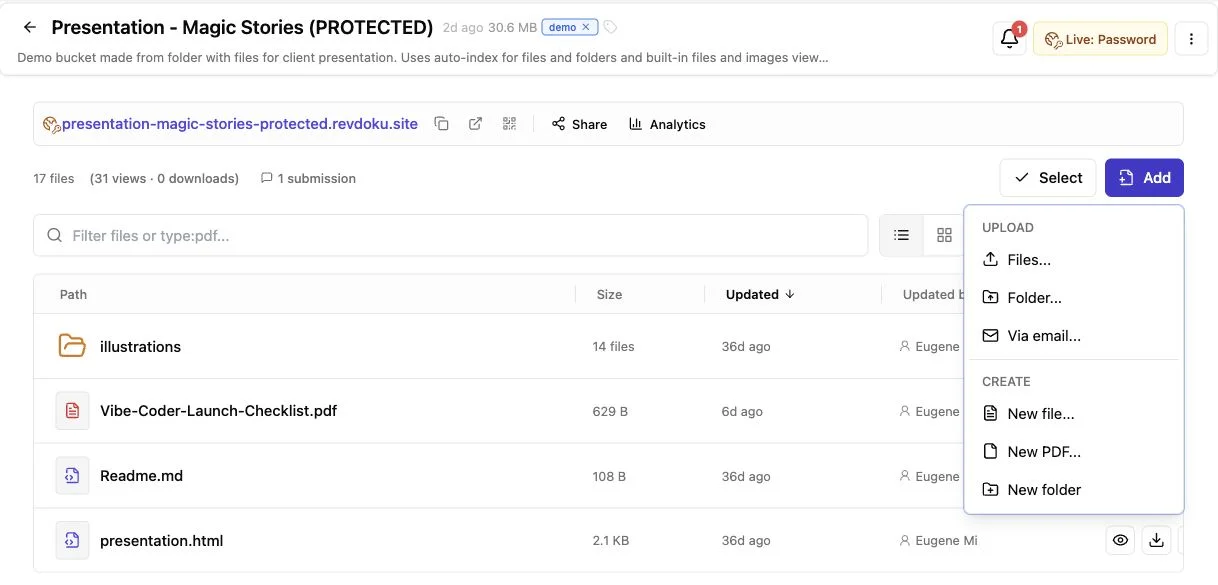
For client-focused AI website publishing, start manually: create a Revdoku bucket, drag in the reviewed folder, and publish a live link. You do not need an API, terminal, or AI agent. Without a custom entry page, Revdoku can turn Markdown, PDFs, images, spreadsheets, and HTML into a browsable document site.
A practical workflow:
- Create a deliverable bucket, such as
acme-proposalorspring-campaign-demo. - Drag in the complete website folder.
- Put
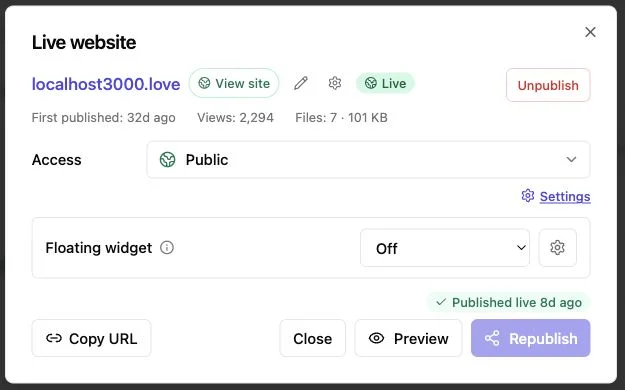
index.htmlat the published root. Without it, Revdoku can generate navigation for uploaded files. - Choose public access, password protection, or an email gate based on sensitivity.
- Test the live URL as a visitor in a private window.
- Send the link only after access and mobile layout pass.
The Revdoku publishing overview says owners can update or roll back content while the link stays the same. For protected links, open notifications guide follow-up timing.
Per-visitor analytics show pages viewed, clicks, and downloads; an email gate identifies the lead. Consultants can correct fee tables or agencies can replace demos without resending.
Claude helps create the work; the bucket controls how the finished work leaves your desk.
6. Test Access, Quality, and AI Website Publishing Performance
An upload does not guarantee a successful release. Test the public site outside your signed-in session.
Test in a private window, then on a phone using mobile data if possible. This reveals permission errors, stale files, oversized images, and resources that worked only locally.
Run this live-site check:
| Test | Pass condition | Common fix |
|---|---|---|
| Root URL | The intended home page loads without a directory error | Move index.html to the published root |
| Access gate | Unapproved visitors stop at the chosen password or email step | Recheck the bucket’s access mode |
| Assets | Fonts, images, styles, and scripts load over HTTPS | Repair paths and remove mixed-content links |
| Interaction | Menus, calculators, downloads, and forms work by keyboard and touch | Use real buttons, labels, and visible focus styles |
| Feedback | A test message reaches the owner with enough context | Configure the built-in feedback or contact form |
| Analytics | The test visit appears with the expected level of identity | Use an email gate when named visitor data is needed |
| Performance | The first view feels fast and the layout stays still | Compress images and reserve media dimensions |
For measurable performance, Google classifies a page as good when its 75th-percentile Largest Contentful Paint is at most 2.5 seconds, Interaction to Next Paint is at most 200 milliseconds, and Cumulative Layout Shift is at most 0.1. Those Core Web Vitals thresholds are field targets, not promises from a single laptop test.
Never put an API secret in browser JavaScript. A password gate controls entry, but visitors can still inspect client-side source.
7. Update the Site Without Changing the Link
A publishing workflow earns its keep on the second release. Keep the live URL stable while replacing its files. This reduces client confusion, preserves bookmarks, and keeps analytics on one deliverable.
Use a small release routine:
- Edit a working copy. Keep the last published folder untouched.
- Describe narrow changes. Ask Claude to modify specific files or components; broad rewrites may remove working behavior.
- Review the difference. Check altered facts, files, dependencies, and access assumptions.
- Retest locally. Repeat relevant link, mobile, keyboard, and form checks.
- Replace the bucket contents. Upload the revision to the same Revdoku bucket and confirm its URL.
- Check from a private window. For old assets, use versioned filenames such as
site-v3.cssor follow the host’s cache guidance. - Record the release. Keep the date, a one-sentence change note, and the zipped folder.
Start manually to see what is happening; one-off projects rarely need automation. If weekly reports or demos become repetitive, the Revdoku API and CLI can update the same buckets. An AI agent can also automate publishing, but must follow the review and test rules.
Does an update require a new client email? Usually no. Send a note only when the change affects decisions, access, or promised scope.
8. Four Real-World Claude Website Publishing Patterns
The same Claude artifacts and files may need different delivery rules. Let the audience drive the setup.
| Scenario | Recommended publishing pattern | Practical measure of success |
|---|---|---|
| Freelance proposal | Export Claude’s HTML proposal, upload it to Revdoku, and require email before access | The freelancer sees who opened it and follows up while the proposal is fresh |
| Agency design demo | Publish the static prototype behind a password and add a feedback form | Review stays limited to the client team and comments return in one place |
| Founder launch page | Review the generated site, then deploy publicly through Cloudflare Pages or GitHub Pages | The site uses a public domain, loads quickly, and can be maintained through Git |
| Monthly consulting report | Upload the report, charts, PDF, and source files to one stable Revdoku bucket | The link stays unchanged while each month’s material is replaced or extended |
You need no programming skills to publish a website made by Claude from a static folder, but developer help is required for accounts, payments, private database queries, or custom server logic. Use passwords for known client groups, email gates when follow-up requires visitor identity, and public access for marketing material meant to travel freely.
HTML can display a form, but submissions need a destination. Use Revdoku’s built-in feedback or contact form, or a vetted form service or backend on another host. Test consent language and data handling before collecting personal information.
Final Thoughts
Claude website publishing becomes straightforward when you separate creation from delivery. First identify Claude’s output. Then review the claims, privacy, accessibility, dependencies, and mobile behavior. Export a complete static folder, choose hosting around the audience, and test the published result as an outsider.
Before sending the link:
- A preview does not prove the exported files work.
- A public repository does not protect privacy.
- A stable link works best with repeatable review.
- Analytics help only when the gate identifies the right visitor.
Git-based static hosting may suit a public product site. For proposals, decks, reports, or demos needing controlled access and timely follow-up, Revdoku offers a simpler route. Start with drag and drop. Add Claude, API, or CLI automation only when repetition makes it worthwhile.
Frequently asked questions
How can I tell whether Claude’s output is ready to publish?
Open the exported index.html outside Claude and verify that every page, image, style, script, and interaction works. If the project uses React, Vue, or another framework, create a production build and publish the generated output folder.
Which hosting option should I choose for a Claude-made website?
Use GitHub Pages or Cloudflare Pages for public static sites, especially when you want Git-based maintenance or a custom domain. For client proposals, reports, and demos that need controlled access, stable links, or visitor feedback, a Revdoku bucket may be a better fit.
Can I publish a Claude website without programming experience?
Yes, if the website is a self-contained static folder with HTML, CSS, JavaScript, and assets. Features such as user accounts, payments, private databases, or custom server logic generally require developer help or an appropriate hosted service.
How should I protect a website containing client-sensitive material?
Remove secrets, internal notes, customer data, and environment files before uploading anything. Then use password protection for a known group or an email gate when visitor identification is needed, remembering that authorized visitors can still inspect client-side files.
Why does the published site look different from Claude’s preview?
The export may contain broken paths, missing dependencies, locally available resources, or styles that behave differently at other screen sizes. Test the live URL in a private window and on a phone, then check the browser-visible asset paths and HTTPS loading.
Can a static Claude website include a working contact form?
It can display a form, but submissions need a service or backend to receive and process the data. Use the host’s built-in feedback tools, a vetted form provider, or a custom backend, and test delivery, consent language, and data handling before launch.
Can I update the website without sending visitors a new link?
Usually, yes: replace the files in the existing deployment or bucket while keeping its URL unchanged. Retest the revision in a private window, use versioned asset filenames when caching causes problems, and keep a zipped copy of each reviewed release for rollback.
Related Articles

GitHub Pages Password Protection and Privacy
Learn why private repositories do not protect Pages sites and compare secure access options for internal teams and external clients.

How to Password Protect a Vercel Deployment
Learn how to secure Vercel deployments with password protection, authentication, trusted access, or protected Revdoku hosting.

How to Password Protect a Website Made with Claude
Learn how to export, secure, publish, and test a Claude-made website using password protection or verified-email access.