ChatGPT Website Hosting: Build, Publish, and Share
Table of Contents
- ChatGPT Website Hosting: What It Really Means
- Can ChatGPT Host a Website?
- What to Request When You Build a Website with ChatGPT
- A Safe ChatGPT Website Hosting Workflow
- Choose the Right ChatGPT Website Hosting and Publishing Layer
- How to Publish ChatGPT Website Files with Revdoku
- Five Real-World ChatGPT Website Hosting Examples
- Quality Checks Before You Publish a ChatGPT Website
- Final Thoughts on ChatGPT Website Hosting
- ChatGPT Website Hosting: What It Really Means
- Can ChatGPT Host a Website?
- What to Request When You Build a Website with ChatGPT
- A Safe ChatGPT Website Hosting Workflow
- Choose the Right ChatGPT Website Hosting and Publishing Layer
- How to Publish ChatGPT Website Files with Revdoku
- Five Real-World ChatGPT Website Hosting Examples
- Quality Checks Before You Publish a ChatGPT Website
- Final Thoughts on ChatGPT Website Hosting
ChatGPT Website Hosting: What It Really Means
ChatGPT website hosting sounds simple: ask ChatGPT for a site, get a link, and share it. In practice, it involves two jobs.
ChatGPT can help refine HTML, CSS, JavaScript, copy, and image instructions. A publishing layer stores and serves the files, manages access, and maintains the link.
TL;DR: ChatGPT creates the site; a publishing layer hosts it.
That split lets you choose a workflow that fits the job:
- Create a lightweight static site with ChatGPT.
- Review the files as software, not a finished product.
- Publish through a host or a controlled sharing service such as Revdoku.
This guide explains how to build safely with ChatGPT, choose a publishing option, and share a client-ready result while keeping generation and hosting distinct.
Can ChatGPT Host a Website?
Generating or previewing a website differs from operating its public hosting layer. OpenAI’s file-work documentation describes creating and refining files and even selecting parts of a website for revision. Available preview and review tools depend on the ChatGPT surface. ChatGPT can produce website files, but they need a publishing destination for a stable visitor link.
Think of ChatGPT as the writer and builder; the host provides the building, address, lock, and front desk.
| Job | ChatGPT can help | Publishing layer must handle |
|---|---|---|
| Structure | Draft pages and navigation | Serve each route reliably |
| Design | Write CSS and responsive layouts | Deliver assets over HTTPS |
| Behavior | Write browser-side JavaScript | Run any server-side code |
| Review | Explain and revise generated files | Monitor availability and access |
| Sharing | Prepare a publishable folder | Provide the live URL and permissions |
This prevents a common mistake: treating a convincing preview as a deployed, tested site.
What to Request When You Build a Website with ChatGPT
A narrow brief produces better results. “Make me a modern website” leaves many decisions unstated. Specify the audience, visitor action, expected files, and constraints. For a first version, I prefer static files because they are easy to inspect, host, and move between services.
Ask for:
| File | Purpose | Review point |
|---|---|---|
index.html |
Page structure and content | Headings, links, forms, metadata |
styles.css |
Layout, colors, and responsive rules | Mobile view, contrast, spacing |
script.js |
Optional interactions | Errors, tracking, unsafe requests |
assets/ |
Images, icons, and fonts | File size, licenses, alt text |
README.md |
Setup and publishing notes | Dependencies and assumptions |
A useful prompt is direct:
Build a responsive static site for a consulting proposal. Return separate HTML, CSS, and JavaScript files. Use no framework, database, external tracker, or third-party library. Include semantic headings, keyboard-friendly navigation, visible focus states, descriptive alt text, and a clear contact action. List every external asset and explain how you tested the result.
This approach uses ChatGPT as an AI website builder while keeping the output portable. You can change publishers without rebuilding the site.
A Safe ChatGPT Website Hosting Workflow
The safest process produces a small folder, reviewable history, and clear handoff. It requires no magic deployment button.
-
Define the static scope. Decide whether the site is a landing page, proposal, portfolio, prototype, or resource hub. If it needs accounts, payments, private databases, or personalized records, stop calling it a simple static site.
-
Generate one page first. Request the file set, brand rules, mobile behavior, and acceptance criteria. Exclude dependencies you do not understand.
-
Inspect the output. Read the copy, test every link, find placeholders, and check for API keys, personal data, hidden instructions, and unapproved analytics.
-
Preview locally. Preview the folder in an editor or local web server at roughly 320, 768, and 1440 pixels. Also use a phone; desktop previews can hide broken mobile pages.
-
Test the actions. Click navigation, downloads, mail links, buttons, and forms. A static form needs a form service, backend, or built-in publishing feature to securely process submissions.
-
Publish and verify again. Upload the reviewed folder, test the live link and access rule in a private window, and save the dated source for manual rollback.
Choose the Right ChatGPT Website Hosting and Publishing Layer
ChatGPT website hosting covers different outcomes. Public websites, private demos, and web applications need tools suited to their audience and risk.
| Publishing approach | Best fit | Main advantage | Main tradeoff |
|---|---|---|---|
| Controlled sharing such as Revdoku | Proposals, demos, decks, and client deliverables | Access gates, visitor activity, stable updates | Less suited to a broad public marketing site |
| Static website hosting | Portfolios, documentation, campaign pages | Fast delivery and public web conventions | Access control and forms may need setup |
| Application platform | Logins, databases, payments, server code | Supports dynamic behavior | More security, cost, and maintenance |
| Visual site builder | Ongoing marketing pages edited by a team | Friendly editing and templates | Generated code may not transfer cleanly |
| Traditional web host | Existing domains and mixed site stacks | Familiar hosting controls | More manual configuration |
For client work, choose the smallest layer that provides the right experience. A protected prototype needs no application platform, while a public store needs more than generated files.
Before publishing, confirm:
- Public, password-protected, or email-gated access
- Search-engine indexing
- Required downloads, feedback, lead capture, or analytics
- Custom-domain and server-side requirements
- Post-handoff update ownership
How to Publish ChatGPT Website Files with Revdoku
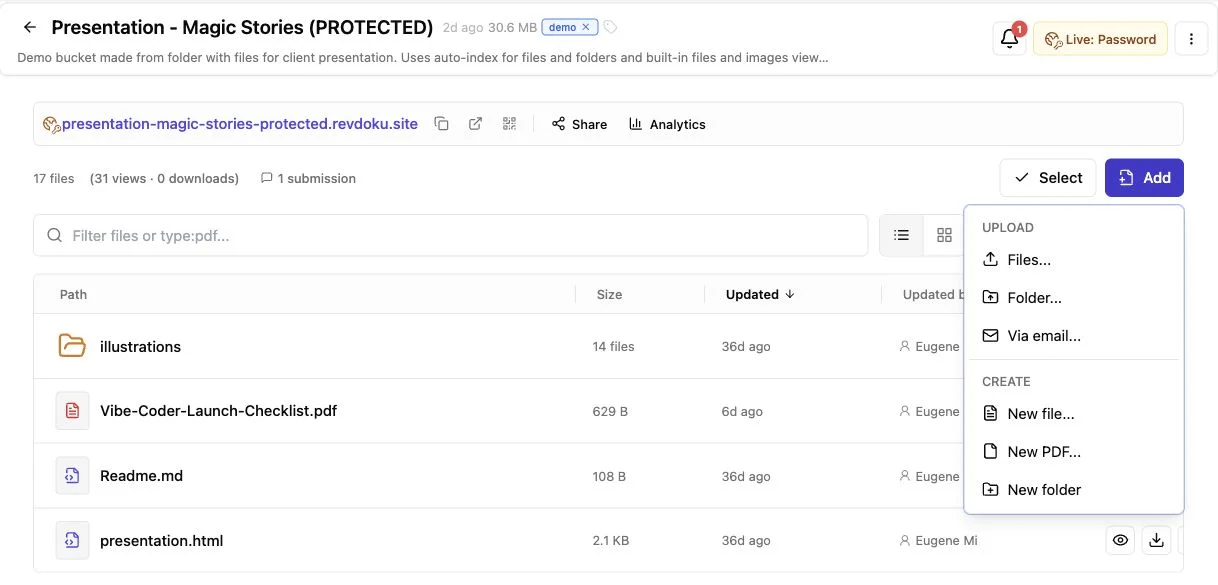
Revdoku provides controlled sharing when “website” means a client-facing demo, proposal, presentation, or deliverable bundle.
Drag a folder into the dashboard; agents, the API, and the CLI are optional automation routes.
Manual Revdoku workflow:
-
Prepare one clean folder. Combine the reviewed site and assets, adding PDFs or a deck if they support the client’s decision.
-
Create a private bucket. Drop the folder or files into the Revdoku dashboard.
-
Choose access. Make the link public, password-protected, or email-gated, using the least restrictive suitable setting.
-
Send the stable link. The recipient opens a live deliverable instead of sorting through attachments and versions.
-
Follow up with context. For protected links, open notifications show when interest is fresh. Visitor activity covers pages, clicks, and downloads, while leads, feedback, and contact forms support follow-up without a backend.
-
Replace files without changing the link. Update the bucket when copy, pricing, or the demo changes; the client keeps the URL.
ChatGPT website hosting is less awkward without “final-v7-really-final.zip.”
Five Real-World ChatGPT Website Hosting Examples
These concrete patterns use ChatGPT for creation and a publishing layer for delivery.
-
Freelancer proposal microsite: A designer turns a scope, timeline, fee table, and samples into a responsive static page, adds the approved PDF, and publishes one password-protected Revdoku link. An open notification suggests when to follow up.
-
Agency prototype room: An agency generates a clickable front-end concept and presentation. An email gate identifies visitors, while per-visitor pages, clicks, and downloads show what each stakeholder inspected. The built-in form keeps feedback beside the work.
-
Consultant resource hub: A consultant organizes a workshop recording, worksheets, slide deck, and HTML guide into one home page. Revised worksheets appear at the same link.
-
Founder landing-page test: A founder builds an early message test with ChatGPT. A static host suits public indexing, custom domains, and broad acquisition; Revdoku suits private investor previews or gated partner reviews.
-
AI agent publishing routine: An agent generates a weekly demo or report folder. After human approval, the Revdoku API or CLI updates the bucket. Automation reduces repetition while files and access rules remain visible in the dashboard.
Quality Checks Before You Publish a ChatGPT Website
Review all ChatGPT-generated code before publishing. The 2025 Stack Overflow Developer Survey found that 46% of respondents distrusted AI-tool accuracy, compared with 33% who trusted it. That developer data does not judge every page, but it supports testing the model’s output.
Keep the hosting checklist measurable:
| Item | What to check | Practical target |
|---|---|---|
| Accuracy | Names, prices, dates, claims, and links | Confirm against the source material |
| Performance | Images, fonts, scripts, and total transfer | Aim below 1 MB for a simple page |
| User experience | Loading, responsiveness, and layout movement | LCP ≤ 2.5 s, INP ≤ 200 ms, CLS ≤ 0.1 |
| Accessibility | Keyboard use, labels, alt text, contrast | 4.5:1 for normal text, 3:1 for large text |
| Privacy | Trackers, form fields, metadata, source comments | Collect only what the job needs |
| Security | Secrets, external scripts, uploads, dynamic features | No credentials in browser files |
The 1 MB target is a practical budget, not a standard.
It is intentionally lean: HTTP Archive measured the October 2024 median at 2,311 KB on mobile and 2,652 KB on desktop in its Web Almanac page-weight study. Google’s Core Web Vitals guidance supplies the performance thresholds above, measured at the 75th percentile. The contrast ratios come from W3C guidance.
Final Thoughts on ChatGPT Website Hosting
ChatGPT website hosting works when creation and delivery remain separate. ChatGPT turns a clear brief into portable files; a publishing layer makes them reachable and controls audience access.
Use this sequence:
- Generate a small static site from explicit requirements.
- Review copy, code, privacy, accessibility, and performance.
- Choose Revdoku for controlled sharing or another host for public needs.
- Test the live link from the recipient’s perspective.
- Update files while retaining the source.
ChatGPT can build what people see, but the publishing layer provides the dependable URL, permissions, forms, and ongoing delivery.
Frequently asked questions
Can ChatGPT host a website by itself?
ChatGPT handles creation and revision; a stable public or private link still requires a publishing layer.
Do I need to know how to code?
You can publish a static site without professional programming skills, but someone must review and test it. Hire a qualified developer for sensitive or dynamic projects.
Is ChatGPT-generated code secure?
Running code is not necessarily secure. Remove secrets, limit dependencies, review forms and scripts, and keep database and API credentials out of browser files.
Can a static site accept contact forms?
HTML can display a form, but processing requires a backend or form feature. Revdoku provides built-in feedback and contact forms.
Should every generated site use Revdoku?
No. Use Revdoku for controlled sharing, stable links, access gates, leads, and visitor activity; use a public host for search visibility and a conventional website.
Can I update the site later?
Yes. Keep the source, request focused revisions, review changes, and republish. Revdoku lets you update the bucket without changing the shared link.
How do I know whether a static website is enough?
A static site is usually sufficient for portfolios, proposals, documentation, prototypes, and simple landing pages. Choose an application platform if the site requires user accounts, payments, private databases, personalized content, or server-side processing.
What should I review before publishing ChatGPT-generated website files?
Verify the copy, links, mobile layout, keyboard navigation, accessibility labels, and browser compatibility. Also remove placeholders, credentials, personal information, unnecessary trackers, and external scripts you have not approved.
How can I test the site from a visitor’s perspective?
Preview it at phone, tablet, and desktop widths, then test every button, link, download, and form. After publishing, open the live URL in a private browser window to confirm that permissions and visitor access work as intended.
What happens if the website includes a contact form?
A static HTML form cannot securely store or deliver submissions on its own. You will need a backend, a trusted form-processing service, or a publishing platform with built-in feedback and contact features.
Should I publish the site publicly or use controlled sharing?
Public hosting is better when search visibility, a custom domain, and broad visitor access are priorities. Controlled sharing is more suitable for proposals, prototypes, investor previews, and client deliverables that need passwords, email gates, or visitor activity tracking.
Can I update the website without sending everyone a new link?
Many publishing services let you replace the hosted files while preserving the existing URL. Keep a dated copy of each reviewed version so you can identify changes and restore an earlier release if necessary.
What should be included in the final website handoff?
Provide the complete source folder, assets, publishing instructions, dependency notes, and ownership details for domains or service accounts. Clearly document who will maintain the content, renew services, review future changes, and respond if the site stops working.
Related Articles

GitHub Pages Password Protection and Privacy
Learn why private repositories do not protect Pages sites and compare secure access options for internal teams and external clients.

How to Password Protect a Vercel Deployment
Learn how to secure Vercel deployments with password protection, authentication, trusted access, or protected Revdoku hosting.

How to Password Protect a Website Made with Claude
Learn how to export, secure, publish, and test a Claude-made website using password protection or verified-email access.