Host AI-Generated Websites Without Git
Table of Contents
- How to Host AI Generated Website Files Without a Git Pipeline
- What Counts as Static Website Hosting for an AI-Generated Website?
- No Git Website Hosting: Upload-Based Publishing vs Git Platforms
- Prepare Files for No Git Website Hosting
- Upload Website Folder Files and Publish With Revdoku
- Use Protected Review Links for Real Client Work
- Update AI Generated Website Hosting Without Resending Links
- Other Ways to Host Without Vercel or Netlify
- Static Website Hosting Failures
- Final Thoughts
- How to Host AI Generated Website Files Without a Git Pipeline
- What Counts as Static Website Hosting for an AI-Generated Website?
- No Git Website Hosting: Upload-Based Publishing vs Git Platforms
- Prepare Files for No Git Website Hosting
- Upload Website Folder Files and Publish With Revdoku
- Use Protected Review Links for Real Client Work
- Update AI Generated Website Hosting Without Resending Links
- Other Ways to Host Without Vercel or Netlify
- Static Website Hosting Failures
- Final Thoughts
How to Host AI Generated Website Files Without a Git Pipeline
An AI tool can build a useful website in minutes but take longer to publish. You may receive a folder full of HTML, CSS, JavaScript, images, and documents, but the suggested next step involves Git, repositories, build settings, branches, and deployment logs.
That suits maintained software but feels excessive when you only need to show a client a proposal, dashboard, prototype, or interactive report.
TL;DR: You can host an AI generated website from finished files without Git or a deployment pipeline. You’ll learn to:
- Confirm the project suits static hosting
- Compare upload-based publishing with Git deployment platforms
- Publish and update a protected client link without a server
- Avoid broken assets, exposed secrets, and other common mistakes
This is a practical no-Git website hosting workflow for non-programmers.
What Counts as Static Website Hosting for an AI-Generated Website?
A static website is a file folder browsers load without server-side application code. The site can still be interactive.
JavaScript enables menus, filters, charts, calculators, and animations in the visitor’s browser.
A typical folder looks like this:
| File or Folder | Purpose | Static Hosting Ready? |
|---|---|---|
index.html |
The home page and usual entry point | Yes |
styles.css |
Colors, spacing, fonts, and layout | Yes |
app.js |
Browser-side interactions | Yes |
assets/ |
Images, icons, fonts, and media | Yes |
data.json or report.csv |
Data loaded by browser scripts | Usually |
| Server functions or database code | Private processing performed on a server | No |
If the project contains only the first five types, AI generated website hosting is straightforward. As MDN explains, even a compiled frontend application eventually becomes HTML, CSS, and JavaScript files that a web server can deliver.
For framework projects, ask the AI tool to create a production build or static export. Upload the dist, build, or out folder, not the source folder with configuration and development files.
Sites requiring logins, payments, a private database, server-side AI requests, or custom backend logic need an application platform. Direct upload suits finished static output.
No Git Website Hosting: Upload-Based Publishing vs Git Platforms
Vercel, Netlify, and similar platforms commonly link Git repositories to build pipelines. Developers commit and push changes; the platform builds and deploys them. This provides version history, automated tests, reviews, and reproducible releases.
Upload-based publishing starts with finished output, which you publish directly. You create neither a repository nor a pipeline.
| Consideration | Upload-Based Publishing | Git Deployment Platform |
|---|---|---|
| Starting point | Finished website folder | Source repository |
| Typical update | Replace or upload revised files | Commit and push code |
| Technical setup | Low | Moderate |
| Build automation | Usually external or unnecessary | Commonly built in |
| Version review | Depends on the host | Git history and pull requests |
| Best fit | Demos, reports, proposals, client previews | Maintained apps and production sites |
| Client access controls | Depends on the publishing tool | Depends on provider and configuration |
Choose the workflow that matches the lifespan of the work. A two-week client review needs less machinery than a product maintained by six engineers.
Git remains useful without driving deployment. A developer may keep local history while a project manager publishes the finished folder. No-Git website hosting removes Git as a sharing requirement without dismissing version control.
Prepare Files for No Git Website Hosting
Don’t upload an AI agent’s first folder. Generated projects may include placeholder text, absolute file paths, source maps, or development-only files. A five-minute check prevents most publishing failures.
| Item | What to Check | Why It Matters |
|---|---|---|
| Entry page | Confirm index.html exists |
Hosts need a root page |
| File paths | Prefer relative paths such as assets/logo.webp |
Local computer paths will fail online |
| Build output | Use the compiled output folder for framework projects | Source files may not run in browsers |
| Private data | Remove tokens, credentials, private notes, and customer data | Visitors can inspect downloaded files |
| File names | Match capitalization exactly | Some servers treat Logo.png and logo.png as different files |
| Forms | Choose where to send submissions | Static HTML cannot securely process forms alone |
| Licenses | Verify rights to generated images, fonts, and copied text | Publishing makes asset-use problems visible |
Open index.html locally, click every major link, and check the browser console for missing files and JavaScript errors. For client-side routing, ask whether the host supports a single-page application fallback. Without it, /pricing may work through the menu but return a 404 when opened directly.
Search the folder for API_KEY, SECRET, TOKEN, and password. The OWASP testing guide warns that JavaScript bundles and source maps can expose API keys, internal routes, and credentials. Assume visitors can read every browser-accessible file.
Upload Website Folder Files and Publish With Revdoku
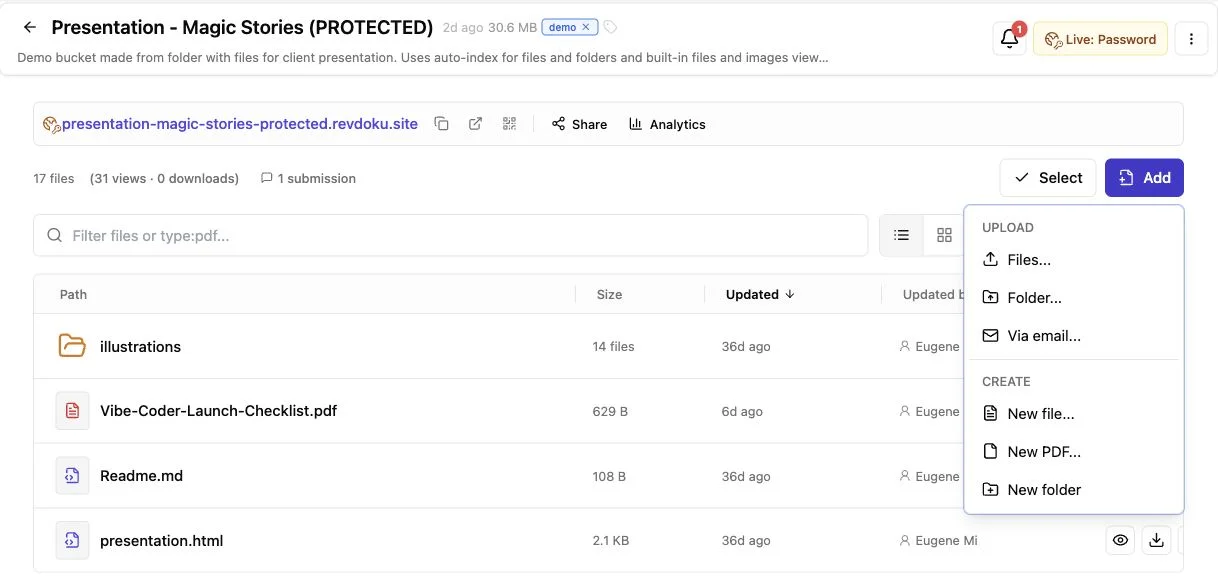
Revdoku offers direct, upload-based static AI generated website hosting. From the dashboard, place the finished folder in a private bucket, publish it, and choose who may open the link. Git, an API, and an AI agent are optional.
-
Create a bucket. Name it for the client or project, such as Acme homepage concept.
-
Upload the finished folder. Preserve its directory structure. CSS, JavaScript, images, and data files often depend on relative paths.
-
Check the entry point. A static site should contain
index.html; for document folders, Revdoku can generate navigation and common file viewers. -
Publish the bucket. Choose public access, password protection, or an email gate based on the work’s sensitivity.
-
Open the live link in a private browser window. Test as a client without your signed-in session or cache.
-
Share the link. Reuse the bucket for revisions instead of creating a destination for each update.
The Revdoku publishing documentation confirms that a bucket can serve an index.html home page and provides a single-page application mode when routing requires it. Without an entry page, Revdoku can index the uploaded files.
This works best for static folders needing immediate, controlled sharing. Production applications with server functions, databases, or complex releases belong on developer infrastructure.
Use Protected Review Links for Real Client Work
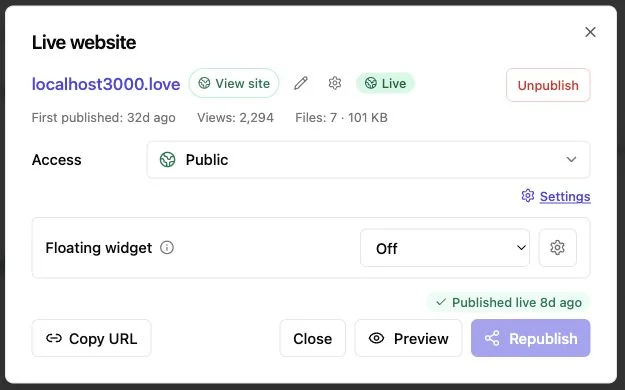
Public hosting is often wrong for unfinished client work. Draft proposals may contain pricing, prototypes may reveal product ideas, and investor updates may include numbers that should not appear in search results.
Revdoku lets owners protect published buckets with Password or Verified Email access. Protected links can provide open notifications and permitted visitor-level activity, helping senders follow up on behavior rather than guesswork.
| Example | Suggested Access | Useful Signal |
|---|---|---|
| Freelancer sharing a homepage concept | Password | Whether the client opened the latest version |
| Agency sending a proposal and interactive demo | Email gate | Which contact viewed pages or downloaded files |
| Consultant delivering a dashboard and PDF report | Password or email gate | Pages viewed, clicks, and downloads |
| AI agent producing a recurring status report | Private review first, then public if approved | Whether stakeholders returned after an update |
AI-generated website hosting makes the live page part of the client conversation. Open notifications can tell consultants when to call; downloads may show a proposal moved beyond its first recipient.
You can add a feedback or contact form without a backend. Revdoku’s hosted form workflow keeps submissions with the bucket and can notify the owner. Request only necessary information and provide a clear privacy notice when collecting personal data.
A shared password cannot replace contractual, regulatory, or high-security controls. For sensitive material, confirm client requirements before publishing.
Update AI Generated Website Hosting Without Resending Links
The first upload is easy; stable workflows prove their value during revisions. Emailing final-v3-revised-really-final.zip creates confusion, as does sending a new URL after every change.
A Revdoku bucket lets you revise files without changing the shared link:
- Use the AI tool or local editor to make the requested changes.
- Generate a fresh static build for framework projects.
- Locally check the revised folder’s links and mobile layouts.
- Update the existing bucket’s files and republish.
- Privately open the existing client URL and verify the release.
The client keeps one bookmark as the work changes. This helps when proposals reach procurement, board decks reopen before meetings, or prototypes pass among reviewers.
Stable links separate creation from publishing. A designer can upload through the dashboard. Later, a developer can automate bucket updates with the CLI, API, or an AI agent. Automate only after proving the manual process. I wouldn’t grant an agent publishing access until someone reviews its output, removes private files, and tests a manual release.
For larger revisions, keep a dated local copy or use version control despite upload-based deployment. No-Git hosting should simplify delivery without erasing your recovery plan.
Other Ways to Host Without Vercel or Netlify
Revdoku is one option, not a universal replacement. The right method depends on whether you need a client review link, a public marketing site, or complete server control.
| Approach | Setup Effort | Strong Fit | Main Tradeoff |
|---|---|---|---|
| Revdoku bucket | Low | Protected demos, reports, proposals, and mixed file folders | Intended for static publishing and controlled sharing |
| Object storage with a CDN | Moderate | Public static sites with predictable files | Access rules, headers, domains, and invalidation need configuration |
| Traditional web hosting with file upload or SFTP | Moderate | Small public sites and existing business hosting | Updates, analytics, and rollback vary by provider |
| VPS with Caddy or Nginx | High | Custom domains, server control, and unusual requirements | You own security updates, logs, backups, and configuration |
| Git deployment platform | Moderate | Maintained frontend projects and automated releases | Repository and build workflow become part of publishing |
Object storage can be economical and reliable, but less friendly for consultants uploading folders and sharing protected links. A VPS offers maximum control but makes its owner responsible for TLS, firewall rules, software updates, and recovery.
Choose based on the website’s next job. Use controlled upload-based publishing for client review. Use a conventional public host for long-lived marketing sites. Use an application platform for projects requiring server code, authentication, payments, or a database.
This avoids trying to force a static host to behave like an application server.
Static Website Hosting Failures
Most AI generated website hosting failures are ordinary static-file problems. Usually, an asset is missing, the wrong folder was uploaded, or a feature depended on a development server.
| Symptom | Likely Cause | Practical Fix |
|---|---|---|
| Blank page | JavaScript error or wrong build folder | Check the browser console and upload the production output |
| Missing styles or images | Broken path or capitalization mismatch | Use relative paths and match file names exactly |
| Direct links return 404 | Missing single-page application fallback | Enable SPA mode or generate real HTML routes |
| Form does nothing | No submission service or backend | Add a hosted form or Revdoku form |
| AI request fails online | Secret key was removed or browser calls are blocked | Move the request to a secure backend |
| Client sees an old version | Browser or CDN cache | Republish, test privately, and use versioned asset names when needed |
Static-site performance still matters. Google’s current Core Web Vitals guidance defines a good Largest Contentful Paint as 2.5 seconds or less, a good Interaction to Next Paint as 200 milliseconds or less, and a good Cumulative Layout Shift as 0.1 or less. These targets are evaluated at the 75th percentile, meaning the experience should be good for at least three out of four measured visits.
Before sharing, compress large images, remove unused video, and set image dimensions to prevent loading shifts.
Common questions have short answers:
Final Thoughts
You don’t need Vercel, Netlify, or Git for every AI-generated website. For a finished static folder, upload-based publishing can create a live link with much less ceremony.
Match the method to the job:
- Use Revdoku for a stable, protected, trackable client review link.
- Use public static hosting for long-lived informational sites.
- Use developer infrastructure for projects needing backend code or an automated engineering workflow.
Before publishing, inspect the files, remove secrets, test the live result, and keep a recoverable copy. The best setup lets audiences open the work safely while giving owners a clear update path.
Frequently asked questions
Do I need a domain?
No. Start with the provided link; add a custom domain only when branding or long-term public use justifies it.
Can I host React or another framework?
Yes, if it can produce static browser files. Server-rendered features and private functions require compatible application hosting.
Can a static site collect feedback?
Yes, via a hosted service or Revdoku’s built-in feedback and contact forms.
Should I publish AI output without review?
No. Before sharing externally, check facts, rights, accessibility, personal data, mobile behavior, and secrets.
How can I tell whether my AI-generated website is suitable for static hosting?
It is usually suitable if the finished folder contains browser-ready HTML, CSS, JavaScript, images, and data files. Features requiring server-side authentication, private databases, payments, or protected API calls need an application platform instead.
Which folder should I upload from a framework project?
Upload the production build or static export folder, commonly named dist, build, or out. Do not upload the source project unless the hosting service is designed to install dependencies and run a build process.
Why does the website work locally but break after uploading?
The most common causes are absolute file paths, missing assets, capitalization differences, or development-server dependencies. Check the live site’s browser console, confirm that the directory structure was preserved, and use relative paths for local assets.
Is password protection enough for confidential client work?
Password- or email-gated access is useful for proposals, prototypes, and routine review materials. It is not a substitute for contractual, regulatory, or enterprise security requirements, so confirm the client’s rules before publishing highly sensitive information.
How can I safely use APIs or forms on a static website?
Use a hosted form service for submissions, or move sensitive API operations to a secure backend. Never place private API keys or credentials in browser-accessible HTML or JavaScript because visitors can inspect those files.
How should I update the site without changing the client link?
Replace the files in the existing publishing destination and republish rather than creating a new bucket or URL. Test the unchanged link in a private browser window, and keep a dated local copy or version history in case you need to restore an earlier release.
When should I move from upload-based hosting to a Git deployment workflow?
Consider switching when the site becomes a long-lived product maintained by multiple contributors or needs automated builds, tests, reviews, and reliable rollbacks. Upload-based hosting remains a strong fit for short-lived demos, reports, proposals, and client previews.
Related Articles

GitHub Pages Password Protection and Privacy
Learn why private repositories do not protect Pages sites and compare secure access options for internal teams and external clients.

How to Password Protect a Vercel Deployment
Learn how to secure Vercel deployments with password protection, authentication, trusted access, or protected Revdoku hosting.

How to Password Protect a Website Made with Claude
Learn how to export, secure, publish, and test a Claude-made website using password protection or verified-email access.