Secure File Sharing for Clients: A Practical Guide
Table of Contents
- Secure File Sharing for Clients Without Guesswork
- What Secure Client File Sharing Really Means
- Choose the Right Access Mode for Secure Client File Sharing
- How to Send Files Securely to Clients in Six Steps
- Keep Client Feedback With the Shared Deliverable
- Keep Client File Sharing Current With Versions
- Use Open Alerts and Per-Visitor Document Sharing Analytics Well
- Know the Client File Sharing Limits Before You Send
- Limits of Secure File Sharing for Clients
- Final Thoughts: One Link, Under Control
- Secure File Sharing for Clients Without Guesswork
- What Secure Client File Sharing Really Means
- Choose the Right Access Mode for Secure Client File Sharing
- How to Send Files Securely to Clients in Six Steps
- Keep Client Feedback With the Shared Deliverable
- Keep Client File Sharing Current With Versions
- Use Open Alerts and Per-Visitor Document Sharing Analytics Well
- Know the Client File Sharing Limits Before You Send
- Limits of Secure File Sharing for Clients
- Final Thoughts: One Link, Under Control
Secure File Sharing for Clients Without Guesswork
Secure file sharing for clients should do more than transfer a PDF. It should reduce accidental access, surface the latest version, and show whether the client opened it.
TL;DR: Practical client file sharing controls access, keeps one link current, collects feedback, and shows activity. It lets you:
- Control who can open a proposal, deck, report, demo, or folder
- Update the work without sending a replacement link
- Collect feedback and use real activity to time your follow-up
Revdoku turns files into browser links with public, password, or verified-email access. Start by dragging files into the dashboard. AI agents, the API, and the CLI can automate repetitive publishing but are optional. This guide covers secure client delivery without overstating web-sharing controls.
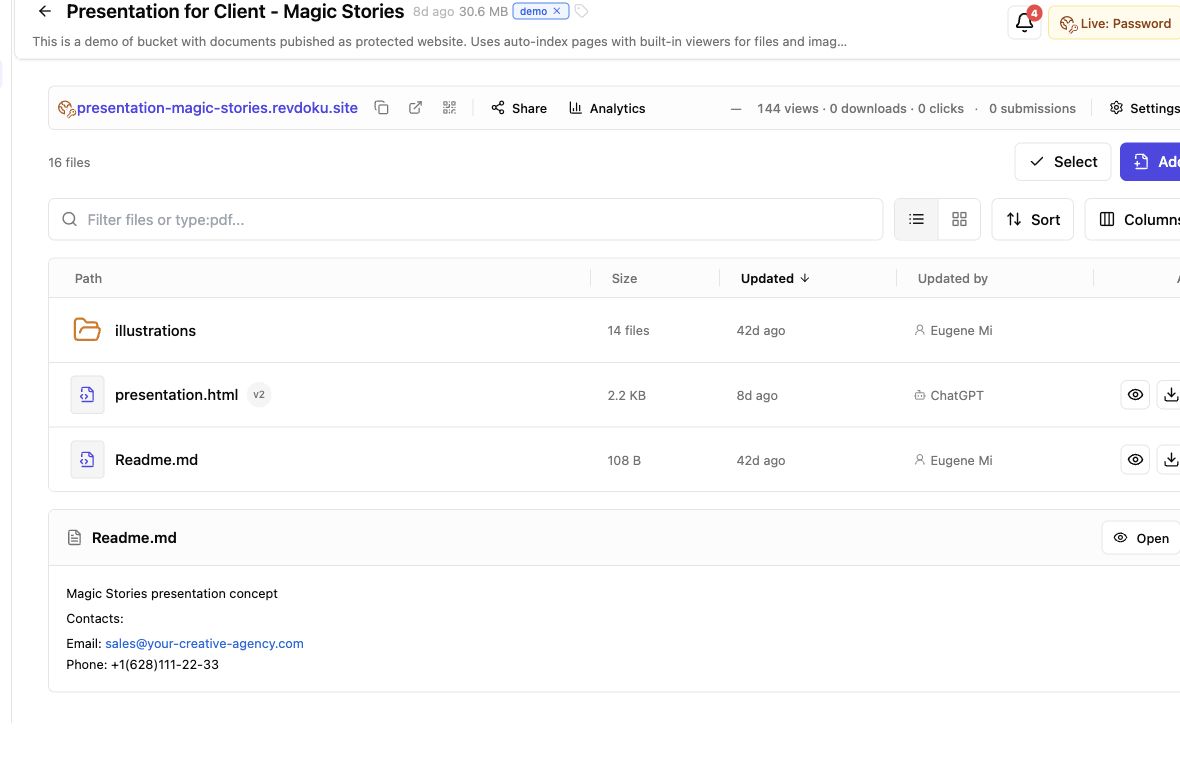
Screenshot of the Revdoku Magic Stories demo bucket in app.revdoku.com, made on July 31, 2026.
What Secure Client File Sharing Really Means
Secure can promise too much. A protected link restricts access but cannot prevent authorized viewers from copying information. Good client file sharing combines suitable access, clear version ownership, and meaningful activity records.
Verizon’s 2026 Data Breach Investigations Report says third-party supply-chain involvement reached 48% of breaches, a 60% increase. Client documents and business systems differ, but access to either crosses an organizational boundary.
| Issue | Email Attachment | Shared Cloud Folder | Protected, Updateable Link |
|---|---|---|---|
| Access | Anyone with the forwarded copy may read it | Depends on folder permissions and accounts | Public, password, or verified-email gate |
| Latest version | Old copies remain in inboxes | One file can change, but folder access may add friction | Same browser link can show the new version |
| Activity | Delivery receipt at best | Varies by service and account type | Opens, pages, clicks, and downloads |
| Feedback | Usually split across email threads | Often separate from the deliverable | Built-in form stored with the bucket |
For proposals, presentations, demos, and client reports, a protected browser link offers a useful, lightweight portal alternative. It is simpler than a full portal and more controlled than an email attachment.
Choose the Right Access Mode for Secure Client File Sharing
The most restrictive setting is not always safest. Too much friction delays review; too little exposes unfinished or private work. Match access to the content and audience.
| Access Mode | Best Used For | Tradeoff |
|---|---|---|
| Public | Portfolios, public handbooks, approved marketing files | Anyone with the URL can enter |
| Password | Draft decks, private demos, general client previews | A forwarded password grants access and does not prove identity |
| Verified email | Proposals, investor material, named-client reports | A one-time code adds a step but links activity to a confirmed mailbox |
| Email allowlist | Client data rooms and restricted stakeholder groups | Builder limits access to chosen addresses or company domains |
The Revdoku pricing page lists verified-email access on Starter and Builder. Builder adds email and domain allowlists.
For password protection, use a unique, randomly generated password and send it separately from the link. As a practical benchmark, NIST SP 800-63B sets 15 characters as the minimum for a single-factor password and warns that passwords are not phishing-resistant.
Consider a confidential freelance proposal. A password may suffice for a client team sharing responsibility. Verified email better identifies which decision-maker opened it.
How to Send Files Securely to Clients in Six Steps
For most people, Revdoku’s manual workflow is shortest. A bucket holds one client project’s files, settings, versions, forms, and analytics.
-
Create one bucket for the deliverable. Name the client and project clearly. Keep unrelated customers in separate buckets.
-
Drag in a PDF or folder. Revdoku supports static files such as PDFs, images, HTML, CSS, JavaScript, and fonts. Without
index.html, Revdoku can create a browsable file index with previews. -
Inspect the browser version. As the client, check navigation, image loading, mobile layout, file names, and downloads.
-
Select the access mode. Use public access only for broadly shareable material. Choose a password or verified email for private work.
-
Configure notifications and feedback. Ask only for useful information. Turn on protected-access alerts when timing matters.
-
Test before sending. Open a private browser window, complete the gate, submit the form, and confirm the live version.
An agency can upload a PDF deck and supporting images, protect and test the link, then send it. If the agency later repeats this process for many clients, an AI agent or the Revdoku API can automate publishing on top of the same bucket model.
Keep Client Feedback With the Shared Deliverable
Client feedback may be a vague email: Looks good, except page three. Later, nobody knows which version it referenced. Built-in forms give responses a clear home.
Revdoku bucket forms support several jobs:
| Goal | Useful Fields |
|---|---|
| Review feedback | Name, email, message, approval status |
| Client question | Email and question |
| Contact request | Name, email, company, message |
| Creating a lead record | Email plus one relevant qualification field |
Visitors submit within the published link. Revdoku stores bucket responses and can notify the owner. The feedback form guide also documents custom labels and spam protection. No separate form server is needed.
A product studio can place a feedback widget beside an interactive demo. It replaces comments across email, chat, and meeting notes with one project response stream.
Do not ask for everything. The FTC’s security guidance recommends avoiding unnecessary collection of sensitive information. A feedback form supports review and lead creation but cannot replace e-signatures or contractually required formal acceptance.
Keep Client File Sharing Current With Versions
Version confusion commonly derails client work. Old-deck comments and newer attachments turn final review into document archaeology.
With Revdoku, the bucket owns the published URL. To update:
- Update the files in the existing bucket.
- Review changes and version history.
- Republish the bucket; do not create another site.
- Confirm the new publication at the live URL.
- Restore an earlier version if needed.
Saving does not automatically publish. That separation lets you prepare a draft before replacing the client-facing version. Publishing can be asynchronous, so verify the live state before announcing an update. The Revdoku documentation explains the distinction between saving, publishing, unpublishing, and restoring versions.
A consultant shares a quarterly report with a summary PDF and supporting CSV files. After correcting a chart, the consultant updates the existing bucket. The client keeps the bookmark; the consultant retains the earlier version for rollback. Analytics remain on one client file sharing link instead of splitting across URLs.
Use Open Alerts and Per-Visitor Document Sharing Analytics Well
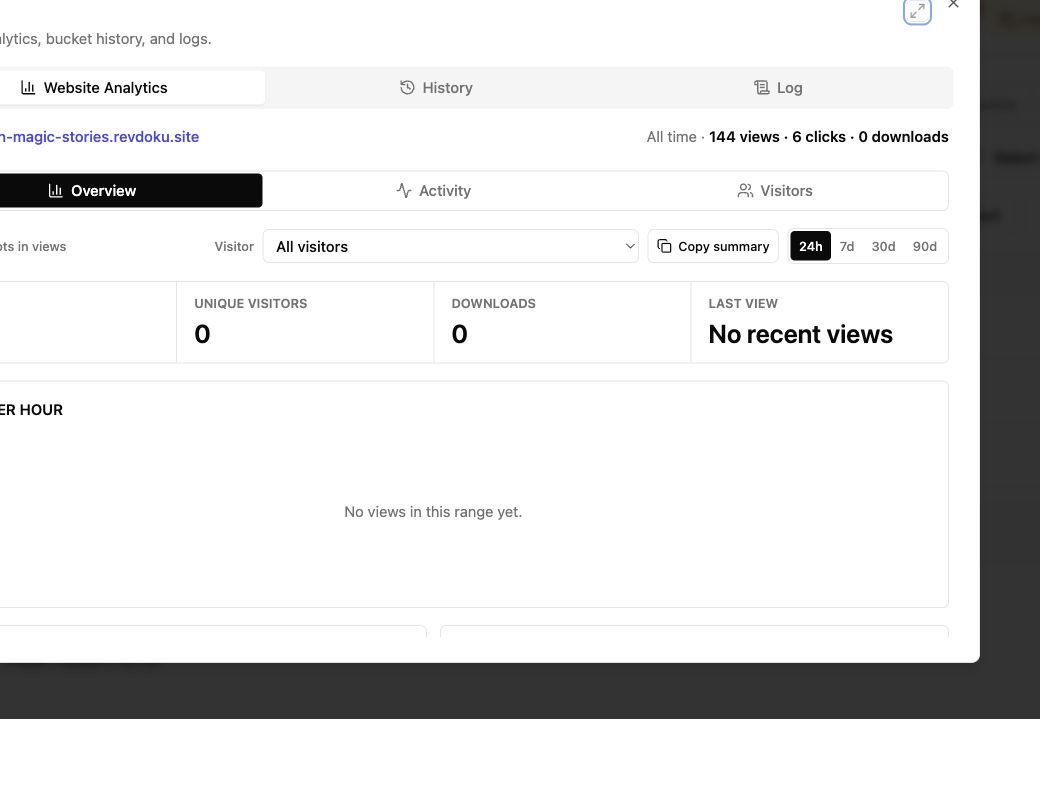
Analytics show whether the client engaged or the email remains unopened. Revdoku can record aggregate traffic and browser events. Verified-email access connects activity to the mailbox that completed the gate.
| Signal | What It Tells You | What It Does Not Prove |
|---|---|---|
| Protected access notification | Someone successfully entered | That the person approved the work |
| Pages viewed | Which sections received attention | Why the visitor spent time there |
| Link clicks | Which next steps interested the visitor | A commitment to proceed |
| File downloads | The asset was requested | That every page was read |
| Form submission | The visitor gave a direct response | Legal acceptance unless your process says so |
Open notifications are cues, not mind-reading. Public traffic may be anonymous; a password proves possession of the shared secret, not identity. Use verified email when visitor attribution matters.
A founder learns that a verified visitor opened the pricing page and downloaded the funding deck’s financial model. A next-morning follow-up might ask whether the budget assumptions need clarification. Saying I watched you download the model at 10:43 would feel intrusive. Good sharing uses analytics to be timely, not creepy.
Know the Client File Sharing Limits Before You Send
File size, traffic, feedback volume, and access controls vary by plan. At the time of publication, the current Revdoku pricing page lists these self-service limits:
| Limit | Free | Starter | Builder |
|---|---|---|---|
| Published websites | 1 public site | 3 | 8 |
| Storage | 100 MB | 5 GB | 25 GB |
| Largest upload | 3 MB; PDFs 0.6 MB | 75 MB | 150 MB |
| Visits per month | 250 | 20,000 | 120,000 |
| Feedback replies | 5 per month | 50 per day | 200 per day |
| Analytics | Basic views | Detailed | Detailed |
| Verified-email mode | No | Yes | Yes |
| Email or domain allowlist | No | No | Yes |
| Reusable API connection | No | No | 1 |
The free plan suits public-link testing, while Revdoku’s paid plans offer a cost-efficient path for protected client delivery. It shows Revdoku branding, is noindex, and requires sign-in at least every 30 days to remain active.
Starter adds protected links and verified visitor identity. Builder fits agencies and small teams that need more sites, larger uploads, custom branding, allowlists, or an API connection.
Treat these figures as purchasing checks, not permanent promises. Check the pricing page before uploading large presentations, videos, design exports, or high-traffic client resources.
Limits of Secure File Sharing for Clients
Secure client file sharing has limits. Review them before sensitive work leaves your organization.
These limits are typical. Every browser delivery system balances usability and control. Match the gate to the risk, and keep highly restricted material out of tools that have not passed your review.
Final Thoughts: One Link, Under Control
Good client file sharing is pleasantly boring. The right person opens one link, sees current work, and responds somewhere you can find.
- Use public access for material that can travel freely.
- Use a unique password or verified email for private client work.
- Update the existing bucket, verify the live version, and treat analytics as context rather than proof.
Revdoku brings those steps together for proposals, reports, presentations, file folders, and static demos. You can start with the dashboard, drag in the work, choose an access mode, and send the browser link. If publishing becomes repetitive, add an AI agent, CLI, or API workflow. The manual path remains, and the client keeps the link.
Frequently asked questions
Is a protected link end-to-end encrypted?
Revdoku’s security page says data is encrypted at rest and in transit. That is different from end-to-end encryption, which Revdoku does not claim.
Does the link prevent copying?
No verified DRM or watermarking feature is documented. Assume a person who can view or download content may also copy, photograph, or redistribute it.
Does verified email prove the visitor's identity?
It confirms control of the mailbox used for the one-time code. It does not independently prove job title, authority, or real-world identity.
Can access be withdrawn?
You can change the gate or unpublish the site. Unpublishing removes public access while retaining the bucket and its reserved URL for later use.
Is Revdoku a production application host?
It hosts static sites and single-page apps. According to its documentation, it does not support custom server backends, per-bucket databases, or scheduled server jobs. Use suitable application infrastructure when those are required.
Can regulated records be uploaded safely?
Regulatory fit depends on your contract, data, location, and required controls. Do not infer a certification from hosting providers or encryption statements. Complete the required legal and security review first.
Which access mode should I choose for a client deliverable?
Use public access only for content that can be shared freely. A unique password works for lower-risk team reviews, while verified email is better when activity must be tied to a confirmed mailbox. Use an email or domain allowlist when access should be limited to specific stakeholders.
How should I send a password-protected link?
Create a unique, randomly generated password of at least 15 characters. Send the password through a different channel from the link, such as a phone call or separate messaging service, and avoid reusing it for another client.
Can I update files without sending the client a new link?
Yes. Update and republish the existing bucket so its URL continues to show the current version. Because saving and publishing are separate actions, confirm the live link after publishing before telling the client that an update is available.
What should I test before sharing the link?
Open the link in a private browser window and complete the same access steps the client will encounter. Check navigation, mobile layout, file previews, downloads, forms, and the published version. This catches permission and presentation problems before they interrupt the review.
How can I keep client feedback tied to the correct version?
Add a short feedback form to the shared bucket and request only information needed for the review. Responses remain associated with the deliverable instead of being scattered across email and chat. Use a formal approval or e-signature process when contractual acceptance is required.
How should I use open and download notifications?
Treat activity as a prompt for timely follow-up, not proof that the client read, understood, or approved the work. Ask a relevant question based on the material viewed without quoting detailed timestamps or behavior. Verified-email activity offers stronger attribution than public or password-only access, but it still confirms mailbox control rather than legal identity.
Should I share confidential or regulated information this way?
Only after the service has passed the legal, security, and compliance review required for that data. Encryption and access gates reduce risk, but do not prevent an authorized viewer from copying or redistributing information. Keep highly restricted records out of any platform that lacks the controls or contractual assurances your organization requires.
Related Articles
Client Deliverables Portal: Share Work in One Link
Share client files through one secure, stable link with browser viewing, access controls, feedback, analytics, and simple updates.
Viewer Analytics for Documents: Track Client Activity
Track document views, clicks, downloads, and verified visitor activity with secure client links and practical follow-up guidance.
Website Link Tracking for Client Engagement
Track proposal and document engagement using visits, downloads, Verified Email, privacy safeguards, and well-timed client follow-up.