Client Feedback Portal for Easy, Secure Reviews
Table of Contents
- A Client Feedback Portal Should Make Review Easy
- What a Client Feedback Portal Should Actually Do
- One Link Keeps Every Deliverable Current
- Secure File Sharing and Protected Access Without Needless Friction
- Client Feedback Forms Belong Beside the Work
- Use Client Feedback Portal Analytics to Time the Follow-Up
- Four Client Workflows That Fit One Client Review Portal
- Build a Client Feedback Portal in 15 Minutes
- Client Feedback Software Versus the Alternatives
- Final Thoughts
- A Client Feedback Portal Should Make Review Easy
- What a Client Feedback Portal Should Actually Do
- One Link Keeps Every Deliverable Current
- Secure File Sharing and Protected Access Without Needless Friction
- Client Feedback Forms Belong Beside the Work
- Use Client Feedback Portal Analytics to Time the Follow-Up
- Four Client Workflows That Fit One Client Review Portal
- Build a Client Feedback Portal in 15 Minutes
- Client Feedback Software Versus the Alternatives
- Final Thoughts
A Client Feedback Portal Should Make Review Easy
A client feedback portal should eliminate delays from proposals, demos, and PDFs scattered across email and chat.
Someone may then comment on an old attachment. With Revdoku, drop work into a private bucket, set access, and send one browser link. The client can view and respond without learning a project-management system.
TL;DR: A client review portal provides one current, protected link for viewing work and responding. You can:
- Present documents, folders, demos, and presentations in one place.
- Protect access with a password or an email gate.
- See opens and visitor activity before you follow up.
- Update the work without making the client hunt for a new URL.
What a Client Feedback Portal Should Actually Do
A client feedback portal helps clients open the right work and respond. Good client feedback software keeps those actions together. Recipients need not create accounts, learn a board, or sort through internal tasks.
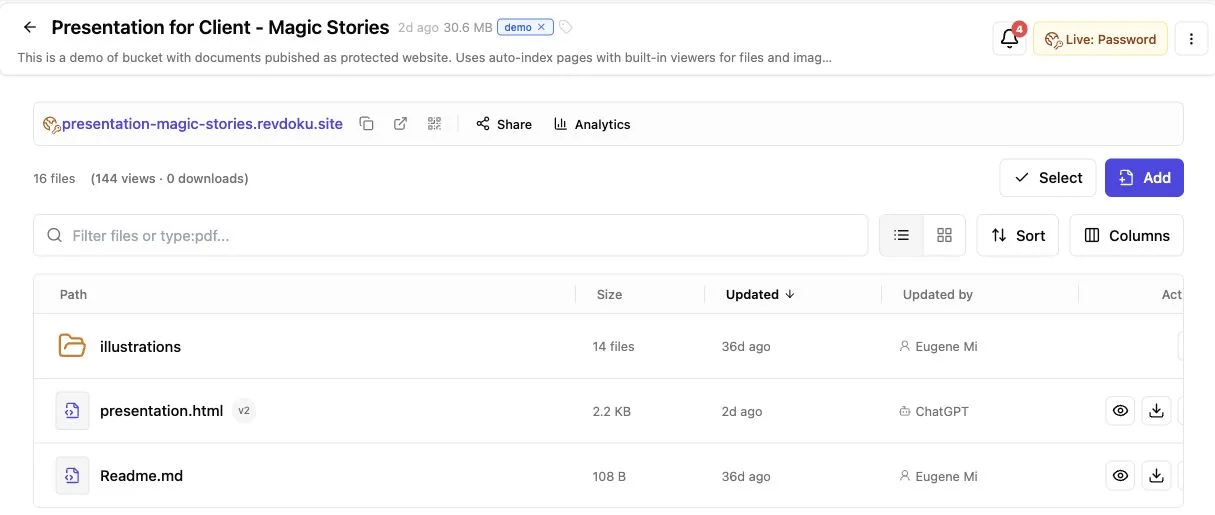
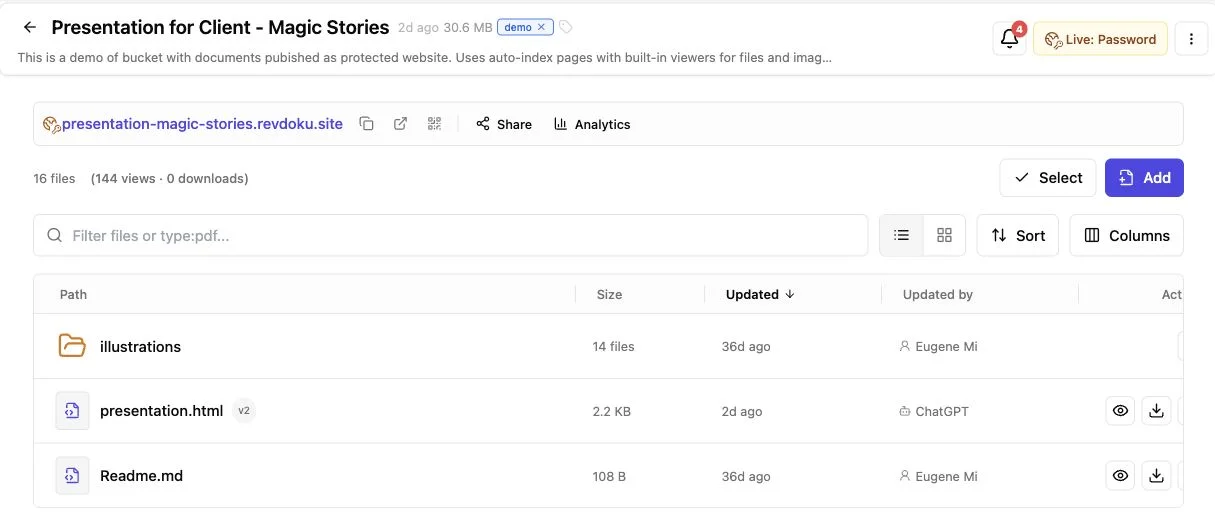
Revdoku uses buckets. From the dashboard, drag in a PDF, presentation, folder, or browser-based demo. The bucket remains behind the shared link. It supports both solo consultants sending proposals and agencies handling several deliverables.
| Client need | Portal response | Practical result |
|---|---|---|
| Open the work quickly | One browser link | Less searching across email and chat |
| Know which version is current | Replace or update files behind the link | Fewer reviews of stale work |
| Limit casual access | Public, password, or email-gated entry | Sharing can match the sensitivity of the work |
| Respond in context | Built-in feedback or contact form | Comments return through a clear channel |
| Confirm engagement | Open notices and per-visitor activity | Follow-up can use evidence instead of guesswork |
A client feedback portal is a presentation and response layer, not an internal task manager, proofing suite, or contract-approval system.
One Link Keeps Every Deliverable Current
Every resent attachment creates another downloadable, renamable, and forwardable copy. A live client feedback portal instead shares a destination. Send the destination once, then maintain its contents.
For example:
- A freelancer can replace a proposal after correcting the timeline.
- A consultant can add the appendix requested on a call.
- A studio can update a campaign deck while keeping the original email useful.
- A founder can refresh a demo before a prospect returns to it.
Name the link for the engagement, not the version: Acme website concept rather than Acme concept final v7. Put the revision date inside the work so clients can confirm freshness without checking filenames.
With client feedback software, clients need not compare attachments or delete old copies. A feedback portal for agencies gives account managers one durable URL for notes and follow-ups. If needed, keep a separate version-history archive. The live link simplifies delivery but does not replace disciplined records.
Secure File Sharing and Protected Access Without Needless Friction
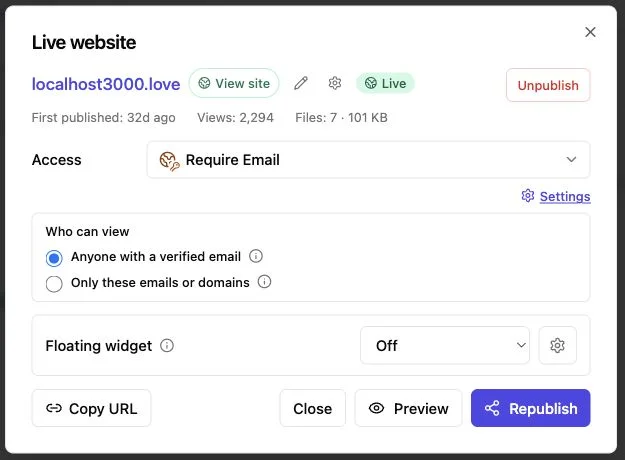
Every client feedback portal should support secure file sharing with access suited to the material. Revdoku supports public links, password-protected links, and links gated by email.Choose based on the material and acceptable client friction.
| Access mode | Best use | Tradeoff |
|---|---|---|
| Public link | Portfolio samples, public demos, general handouts | Anyone with the URL may open it |
| Password protection | Proposals, draft decks, client-specific presentations | The password must reach the right people safely |
| Verified Email | Sales material or reviews where visitor identity matters | One emailed one-time-code step stands between the client and the work |
Use the lightest sensible control. A public demo needs no ceremonial password, while a pricing proposal probably should not use an open URL. For sensitive contents, send passwords separately. Explain Verified Email briefly: Enter your work email and use the one-time code to view this material.
Verified Email confirms access to the entered inbox but does not prove legal identity, and passwords can be forwarded. For regulated records, highly confidential deals, or access requiring multi-factor authentication and audit controls, ask a security or legal adviser whether to use a dedicated data room instead of general client feedback software.
Client Feedback Forms Belong Beside the Work
Feedback suffers when clients must leave the client feedback portal, find an email, recall the filename, and describe what they saw. Revdoku places client feedback forms beside the work, eliminating the need for a separate backend.
Keep the form short. Baymard’s 2024 checkout research found that 17% of surveyed shoppers had abandoned a purchase because checkout felt too complex; the average checkout used 11.3 fields even though most needed only eight. Client reviews differ from checkouts, but every field must still earn its place.
A strong client feedback software form can use four steps:
- Ask for an overall reaction in plain language.
- Ask what needs to change, with room for specifics.
- Ask which deliverable, page, or section the note concerns.
- Ask whether the client wants a reply or a revised version.
Two questions may suffice for a first proposal; add a deliverable selector for a multi-file feedback portal for agencies. Do not present feedback as legal acceptance. Use a proper contract or approval tool for signatures, compliance records, or formal approval.
Use Client Feedback Portal Analytics to Time the Follow-Up
Silence may mean the client is busy, the email is buried, or the deck prompted internal discussion. A client feedback portal cannot read intent, but activity can reduce uncertainty.
Revdoku can report protected-link opens and per-visitor page views, clicks, and downloads. Verified Email leads can connect permitted activity to an OTP-verified address. Attention is brief. DocSend’s analysis of pitch activity reported an average investor viewing time of 3 minutes 40 seconds across decks in its dataset.
| Signal | Reasonable interpretation | Better next move |
|---|---|---|
| No open after two business days | Delivery or timing may be the issue | Send a short note asking whether the link arrived |
| One complete visit | The client has likely reviewed the main story | Follow up with one specific question |
| Repeated visits | The work may be under active consideration | Offer context or a brief call |
| Attention on one section | That topic may matter or confuse | Lead with clarification, not a generic nudge |
| Download recorded | The file may be circulating offline | Ask who else should have access or context |
Treat analytics as clues: a long visit can indicate interest or an unattended tab. Good client feedback software improves timing but does not justify messages like I saw you spent 47 seconds on page six.
Four Client Workflows That Fit One Client Review Portal
These representative workflows show how a feedback portal can reduce handoff friction for agencies and independent professionals without changing how they create work.
-
Freelance brand presentation. A designer password-protects an identity PDF and asks which direction feels closest and what feels off. After revising it, the designer updates the same portal. The original meeting invite still points to the current deck.
-
Consulting proposal. A consultant sends an email-gated proposal on Tuesday. The open notice arrives that afternoon, and the visitor returns to the pricing pages the next morning. The consultant follows up with an answer about scope instead of sending a vague checking-in email.
-
Agency campaign review. An account lead puts the deck, copy sheet, and landing-page demo in one bucket, and the client selects the relevant deliverable in the form. This feedback portal for agencies keeps presentation and response together, while the production team continues to manage tasks in its internal system.
-
AI-assisted demo publishing. An agent builder tests the workflow by manually adding a demo to a bucket. Later, the team publishes repetitive outputs through Revdoku’s API or CLI. Automation changes publishing, but the client’s client feedback portal remains one simple link.
Build a Client Feedback Portal in 15 Minutes
Setting up Revdoku as client feedback software requires no code. Start with one deliverable and recipient. Automate only after proving the manual sharing pattern.
-
Create a bucket for the engagement. Give it a client-facing name that survives several revisions.
-
Drop in the work. From the dashboard, upload a PDF, folder, presentation, or demo. Check the result on mobile and desktop.
-
Choose access. Make the link public, add a password, or require an email. Match the control to the content instead of defaulting to the strictest setting.
-
Add a small response form. Ask only actionable questions. In a feedback portal for agencies, assign the response owner before sending the link.
-
Send the link with one instruction. Try: Review the deck and use the form below it to flag the section you want revised. State the feedback deadline.
-
Use activity to follow up, then update in place. Review activity with restraint. When work changes, replace the deliverable behind the existing portal and tell the client what changed.
Once the manual flow is routine, use AI agents, the API, or the CLI to publish recurring outputs to the same buckets.
Client Feedback Software Versus the Alternatives
Choose the tool for the job. Email may suffice for sending a public one-page PDF once. For frame annotations or formal approvals, specialist client review portal software may justify the extra process. Revdoku offers a middle ground: controlled presentation, stable updates, engagement data, and a nearby form.
| Approach | Best at | Common limitation |
|---|---|---|
| Email attachment | Familiar one-off delivery | Copies go stale and opens are mostly invisible |
| Shared cloud folder | File storage and team access | The client experience can feel like browsing storage |
| Project-management guest access | Tasks, owners, and deadlines | Too much setup for a simple review |
| Full proofing platform | Pinpoint annotation and formal review flows | More system than many proposals or demos need |
| Revdoku client feedback portal | Presenting protected, current work at one tracked link | It is not a replacement for task management or specialist proofing |
Avoid four mistakes:
- Asking for an account when an email gate is enough.
- Packing the form with questions you will not act on.
- Treating a page view as proof of agreement.
- Automating publishing before the manual client experience works.
Microsoft’s 2023 Work Trend Index found that people in Microsoft 365 spent 57% of their time communicating and 43% creating. A feedback portal for agencies should reduce coordination, not give clients another place to manage.
Final Thoughts
A good client feedback portal doubles as a client review portal with an obvious next action: clients open one link, see current work, and respond beside it. Choose public, password-protected, or email-gated access. Open notices and analytics improve follow-up timing, while a stable URL supports revisions without restarting the conversation.
Start small:
- Put one live client project into a Revdoku bucket.
- Add only the access control and form fields that the review needs.
- Send one instruction with one deadline.
- Update the same link when the work changes.
That makes client feedback software useful. If repetitive publishing becomes burdensome, add the API, CLI, or an AI agent. Clients should still get one clear link without hunting for the latest file.
Frequently asked questions
What should I include in a client feedback portal?
Include the current deliverables, clear access instructions, a short feedback form, and a deadline or next step. Keep internal tasks, working files, and unrelated project material elsewhere so the client experience stays focused.
Which access option should I choose for client work?
Use a public link for material that is safe to share openly, password protection for client-specific documents, and an email gate when identifying visitors matters. Highly confidential or regulated information may require a dedicated data room with stronger identity and audit controls.
How do I prevent clients from reviewing an outdated version?
Share one durable portal URL and replace or update the deliverables behind it. Add a revision date inside the document so clients can quickly confirm that they are viewing the latest version.
What questions should a client feedback form ask?
Ask for the client’s overall reaction, requested changes, and the deliverable or section involved. You can also ask whether they want a response or a revised version, but avoid fields that will not affect your next action.
How should I use portal activity to follow up?
Treat opens, repeat visits, clicks, and downloads as signals rather than proof of interest or approval. Use them to choose a timely, specific follow-up, such as clarifying a heavily viewed section or confirming that an unopened link arrived.
Can a client feedback portal replace project-management or approval software?
No. A feedback portal is designed to present current work and collect responses with minimal friction, while project-management systems handle internal tasks and specialist tools support detailed proofing, signatures, or formal approvals.
When should I automate publishing to the portal?
Start with a manual workflow for one deliverable and recipient, then confirm that clients can access the work and respond easily. Add an API, CLI, or AI agent when recurring publishing becomes repetitive and the client-facing process is already working well.
Related Articles
Best Client Portal Software for Agencies
Compare client portal software for agency operations, collaboration, file sharing, creative proofing, and secure delivery.
One Link Client Portal for Deliverables | Revdoku
Create a secure one-link client portal for reports, files, demos, feedback, analytics, and updates without sending a new URL.
Folder to Website: Publish and Share Client Files
Turn a folder into a secure website with browser previews, stable links, access controls, analytics, forms, and easy updates.