Best Client Portal Software for Agencies
Table of Contents
- Introduction: Finding the Best Client Portal Software for Agencies
- How to Choose Agency Client Portal Software
- Best Client Portal Software for Agencies: Shortlist by Use Case
- All-in-One Agency Client Portal Software: Productive and SuiteDash
- Client Collaboration Tools for Agency Work
- Secure Client File Sharing and Document Analytics
- Creative Proofing Software for a Marketing Agency Client Portal
- Revdoku for Lightweight, Secure Client File Sharing
- A 14-Day Agency Client Portal Software Pilot
- Final Thoughts
- Introduction: Finding the Best Client Portal Software for Agencies
- How to Choose Agency Client Portal Software
- Best Client Portal Software for Agencies: Shortlist by Use Case
- All-in-One Agency Client Portal Software: Productive and SuiteDash
- Client Collaboration Tools for Agency Work
- Secure Client File Sharing and Document Analytics
- Creative Proofing Software for a Marketing Agency Client Portal
- Revdoku for Lightweight, Secure Client File Sharing
- A 14-Day Agency Client Portal Software Pilot
- Final Thoughts
Introduction: Finding the Best Client Portal Software for Agencies
The best client portal software fits the way you already deliver work. Many comparisons blur five distinct jobs: agency operations, project management, file storage, creative approval, and presenting finished deliverables. A tool may excel at one and struggle with the rest.
TL;DR: The best software fits your costliest client handoff. This guide compares options by use case:
- All-in-one agency operations
- Day-to-day client collaboration
- File sharing and document analytics
- Creative proofing and approval
- Lightweight, protected delivery
You’ll also get a selection framework, five examples, and a short pilot. Pricing is omitted because plans change, discounts skew comparisons, and controls vary by plan. Verify the current plan before buying.
How to Choose Agency Client Portal Software
Match the software to the most important client action: checking status, commenting on tasks, approving a video, downloading a final folder, or opening a tracked proposal. Each requires a different workflow. The broadest platform can add more setup than value.
There is a real cost to poor coordination. Teamwork reported that 57% of agency professionals in its research spend more time reporting on work than doing it. Filestage says online proofing can cut review cycles by 30%. These vendor figures are directional, but both show that email handoffs consume paid time.
| Criterion | What to Test | Why It Matters |
|---|---|---|
| Client effort | Can a first-time client act without training? | Adoption fails when the portal feels like another job |
| Access control | Public, password, email, role, and revocation options | Different work carries different risk |
| Activity record | Opens, comments, approvals, clicks, or downloads | The right signal helps the team follow up |
| Version handling | Replace, compare, archive, and restore | Clients should not work from an old file |
| Internal fit | Tasks, budgets, proofing, or delivery | A narrow need should not force a broad migration |
| Exit path | Export files, history, contacts, and approvals | Your client record should not be trapped |
Solve the costliest handoff first; everything else is secondary.
Best Client Portal Software for Agencies: Shortlist by Use Case
This shortlist is organized by client relationship, not ranked.
| Use Case | Shortlist | Best Fit | Main Trade-Off |
|---|---|---|---|
| All-in-one operations | Productive, SuiteDash | Agencies replacing several business systems | Longer setup and broader change management |
| Client collaboration | Teamwork, Basecamp | Ongoing projects with shared tasks and discussion | Clients may need accounts and regular participation |
| File sharing | Dropbox, DocSend | Large folders or tracked documents | Limited project workflow or creative approval |
| Creative proofing | Filestage, Ziflow | Images, PDFs, video, and formal sign-off | More process than simple final delivery needs |
| Protected delivery | Revdoku | Proposals, reports, demos, presentations, and file sets | Not a replacement for project management or billing |
A marketing agency portal may combine collaboration, proofing, and delivery tools. A campaign team might manage tasks in Teamwork, review video in Ziflow, and deliver assets through Dropbox. This works until teams must manually copy the same status, file, or decision between tools.
Before shortlisting, complete this sentence: The client must be able to ____, and our team must know ____. It filters better than a 100-feature grid.
All-in-One Agency Client Portal Software: Productive and SuiteDash
Choose an all-in-one platform when the portal is part of a wider operating problem involving disconnected delivery, capacity, budgets, sales records, contracts, or invoices.
- Productive is the operations-led choice. Its agency pages cover project budgets, resource planning, profitability, forecasting, invoicing, and a client portal. Productive also documents distinct client permissions, including a client-manager role that can see budgets and timesheets. That makes it suitable when financial visibility is part of the client relationship.
- SuiteDash is the client-lifecycle choice. It combines a branded portal, CRM, projects, contracts, invoicing, scheduling, messaging, and file sharing in one database. This can reduce handoffs but requires more configuration.
Example: Productive fits an 18-person fixed-fee and retainer consultancy whose managers track utilization and margin while clients see selected project and budget information. A five-person firm seeking one system for lead intake, e-signatures, invoices, and portal content may prefer SuiteDash.
The drawback is setup: broad platforms require ownership, permission design, templates, and client onboarding. If you only need to send a deck securely, they are likely excessive.
Client Collaboration Tools for Agency Work
Client collaboration tools suit active participants, not occasional viewers. Teamwork and Basecamp take different approaches.
| Product | Strongest Use | Current Capability | Watch For |
|---|---|---|---|
| Teamwork | Structured delivery with tasks and accountability | Free client-user licenses with reduced permissions; clients can comment, upload files, and complete work | Permission rules and project limits vary by user type and plan |
| Basecamp | Clear discussion, shared files, dates, and simple task coordination | Client mode controls what a client sees on each project | Less suited to agencies whose main need is resource and profit forecasting |
Teamwork fits agencies that must connect client actions to task delivery. External users can work with tasks, milestones, messages, comments, and files without seeing profitability. In one published customer story, IT services company Strencom said it saved more than four workdays per week in administration and increased concurrent projects from about 30 to 55.
The vendor case study is not a guarantee, but shows what better client visibility can change.
Basecamp is calmer and communication-led. Client mode lets agencies share selected project items while keeping unfinished work private. A branding studio can hide internal exploration, then share the approved direction, schedule, decisions, and final assets in one project. Choose it for a shared room rather than an operations database.
Secure Client File Sharing and Document Analytics
Sometimes the portal is simply a better handoff. Dropbox and DocSend approach it differently.
- Dropbox is strongest when secure client file sharing is the core requirement. It supports shared links, password protection, and link expiry on eligible plans. A production agency can deliver a 12 GB photo set in a familiar folder structure without making the client learn a project system.
- DocSend is strongest when the document itself is part of a sales or decision process. It offers access and download controls, page-by-page analytics, data rooms, and document replacement behind an existing link. View data helps owners prepare for the next call.
Example: for a 24-page proposal to a buying committee, DocSend shows visits and page-level interest that may help a consultant prepare for questions. For hundreds of editable source files after the engagement, Dropbox is more natural.
Neither product is full agency portal software: file storage lacks task accountability, and document analytics does not replace creative approval. Test the signal you need. An open can time a follow-up but does not prove agreement, understanding, or approval.
Creative Proofing Software for a Marketing Agency Client Portal
Creative proofing handles the messy middle from first draft to final approval. It often best serves marketing agencies with visual deliverables and multiple reviewers.
| Product | Review Strength | Useful Current Detail | Best For |
|---|---|---|---|
| Filestage | Central comments, versions, review steps, and approval decisions | Reviewers can work without creating an account; its site also promotes AI-assisted checks | Teams wanting an approachable review flow |
| Ziflow | Detailed workflows and version comparison | Compare mode supports side-by-side, overlay, synchronized navigation, and automatic difference detection | Complex, high-volume creative review |
Example: an ad agency produces six video cutdowns, three aspect ratios, and localized captions. Email feedback such as “fix the logo near the end” is vague. Filestage or Ziflow ties comments to frames, records versions, and captures decisions.
Filestage offers a simple upload, feedback, and approval flow with staged reviewer groups. Ziflow goes deeper on comparisons and controlled workflows; its current help documentation shows that guests can securely review proofs without an account and that two versions can be compared directly.
The trade-off is focus: proofing tools excel at review but may be unnecessary after approval. If clients mainly open reports, download final files, or browse demos, lighter software is easier to maintain.
Revdoku for Lightweight, Secure Client File Sharing
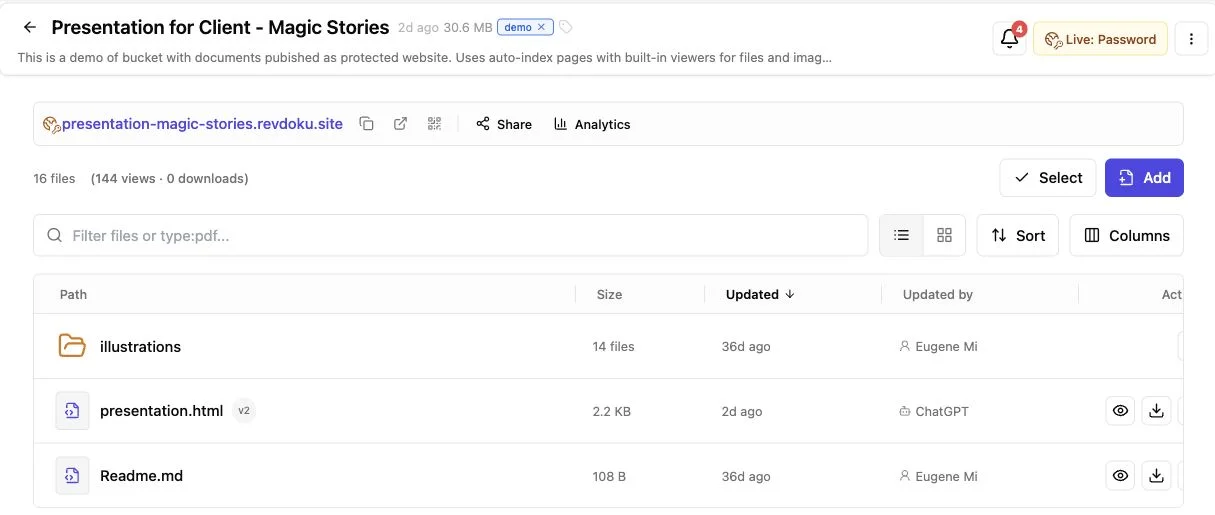
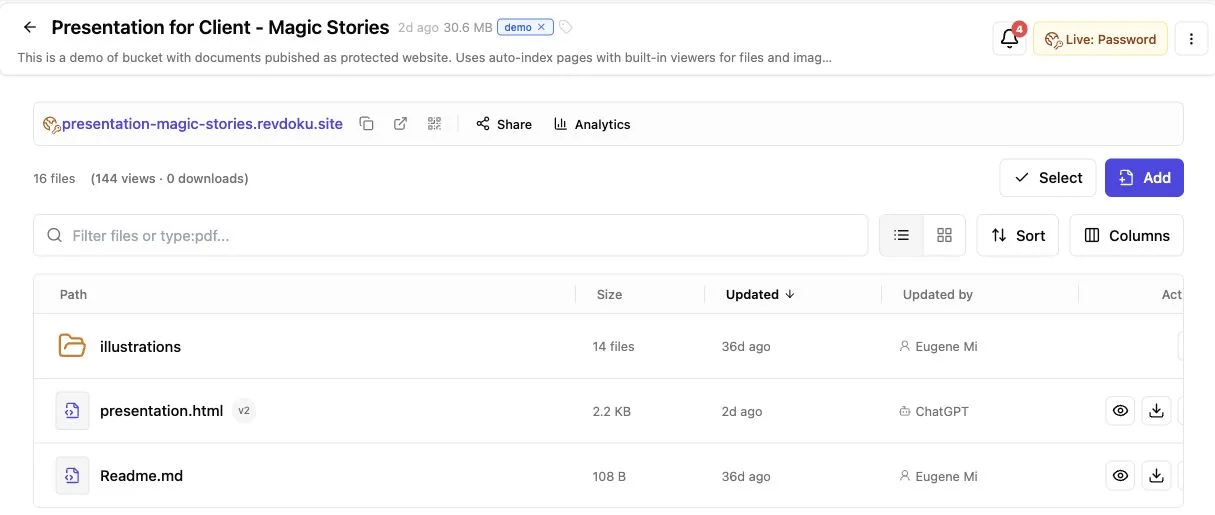
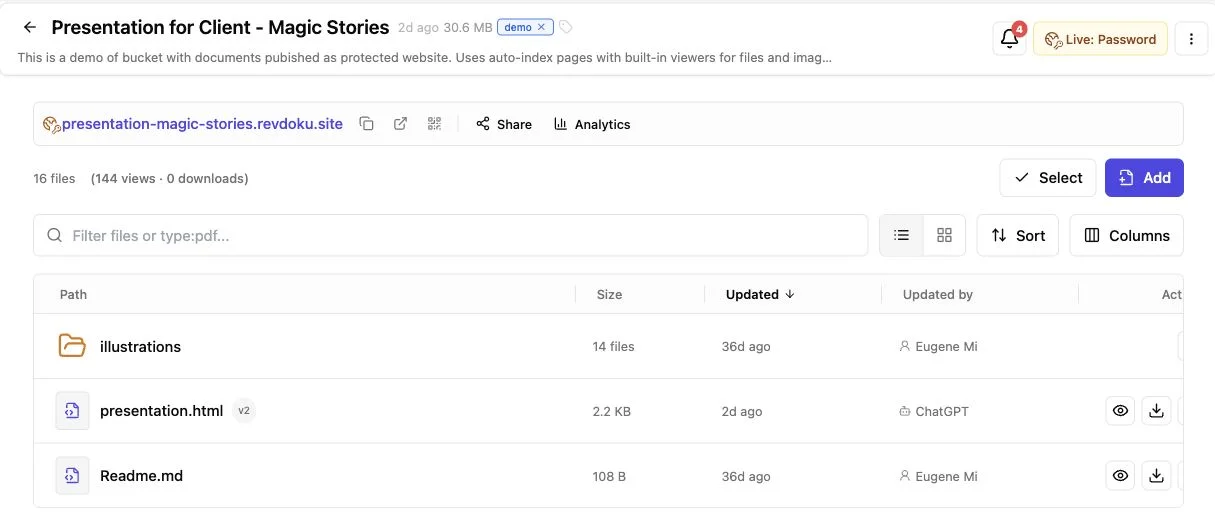
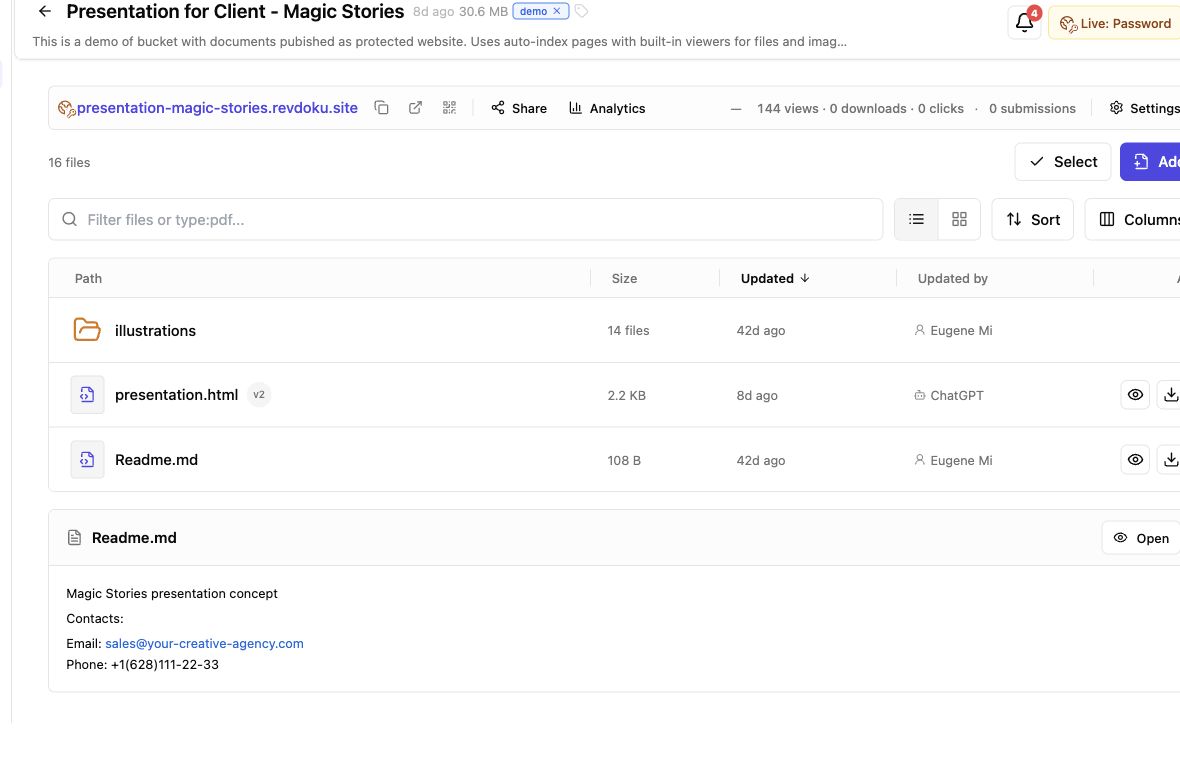
Revdoku belongs in the lightweight protected-delivery category. It presents finished work: a proposal, PDF, report, demo site, presentation, dashboard, or deliverables folder. The workflow starts in the dashboard.
Drop in a PDF or folder, choose access, and send the resulting browser link.
Revdoku includes:
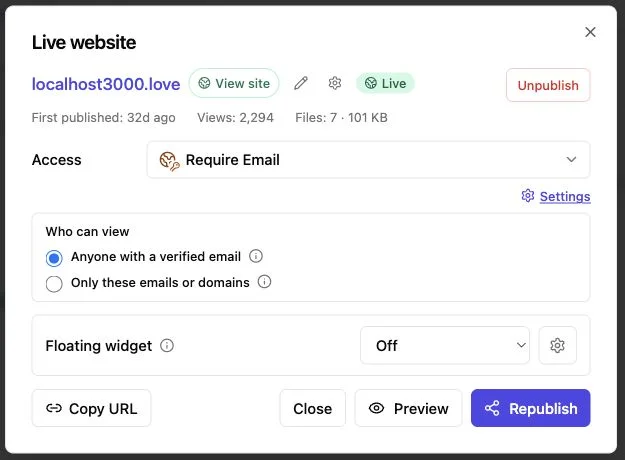
- Public, password-protected, or verified-email access
- Email and domain allowlists
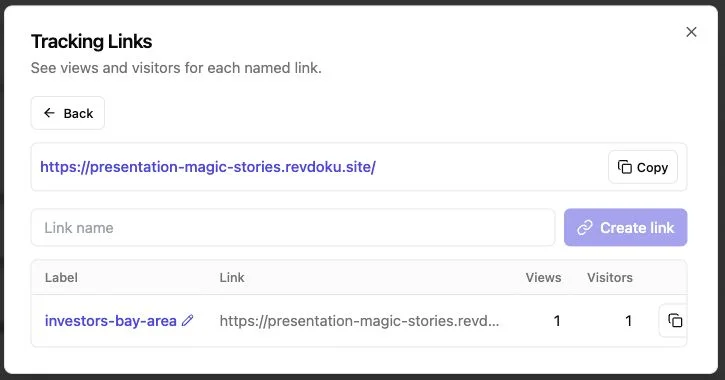
- Open notifications and per-visitor tracking of pages, clicks, and downloads
- Built-in feedback and contact forms without a separate backend
- File replacement and updates at the same stable link
- Version history and rollback
- Optional API, CLI, and AI-agent control
Example: a two-person design studio sends a proposal Tuesday. On Thursday, the client opens the verified-email link, views the pricing page, and downloads the scope, letting the studio follow up promptly. Afterward, it can replace the proposal with final deliverables without teaching the client a new portal.
Its narrowness is also its limit: Revdoku does not run tasks, resource planning, invoicing, or frame-accurate proofing. Choose it when a full portal is too heavy for a controlled handoff. Drag-and-drop is primary; optional AI and API automation support repetitive publishing.
A 14-Day Agency Client Portal Software Pilot
A polished demo can hide friction. Pilot one real project with one internal owner and a friendly client, keeping the decision reversible.
-
Define one success measure. Pick a result such as cutting weekly status preparation from 90 minutes to 30, getting approval two days faster, or confirming proposal opens.
-
Recreate a real handoff. Use ordinary files, permissions, reviewers, and deadlines, not only the vendor’s clean sample project.
-
Invite a client with no training. Track hesitation, login problems, permission questions, duplicate messages, and missing notifications.
-
Change the work after sharing. Replace a file, revoke access, add a stakeholder, and recover an older version to expose weak administration.
-
Review cost and ownership. Include paid seats, guest limits, storage, setup time, and the staff member responsible for keeping the portal tidy.
Common concerns:
Final Thoughts
The best client portal software makes the next client action obvious and gives your team the evidence it needs, not the longest feature list.
The shortlist:
- Choose Productive or SuiteDash for broad agency operations.
- Choose Teamwork or Basecamp for ongoing collaboration.
- Choose Dropbox or DocSend for file and document sharing.
- Choose Filestage or Ziflow for visual review and approval.
- Choose a lightweight protected-delivery portal when clients mainly need to view, respond to, or download finished work.
Pilot one workflow with a real client and measure time saved or confusion reduced. Good portal software disappears into the work. If clients need a manual to open a proposal or approve a draft, the portal has become another deliverable.
Frequently asked questions
Do clients need accounts?
It depends: collaboration portals often require them; proofing and protected-link tools may offer guest or gated access.
Can one portal cover the whole agency?
Sometimes, but a hybrid may work better when operations, proofing, and delivery have different owners.
What security rule matters most?
Use the least access needed, test as an external visitor, revoke stale links, and send passwords through a separate channel.
Should AI drive the portal?
Only when it removes repeat work; clients still need a simple, predictable experience.
Should an agency use one client portal or several specialized tools?
Start with the tool that solves your most expensive or error-prone client handoff. One broad platform may work when operations, billing, and delivery share the same owner, while specialized tools are often better for proofing, collaboration, and final delivery. If you combine tools, define where files, approvals, and status records officially live.
How can I tell whether clients will actually use the portal?
Test it with a first-time client and provide no live training. Ask them to complete a realistic action, such as finding a deadline, approving a draft, or downloading files. Login problems, permission questions, and follow-up emails reveal whether the workflow is genuinely intuitive.
Do clients need accounts to access agency portal content?
It depends on the workflow and product. Collaboration platforms commonly require accounts because clients participate in tasks and discussions, while proofing and protected-delivery tools may support guest, password, or verified-email access. Choose the lowest-friction option that still provides the necessary security and activity record.
What security controls should an agency prioritize?
Use the least access necessary and look for expiration, revocation, role-based permissions, and appropriate identity checks. Always test shared content as an external visitor to confirm that internal files and discussions remain hidden. Send passwords through a separate channel and remove access when the engagement ends.
When is creative proofing software better than standard file sharing?
Proofing software is valuable when several people must comment on images, PDFs, or videos and formally approve a specific version. It connects feedback to the relevant page, area, or frame and reduces ambiguity about which revision is current. Standard file sharing is usually simpler for distributing finished assets that no longer require review.
Which activity data is most useful for client follow-up?
Track the signal connected to the next decision, such as an approval, comment, download, link click, or proposal view. Viewing analytics can help time a follow-up, but they do not prove that a client understood or accepted the content. Formal decisions should still be captured through an explicit approval or written response.
How should an agency evaluate a client portal before committing?
Run a short pilot using a real project, normal files, actual permissions, and at least one client. During the test, replace a file, add a stakeholder, revoke access, and restore an older version. Measure a practical result such as time saved, faster approval, fewer emails, or reduced client confusion.
Related Articles
One Link Client Portal for Deliverables | Revdoku
Create a secure one-link client portal for reports, files, demos, feedback, analytics, and updates without sending a new URL.
Folder to Website: Publish and Share Client Files
Turn a folder into a secure website with browser previews, stable links, access controls, analytics, forms, and easy updates.
PDF to Link & Folder to Link for Client Files
Turn PDFs and folders into one secure client link you can update, track, password-protect, and use to collect feedback and leads.