How to Collect Client Feedback Online
Table of Contents
- Collect Client Feedback Online Without Guesswork
- Why Collect Client Feedback Online Beside the Work
- Ask Focused Questions in Your Client Feedback Form
- Build a Website Feedback Form for Clients That Gets Answers
- Share Protected Client Deliverables and Feedback in Revdoku
- Set a Clear Client Review Process and One Feedback Owner
- Use Open Notifications and Analytics for Online Feedback Collection
- Four Practical Online Feedback Collection Examples
- Compare Online Feedback Collection Channels and Avoid Common Traps
- What to Do Next
- Add a simple feedback form and read submissions
- Ask ChatGPT to summarize review activity
- Collect Client Feedback Online Without Guesswork
- Why Collect Client Feedback Online Beside the Work
- Ask Focused Questions in Your Client Feedback Form
- Build a Website Feedback Form for Clients That Gets Answers
- Share Protected Client Deliverables and Feedback in Revdoku
- Set a Clear Client Review Process and One Feedback Owner
- Use Open Notifications and Analytics for Online Feedback Collection
- Four Practical Online Feedback Collection Examples
- Compare Online Feedback Collection Channels and Avoid Common Traps
- What to Do Next
- Add a simple feedback form and read submissions
- Ask ChatGPT to summarize review activity
Collect Client Feedback Online Without Guesswork
Clients may open one file, comment on another version, and send the final request through chat. When revisions start, nobody is sure which comments count.
A better feedback process puts the deliverable, instructions, and client feedback form in one shared place. It also specifies the needed response, deadline, and feedback owner. This works for proposals, presentations, design drafts, reports, demos, and almost any browser-delivered work.
The goal is not to turn every review into a large project-management exercise. It is to reduce ambiguity.
TL;DR: Keep one protected deliverable, one focused form, and one feedback owner for each review round. This guide covers focused questions, protected sharing, review rounds, ownership, analytics, and a website feedback form for clients without adding friction.
Why Collect Client Feedback Online Beside the Work
Feedback loses meaning when separated from the reviewed item. With three document versions, a comment such as the second section feels weak is hard to act on. Keeping the form beside a live deliverable gives each response context.
There is a human reason to ask directly. In a study covering five experiments and 1,984 participants, people consistently underestimated how much others wanted constructive feedback. In the pilot field study, only 2.6% of people alerted someone to a visible problem. The lesson is simple: useful feedback often must be invited, even when the problem seems obvious. The details appear in the published study abstract.
Choose the access method to suit the work:
| Sharing Method | Best Fit | Main Tradeoff |
|---|---|---|
| Public link | Low-risk samples or general information | Easy to open, but access is unrestricted |
| Password-protected link | Confidential drafts shared with a known group | Reviewers must receive and manage the password |
| Email-gated link | Proposals, decks, or lead-generating material | Adds one step, but identifies visitors and captures leads |
The shared location becomes a reference point for protected deliverables. It need not become a full client portal or task board.
Ask Focused Questions in Your Client Feedback Form
A vague request produces vague comments. Let me know what you think invites reactions such as looks good or make it pop, neither says what to change. A focused client feedback form asks questions that match the current decision.
Before adding a field, decide how you will use its answer. The GOV.UK guidance on form structure recommends asking only when you know why information is needed, who needs to provide it, and how it will be used. That test also suits a website feedback form for clients.
Useful questions include:
- Decision: Does this draft address the agreed objective? If not, what is missing?
- Location: Which page, slide, screen, section, or timestamp does your comment concern?
- Reason: What problem would the requested change solve?
- Priority: Is this blocking the next round, important but non-blocking, or an idea for later?
- Replacement: If wording must change, what fact or message should replace it?
- Ownership: Are these comments consolidated on behalf of all client reviewers?
Ask about one decision at a time. Ask about direction and audience for an early concept; for a near-final PDF, ask about factual errors, missing material, and production defects. Mixing strategic questions with comma-level edits wastes client time and creates rework.
Build a Website Feedback Form for Clients That Gets Answers
The best form is usually shorter than its creator imagines. Every field pulls the reviewer from the work into administration. Require only the fields needed to understand and route the response.
Ecommerce research does not directly measure client reviews, but warns about form friction. Baymard found that the average checkout had 11.3 fields, though most needed only eight, and 17% of surveyed users had abandoned a purchase because checkout felt too complicated. Its 2024 form-field research found that the number of fields mattered more than the number of steps.
A practical client feedback form can use this structure:
| Field | Requirement | Purpose |
|---|---|---|
| Name and email | Required when identity is not already captured | Identifies the reviewer |
| File or section reference | Required | Connects the comment to the work |
| Requested change | Required | States what should be different |
| Reason or expected outcome | Required | Explains why the change matters |
| Priority | Optional | Helps with sequencing |
| Supporting link | Optional | Supplies evidence or source material |
Use visible labels, not placeholder text alone. The W3C form guidance recommends labeling every control and technically associating each label with its field. Plain labels help everyone, including people using screen readers, translation tools, or mobile devices.
Share Protected Client Deliverables and Feedback in Revdoku
Revdoku lets you share documents, folders, demos, and presentations from private buckets as live sites. The manual process is simple: upload the work from the dashboard, choose access settings, and send the link. No code or AI agent is required.
A practical workflow for protected client deliverables is:
-
Create a bucket for the deliverable. Name it for the client, project, and review stage.
-
Upload the current work. Upload a PDF, presentation, folder, demo, or related files. Remove internal notes and obsolete drafts first.
-
Choose access. Use a public link for low-risk material, a password for controlled access, or an email gate to capture visitor identity and leads.
-
Add a feedback or contact form. Put focused questions on the shared Revdoku site so the client can review and respond in one system. The form requires no separate backend.
-
Send one link with a deadline. In the message, state the review round, feedback owner, and deadline.
When the deliverable changes, update it behind the same stable link. The client needs no new URL, avoiding links named final, final-two, and final-really-final. The client feedback form still needs a visible version or review-round reference to interpret older submissions correctly.
Set a Clear Client Review Process and One Feedback Owner
Collecting responses is only half the job; you need a rule for which responses become work. Without one, five stakeholders can submit five conflicting opinions and expect all to be followed.
Define the client review process and its rounds in the proposal or statement of work. Two rounds are common for bounded creative work, but no number is universal. A research report may need fact review, structural review, and proofreading. A small banner may need only one consolidated round.
| Stage | Client Reviews | Changes Normally Accepted |
|---|---|---|
| Direction round | Goal, audience, structure, concept | Major changes within the agreed scope |
| Refinement round | Content, examples, visual treatment | Focused revisions to the chosen direction |
| Final quality check | Facts, links, spelling, broken behavior | Corrections rather than new concepts |
Name one client feedback owner to collect internal comments, resolve disagreements, and submit one response through the form. Name a delivery owner to classify each request as in scope, unclear, or new work.
A round should have a start, a deadline, and a close. For late comments, explain whether they enter the next round or require a schedule change. This is not bureaucracy for its own sake. An older Project Management Institute communication study reported that two in five projects missed their original goals and linked half of those failures to ineffective communication. Clear ownership is cheap protection against that risk.
Use Open Notifications and Analytics for Online Feedback Collection
A protected link can tell you more than an attachment.
Revdoku can notify the owner when someone opens a protected link and show per-visitor page views, clicks, and downloads. Email gates can also record leads.
These signals help time and shape follow-up:
- Opened, then viewed several pages: The client may be reviewing. Honor the promised review window before contacting them.
- Opened briefly: They may have checked access on a phone or between meetings; that is not a completed review.
- Downloaded but did not submit the form: Ask whether they will comment offline and remind them where to record the official response.
- No recorded open near the deadline: Check access, resend the same stable link, and offer help.
Analytics are attention signals, not intent. A download does not mean approval. A long session does not prove careful reading. A form submission does not become contractual acceptance unless your agreement and process explicitly say so.
Combine activity with direct response. An open notification can prevent an awkward did you see it? email five minutes after delivery. The website feedback form then captures what the client wants changed. Use both with restraint; nobody likes a follow-up that feels like surveillance.
Four Practical Online Feedback Collection Examples
These examples show how the same pattern adapts to different client work.
-
A freelance designer shares a brand deck. The first form asks about audience, tone, and the preferred direction. The second asks for slide numbers, replacement copy, and factual corrections. One marketing lead consolidates comments from the wider team.
-
A consultant delivers a research report. The PDF sits behind an email gate. Reviewers use a form to identify the page, disputed fact, and supporting source. When the consultant corrects the report, the updated PDF appears at the same link.
-
An agency sends a proposal. The account lead gets an open notification and sees whether the prospect viewed pricing pages or downloaded the proposal. The follow-up refers to the agreed decision date, not the private browsing details. A contact form lets the prospect ask a question without searching for the original email thread.
-
An AI agent builder publishes a demo. A client feedback form asks about the attempted task, result, expected outcome, and use of sensitive data. The builder can upload releases manually. If publishing becomes repetitive, an agent, API, or CLI can update the same Revdoku bucket. Automation changes the publishing method, not the client’s review experience.
In each case, the form stays beside the work, the reviewer knows what to answer, and the delivery owner can create a bounded revision plan.
Compare Online Feedback Collection Channels and Avoid Common Traps
No single channel fits every conversation. Calls suit sensitive disagreement; a structured client feedback form suits recording specific changes. Problems start when every channel is treated as an equal source of final instructions.
| Channel | Strongest Use | Common Problem |
|---|---|---|
| Formal messages and simple decisions | Comments split across threads and attachments | |
| Chat | Quick questions | Requests disappear in a busy channel |
| Video call | Nuance, discussion, and conflict resolution | Decisions are lost unless someone writes them down |
| Project-management tool | Internal tasks and complex delivery programs | Some clients resist creating another account |
| Form beside the deliverable | Structured, contextual responses | Poor questions can still produce poor feedback |
Set one source of record. Record call feedback in the shared process and ask the feedback owner to confirm. Politely redirect private chat messages instead of silently adding unreviewed work.
Watch for these traps:
- Treating a form submission as formal approval when no approval process was agreed
- Starting revisions before conflicting stakeholder comments are consolidated
- Accepting a new deliverable as though it were a minor edit
- Updating files without identifying the new review round
- Following up from analytics alone instead of asking a direct question
Revdoku supplies controlled sharing, forms, notifications, and activity data. Do not present it as a full approval workflow, contract system, or project-management platform. Use the right tool when legal sign-off, task dependencies, billing changes, or regulated records are required.
What to Do Next
To improve client reviews, keep the work and questions together. Protect sensitive deliverables, ask only what you can act on, and tell the client who owns the response. Separate early direction from later corrections with clear review rounds.
A sound starting sequence is:
- Put the current deliverable in a private Revdoku bucket.
- Choose a password or email gate when access must be controlled.
- Add a short client feedback form with location, request, reason, and ownership fields.
- Send one stable link with a round number and deadline.
- Use open notifications and visitor analytics to time a considerate follow-up.
The process is simple for freelancers yet structured for agencies. More importantly, it makes responding easy for clients and gives you a reliable basis for revision.
Add a simple feedback form and read submissions
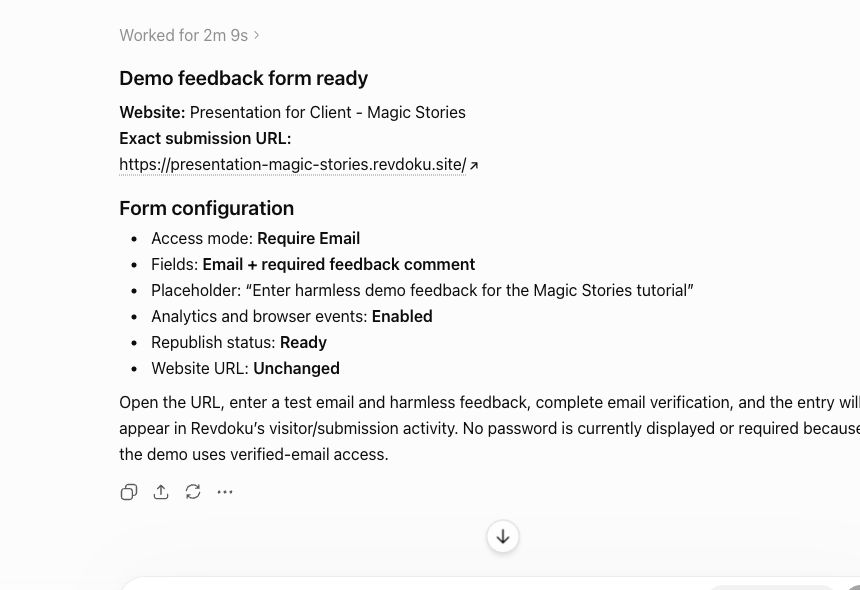
For lightweight client feedback, ChatGPT can help prepare a Revdoku-powered page with a form and confirm the form is ready on the published website.
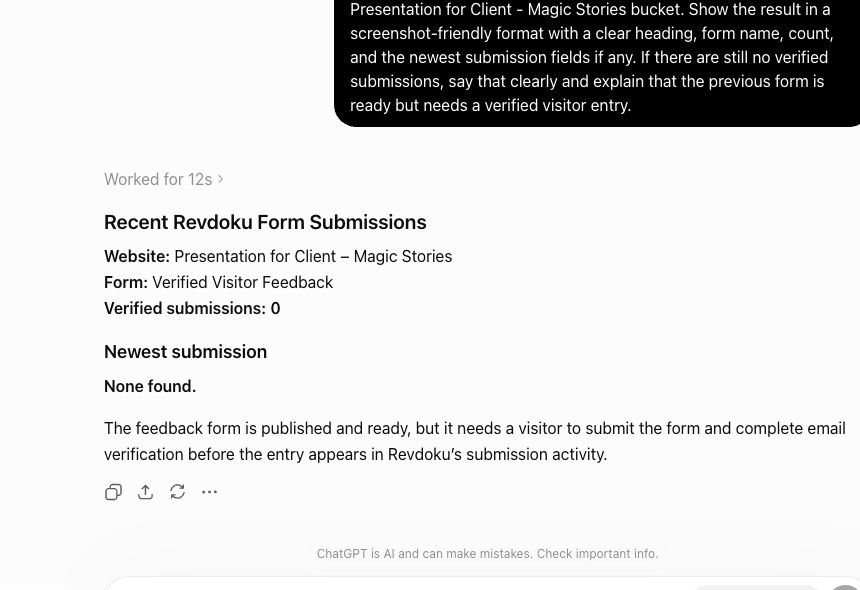
After responses arrive, ask ChatGPT to read the Revdoku form submissions and summarize the next actions.
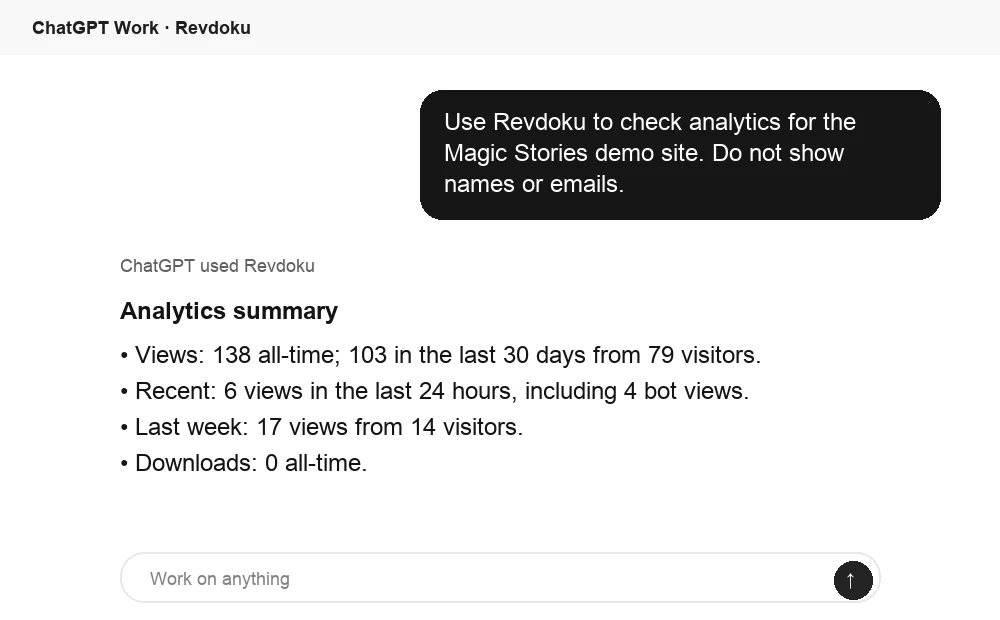
Ask ChatGPT to summarize review activity
After the link is opened, ChatGPT can summarize Revdoku analytics for the published site. That turns raw viewing activity into a clear follow-up signal.
Frequently asked questions
How many questions should a client feedback form include?
Include only the questions needed to understand and route the requested changes. A concise form typically asks for the relevant location, requested change, reason, and reviewer identity or ownership, with priority and supporting links left optional.
Which access method should I use for client deliverables?
Use a public link for low-risk material, password protection for confidential drafts shared with known reviewers, and an email gate when visitor identification or a lead record matters. Match the access level to the sensitivity of the work without adding unnecessary friction.
How should feedback from multiple client stakeholders be handled?
Ask the client to appoint one feedback owner who consolidates comments and resolves internal conflicts before submission. This gives the delivery team one authoritative response instead of several competing instruction sets.
What should happen when a client sends feedback through email, chat, or a call?
Transfer the decision or requested change into the agreed source of record, then ask the feedback owner to confirm it. Quick conversations can still happen elsewhere, but revisions should be based on documented, consolidated instructions.
How do I distinguish an in-scope revision from new work?
Compare the request with the agreed objective, deliverables, and current review stage. Corrections and refinements within the chosen direction are usually revisions, while new concepts, audiences, formats, or deliverables may require a scope and schedule change.
Can open notifications or download activity be treated as approval?
No. Analytics indicate activity, not intent: an open, long session, or download does not prove that the client reviewed or approved the work. Use direct confirmation and the approval process defined in your agreement.
Should the link change when a revised deliverable is uploaded?
Keep the same stable link when possible so reviewers do not have to track multiple URLs. Clearly label the current version or review round so older feedback can be interpreted against the correct deliverable.