Protected Demo Site for Secure Client Review
Table of Contents
- A protected demo site keeps unfinished work in the right hands
- What a protected demo site is, and what it is not
- Password protected demo access or Verified Email access?
- How to publish a private demo link for client review
- Keep every protected demo site current at one private demo link
- Use client demo analytics without becoming intrusive
- Four practical uses for a password-protected demo site
- Make a private client preview easy to review
- Common protected demo site mistakes and concerns
- Final thoughts on protected demo sites
- A protected demo site keeps unfinished work in the right hands
- What a protected demo site is, and what it is not
- Password protected demo access or Verified Email access?
- How to publish a private demo link for client review
- Keep every protected demo site current at one private demo link
- Use client demo analytics without becoming intrusive
- Four practical uses for a password-protected demo site
- Make a private client preview easy to review
- Common protected demo site mistakes and concerns
- Final thoughts on protected demo sites
A protected demo site keeps unfinished work in the right hands
TL;DR: A protected demo site gives clients private browser access to unfinished work through one stable, controlled link. Revdoku tells you when it is opened.
No attachment hunt or uncertainty about whether anyone looked at version three.
It works well for:
- Agencies presenting website concepts and campaign previews
- Freelancers delivering files, proposals, or design packages
- AI builders publishing static prototypes and generated reports
- Consultants sharing decks and supporting documents
Revdoku lets you publish a password-protected demo or require Verified Email access. Then update the same link, review page views and clicks, collect feedback, and follow up while interest is fresh.
What a protected demo site is, and what it is not
Static demo hosting puts static pages and files behind an access gate, limiting casual exposure while retaining a normal web link. It suits cases where a public URL is too open but a full client portal is unnecessary.
Revdoku publishes static sites and files, including HTML, CSS, browser-side assets, PDFs, presentations, images, downloads, and web-ready folders. It cannot host databases, run arbitrary server code, or turn a static prototype into a production backend.
| Publishing method | Who can open it | Good fit |
|---|---|---|
| Public link | Anyone with the URL | Approved work meant for broad distribution |
| Password-protected demo | Anyone with the URL and password | Small client groups that can share one credential safely |
| Verified Email access | A visitor who verifies an email address | Named prospects, external reviewers, and lead capture |
A private demo link needs real access control; an obscure URL or robots.txt rule is insufficient. Google explicitly warns that robots.txt is not a way to hide confidential material. Keep private work behind a password or email gate.
Password protected demo access or Verified Email access?
Choose an access gate based on what you need to know about visitors. A password-protected demo is fast and familiar: send the client a URL and the password separately. It suits small teams prioritizing quick access over individual attribution.
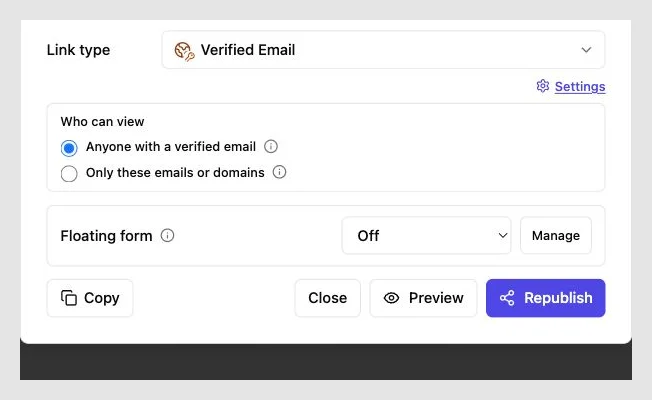
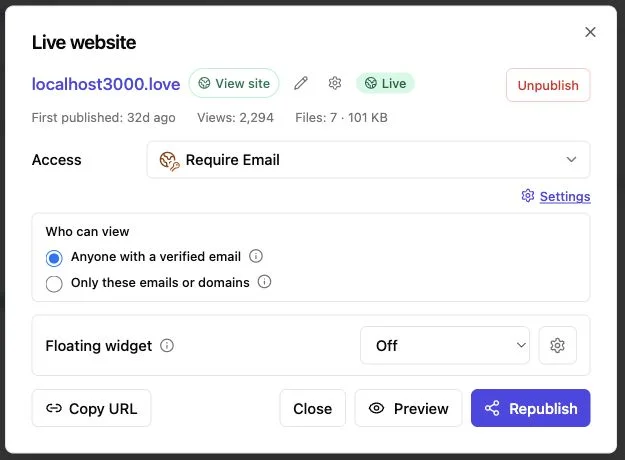
Verified Email requires visitors to confirm control of an email address before entry, creating clearer records and capturing leads without a registration system. It usually suits sales previews, partner reviews, and demos shared with several companies.
| Question | Password access | Verified Email access |
|---|---|---|
| Is entry quick for a known group? | Yes | Yes, with an extra verification step |
| Can several people reuse one credential? | Yes | No shared password is required |
| Can activity be tied to an email? | Usually not with confidence | Yes |
| Does it support lead capture? | Limited | Yes |
| Is it suitable for highly sensitive secrets? | No | No |
Neither option provides digital rights management: permitted visitors can still take screenshots or save allowed downloads. Use it to control entry and understand engagement, not prevent copying. For sensitive material, publish only what the recipient needs and use contracts or nondisclosure terms where appropriate.
How to publish a private demo link for client review
The simplest Revdoku workflow starts in the dashboard; AI agents, the API, and the CLI are optional. You can publish your first private preview without them.
-
Prepare the deliverable. Export the static website, proposal, deck, PDF, or files. Remove development notes, secret keys, customer records, and unused source files before uploading.
-
Create a private bucket. Use a clear internal name, such as Acme homepage preview or July campaign presentation. The name should distinguish the project from later versions.
-
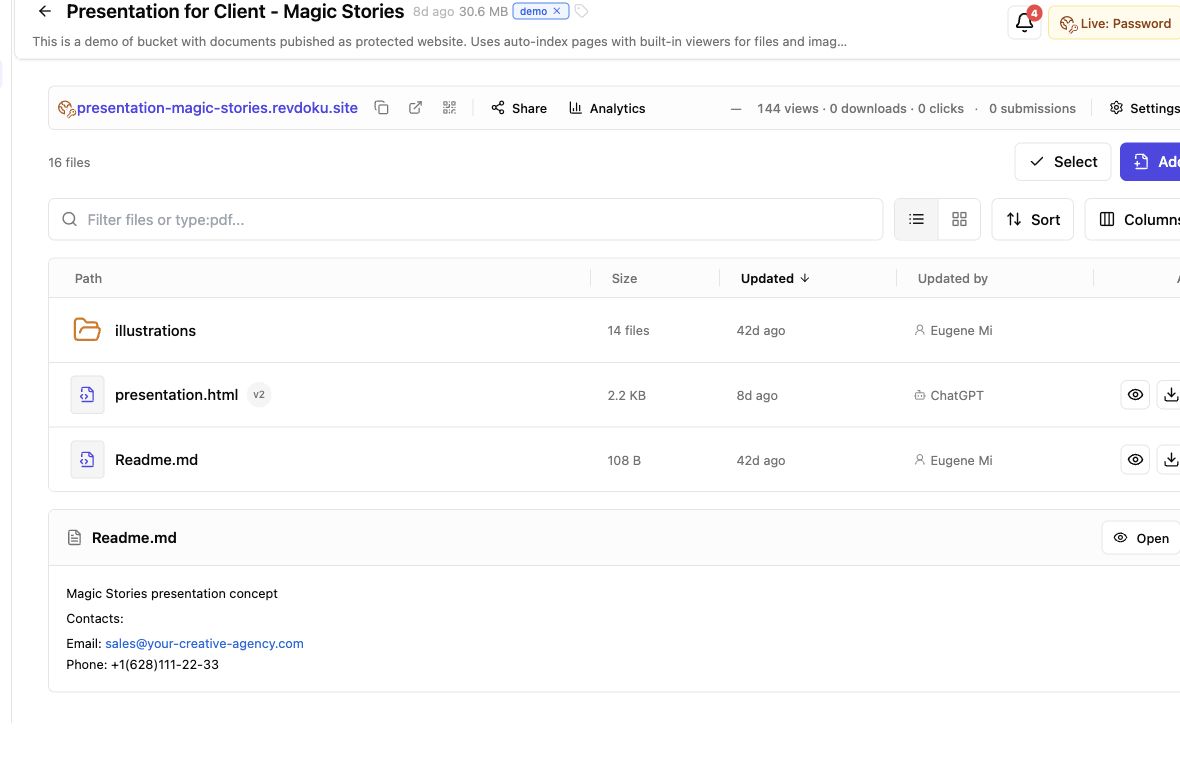
Drop in the files. Drag in a PDF, presentation, or static site folder, then check the published entry page, internal links, images, and downloads.
-
Choose access. Use a password-protected demo for a small known group; use Verified Email for visitor identity and lead capture.
-
Send the link with context. Tell recipients what is ready, what feedback you want, and the deadline. Send passwords separately.
-
Watch for the open notification. Review visitor activity before following up; a message soon after a meaningful visit feels informed, not random.
For repeat publishing, an AI agent or script can send static output to the same bucket type through the API or CLI. Access stays the same; automation replaces manual uploads.
Keep every protected demo site current at one private demo link
Private previews evolve after review: copy and images change, and awkward mobile layouts get fixed. A new link for every revision leaves clients unsure which is current.
Revdoku keeps the link stable as you update the deliverable. Update the bucket, then check it.
Tell the client the latest version is ready at their existing link. This helps in email threads, project tools, and calendar invitations where old URLs can remain for weeks.
Before replacing a password-protected demo:
- Record the revision name or date in your own project system
- Test the opening page in a private browser window
- Check navigation, forms, downloads, and responsive layouts
- Confirm that the access gate still behaves as expected
- Tell reviewers what changed and which comments remain unresolved
A stable link reduces friction but makes careless updates costlier. Keep the live bucket out of your scratch workflow. Preview revisions locally, upload a complete build, and open the link as an outside visitor.
Use client demo analytics without becoming intrusive
Client demo analytics start with an open notification: did the client look? Per-visitor analytics also show pages viewed, links clicked, and files downloaded. Verified Email connects that activity to a known address rather than an anonymous browser session.
Use analytics for better timing and clearer communication, not surveillance. A Pew Research Center survey found that 81% of Americans were concerned about how companies use collected data.
| Signal | Reasonable interpretation | Sensible response |
|---|---|---|
| Protected link opened | The recipient reached the preview | Wait long enough for a useful review |
| Several pages viewed | The visitor looked at the work | Ask about the sections they saw |
| Pricing or scope clicked | Commercial details may be under review | Offer to answer scope questions |
| File downloaded | The asset may be circulating internally | Ask whether other stakeholders need access |
| Feedback form submitted | The visitor supplied direct guidance | Confirm receipt and explain the next revision |
A page view does not prove approval or purchase intent; someone may reopen a tab, forward access, or download for a colleague. Analytics provide context; direct client communication remains the source of truth.
Four practical uses for a password-protected demo site
The same publishing model can support several stages of client work.
-
Agency website review: An agency uploads a static homepage concept with Verified Email access for the client’s marketing and legal teams. The agency tracks pages each reviewer opened, receives built-in-form feedback, and publishes revisions at the same link.
-
Freelance brand delivery: A designer places logo files, usage notes, and a PDF style guide in a password-protected demo. Downloads reveal when the client collects final assets; the designer can later correct a file without sending another folder URL.
-
Consulting proposal: A consultant shares a presentation and supporting research behind an email gate. An open notification before the scheduled call helps focus the conversation on sections the prospect viewed.
-
AI-generated prototype: An AI builder publishes a static interface mockup through the optional CLI. It can demonstrate browser-side interactions, but its database, secret API credentials, and arbitrary backend processes require separate hosting.
In each case, the protected layer supports delivery and review. It does not alter the underlying files.
Make a private client preview easy to review
Access control cannot rescue a confusing presentation. Reviewers should know the demo’s contents, where to begin, and how to respond. Check security and usability before sending the link.
| Item | What to check | Why it matters |
|---|---|---|
| Entry page | State the project, revision, and review goal | The client knows they opened the correct preview |
| Access choice | Match password or Verified Email to the audience | Excess friction can delay a review |
| Sensitive data | Remove secrets, personal data, and internal notes | A gate reduces exposure, but does not erase risk |
| Navigation | Test every page and return path | Reviewers should not become trapped in the demo |
| Mobile layout | Open common phone and desktop widths | Clients often follow links from email on a phone |
| Accessibility | Check keyboard use, labels, and contrast | More reviewers can use the preview successfully |
| Feedback route | Add a built-in feedback or contact form | Comments reach you without a custom backend |
| Downloads | Confirm names, formats, and permissions | The client receives the intended files |
For text, the Web Content Accessibility Guidelines specify a contrast ratio of at least 4.5:1 for normal-sized text in most cases. Even unfinished password-protected demos need basic readability. Clients judge usable work, not intentions.
Common protected demo site mistakes and concerns
Major mistakes come from treating privacy as a single switch. Verizon’s 2024 Data Breach Investigations Report found that the human element was involved in 68% of breaches. A shared password sent to the wrong thread can defeat an otherwise sensible setup.
Watch for these problems:
- Sending the password beside the link: Use a separate channel, especially for client-confidential work.
- Reusing one password across projects: Give each demo a strong credential; replace it when the audience changes.
- Publishing secrets in static files: Browser code is inspectable, so never put private API keys, database credentials, or hidden customer data in a static build.
- Assuming email verification proves legal identity: It proves current inbox control, not identity screening.
- Collecting more analytics than you can justify: Tell visitors what you collect, retain it sensibly, and follow applicable privacy rules.
- Following up too aggressively: An open notification guides timing; it does not justify narrating every click to the client.
A protected demo site cannot run a conventional server application. Browser-side static behavior works, but databases, private server logic, payment processing, and secret-bearing API calls require a separate hosted backend. State this clearly so no one mistakes a static preview for a production system.
Final thoughts on protected demo sites
A protected demo site offers a middle ground: easier than a heavy client portal and safer than a public URL for unfinished work. Revdoku lets you put static sites, documents, presentations, and files in private buckets and share them through a password or Verified Email gate.
The practical gains are straightforward:
- One private demo link stays current across revisions
- Open notifications improve follow-up timing
- Visitor analytics add context without replacing conversation
- Feedback and contact forms work without your own backend
- Optional API, CLI, and AI automation can handle repeated publishing
Choose the lightest access method for the audience. Remove secrets before uploading, tell reviewers what to inspect, and use analytics sparingly. A well-run password-protected demo simplifies client review while keeping the publisher in control.
Frequently asked questions
Should I use password protection or Verified Email access?
Use password protection when a small, trusted group needs quick access and individual visitor identification is unnecessary. Choose Verified Email when you need to connect activity to specific email addresses, manage multiple reviewers, or record leads.
What can I publish on a protected demo site?
You can publish static websites, PDFs, presentations, images, downloadable files, and folders containing browser-ready HTML, CSS, and JavaScript. Server-side applications, databases, and arbitrary backend code require separate hosting.
Is a protected demo suitable for confidential information?
An access gate reduces casual exposure, but it cannot prevent authorized visitors from saving files or taking screenshots. Remove credentials, personal data, internal notes, and other unnecessary secrets before publishing, and use appropriate legal agreements for sensitive work.
Can I update the demo without sending a new link?
Yes, you can replace or revise the published files while keeping the same private link. Test the complete update in a private browser window before telling reviewers that the latest version is ready.
What should I tell clients when sending a private demo?
Explain what the preview contains, where they should begin, which areas need review, and when feedback is due. If the demo uses a password, send the credential through a separate channel rather than alongside the link.
How should I use demo analytics when following up?
Treat opens, page views, clicks, and downloads as context rather than proof of approval or purchase intent. Allow enough time for a meaningful review, then ask focused questions without describing every action the visitor took.
Can a static demo include forms or interactive features?
Browser-side exchanges and supported feedback or contact forms can work without a custom backend. Features involving private API keys, payment processing, databases, or secure server logic must connect to separately hosted services.
Related Articles
Password Protected Portfolio Website Guide
Learn how to share confidential client work safely using permission, redaction, passwords, Verified Email access, and private portfolio links.
Vercel Password Protection Alternative for Client Links
Compare Vercel password protection with Revdoku for secure client review links, Verified Email access, analytics, and stable file updates.
How to Share an App Prototype With Clients Safely
Share app prototypes securely with protected access, stable preview links, safe sample data, version updates, analytics, and focused feedback.