How to Share an App Prototype With Clients Safely
Table of Contents
- Share an App Prototype With a Client Safely
- Define What the Client App Preview Link Can Prove
- Run Safe Pre-Publish Checks for Static Prototype Sharing
- Choose Access for a Protected Demo Site
- Keep One Client App Preview Link Through Updates
- Collect Client Prototype Feedback and Time the Follow-Up
- Four Ways to Share an App Prototype With a Client
- Avoid Common Protected Demo Site Failures
- Final Thoughts
- Ask ChatGPT to check prototype access
- Share an App Prototype With a Client Safely
- Define What the Client App Preview Link Can Prove
- Run Safe Pre-Publish Checks for Static Prototype Sharing
- Choose Access for a Protected Demo Site
- Keep One Client App Preview Link Through Updates
- Collect Client Prototype Feedback and Time the Follow-Up
- Four Ways to Share an App Prototype With a Client
- Avoid Common Protected Demo Site Failures
- Final Thoughts
- Ask ChatGPT to check prototype access
Share an App Prototype With a Client Safely
Sharing an app prototype with client reviewers without making unfinished work public raises harder questions than uploading it. Does the demo contain private data, survive tomorrow’s revision, provide a feedback channel, or make simulated buttons look finished?
TL;DR: A good client app preview link sets expectations before the first click, controls access, keeps feedback tied to the current version, and gives reviewers one response channel.
This guide covers static prototype sharing and browser-based demos: HTML, CSS, JavaScript, images, documents, and other files that run or render without a private server. It covers safety checks, protected access, stable updates, visitor analytics, and feedback.
Define What the Client App Preview Link Can Prove
Before publishing, write a one-sentence review goal. Clients expecting a finished application may judge a prototype by the wrong standard, so state what works, what is simulated, and what is absent.
A static prototype can demonstrate:
- Visual design: layout, typography, colors, responsive behavior, and content hierarchy
- Browser interactions: navigation, menus, filters, local calculations, and scripted transitions
- Prepared scenarios: sample records loaded from JSON files or browser storage
- Supporting material: a proposal, deck, specification, or short usage note beside the demo
It cannot securely hide an API secret or run an arbitrary server-side runtime. A simulated AI response does not prove that authentication, billing, database writes, queues, or production AI calls work.
| Prototype State | What to Tell the Client | Suitable Review Question |
|---|---|---|
| Static screens | Data and actions are simulated | Is the workflow understandable? |
| Interactive front end | Browser interactions work with sample data | Can you complete the main task? |
| Connected test build | Some approved test services are live | Does the integration behave as expected? |
Put the scope in the protected demo, not just the email. Forwarded links often lose that explanation.
Run Safe Pre-Publish Checks for Static Prototype Sharing
Costly preview mistakes are often small: an exposed token, a broken route, or a mobile button hidden below the fold. Test the exported folder as a first-time client.
| Item | What to Check | Why It Matters |
|---|---|---|
| Sensitive data | Search files for API keys, tokens, customer records, private URLs, and internal comments | Browser-delivered files can be inspected or downloaded |
| Navigation | Open every deployed route, then refresh nested pages | Local paths may work while hosted paths fail |
| Actions | Disable or label destructive, paid, and production-facing controls | A realistic button can create a false expectation |
| Devices | Test desktop, narrow mobile, keyboard navigation, and one private browser window | Your signed-in development browser hides access problems |
| Version | Show a date or revision label inside the prototype | Feedback needs a clear reference point |
Check performance too. Google’s recommended Core Web Vitals targets are 2.5 seconds or less for Largest Contentful Paint, 200 milliseconds or less for Interaction to Next Paint, and 0.1 or less for Cumulative Layout Shift at the 75th percentile. These targets also suit temporary client previews ( web.dev).
The W3C calls for keyboard operation and at least a 4.5:1 contrast ratio for normal text under WCAG 2.2 (W3C). A prototype need not be perfect, but should not block reviewers.
Choose Access for a Protected Demo Site
Match access to the work’s sensitivity. An obscure URL is convenient but offers no meaningful protection. Links can surface in chats, synchronized browsers, forwarded email, screenshots, and analytics logs.
| Access Method | Best For | Main Tradeoff |
|---|---|---|
| Public link | Low-risk concepts intended for broad circulation | Anyone with the URL can open it |
| Password gate | A known client team reviewing confidential work | The password may be forwarded with the link |
| Email gate | Named reviewers, lead capture, and visitor-level activity | Adds one step before entry |
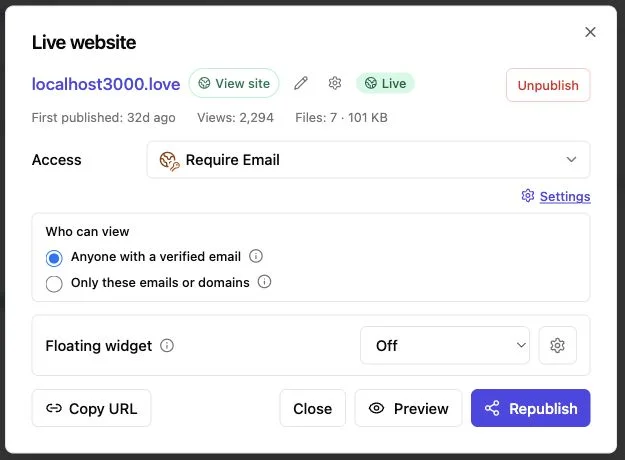
Revdoku lets you store a static demo folder and related files in a private bucket and publish a public, password-protected, or email-gated link.
For a password-protected app demo, use a password different from your account credentials and, for sensitive material, send it separately. Use an email gate to distinguish stakeholders’ activity.
A protected demo still needs sensible content. Protection reduces casual exposure but cannot replace contracts, NDAs, source-control permissions, or security reviews. Remove production data before upload. Rotate or revoke access when the engagement ends.
OWASP recommends Content Security Policy, correct content types, nosniff, and careful caching rules. OWASP notes that CSP remains a useful second defense layer on fully static sites (OWASP CSP guidance).
Keep One Client App Preview Link Through Updates
A new URL for every revision creates confusion. One reviews version two while another unknowingly comments on version four. A stable client app preview link keeps one project address as its files change.
A practical sharing flow:
-
Export the prototype to a clean folder, removing source maps, unused assets, local notes, secrets, and unneeded test data.
-
Drag the folder into a Revdoku bucket. Add any needed brief, deck, or specification.
-
Set public, password, or email-gated access, then test the resulting link from the first screen in a private browser window.
-
Send the link with the review goal, version label, access instructions, and response date.
-
Update the bucket’s files after revisions; the address stays stable, so the client needs no new URL.
Use hashed asset filenames or another cache-busting method when supported. Otherwise, old JavaScript or CSS may remain in the reviewer’s cache.
Also keep a dated local copy of every client-facing release. The stable link shows the latest version; your archive preserves earlier client views.
Collect Client Prototype Feedback and Time the Follow-Up
Email threads poorly track client prototype bugs. A comment like the button feels wrong is useless without the screen, device, and version. Put the feedback path next to the work.
Revdoku provides built-in feedback and contact forms without a custom backend. Ask reviewers to include:
- Location: page, screen, or component name
- Action: what they clicked or attempted
- Result: what happened and what they expected
- Context: device, browser, and whether the issue repeats
- Priority: blocking decision, requested change, or later polish
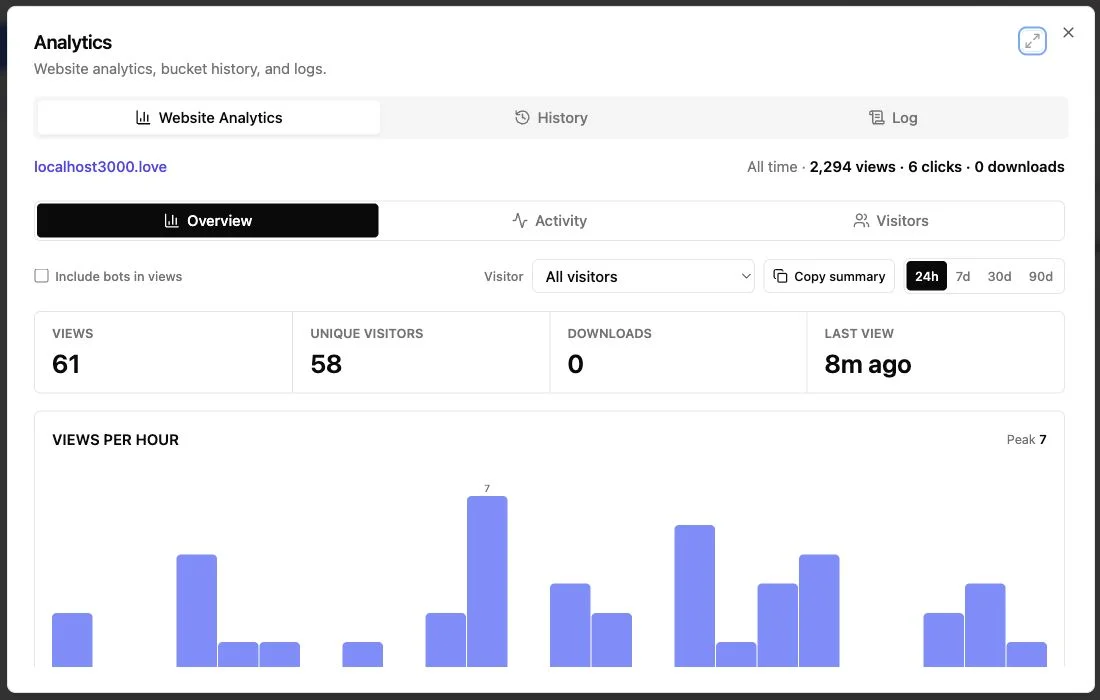
Protected-link notifications can notify the owner when someone opens the preview.
Per-visitor analytics show page views, clicks, and downloads; an email gate records leads or identifies invited reviewers. Use this activity for timing, not mind reading. Opening the pricing screen does not imply price approval.
When a decision-maker opens the demo and relevant material, follow up while the review is fresh. If nobody opens it, check the delivery and access instructions first. If several people visit without responding, ask one focused question rather than broadly requesting thoughts.
Tell reviewers what you record and collect only required identity data. Transparent analytics feel professional. Surprise tracking does not.
Four Ways to Share an App Prototype With a Client
The method works across client projects. These examples reflect common review patterns.
-
Agency landing-page concept: An agency exports two responsive HTML campaign variants. It uses an email-gated client app preview link for four reviewers. Each has a feedback button and asks one question: which message should move into production?
-
AI support assistant: A builder publishes a browser-only interface with 12 fictional support tickets and prepared AI responses. The protected demo labels generation, customer records, and account permissions as simulated. No model key is shipped to the browser. The client reviews tone and workflow without implying production integration.
-
Consulting proposal: A consultant places a deck, a PDF scope, and an interactive cost calculator in one bucket. The email gate records which invited stakeholders opened it, while analytics show whether they downloaded the scope. The consultant can follow up without treating a page view as agreement.
-
Product redesign: A small team shares a password-protected static dashboard. After the client reports a hard-to-find mobile filter, the team updates the folder and visible label from revision 1.2 to 1.3. The original client app preview link still opens the current build.
Each gives the client a narrow question, safe sample data, and one response channel. That matters more than making an early prototype look finished.
Avoid Common Protected Demo Site Failures
A polished screen can make people careless. I’d rather send a clearly labeled rough prototype than a beautiful demo that leaks credentials or implies nonexistent features.
| Failure | Why It Happens | Better Choice |
|---|---|---|
| Treating an unlisted URL as private | The address looks random | Use a password or email gate for sensitive work |
| Embedding an API key | The front end needs a live service | Use fixtures, mock responses, or an approved test architecture |
| Uploading real customer data | Sample data was copied from production | Create fictional records and remove personal information |
| Sending a new URL after each edit | Each export feels like a separate release | Update the files behind one stable link |
| Collecting feedback in many channels | Reviewers reply wherever convenient | Name one primary feedback route |
| Reading analytics as approval | Visits are mistaken for decisions | Ask directly for the required decision |
| Hiding prototype limits | The demo looks more complete than it is | Put limitations and simulated actions on the first screen |
Also test the access gate after every meaningful change. A working prototype with broken login instructions still fails. Before a major presentation, test the exact link on a different device and network.
Automation can streamline repetitive releases. Revdoku’s optional API, CLI, and AI-agent workflows can publish to the same bucket model. For occasional client work, dragging the folder into the dashboard is often simplest.
Final Thoughts
Treat the preview as a small delivery system, not a loose internet folder.
State what it proves. Remove secrets and real customer data. Test the exported build outside your normal browser. Choose public, password, or email-gated access based on sensitivity.
The best setup gives both sides one stable link, one current version, and one feedback channel. Open notifications and per-visitor activity can help time follow-up, but final decisions require direct conversation.
Start manually: place the static demo and supporting files in a Revdoku bucket, protect and test the link, then send it. Add API, CLI, or AI-agent automation only when repeated publishing justifies it.
Ask ChatGPT to check prototype access
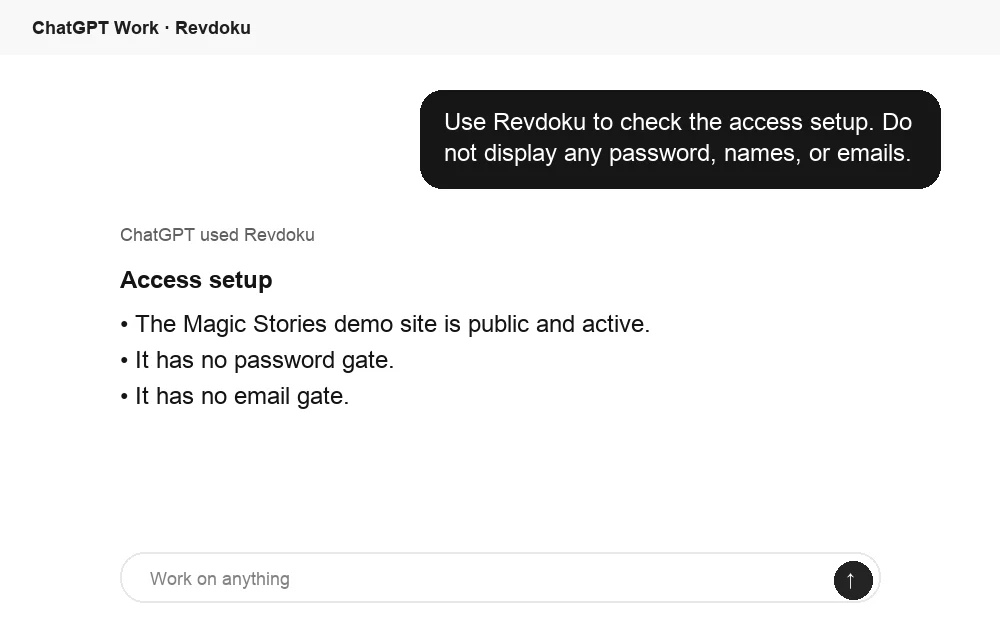
Before sharing, ChatGPT can ask Revdoku what access mode is active for the bucket. Use this to confirm whether the link is public, password protected, or email gated.
Frequently asked questions
Is a password-protected link enough for confidential work?
It may suffice for an ordinary concept review, depending on the contract and data. It is unsuitable for secrets, regulated records, production credentials, or individually authorized material. Use an email gate when reviewer identity matters, and always remove sensitive data.
Can a static prototype call a live API?
Browser code can make network requests; doing so safely is harder. Never put a private credential in downloadable JavaScript. Prefer fixtures or mock responses. If necessary, use an approved, narrowly scoped live test design with proper server-side credential handling outside the static prototype.
Does Revdoku run my backend?
Treat the shared demo as static browser content. Do not expect arbitrary server-side runtimes, databases, background workers, or private environment variables. Simulate those parts or host them through an architecture designed for them.
What should accompany the link?
Keep the delivery note short:
- What the reviewer should examine
- Which actions are simulated
- How to enter the protected demo site
- Where to submit feedback
- What decision is needed and by when
Can I update the preview without resending it?
Yes. Update the same bucket’s files without changing the client app preview link. Change the visible revision label so reviewers know they have the latest build.
How should I choose between a password gate and an email gate?
Use a password gate when a known group needs simple access to moderately sensitive work. Choose an email gate when you need to identify individual reviewers or understand stakeholder activity. Neither option makes it safe to include production credentials, regulated records, or unnecessary personal data.
What should I test immediately before sending the preview?
Open the exact shared link in a private browser window and test every route, important action, download, and access instruction. Repeat the main workflow on a mobile device and confirm that keyboard users are not blocked. Verify that the displayed revision label matches the files being shared.
How can I prevent reviewers from mistaking simulated features for finished functionality?
Place a brief scope notice on the prototype’s first screen identifying what works, what is simulated, and what is unavailable. Label mock actions and prepared data where they appear instead of relying only on the delivery email. Give reviewers a specific question that matches what the prototype can genuinely demonstrate.
What should I do if a reviewer still sees an older version after an update?
Ask them to refresh the page or reopen the link in a private window to rule out cached assets. Use hashed filenames or another cache-busting approach for changed JavaScript, CSS, and images when possible. A visible revision number also makes stale versions easier to identify.
How much sample data should a client prototype include?
Include only enough fictional data to exercise the workflows under review, including a few realistic edge cases. Avoid copying production records even when names or obvious identifiers have been removed, because other fields may still expose private information. Keep the dataset small enough that reviewers can understand the intended scenario quickly.
What is the best way to organize feedback from several reviewers?
Choose one primary feedback channel and ask reviewers to identify the screen, action, expected result, device, and priority. Tie every feedback round to the visible revision label and a response deadline. If comments conflict, ask the designated decision-maker to resolve the product choice rather than inferring consensus from analytics.
What should happen to the preview after the client review ends?
Archive a dated copy of the final client-facing version, then revoke or rotate access when the engagement no longer requires it. Remove temporary analytics or identity data according to the stated retention policy. If the link must remain available, review its contents and permissions periodically.