Link Tracking Software for Client Engagement
Table of Contents
- Introduction
- What Link Tracking Software Records When You Track Link Clicks
- Track Link Clicks or Use Client Engagement Analytics?
- Link Tracking Software and Aggregate Client Engagement Analytics
- Verified Email Tracking: How to Track Who Opened a Link
- Stable Links Keep Document Tracking and Client Deliverables Current
- Feedback Makes Client Engagement Analytics More Useful
- Four Real-World Link and Document Tracking Examples
- Choosing and Using Link Tracking Software
- Final Thoughts
- Introduction
- What Link Tracking Software Records When You Track Link Clicks
- Track Link Clicks or Use Client Engagement Analytics?
- Link Tracking Software and Aggregate Client Engagement Analytics
- Verified Email Tracking: How to Track Who Opened a Link
- Stable Links Keep Document Tracking and Client Deliverables Current
- Feedback Makes Client Engagement Analytics More Useful
- Four Real-World Link and Document Tracking Examples
- Choosing and Using Link Tracking Software
- Final Thoughts
Introduction
Link tracking software shows that someone clicked. But client-facing teams care most about what happened next.
A proposal may get several clicks without reaching the decision-maker. A client may open a presentation, study pricing, download the scope, yet remain silent. Those actions carry different meanings.
Good link tracking software separates four kinds of evidence:
- A request reached the tracked URL
- An anonymous visitor used the destination
- A verified visitor opened protected content
- A client viewed, downloaded, or responded to the work
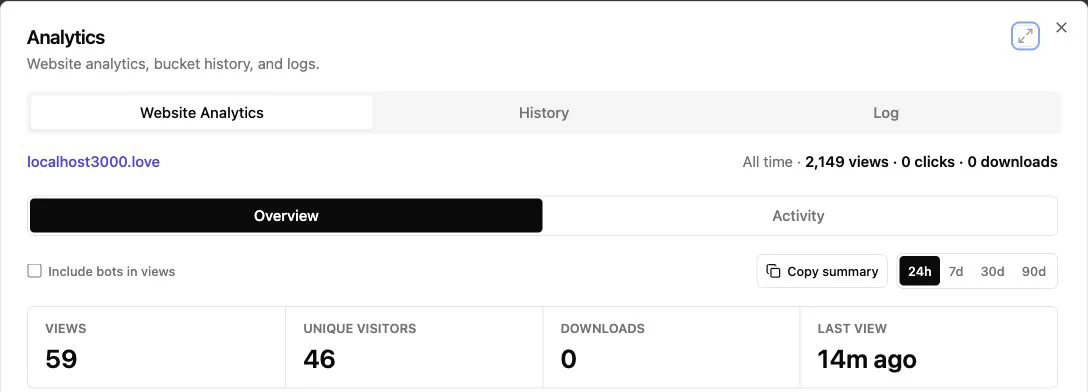
TL;DR: Track clicks without mistaking them for identity. Revdoku combines verified email and document tracking, client engagement analytics, stable links, access gates, and built-in feedback for documents, demos, and presentations.
What Link Tracking Software Records When You Track Link Clicks
Most link tracking software uses a redirect: you send a tracking URL instead of the final address. A request to that URL records an event, then redirects to the destination.
More complete software also records activity after arrival. A redirect click and five-minute visit are different signals.
| Signal | What It Can Tell You | What It Cannot Prove by Itself |
|---|---|---|
| Recorded click | The tracking URL was requested | A named person clicked it |
| Unique visit | A browser or device appears new | One specific human visited |
| Page view | A page loaded in the browser | The visitor read every word |
| Download | A file was requested | The recipient reviewed the file |
| Form response | Someone submitted details | Every detail is accurate |
| Verified access | The visitor controlled an approved inbox | The account owner used the device |
Security scanners, messaging previews, email filters, and bots can request URLs.
One person using a phone and laptop may appear as two visitors. Treat anonymous traffic as behavior, not identity.
To track who opened a link, verify access instead of inferring identity from an IP address or browser fingerprint.
Track Link Clicks or Use Client Engagement Analytics?
Generic link trackers count visits to another destination. Website analytics measures behavior on your pages. A controlled client website combines publishing, access, analytics, and responses around the deliverable.
| Capability | Generic Click Tracker | Standard Website Analytics | Published Client Website |
|---|---|---|---|
| Track link clicks | Yes | Sometimes | Yes |
| Count destination page views | Usually no | Yes | Yes |
| Identify an approved visitor | Rarely | Requires separate login or identity setup | Yes, with Verified Email access |
| Track downloads and page activity per visitor | Limited | Possible with configuration | Built into sharing |
| Replace files without changing the shared URL | No | Requires site management | Yes |
| Collect client feedback | No | Requires another tool | Built-in forms and feedback |
| Protect access | Usually no | Requires development | Public, password, or email-gated access |
Buyers increasingly research independently. A Gartner survey of 632 B2B buyers found 61% preferred an overall rep-free experience, while 73% avoided suppliers sending irrelevant outreach. McKinsey found B2B buyers average 10 interaction channels per buying journey.
Client engagement analytics let you follow up on what a client viewed. Answer a likely question instead of requesting an update.
Link Tracking Software and Aggregate Client Engagement Analytics
Aggregate analytics shows overall use without attributing every event to a known person. It suits public links, broad campaigns, portfolio samples, and forwardable content.
Aggregate questions include:
- How many visits did the deliverable receive?
- Which pages attracted the most attention?
- Which links were clicked most often?
- How many visitors downloaded the supporting files?
- Did activity rise after an email, meeting, or social post?
A public proposal page with 22 visits, 15 pricing-page views, and 4 scope downloads shows attention to commercial sections. You cannot know whether 22 people visited or the named recipient generated every event.
Google Analytics applies data thresholds in some reports to limit inferences about identity or sensitive information from sparse data.
Email opens are weaker than destination engagement. Apple’s Mail Privacy Protection may download remote email content in the background without recipient engagement. A pixel load may look like an open when no one read the email.
Clearly label anonymous visits, verified visitors, and form submissions. Where possible, filter known bots, disclose analytics in your privacy notice, and retain personal data only as needed.
Verified Email Tracking: How to Track Who Opened a Link
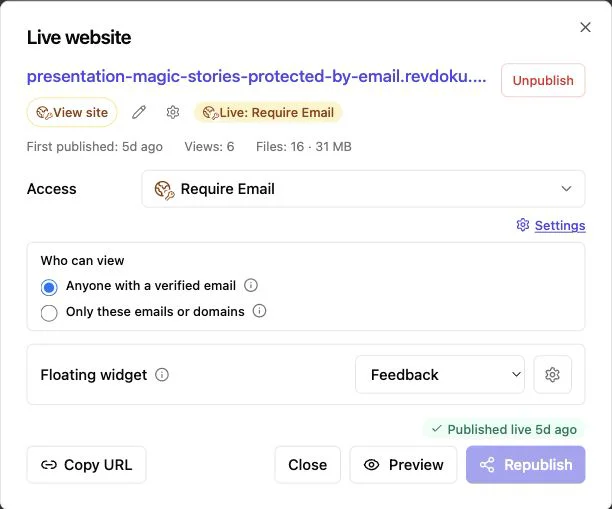
Verified email tracking is the cleanest way to identify who opened a link. The website asks visitors to prove control of an email inbox instead of guessing from network data.
Typical flow:
-
The visitor opens the client website and enters an email address.
-
The system sends a one-time code or verification message to that address.
-
The visitor verifies and enters the protected website.
-
Authenticated visit activity can be tied to that verified address.
-
The owner receives an open notification and reviews pages viewed, links clicked, and files downloaded.
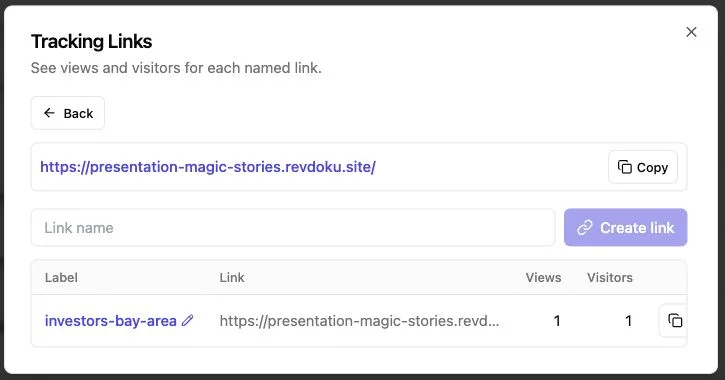
Revdoku supports public, password-protected, and one-time-code email access. Owners can limit access to chosen addresses or a company domain. Its product overview describes per-visitor page, click, and download activity after Verified Email access.
One limit remains. Verified Email proves someone controlled the inbox during access. It does not prove the user’s legal identity. A shared mailbox may have several users, and an approved recipient can show the screen to a colleague.
Use Verified Email for named engagement, lead records, or tighter access. Use a password when a shared secret is enough. Use a public link when lower friction matters more than identity.
Stable Links Keep Document Tracking and Client Deliverables Current
New URLs for every revision make document tracking less useful. Client engagement analytics fragment, old messages point to stale files, and clients must identify the current version.
A stable workflow is simpler:
- Create a bucket for the client or project.
- Drag in a PDF, presentation, folder, demo, or group of files.
- Choose public, password, or Verified Email access.
- Send the published browser link.
- Revise files in the same bucket when the work changes.
- Review analytics and feedback in the existing record.
In Revdoku, the bucket holds the live URL and publishing settings. The same bucket can be republished after files or website content changes, keeping the existing address. This helps with weekly reports, proposals under negotiation, or demos revised after client comments.
Stable links need not hide revisions. Add a visible revision date when clients need change details. After replacing files, review the live result, especially if filenames or internal links changed. Frequently edited deliverables also benefit from version history and rollback.
Clients can bookmark it while your team improves the content.
Feedback Makes Client Engagement Analytics More Useful
Analytics shows what happened; feedback explains why. Without a response channel, even detailed tracking leaves you interpreting page views and downloads.
A published client website can offer several responses:
- A feedback form for revisions or approval
- A question form for unclear report sections
- A contact form for interested prospects
- A waitlist form for an early demo or preview
Revdoku lets owners add these forms without building a backend. Submissions stay with the bucket alongside views and downloads, and notifications prompt replies.
An agency presents a new campaign concept. The client views the strategy page twice, opens the budget section, then submits: Please revise the launch date and keep option B. Analytics provides context; the form provides the decision. The agency can update the files at the same link and request a review.
Keep forms short. Ask only for useful information and explain what follows submission. If Verified Email established an address, don’t make visitors retype the same details. Less friction often yields clearer feedback.
Four Real-World Link and Document Tracking Examples
Numbers are illustrative; workflows are practical.
-
Freelance proposal: A designer publishes a seven-page proposal with Verified Email access. The client opens it at 10:14 a.m., returns to the pricing page that afternoon, and downloads the scope. The designer asks about the package choice instead of whether the proposal arrived.
-
Agency presentation: An agency sends a 24-slide campaign deck to three approved client addresses. Two visitors open it, one views 21 slides, and both click the prototype link. The account lead reviews the prototype instead of repeating the full presentation.
-
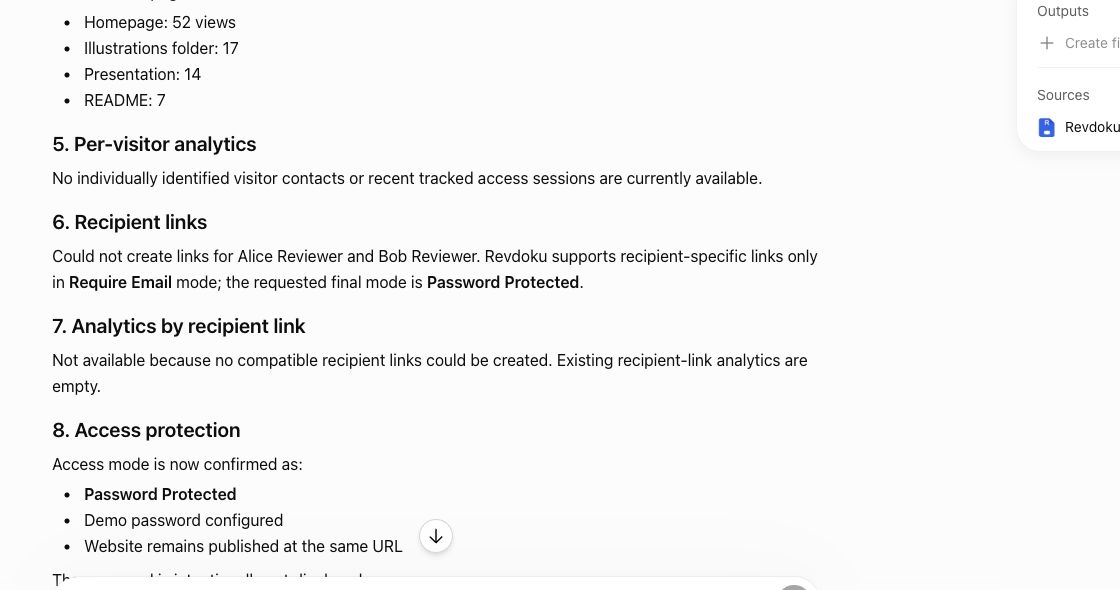
Consulting report: A consultant shares a password-protected report with an executive team. Aggregate analytics shows 17 visits and 6 spreadsheet downloads. Because the password is shared, the consultant cannot claim who opened the link. A feedback form captures two named questions for the next meeting.
-
AI-built demo: A founder publishes a generated product demo from the dashboard, then uses an API or AI agent to refresh the files. The URL stays unchanged. Verified visitors can open the new version, submit comments, and revisit it without finding another message.
Page views, downloads, verified access, updates, and responses make it useful.
Choosing and Using Link Tracking Software
The best link tracking software depends on what you send and your next decision. A campaign marketer may need aggregate totals. A consultant sharing confidential findings may prioritize access control and verified identity.
| Item | What to Check | Why It Matters |
|---|---|---|
| Identity method | Anonymous, password, or Verified Email | A click alone does not establish identity |
| Engagement depth | Page views, link clicks, downloads, and visit times | Destination behavior matters more than redirect counts |
| Stable URL | Replace files without creating a new link | Clients retain one dependable destination |
| Access rules | Email allowlists, domain rules, and password controls | Sensitive work should not depend on an unprotected URL |
| Feedback | Hosted feedback and contact forms | Clients can respond where they review the work |
| Manual workflow | Drag-and-drop publishing from a dashboard | Non-programmers can share and update directly |
| Automation | API, CLI, or AI-agent support | Automate repetitive publishing as needed |
| Privacy controls | Clear retention, disclosure, and export options | Visitor data requires careful handling |
Common questions:
Final Thoughts
Link tracking software works best when pairing click counts with client engagement analytics. It should show how clients use your work without overstating what the data proves.
For client deliverables:
- Use aggregate analytics for public or broadly shared content
- Use Verified Email when you need to track who opened a link
- Track link clicks alongside page views and downloads
- Keep revisions at one stable URL
- Give clients a direct way to ask questions or provide feedback
Revdoku combines them in one browser link for proposals, reports, presentations, files, and demos. Start with the dashboard and drag-and-drop publishing. For repetitive workflows, an AI agent, API, or CLI can update the same buckets without changing client access.
Frequently asked questions
Does every click identify someone?
No. Identity requires a reliable gate or authenticated session.
Can recipients forward a tracked link?
Usually, though Password or Verified Email rules can limit access.
Does Revdoku require coding?
No. Publish manually by dropping files into a bucket; API, CLI, and AI tools are optional.
When should I follow up?
Use the visitor’s action as context. A pricing-page visit may justify a pricing note; a feedback submission deserves a direct response.
How can I tell whether a click came from a real client rather than a bot?
A recorded click alone cannot confirm human engagement because security scanners, link previews, and email filters may request URLs automatically. Look for stronger signals such as time spent on the destination, multiple page views, downloads, verified access, or a submitted response.
When should I use Verified Email instead of a password or public link?
Use Verified Email when you need to associate activity with an approved email address or restrict access by recipient or company domain. A password works for shared access without individual attribution, while a public link is best when convenience and easy forwarding matter most.
Does Verified Email prove exactly who viewed the content?
It proves that the visitor controlled the verified inbox during access, which is more reliable than identifying someone through an IP address or device fingerprint. It does not establish legal identity, and shared mailboxes or shared screens can still involve other people.
What engagement signals are most useful for planning a follow-up?
Page views, return visits, link clicks, downloads, and feedback submissions provide more context than a click count alone. Match your follow-up to the behavior; for example, clarify pricing after repeated pricing-page visits or answer a specific question after a form submission.
Can I update a proposal or presentation without sending a new link?
Yes, if the platform supports stable URLs and republishing. Replace or revise the files in the existing project, verify the live version, and add a revision date when clients need to understand what changed.
What happens if a recipient forwards the tracked link?
A public or password-protected link may be opened by additional people, so its analytics should not be treated as proof that the original recipient visited. Verified Email rules, address allowlists, and company-domain restrictions can reduce unauthorized access and provide clearer attribution.
What privacy practices should I follow when tracking client engagement?
Explain the tracking in your privacy notice, collect only the data needed for the business purpose, and retain it only as long as necessary. Clearly distinguish anonymous activity from verified access, filter known bots where possible, and avoid making identity claims that the evidence cannot support.
Related Articles
Website Link Tracking for Client Engagement
Track proposal and document engagement using visits, downloads, Verified Email, privacy safeguards, and well-timed client follow-up.
Proposal Tracking: Know When Clients Open It
Send proposals with protected links, track verified opens and engagement, and use client activity to time thoughtful follow-ups.
Website Visitor Identification with Verified Email
Identify verified viewers of shared proposals, reports, and demos while keeping anonymous website traffic private.