How to Share a Password-Protected PDF Securely
Table of Contents
- Share a PDF With a Password: Choose the Right Control
- Secure PDF Sharing: Two Ways to Share a PDF With Password Protection
- Send a Password Protected PDF as an Encrypted PDF
- How to Password Protect a PDF Link in the Browser
- Updateability: Why a Stable PDF Link Changes Delivery
- Secure PDF Sharing: Forwarding Risk and Viewer Identity Limits
- When Verified Email Is Better Than a Shared Password
- How to Share a PDF With Password Protection in Revdoku
- Secure PDF Sharing Best Practices
- Final Thoughts: Send a Password Protected PDF With Context
- Ask ChatGPT to check PDF access
- Share a PDF With a Password: Choose the Right Control
- Secure PDF Sharing: Two Ways to Share a PDF With Password Protection
- Send a Password Protected PDF as an Encrypted PDF
- How to Password Protect a PDF Link in the Browser
- Updateability: Why a Stable PDF Link Changes Delivery
- Secure PDF Sharing: Forwarding Risk and Viewer Identity Limits
- When Verified Email Is Better Than a Shared Password
- How to Share a PDF With Password Protection in Revdoku
- Secure PDF Sharing Best Practices
- Final Thoughts: Send a Password Protected PDF With Context
- Ask ChatGPT to check PDF access
Share a PDF With a Password: Choose the Right Control
Sharing a password-protected PDF sounds like one task but can mean two things. You can encrypt the file or place it behind a password-protected browser link. Both deter unintended readers but solve different problems.
Before sending one, decide what matters most:
- Keeping a downloaded file encrypted
- Updating the document without sending a new URL
- Knowing when a client opens it
- Identifying each viewer rather than trusting one shared password
This guide compares their updateability, forwarding risk, and viewer analytics. It also shows when Revdoku’s Verified Email gate fits better. TL;DR: Use an encrypted PDF for protected offline storage, a password-protected link for updates and analytics, or Verified Email to distinguish verified addresses; neither is DRM or unbreakable security. The goal is controlled delivery balancing privacy and convenience.
Secure PDF Sharing: Two Ways to Share a PDF With Password Protection
An embedded PDF password protects the file; a browser password protects page or link access. That distinction shapes what happens after delivery.
| Question | Password Embedded in PDF | Password-Protected Browser Link |
|---|---|---|
| What is protected? | The PDF file itself | Access to the hosted page and file |
| Can the content be updated? | No; a new file must be sent | Yes; the file can change while the link stays stable |
| What happens if it is forwarded? | Anyone with the file and password may open it | Anyone with the link and password may request access |
| Is the viewer identified? | Usually no | Not from a shared password alone |
| Are opens measurable? | Usually no reliable reporting | Opens, page views, clicks, and downloads can be measured |
| Does it work offline? | Yes, after the file is downloaded | The initial visit requires browser access |
| Where is the friction? | In the PDF reader | Before the protected page opens |
For protected offline storage, an encrypted PDF can make sense. For a current version, open notifications, and client engagement data, password-protect the PDF link.
It concerns where access is checked and what remains available after delivery.
Send a Password Protected PDF as an Encrypted PDF
A PDF’s document-open password must be entered before its pages appear. This differs from a permissions password, which may restrict printing or editing while allowing the document to open. For confidentiality, use a document-open password, not a permissions password.
Workflow:
- Export the final document as a PDF.
- Apply a document-open password in a trusted PDF tool.
- Test the file in a second reader or on another device.
- Send the file and communicate its password through a separate channel.
Modern PDF tools may support 256-bit AES encryption. Adobe explains that the selected compatibility level affects the available encryption method. But it cannot rescue a weak or reused password. Nor can it prevent authorized readers from taking screenshots, copying permitted content, or sharing the password.
Consider a freelance designer’s final brand guidelines. Encryption helps when the client needs an offline archive. Each downloaded copy becomes a separate version.
If the designer later corrects a color value, the old file cannot be recalled or replaced. The designer must send a new attachment and identify the current copy.
How to Password Protect a PDF Link in the Browser
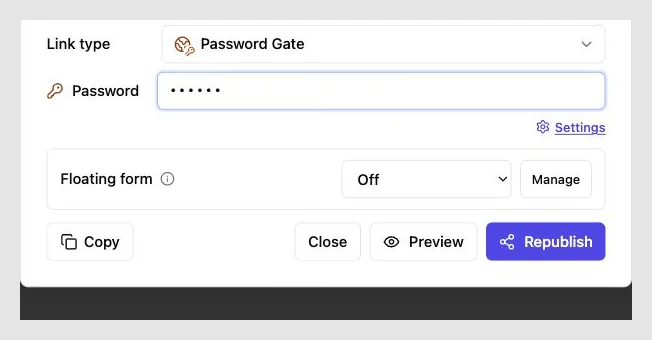
A protected browser link moves the access check from the file to the delivery page. In Revdoku, start in the dashboard. Drag a PDF or folder into a private bucket, enable password protection, and share the live link.
Flow:
- The client opens the URL.
- The browser requests the password.
- The protected page loads once the password is accepted.
- Revdoku records page views, clicks, and downloads.
- The owner receives an open notification.
This approach password-protects access to a PDF link while keeping the presentation current. The URL can stay fixed as the deliverable changes.
A founder might share a product brief, demo, and pricing PDF in one bucket, then replace the pricing file after a call. The prospect still uses the original link.
Once downloaded, the PDF’s local copy is no longer governed by the browser gate. A password-protected link controls delivery, not later use. For sensitive work, weigh download convenience against risk.
Updateability: Why a Stable PDF Link Changes Delivery
Attachments freeze a version; live links point to the current one. This becomes costly when several people review a proposal, deck, report, or design package.
| Delivery Event | Embedded PDF Password | Stable Protected Link |
|---|---|---|
| Correct a typo | Encrypt and resend the file | Replace the file at the same link |
| Revise a price | Send a new attachment and explain the change | Publish the revision to the existing bucket |
| Add supporting files | Send another message or archive | Add files to the shared bucket |
| Retire an old version | Ask recipients to delete it | Stop presenting it at the live link |
| Check renewed interest | Wait for a reply | Watch for a new open and recent activity |
Suppose a consultant sends a $12,000 proposal, then agrees to $10,800 after a call. Both encrypted versions may remain in the client’s inbox. With a protected link, the consultant can update the proposal and tell the client the same URL holds it.
Keep an internal archive of important versions, especially for contracts or regulated records. A stable link delivers files; it does not replace your archive. Unless the platform records it, the link does not prove which version someone read. Still, it reduces confusion from filenames like final-v4-revised.pdf.
Secure PDF Sharing: Forwarding Risk and Viewer Identity Limits
A password is a shared secret, not a personal identity. When five stakeholders share a password, the system sees visits but cannot reliably identify each person. This applies to encrypted PDFs and protected links.
| Risk | Embedded File | Protected Link | Practical Response |
|---|---|---|---|
| Recipient forwards the item | File and password can travel together | Link and password can travel together | Use Verified Email when identity matters |
| Password is reused elsewhere | Weakens every place where it appears | Weakens link access | Create a unique password for each delivery |
| Viewer takes a screenshot | Possible after opening | Possible after access | Share only material the recipient needs |
| Viewer downloads a copy | The file already exists locally | The local copy leaves the link workflow | Treat downloads as a separate risk decision |
| Analytics show an open | Usually unavailable | Shows activity, not intent | Use the signal to time a polite follow-up |
One password shared by eight people may show eight sessions but zero reliable person-level identities. Analytics can still answer: Was the proposal opened? Which pages received attention? Was the pricing PDF downloaded? They do not prove that a named executive read or approved the work.
Open notifications also deserve restraint. An alert is a timing signal. It does not prove consent, acceptance, or full understanding.
When Verified Email Is Better Than a Shared Password
Use Verified Email when the recipient’s address matters more than a shared secret. Each visitor verifies access by email instead of entering one shared password. Revdoku can associate lead information and per-visitor activity with that address.
| Situation | Better Gate | Reason |
|---|---|---|
| One known client needs a quick preview | Password | Low setup and simple access |
| Several stakeholders will review a board pack | Verified Email | Separates visitors by email address |
| A proposal may be forwarded internally | Verified Email | A new viewer must verify an email address |
| A public brochure needs broad reach | Public link | A gate may add needless friction |
| A sales deck needs a lead record | Verified Email | Access can produce a usable contact record |
A consultant sharing a board report with six executives may want to know who returned before the meeting. One shared password cannot distinguish them. Verified Email clarifies access and follow-up interest.
Email verification shows control of an inbox at that moment. It does not prove legal identity, employment status, signing authority, or redistribution permission. For high-stakes records, use contracts, identity checks, and document systems. Verified Email is a delivery gate, not a substitute for those controls.
How to Share a PDF With Password Protection in Revdoku
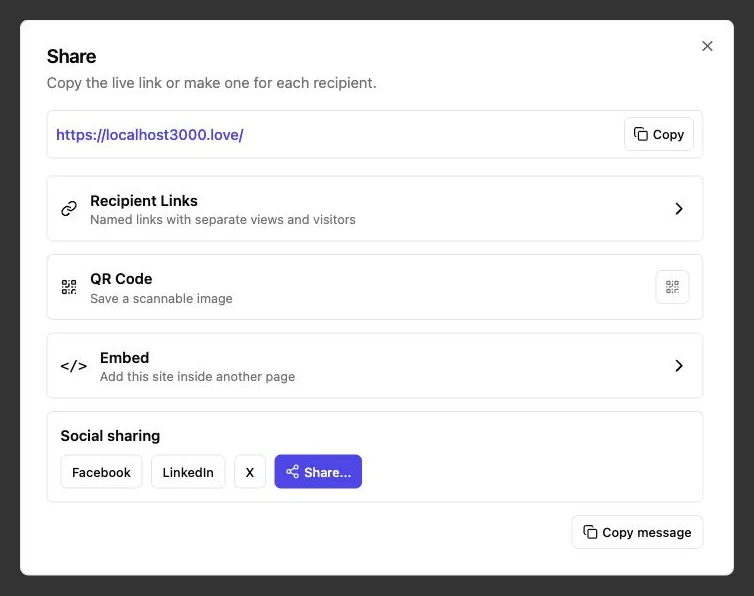
The simplest Revdoku workflow requires no code, AI agent, or command line. Start with the files you would otherwise email.
-
Prepare the deliverable. Remove comments, hidden notes, and outdated pages. Use a clear filename with the client or project when appropriate.
-
Create a private bucket. Drag the PDF into the Revdoku dashboard. You can also add a folder with a deck, demo assets, and supporting documents.
-
Choose the access gate. Select a password for shared-secret access. Choose Verified Email for visitor-level identification or a lead record.
-
Test the recipient experience. Open the link in a signed-out or private window. Check the gate, page rendering, links, downloads, and mobile layout.
-
Send the live link. Tell the client what the link contains and who should use it. When sending password-protected PDF access, share the password through another channel when practical.
-
Use activity with care. An open notification can prevent premature follow-up. Page views, clicks, and downloads add context; built-in feedback or contact forms let viewers respond without a separate backend.
-
Update the same bucket. Replace stale files instead of sending new URLs. If publishing becomes repetitive, automate the bucket workflow with the API, CLI, or an AI agent.
Secure PDF Sharing Best Practices
A strong sharing process needs more than a password. Review these points before sharing a password-protected PDF.
| Item | What to Check | Why It Matters |
|---|---|---|
| Password length | Prefer a unique phrase of at least 15 characters | Length resists guessing better than short complexity tricks |
| Password delivery | Use a separate channel when practical | A forwarded email is less likely to contain both parts |
| Access model | Match public, password, or Verified Email access to the audience | More friction is useful only when it solves a real risk |
| PDF preview | Test encrypted files before uploading | File encryption can interfere with browser previews or analysis |
| Viewer claims | Describe opens as activity, not proof of reading | Analytics show behavior signals, not a person’s intent |
| Current version | Replace stale content and keep an internal archive | Clients see the latest delivery while you preserve records |
NIST’s current password guidance sets 15 characters as the minimum for a password used as a single authentication factor and says systems should support at least 64 characters. Though intended for online authentication rather than PDFs, it is a sensible baseline for link or document passwords.
Common questions:
Final Thoughts: Send a Password Protected PDF With Context
No single method suits every password-protected PDF. Choose based on the delivery problem.
- Use an embedded password when the downloaded file must remain encrypted and offline access matters.
- Use a password-protected link when you need a stable URL, easy updates, open notifications, and engagement analytics.
- Use Verified Email when each viewer’s email address matters more than the convenience of one shared password.
Assume authorized recipients can forward, download, photograph, or describe the content. Share only what’s needed, use a unique password, and test the recipient experience. Good protection means a clear gate, a current document, and enough information for timely follow-up.
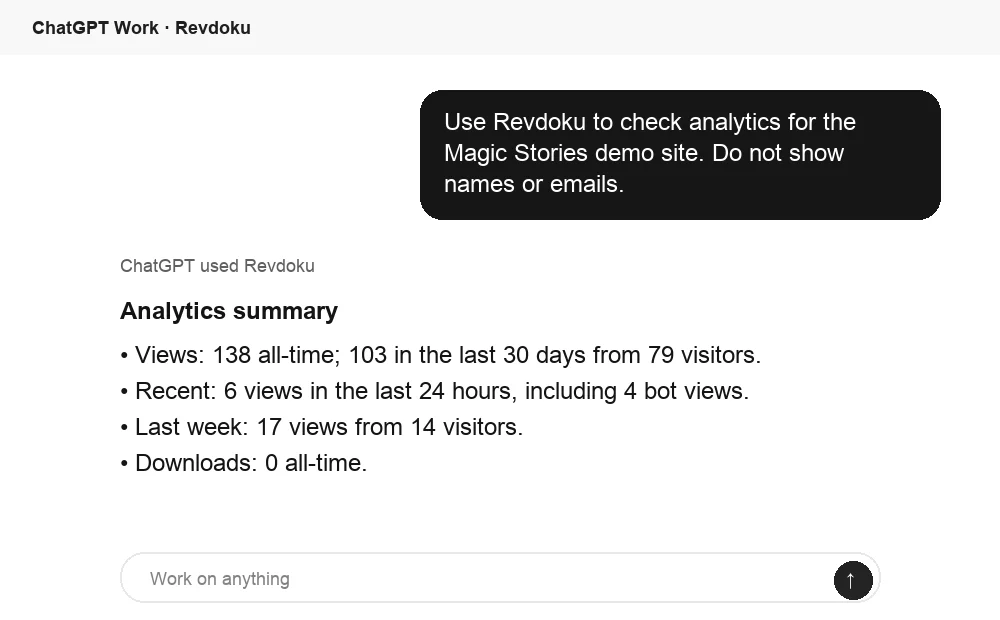
Ask ChatGPT to check PDF access
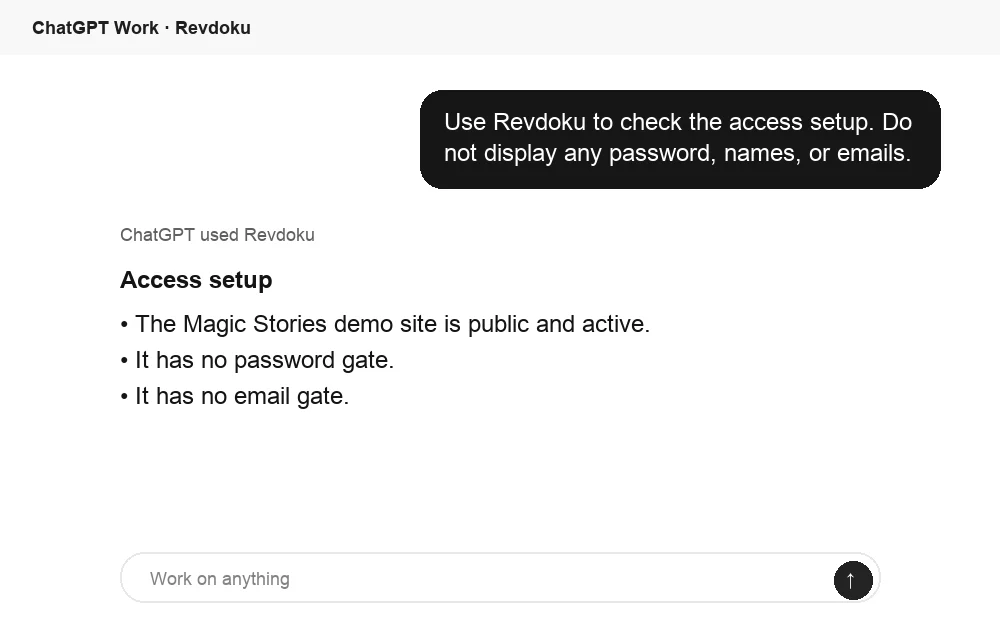
Before sharing, ChatGPT can ask Revdoku what access mode is active for the bucket. Use this to confirm whether the link is public, password protected, or email gated.
Frequently asked questions
Can a password-protected PDF be forwarded?
Yes. Anyone with the file and password may be able to open it.
Does a protected link stop screenshots or downloads?
No. It controls initial access, not every action after authorized viewing.
Should I use both file encryption and a gated link?
Only after testing. An encrypted source file may prevent an online preview and reduce page-level analytics.
When should I use Verified Email?
Use it when visitor identification and contact capture justify the extra step.
Should I encrypt the PDF or share it through a password-protected link?
Encrypt the PDF when recipients need a protected file they can store and open offline. Use a password-protected link when you need to update the document without changing its URL or want activity data such as opens and downloads.
Can I replace a PDF after sharing it without sending a new link?
Yes, if you use a hosted, protected link that points to a live file or bucket. An encrypted attachment cannot be replaced after delivery, so revisions must be encrypted and sent as new files.
Does password protection prevent forwarding, screenshots, or copying?
No. A recipient can potentially share the password and file or link, and an authorized viewer may record or redistribute the content. Password protection controls access, but does not provide digital rights management.
Can analytics identify exactly who viewed a protected PDF?
A shared password can show activity, but usually cannot identify individual viewers reliably. Use Verified Email when you need to associate access and engagement with a verified email address, while remembering that email verification does not prove legal identity or authority.
Should I use file encryption and a protected browser link together?
Use both only when the added protection justifies the extra friction. Test the complete experience first because an encrypted PDF may not preview correctly in the browser and can limit page-level analytics.
How should I send the password to the recipient?
When practical, send the password through a different channel from the file or link, such as a phone call or messaging app. Use a unique, long passphrase for each delivery instead of reusing an existing password.
Do open notifications prove that the recipient read or approved the PDF?
No. Opens, page views, clicks, and downloads are useful engagement signals, but they do not prove who reviewed the material, how well they understood it, or whether they approved it. Use formal acknowledgments, signatures, or appropriate document systems when proof is required.
Related Articles
Website Link Tracking for Client Engagement
Track proposal and document engagement using visits, downloads, Verified Email, privacy safeguards, and well-timed client follow-up.
How to Track PDF Opens and Identify Viewers
Learn how to track PDF opens, views, clicks, and downloads, and when Verified Email can identify visitors without overstating engagement.
Secure PDF Sharing: Links, Access & Analytics
Learn how to share PDFs securely using protected links, passwords, email gates, viewer analytics, and stable document URLs.