Restaurant Menu Hosting with Stable Links & QR Codes
Table of Contents
- Restaurant menu hosting without rebuilding your website
- Why put a restaurant menu online as a stable link?
- PDF menu link or static HTML online price list?
- How to put your menu online with Revdoku
- Make your hosted online price list readable on a phone
- QR code menu hosting: use Revdoku for the URL
- Update prices without changing the menu URL
- Analytics, custom domains, branding, and noindex
- Restaurant, cafe, salon, and studio examples
- Review the live menu before publishing
- Final thoughts
- Restaurant menu hosting without rebuilding your website
- Why put a restaurant menu online as a stable link?
- PDF menu link or static HTML online price list?
- How to put your menu online with Revdoku
- Make your hosted online price list readable on a phone
- QR code menu hosting: use Revdoku for the URL
- Update prices without changing the menu URL
- Analytics, custom domains, branding, and noindex
- Restaurant, cafe, salon, and studio examples
- Review the live menu before publishing
- Final thoughts
Restaurant menu hosting without rebuilding your website
A printed menu becomes outdated when a price, service, or seasonal item changes. A PDF on social media helps, but customers may struggle to find the latest copy. Restaurant menu hosting solves this: publish a mobile-readable menu at a stable URL and update it as needed.
TL;DR: Host one mobile-friendly menu at a stable link, share it directly or through a QR code, and update prices without changing the public URL.
Revdoku lets local businesses publish a PDF or static website folder as a browser link. You can then place that link on your website, social profiles, printed material, or a QR code made with a separate QR generator.
This approach works well when you need to:
- Put a menu online without building a full website
- Share an online price list that staff can update
- Create a dependable PDF menu link
- Measure visits without running your own analytics system
- Keep the same public address after prices change
Why put a restaurant menu online as a stable link?
Customers often arrive at a menu from a phone. They may be outside, scanning a table card, checking Instagram prices, or comparing options at home. Pew Research Center reports that 97% of U.S. adults under 50 own a smartphone, while 16% of U.S. adults rely on a smartphone without home broadband. That makes mobile readability a basic requirement, not a nice extra. Pew Research Center
A stable restaurant menu link also prevents multiple versions from circulating. If the printed QR code points to menu.example.com, changing a lunch price should not require printing a new QR code. You update the content while keeping the address.
A good restaurant menu hosting link gives customers a few simple benefits:
- Immediate access: no app installation or account creation for a public menu
- Current information: one source for prices, hours, allergens, and availability notes
- Easy sharing: the same URL works in text messages, email, social profiles, and QR codes
- Less confusion: old PDF attachments do not compete with the current version
I would keep a public menu public. Password and email gates suit wholesale price lists or private catalogs but add friction for someone ordering lunch.
PDF menu link or static HTML online price list?
You can publish a menu as a hosted PDF or static HTML site. Both work with Revdoku but offer different experiences. A PDF is usually faster because you can publish the file sent to your printer. Static HTML takes more preparation but offers greater control over phone layouts.
| Consideration | Hosted PDF menu | Static HTML menu |
|---|---|---|
| Setup speed | Fast if the menu already exists | Requires an HTML folder or generated site |
| Mobile reading | Good when designed for a narrow page | Can reflow for every screen width |
| Brand control | Uses the PDF design | Full control over fonts, colors, and navigation |
| Updating | Replace the PDF in the same bucket | Replace edited site files and republish |
| Multiple sections | Pages or internal PDF links | Separate pages, tabs, or anchored sections |
| Best fit | Short menus and printable price sheets | Longer menus, salons, studios, and service catalogs |
Choose a PDF menu link when speed and print consistency matter most. Choose HTML when customers need large text, fast section switching, or a layout built specifically for their phones.
A middle path also works. Publish an HTML landing page with breakfast, dinner, drinks, or services buttons linked to PDFs. This keeps the page scannable while preserving your existing documents.
How to put your menu online with Revdoku
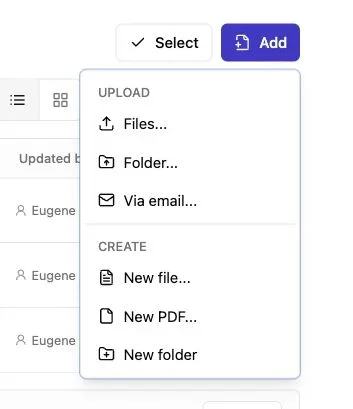
Note: Use the Add menu to upload files or a complete folder.
The manual process is short. You need no AI agent, command line, or API. Revdoku buckets are private storage areas until you publish selected content, and the published URL remains tied to the bucket through later updates. Revdoku buckets
-
Prepare the current menu. Export a clean PDF or collect your static HTML, CSS, images, and assets in one folder. Remove draft prices, printer notes, and hidden files before uploading.
-
Create a bucket. Sign in to the Revdoku dashboard and make a bucket with a clear internal name, such as
Downtown Cafe MenuorJuly Salon Prices. -
Upload the file or folder. Drag the PDF into the bucket. For a static menu site, drag in the complete folder and confirm that
index.htmlis at the correct level. -
Publish the menu. Choose public access for a customer-facing menu. Revdoku can also publish password-protected or verified-email links, but those modes suit private trade pricing better than an everyday menu.
-
Open the resulting URL on a phone. Test every page, link, and image before placing the address in printed material.
-
Share the link. Add the Revdoku URL to your website, Google Business Profile where appropriate, social bio, email signature, and a QR code created elsewhere.
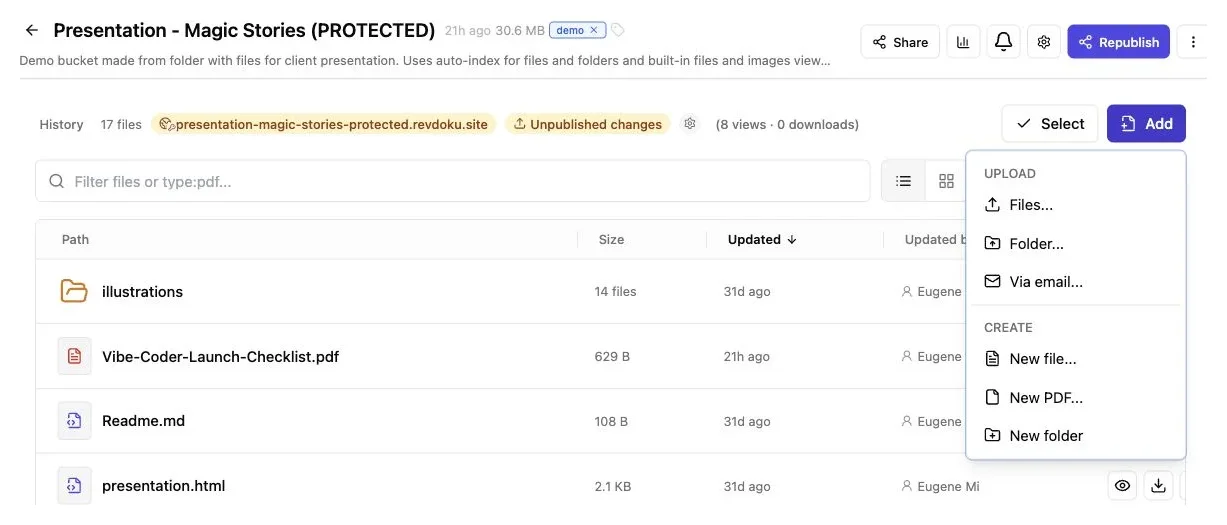
Use Add to upload the menu PDF or a complete menu website folder without exposing account credentials.
This process turns a local file into an online price list without requiring a web server.
Make your hosted online price list readable on a phone
Hosting does not automatically make a menu readable. A polished three-column print menu may require pinching and zooming on a six-inch screen. Before publishing, inspect the menu at its actual viewing size.
| Item | What to check | Why it matters |
|---|---|---|
| Text size | Body text remains readable without zooming | Tiny type slows customers and creates mistakes |
| Page width | Prefer a single narrow column or responsive HTML | Wide layouts force horizontal movement |
| Contrast | Dark text and prices remain clear against the background | Dim restaurants and outdoor glare reduce visibility |
| File weight | Compress large photos and remove unused assets | Mobile connections may be slow or metered |
| Prices | Every item has one clear, current price | Ambiguous modifiers cause questions at the counter |
| Dietary notes | Explain symbols for allergens and dietary options | Unexplained icons are easy to misread |
| Contact details | Include location, phone, and effective date | Screenshots can circulate without their original context |
For a PDF, use selectable text instead of full-page images. Search, accessibility tools, and scaling work better with actual text. Keep decorative photography modest. Customers want dishes and prices, not a 12 MB background texture.
For static HTML, set the viewport, use responsive CSS, and make tap targets thumb-friendly. Test at roughly 320 pixels wide as well as on a current phone. A clean one-column menu usually beats a clever layout.
QR code menu hosting: use Revdoku for the URL
A QR code carries a URL visually.
For QR code menu hosting, Revdoku hosts the menu or price list but does not generate the QR code. Use a separate QR code generator to encode the published Revdoku URL. The QR image and its destination are separate.
The safest workflow for QR code menu hosting is:
- Publish the menu and copy its final public URL.
- Open the URL in a private browser window to confirm that customers can access it.
- Paste that exact URL into a reputable QR code generator.
- Export the QR code in a print-friendly format, preferably SVG for professional printing or a high-resolution PNG for simple signs.
- Print a small test and scan it with both iPhone and Android devices.
- Test again from the distance and in the lighting conditions in which customers will use it.
Avoid QR services with expiring redirects unless you accept dependence on that provider. A static QR code containing the stable Revdoku URL is simpler. Replacing the PDF or HTML in the same bucket keeps the printed QR code current.
Use a short instruction beside the image, such as Scan to view today’s menu. Print a readable fallback URL. Cameras fail, screens crack, and some people simply prefer typing.
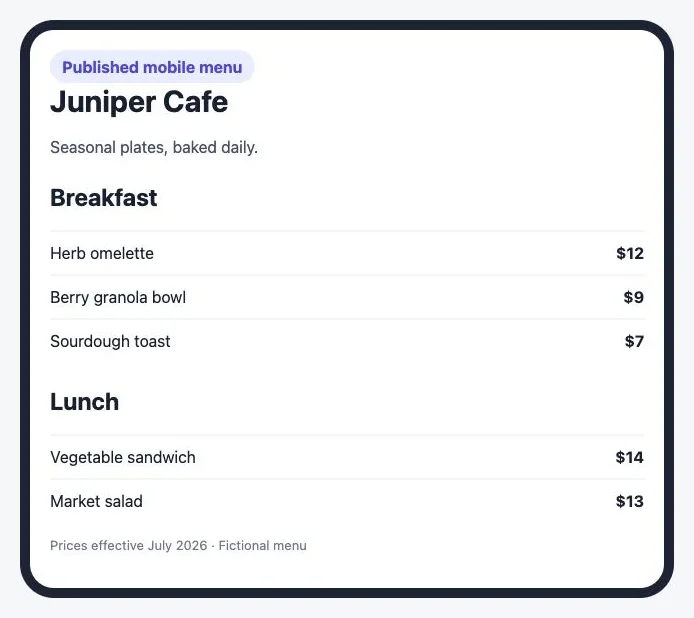
The phone-friendly menu keeps dish names, prices, and its effective date readable without horizontal scrolling.
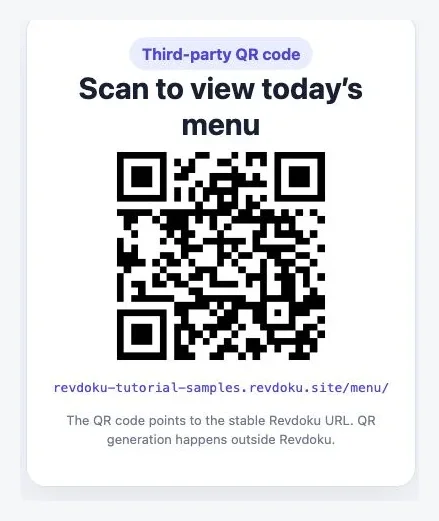
The QR code points to the stable Revdoku URL and includes a readable fallback address. QR generation happens outside Revdoku.
Update prices without changing the menu URL
The best reason to publish a menu online is the next update. When prices, service times, or class packages change, the owner should update the content without replacing every old link.
Revdoku keeps the public address connected to its bucket. The dashboard lets you add, replace, rename, or remove files, and update published sites in place. Revdoku publishing overview That stable-link model protects printed QR codes, bookmarked pages, social links, and old customer messages.
A sensible update routine looks like this:
- Edit the source PDF or static HTML files
- Check prices, dates, legal notices, and allergens with a second person
- Upload the replacement to the existing bucket
- Republish the existing site rather than creating a new one
- Open the public URL in a private window and on a phone
- Scan one printed QR code to confirm that it reaches the new version
Name the effective date inside the menu, such as Prices effective July 2026. That line helps staff identify old screenshots and downloads. If an update goes wrong, Revdoku buckets also retain versions and support rollback, according to the product’s bucket documentation.
Optional AI agents, APIs, and CLI tools can automate repetitive publishing later. A cafe updating its PDF twice a season may prefer drag and drop to elaborate automation.
Analytics, custom domains, branding, and noindex
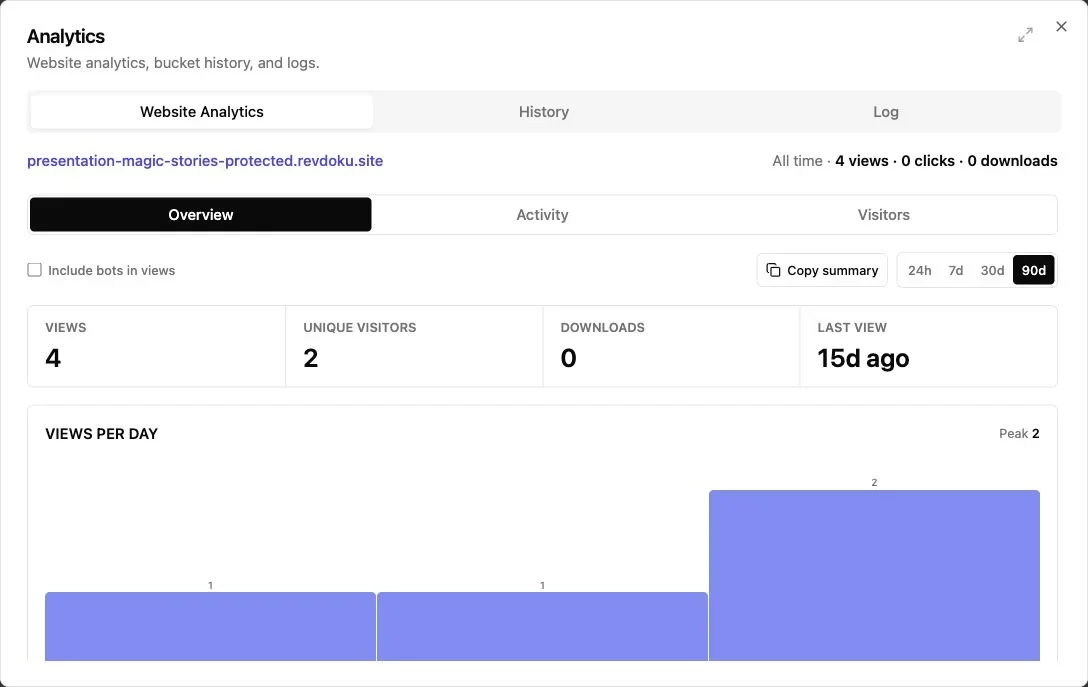
Note: The overview summarizes views, visitors, downloads, and recent activity.
Menu hosting is more useful when you can measure link usage. Revdoku records views, pages, and clicks on published sites.
Paid plans provide detailed visitor analytics, while the free plan provides basic view information. Public-menu analytics track visits, not verified identities. Email-gated links can record addresses but usually add too much friction to a public menu.
Analytics can help answer practical questions:
- Did scans rise after new table cards were printed?
- Which menu sections receive visits or clicks?
- Are customers opening the online price list outside business hours?
- Did traffic fall after a QR sign was moved?
- Are visitors downloading the PDF menu link?
Treat these numbers as directional. A visit is not an order, and Revdoku is not an ordering, payment, inventory, or reservation system.
Custom domains are available on eligible paid plans. A business might use menu.example.com or prices.example.com while keeping Revdoku as the publishing layer. Check current Revdoku pricing before choosing a plan because limits can change.
The free plan has important conditions. Free sites use a revdoku.site address, display Revdoku branding, and are marked noindex. They also require the owner to sign in at least once every 30 days to remain active. Noindex tells supporting search engines not to show the page in search results; Google explains that a noindex rule removes a crawled page from Google Search. Google Search Central
That suits direct links or QR codes, but not menus intended for organic search discovery. Use your primary business website for searchable location and service pages, then link to the hosted menu.
Restaurant, cafe, salon, and studio examples
The pattern works beyond restaurants: prices change more often than signs and links should.
| Business | What it publishes | Useful measurement |
|---|---|---|
| Neighborhood cafe | One-page breakfast and lunch PDF | QR scans before the morning rush |
| Full-service restaurant | Mobile HTML food menu plus a drinks PDF | Visits to food and drinks sections |
| Hair salon | Online price list with service duration notes | Clicks on booking or contact links |
| Photography studio | Session packages behind a password | Opens from individual prospects |
| Fitness studio | Class passes and membership prices | Visits after social campaigns |
Consider a cafe with 40 laminated QR cards. A new monthly URL can make every card obsolete. Publishing the replacement PDF to the existing restaurant menu hosting bucket avoids that waste.
A salon has a different need. Its online price list may include cuts, color services, deposits, and expected appointment lengths. Static HTML is often easier to scan than a dense PDF, and a contact form can collect questions without a custom backend. It still does not replace the salon’s booking or payment software.
A catering company may share public sample menus while protecting its wholesale PDF menu link with a password. A studio quoting corporate packages might use verified-email access so it knows which prospect opened the material. These protected modes suit sales conversations rather than walk-in customers.
Review the live menu before publishing
Finally, review the live version, not just the source. Missing fonts, broken links, oversized images, and cached copies may appear only after publication. Five minutes of phone testing is cheaper than replacing a dining room full of cards.
Final thoughts
A good online menu should be pleasantly boring. It opens quickly, reads well on a phone, shows current prices, and keeps working after the next update. Revdoku hosts PDF or static HTML menus with stable links, optional custom domains, and analytics. Put that URL in a third-party QR code and update the content without changing the printed destination.
Start with the simplest format your customers can read. For many operators, that is a clean PDF menu link. For longer price lists, responsive HTML may justify the extra effort. Test on real phones, state when prices took effect, and leave search, ordering, payments, inventory, and reservations to dedicated systems.
Frequently asked questions
Can Revdoku make the QR code?
No. Publish the menu in Revdoku, then place its URL into a QR code made with a separate tool.
Can customers order or pay through it?
Revdoku hosts static files and websites. It does not manage orders, payments, reservations, or inventory. You may link to a separate approved system.
Will the menu rank in Google?
Free sites are noindexed, so they are intended for direct sharing rather than search discovery. Use the business’s main website for SEO pages.
Can prices change without reprinting the QR code?
Yes, provided you update the existing bucket and keep its published URL rather than creating a new publication.
Should a public menu require an email?
Usually no. Email verification makes sense for restricted catalogs or trade pricing, but it can frustrate restaurant guests.
Is a PDF enough?
Often. A short, compressed, single-column PDF can work very well. Use static HTML when the menu is long or needs a more responsive interface.
Can I use my own domain?
Eligible paid plans support custom domains. Confirm current limits on the pricing page before publishing signs or printed menus.
Will I need to create a new QR code whenever menu prices change?
No. Update and republish the files in the existing Revdoku bucket so the public URL remains unchanged. Any QR code, social profile, or printed material using that URL will continue to open the latest menu.
Should I publish my menu as a PDF or static HTML?
A PDF is usually best for a short menu that already has a clean, mobile-readable design. Static HTML is better for longer menus that need responsive layouts, larger text, or quick navigation between sections.
Does Revdoku create QR codes for hosted menus?
No. Revdoku provides the stable menu URL, which you then encode using a separate QR code generator. Test the finished code on multiple phones and include a readable fallback URL beside it.
Can customers place orders, make reservations, or pay through the hosted menu?
Revdoku hosts static PDFs and websites but does not process orders, reservations, payments, or inventory. The menu can link to a separate ordering, booking, or payment service.
How can I make a PDF menu easier to read on a phone?
Use a narrow layout, readable type, strong contrast, and selectable text rather than full-page images. Compress large photos, clearly explain dietary symbols, and test the published PDF on a small screen without zooming.
Should a customer-facing menu be password-protected or email-gated?
Usually not, because access requirements add friction for guests who want to check dishes and prices quickly. Protected access is more appropriate for wholesale lists, private packages, or materials shared with specific prospects.
Will a hosted menu appear in Google search results?
Free Revdoku sites are marked noindex and are designed primarily for direct access through links and QR codes. Use your main business website for searchable location and service pages, then link visitors to the current hosted menu.