Summary: ChatGPT Revdoku Automation in One View
To automatically update weekly websites, the Revdoku Content Team paired one scheduled ChatGPT task with three Revdoku sites. Every Monday, ChatGPT researches new material, updates each site, archives the previous issue, publishes, and tests the live result. The public URLs do not change.
The key is where the instructions live. Each website has a public root prompt.md. ChatGPT reads it before each run, letting the content team change research rules, data fields, page behavior, or quality checks without rebuilding the task.
| Workflow detail | Current setup |
|---|---|
| Websites maintained | 3 static weekly sites |
| Schedule | Monday at 9:00 AM America/Los_Angeles |
| Operation | Unattended, then team notification |
| Safety | Temporary previews, version history, and quick rollback |
| Measurement | Per-site views, visitors, and outbound clicks in ChatGPT |
This model provides weekly content website automation without making the content team operate repository-driven deployments. The Weekly Remote Jobs bucket also syncs automatically to a private GitHub repository used as a backup.
Three Weekly Content Website Automation Examples
The three sites use the same pattern but solve different research problems. Each is live, not a mockup.
| Website | What it publishes | Useful fields and behavior |
|---|---|---|
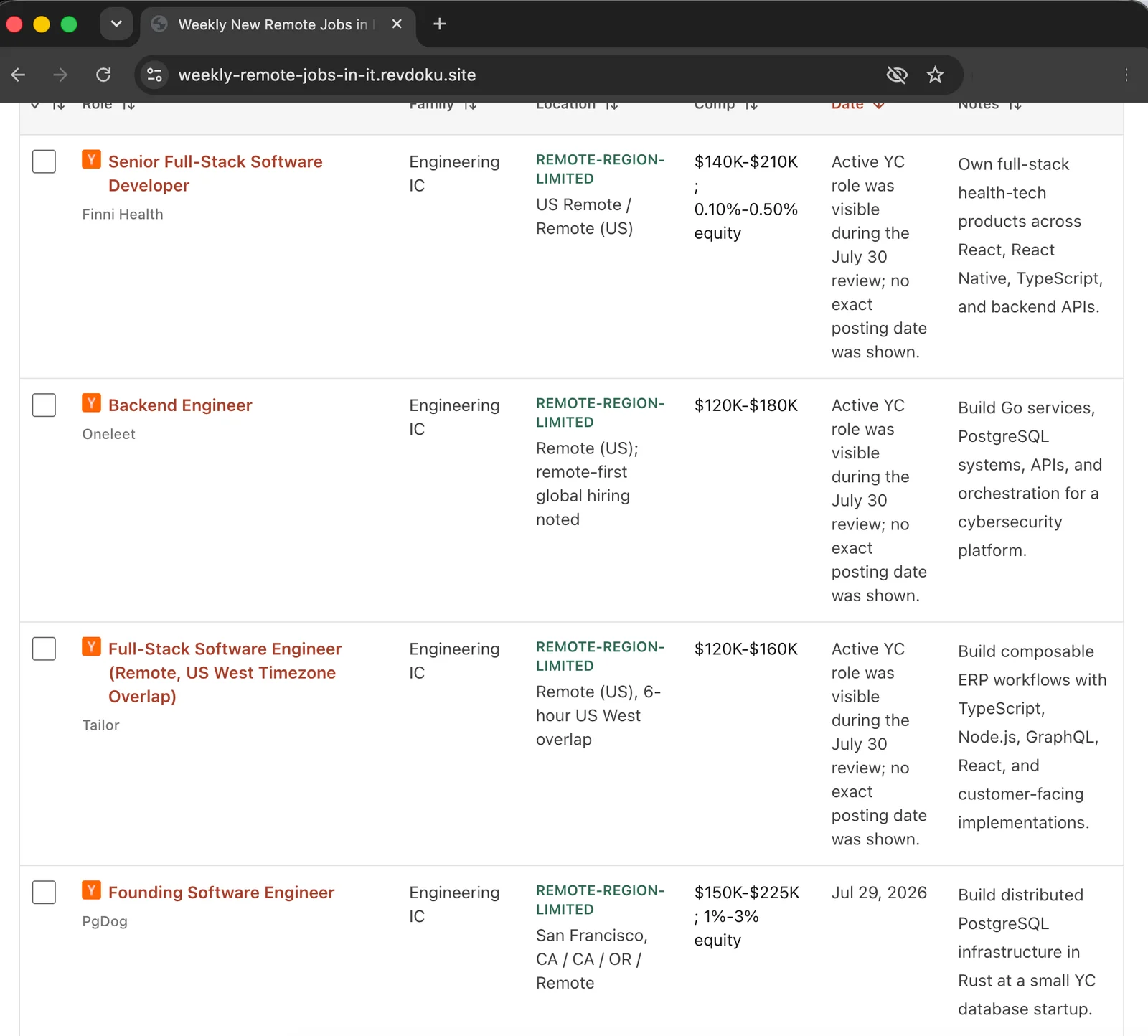
| Weekly New Remote Jobs in IT | A rolling list of up to 25 recently researched remote IT and AI-adjacent roles | Compensation, location, job family, freshness evidence, persistent checkboxes, and archived issues |
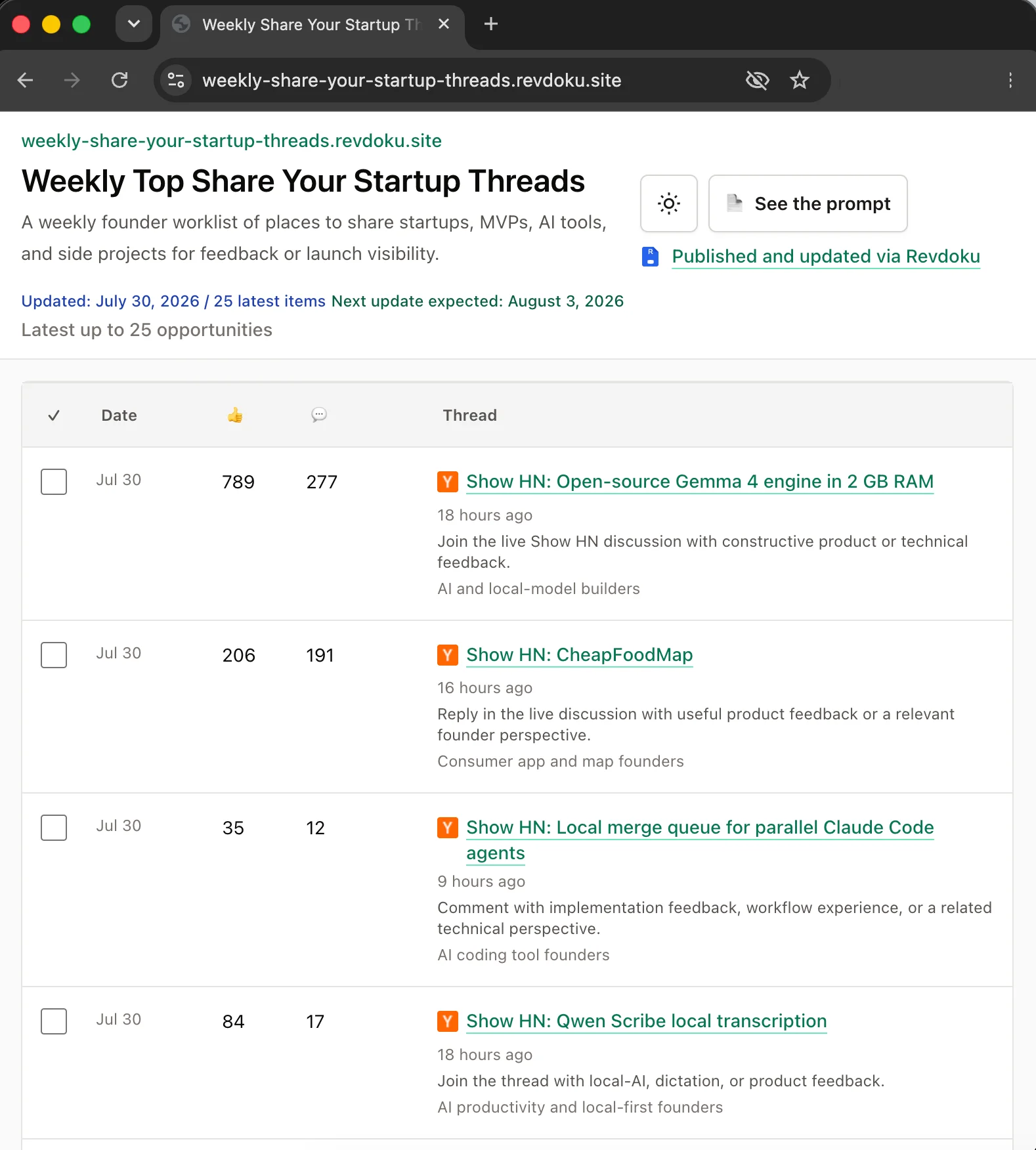
| Weekly Share Your Startup Threads | Current discussions and communities for sharing a startup, MVP, AI tool, or side project | Submission timing, visible engagement, audience fit, source links, and a founder worklist |
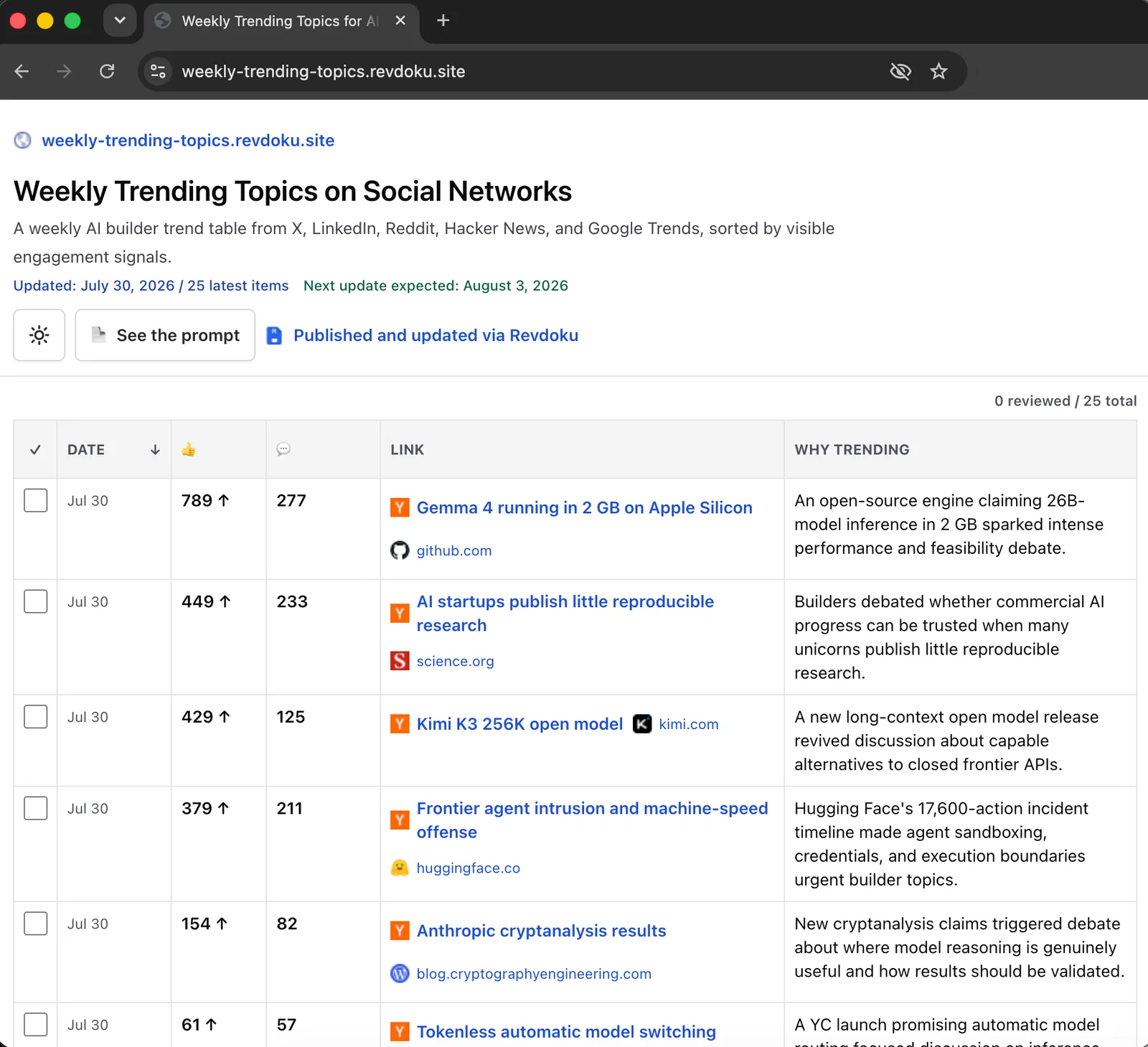
| Weekly Trending Topics | Public signals about subjects gaining attention among AI and software builders | Social and community sources, Hacker News, Google Trends, engagement evidence, and archived issues |
Weekly New Remote Jobs in IT
Weekly Share Your Startup Threads
Weekly Trending Topics
The Remote Jobs site shows the verification rules most clearly, omitting roles whose remote status or application path it cannot confirm. The Startup Threads site avoids old, closed, or spammy discussions.
The Trending Topics site records visible evidence instead of labeling topics as trends because they feel popular.
Each page includes a See the prompt link. Readers can inspect the rules for Remote Jobs, Startup Threads, and Trending Topics. This transparency simplifies understanding and auditing.
ChatGPT Scheduled Tasks Website Workflow for Three Sites
One unattended ChatGPT scheduled tasks website workflow runs Mondays at 9:00 AM in the America/Los_Angeles time zone. In ChatGPT, open search, type Manage scheduled tasks, and select the matching result.
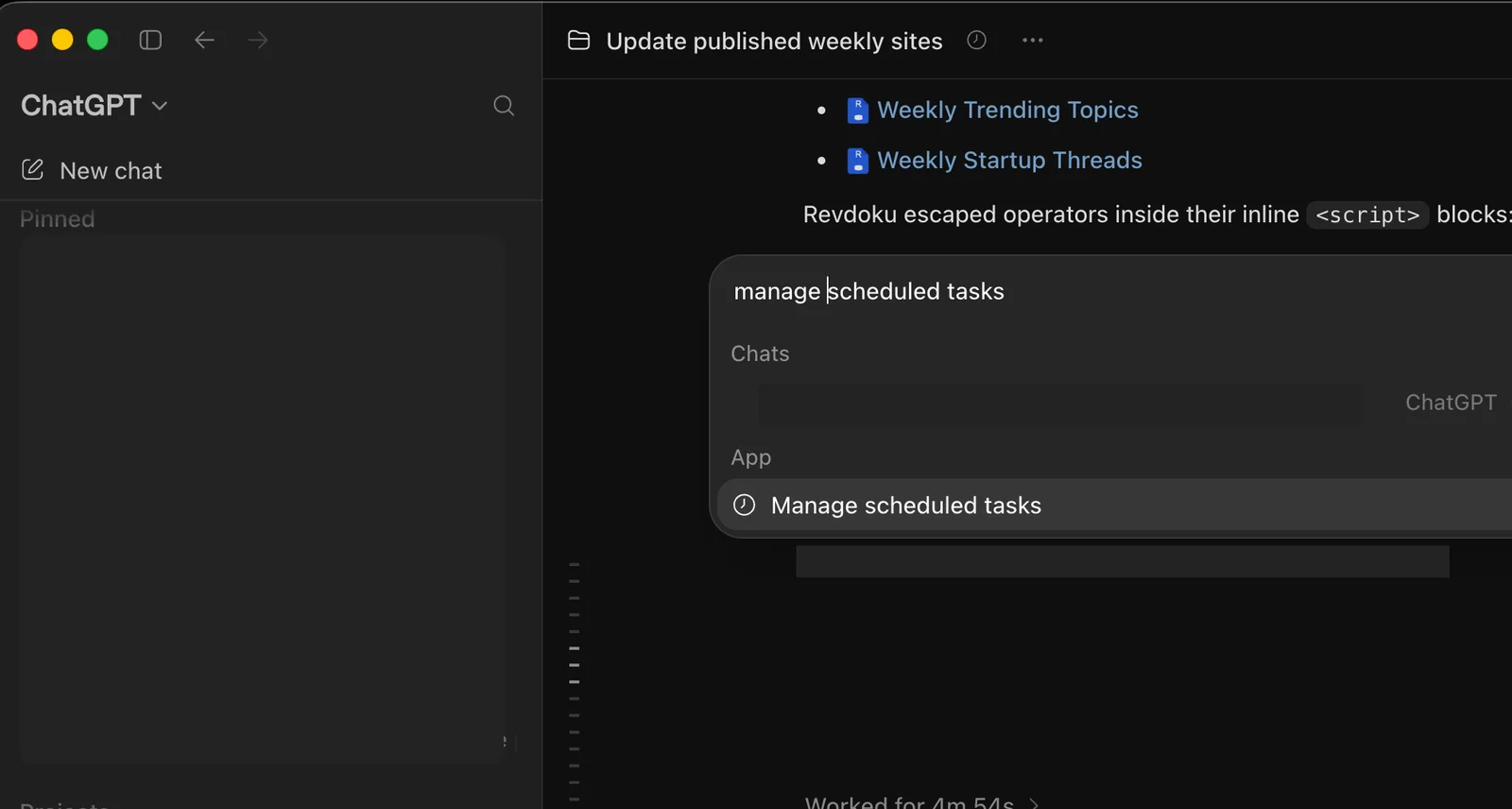
The task manager shows the recurring job and its Monday schedule.
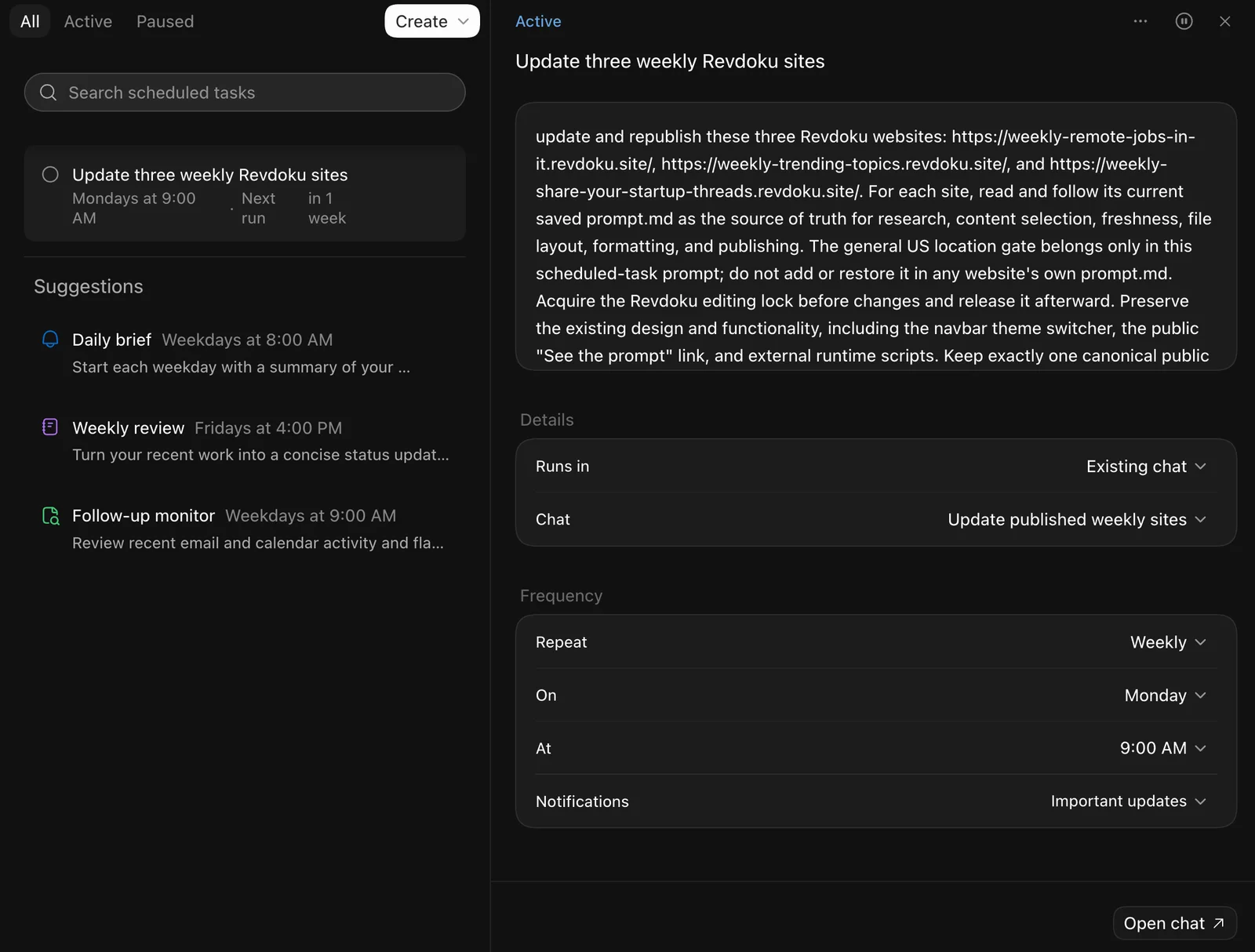
Open the task to review its instructions, schedule, and next run.
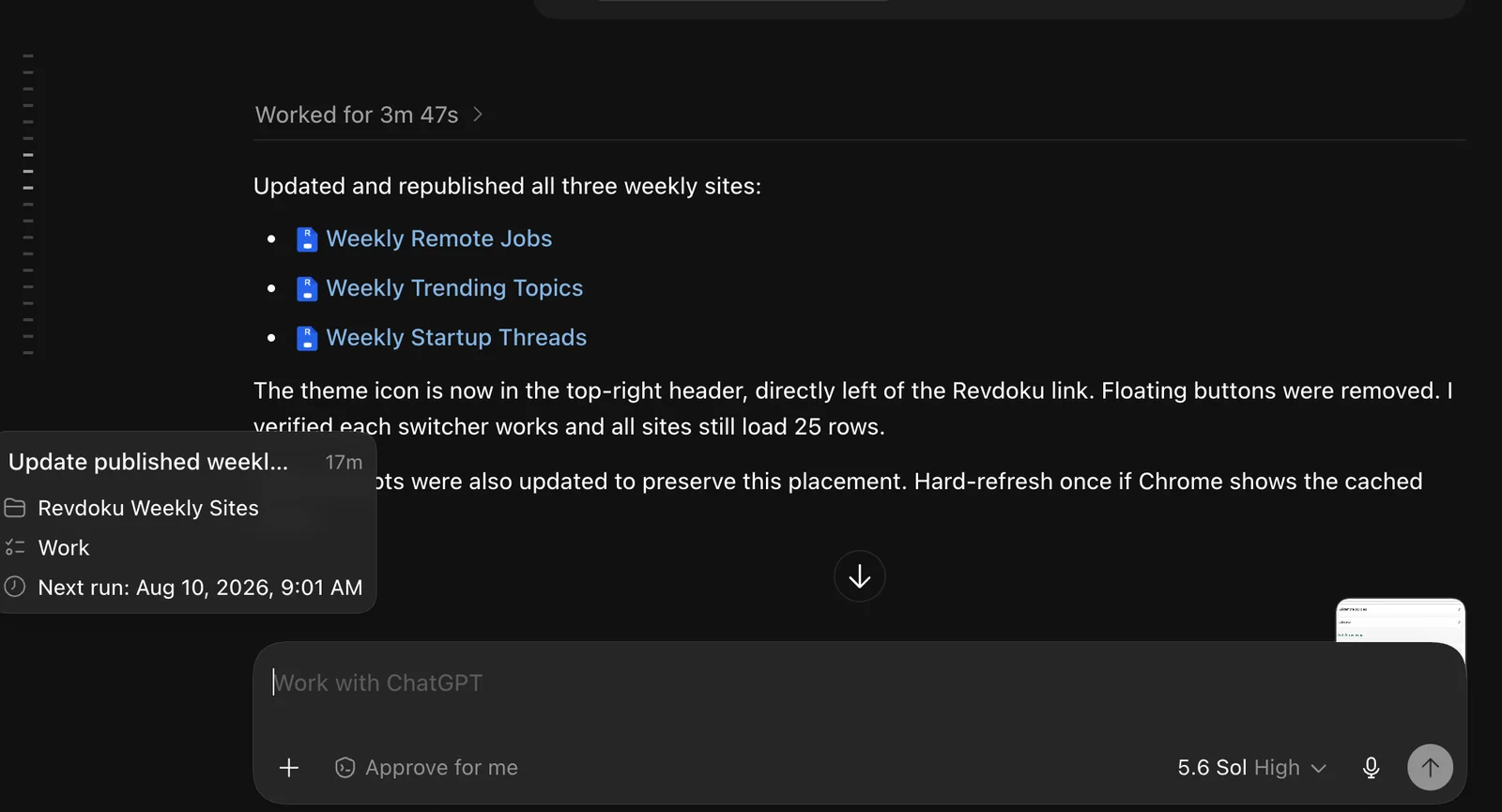
The scheduled instruction stays deliberately short:
Every Monday at 9:00 AM America/Los_Angeles, update and publish these sites:
https://weekly-remote-jobs-in-it.revdoku.site/
https://weekly-share-your-startup-threads.revdoku.site/
https://weekly-trending-topics.revdoku.site/

For each site, read /prompt.md at the site root and follow it as the current source of truth. Research only verifiable material. Archive the previous issue, update the site files, publish, run the required QA, and report any limitation. Notify the content team when all three runs finish.
Each run, ChatGPT:
- Reads the current rules in each root
prompt.md. - Acquires the Revdoku editing lock before changing its files.
- Researches and verifies fresh candidates.
- Archives the previous CSV, writes current data, and updates related files.
- Republishes to the same Revdoku URL and tests the live page.
- Releases the editing lock and reports the result.
If a claim cannot be verified, omit it and report the limitation. A smaller trustworthy issue is better than a full table padded with guesses.
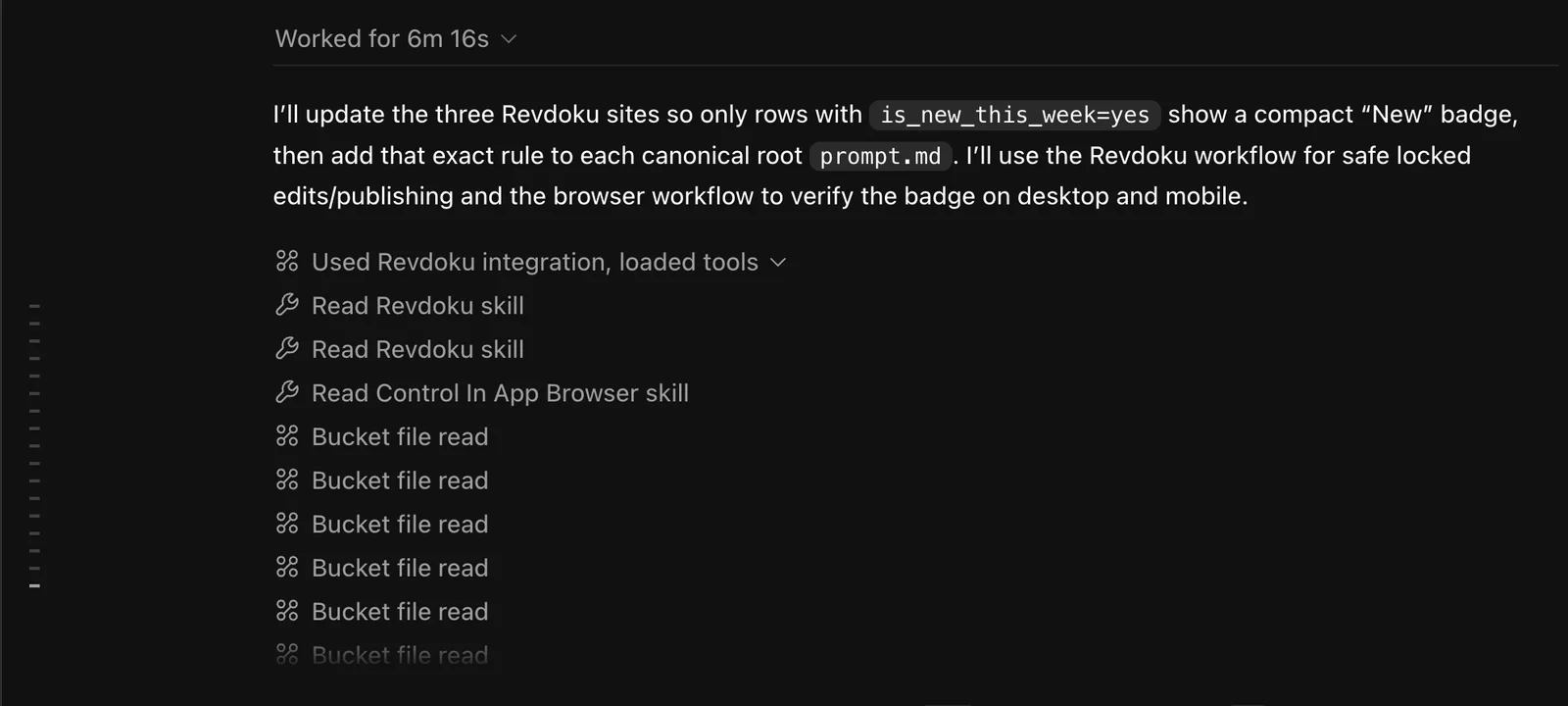
ChatGPT Revdoku Automation: Prompt-as-Source-of-Truth Architecture
Recurring automations often put every rule in one scheduled prompt, which becomes unwieldy when three sites require different sources, schemas, layouts, and rejection rules. This ChatGPT Revdoku automation uses a thin control layer.
The scheduled task defines when and where to run. Each site’s prompt.md defines how to update that site.
| Layer | Responsibility | How often it changes |
|---|---|---|
| Scheduled task | Cadence, three URLs, completion notice | Rarely |
Root prompt.md |
Research sources, selection rules, file layout, formatting, QA, and publishing | Whenever site requirements change |
data.csv |
Current rolling issue | Weekly |
archives.csv and archive/ |
Previous issue index and saved snapshots | Weekly |
index.html and assets/ |
Reusable site shell and browser behavior | When the presentation changes |
To change the item limit, add a data field, reject a source type, or alter mobile behavior, the team edits the relevant public prompt.
The team need not recreate the Monday task.
The prompt accompanies the published files, explaining the site within the bucket. Operators can still manage the bucket through Revdoku’s dashboard. AI, API, and CLI automation extend the file workflow but are optional.
GitHub repository as an automatic backup
The Weekly New Remote Jobs in IT bucket is connected to a private GitHub repository through Revdoku GitHub Sync. The Revdoku bucket remains the publishing workspace, while the repository keeps an automatically synchronized copy of the website files and sync commits. Changes sync in both directions, so GitHub can also remain available for developer review or recovery.
This backup does not add a GitHub Pages deployment step to the weekly task. ChatGPT updates and publishes the Revdoku bucket as before; GitHub Sync keeps the connected repository aligned automatically. Follow How to set up GitHub Sync in Revdoku to create a private repository from a bucket or import an existing repository into an empty bucket.
QA, Archives, and Mobile Checks for Weekly Website Automation
A published weekly page can still be wrong, stale, duplicated, or broken on mobile. The prompts therefore include QA in publishing.
| Check | What ChatGPT verifies | Failure response |
|---|---|---|
| Freshness | Dates, current availability, and evidence that an item still applies | Omit stale or unverifiable entries |
| Duplicates | Exact URLs and materially repeated jobs, threads, or topics | Keep one supported record |
| Links | Public destination and source links work | Repair or remove the row |
| CSV and Unicode | Quoting, commas, special characters, and browser parsing | Correct the data before release |
| Desktop layout | Tables, filters, archives, metadata, and navigation render | Reject the release until fixed |
| Mobile layout | Live pages fit at 375px and 390px without viewport overflow | Adjust the responsive layout and retest |
Before writing a new issue, ChatGPT copies data.csv to a dated file under archive/. It records the snapshot in archives.csv.
Visitors can open an earlier issue by URL instead of downloading raw data.
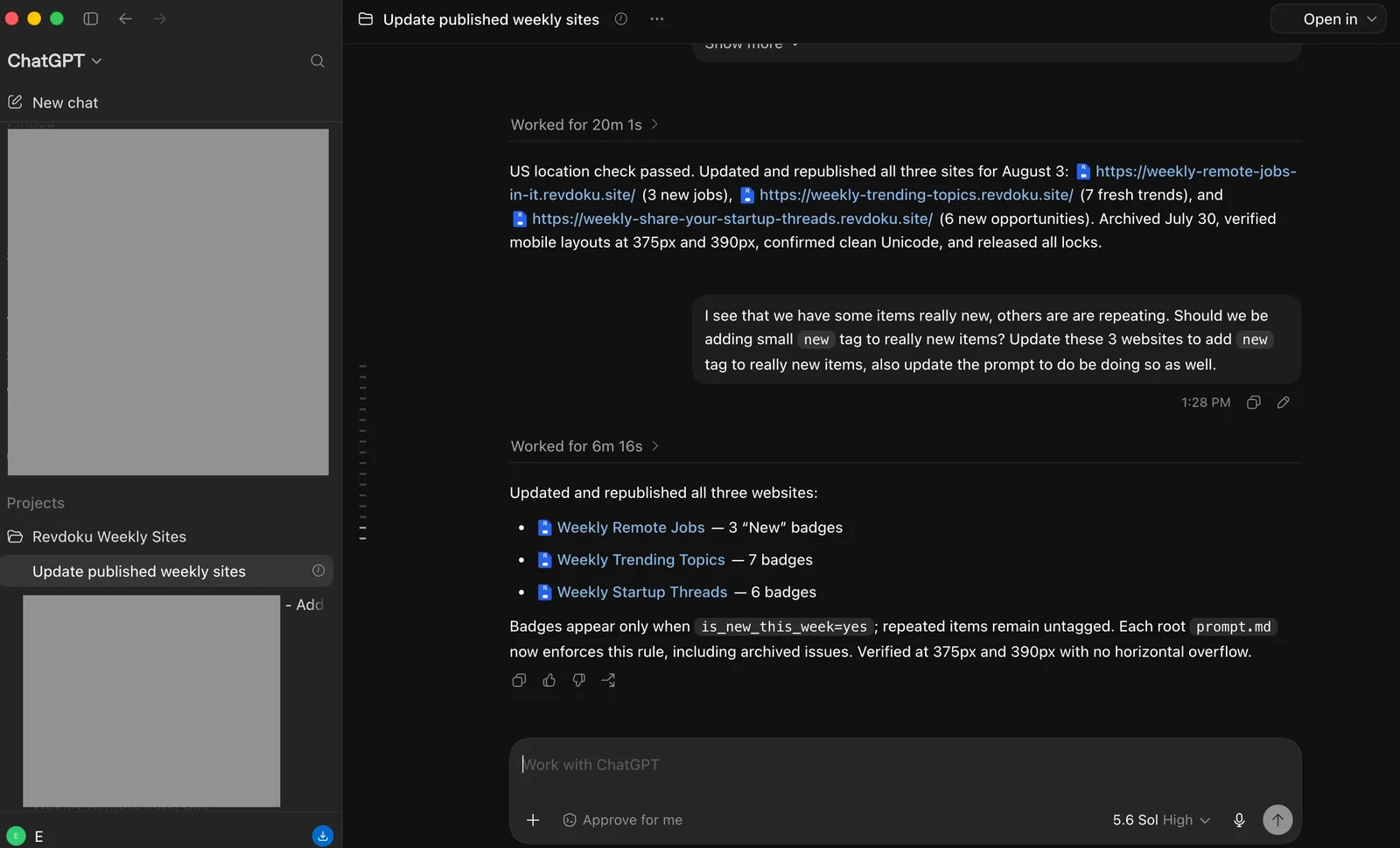
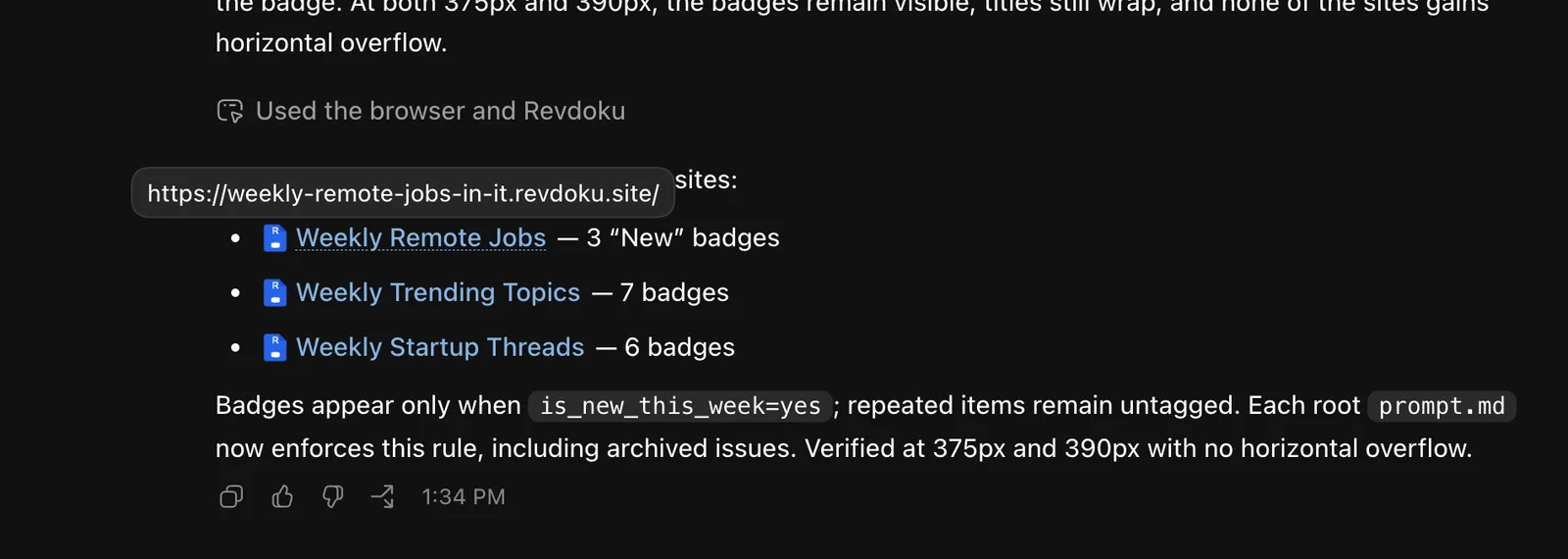
Archiving first protects history if research or publishing later fails. It keeps the current page rolling and older evidence available. Persistent row checkboxes let visitors mark reviewed jobs, discussions, or topics without changing the public dataset. The automation can also add a small New badge only to entries that were absent from the previous issue.
AI Website Analytics from ChatGPT
The team can request Revdoku’s AI website analytics in ChatGPT to connect publishing with review. The team requested results for July 27 through August 2, 2026.
| Site | Views | Visitors | Outbound clicks | Clicks per view |
|---|---|---|---|---|
| Remote Jobs | 57 | 33 | 8 | 14.0% |
| Trending Topics | 24 | 15 | 0 | 0.0% |
| Startup Threads | 39 | 22 | 2 | 5.1% |
| Combined | 120 | 70 | 10 | 8.3% |
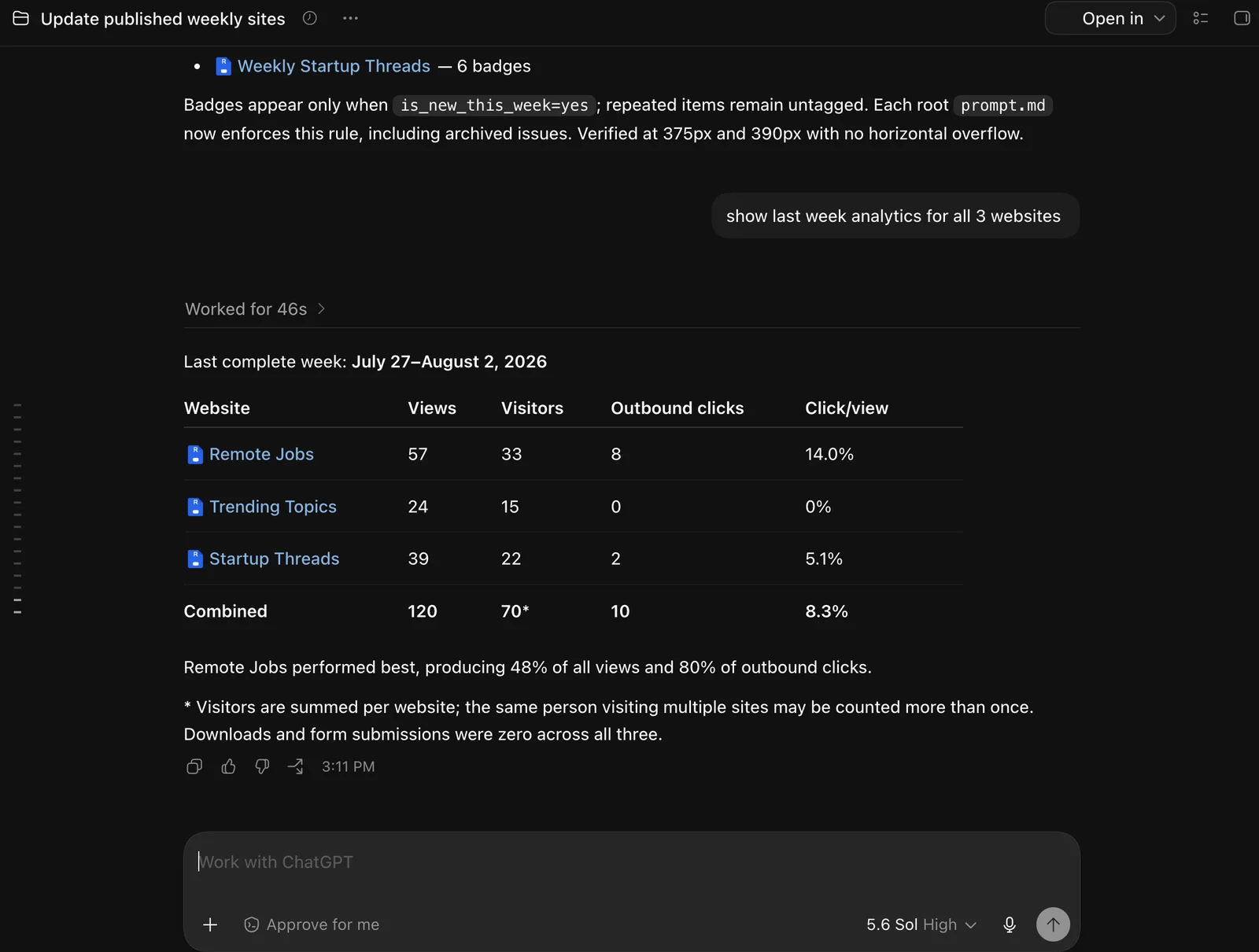
Combined visitors sum the three site totals. People visiting multiple sites may be counted more than once. It therefore does not guarantee 70 unique people across the collection.
Compared with July 20 through July 26, combined views rose from 15 to 120, an increase of 700%. Summed visitors rose from 9 to 70, about 678%. Outbound clicks rose from between zero and two to 10.
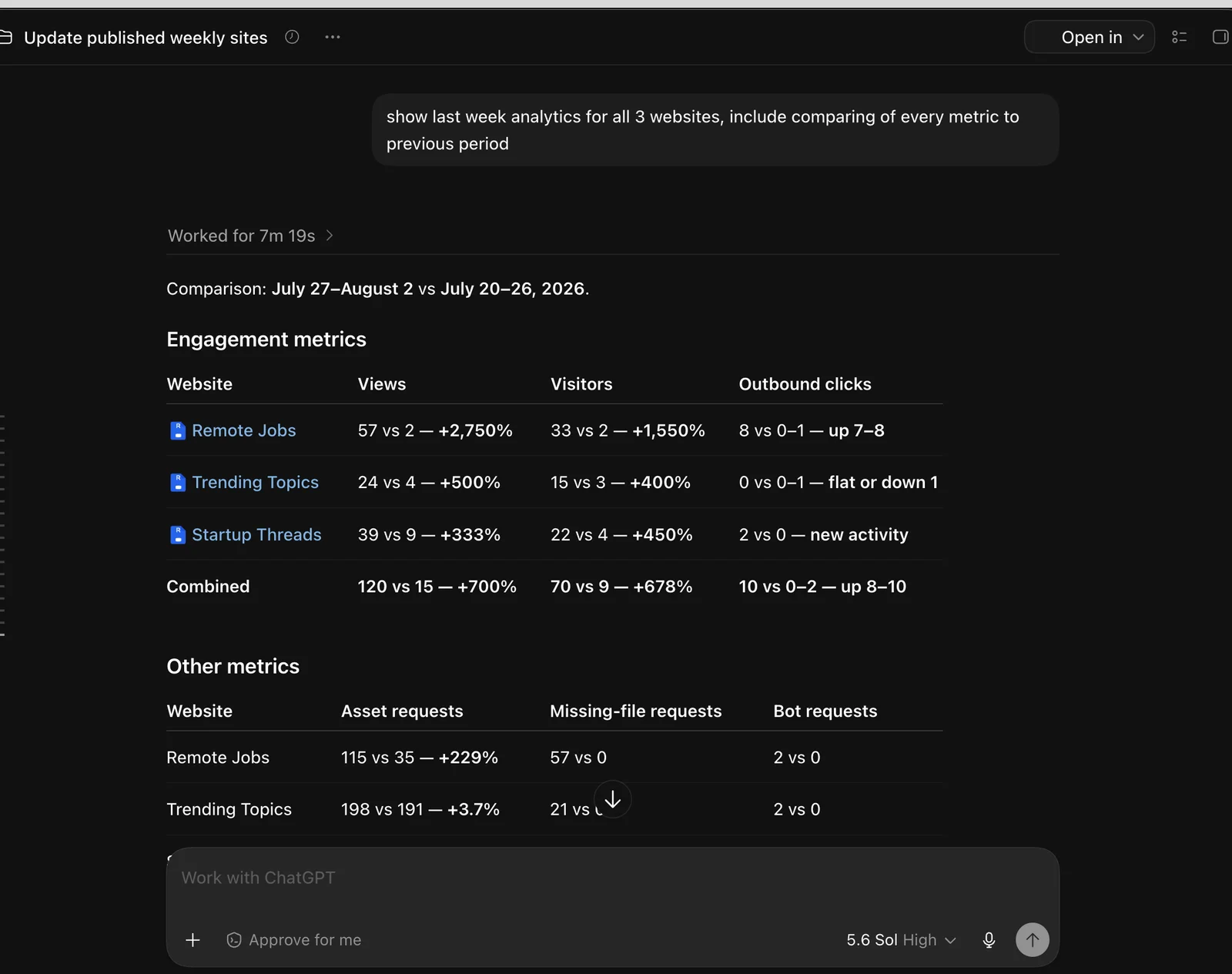
The short sample is encouraging but does not prove automated publishing caused the increase; traffic sources, promotion, search discovery, and week-to-week variation may also matter. The narrower lesson: AI website analytics showed which site attracted action. Remote Jobs produced eight of ten outbound clicks, while Trending Topics drew attention but no outbound clicks during this period.
Preview and Rollback Safety
Unattended publication should remain reversible. Revdoku offers two recovery paths.
- Revdoku can generate a temporary preview site before production when changes need visual review.
- Version history keeps earlier bucket states available after publication.
- The team can quickly restore a prior Revdoku version if the live result is incomplete or broken.
- Stable URLs let a corrected release replace the faulty one without sending visitors to a new link.
ChatGPT acquires an editing lock before changing a site and releases it afterward. This reduces the risk of concurrent operations writing competing file versions.
Afterward, the content team receives a notification and reviews the live pages. Human review remains light but real. The operator can inspect the issue, follow key links, and roll back anything missed by automated QA.
I like this balance: repetitive work runs unattended, but the result remains visible, reviewable, and reversible. For client-facing work, reviewability and reversibility matter as much as automation.
Beyond Weekly Publishing: Protected Access, Analytics, and Forms
The same Revdoku workflow can support private or interactive websites, not only public weekly lists.
| Revdoku capability | What it adds |
|---|---|
| Password protection | Share a site behind a password while keeping one stable link for future updates. |
| Protected by email login | Require visitors to verify their email before opening the site. This is useful when access should be limited or attributable. |
| Visitor analytics | Review views, visitors, pages opened, and outbound clicks in Revdoku or through a connected AI such as ChatGPT. |
| Built-in forms | Add forms for approval, feedback, a quote request, or another structured response without building a separate form backend. |
These controls can be combined. For example, a client-facing weekly report can require email login, record viewing activity, and include an approval or feedback form on the same site. The content team can still update the files at the existing URL and restore a previous version when necessary.
ChatGPT Revdoku Automation Versus the Old GitHub Pages Workflow
Previously, the team used a semi-manual research and GitHub Pages workflow. It worked but required the operator to manage repositories, deployments, and editorial quality.
| Need | Previous GitHub Pages process | ChatGPT and Revdoku process |
|---|---|---|
| Publishing | Commit and deployment workflow | Update Revdoku bucket files and republish |
| Public URL | Stable once configured | Stable Revdoku URL across weekly releases |
| Visitor analytics | No built-in Revdoku-style visitor reporting | Views, visitors, clicks, and visitor activity available in Revdoku and ChatGPT |
| Previewing | Harder for quick editorial checks | Temporary preview site before production |
| Recovery | Repository knowledge needed for rollback | Revdoku version history and quick restore |
| Operator skills | More approachable for Git users | Usable by content operators without repository mechanics |
| Operating instructions | Often separated from the deployed page | Public prompt.md stored with each site |
GitHub Pages remains a sound option when a team wants source control, pull requests, and complete ownership of a repository-based deployment. The fit was wrong: a content team ran this publishing operation, not a developer-centered software release.
The current Remote Jobs workflow still keeps a GitHub repository—now as an automatically synchronized backup rather than the production deployment mechanism. The GitHub Sync tutorial shows the exact Bucket Settings flow.
Revdoku also supports manual publishing: an operator can drag a PDF, presentation, or folder into a private bucket and share it via a stable public, password-protected, or email-gated link. The weekly automation uses the same file-and-link model on a recurring schedule.
Setup Checklist for Weekly Content Website Automation
A similar setup need not put credentials in a prompt. Connect and authorize Revdoku through the supported ChatGPT connector or a controlled API or CLI setup, granting only required access. Keep secrets in the connection layer, never in a public prompt.md.
| Item | What to check | Why it matters |
|---|---|---|
| Revdoku connection | ChatGPT can read, edit, lock, publish, and inspect the intended buckets | The task must finish without exposing credentials |
| One bucket per site | Files and version history are separated by website | A failed update stays contained |
| Optional GitHub backup | Connect GitHub Sync and verify the selected private repository and branch | Bucket files are copied to GitHub without adding a repository deployment step |
| Canonical prompt | Exactly one current prompt.md exists at the bucket root |
Every run reads the same public source of truth |
| Stable file layout | Root index.html, data.csv, archives.csv, and logical asset folders |
Data updates need not rebuild the site shell |
| Test run | Research, archive, publish, and QA work in a normal chat | Problems are easier to fix before scheduling |
| Scheduled task | Monday, 9:00 AM, America/Los_Angeles, with all three URLs |
The intended cadence is explicit |
| Notification and rollback | The team knows where completion reports and prior versions appear | Unattended runs remain reviewable |
The practical sequence is:
- Connect ChatGPT to Revdoku and create one bucket per website.
- Give ChatGPT the first site’s full operating prompt to create its static website, data files, archive structure, and public page.
- Save that instruction as the root
prompt.md, then repeat for the other sites. - Run each update manually; inspect research quality, archives, desktop rendering, and the 375px and 390px layouts.
- Create the short weekly task only after all three manual runs succeed.
If sources are blocked or evidence is missing, publish a smaller issue and report the limitation. Never fill gaps with invented dates, compensation, engagement, or availability.
Lessons for Teams That Automatically Update Weekly Websites
The design rule is simple: keep the schedule small and keep the operating knowledge close to the website. The three public prompts let the team change weekly research and publishing rules without editing a giant automation. Revdoku supplies stable links, file-based publishing, analytics, previews, version history, and rollback. For the Remote Jobs site, GitHub Sync also maintains a private repository backup. ChatGPT handles the repetitive research and update cycle.
The early traffic increase is worth watching, not celebrating as proof. The stronger result is operational: one unattended Monday task researches, archives, tests, and republishes all three sites transparently and reversibly.
See the live sites and instructions:
- Weekly New Remote Jobs in IT and its public prompt
- Weekly Share Your Startup Threads and its public prompt
- Weekly Trending Topics and its public prompt
To publish files, client deliverables, demos, or an automated static site at a stable link, create a Revdoku workflow. Start with drag and drop. Add ChatGPT automation only when repetition warrants it.
Frequently asked questions
Do I need three separate scheduled tasks to maintain three Revdoku sites?
No. One scheduled ChatGPT task can update multiple sites by listing their URLs and instructing ChatGPT to read each site’s root prompt.md. Each prompt can define different research, formatting, archiving, and QA requirements.
How can I change a site’s weekly update rules without rebuilding the automation?
Edit the site’s root prompt.md. The next scheduled run will use the revised instructions, so you can change sources, fields, item limits, rejection rules, layouts, or checks without recreating the recurring task.
What happens when ChatGPT cannot verify enough current items?
The workflow should omit stale or unsupported entries and publish a smaller, trustworthy issue. The completion report should identify blocked sources or missing evidence rather than filling gaps with invented information.
How are previous weekly issues preserved?
Before replacing the current data.csv, ChatGPT saves a dated copy in the site’s archive directory and records it in archives.csv. Visitors can then open earlier issues through normal page URLs while the main page continues to show the latest edition.
How can a team prevent overlapping updates from corrupting a site?
ChatGPT should acquire the Revdoku editing lock before changing files and release it after publishing and testing. Keeping each website in its own bucket also limits the effect of a failed or conflicting update.
What checks should run before an automated issue is accepted?
At minimum, verify freshness, duplicates, destination links, CSV parsing, Unicode characters, and desktop rendering. The live page should also be tested at 375px and 390px widths to catch mobile overflow or broken responsive behavior.
How can an incorrect automated release be recovered?
Use a temporary preview when changes need visual approval, and rely on Revdoku version history if a problem reaches production. A previous bucket version can be restored while keeping the same public URL, allowing the team to correct the release without redirecting visitors.