How to Track Who Opened a Link Accurately
Table of Contents
- Track Who Opened a Link Without Guessing
- What It Means to Track Who Opened a Link Accurately
- Public Links: Track Link Opens, Not People
- Shared Passwords: Can I Know Who Clicked My Link?
- Tagged Links: Track Link Opens by Recipient
- Verified Email Links: Know Who Opened a Link
- A Practical Revdoku Workflow to Track Link Opens
- Read Engagement After You Know Who Clicked Your Link
- Privacy and Forwarding Limits When You Track Link Opens
- Final Thoughts on How to Track Who Opened a Link
- Ask ChatGPT to summarize link activity
- Track Who Opened a Link Without Guessing
- What It Means to Track Who Opened a Link Accurately
- Public Links: Track Link Opens, Not People
- Shared Passwords: Can I Know Who Clicked My Link?
- Tagged Links: Track Link Opens by Recipient
- Verified Email Links: Know Who Opened a Link
- A Practical Revdoku Workflow to Track Link Opens
- Read Engagement After You Know Who Clicked Your Link
- Privacy and Forwarding Limits When You Track Link Opens
- Final Thoughts on How to Track Who Opened a Link
- Ask ChatGPT to summarize link activity
Track Who Opened a Link Without Guessing
TL;DR: To track who opened a link, focus on the sharing method, not the analytics dashboard. Public links show visits, tagged links show which assigned URL was used, and only verified identity strongly identifies the visitor.
For proposals, presentations, demos, or client deliverables, knowing who clicked can guide timely follow-up, but claim only what the data proves.
This guide compares four link-tracking options:
- Public links for easy, anonymous access
- Shared-password links for group-level protection
- Tagged links for recipient-level attribution
- Verified Email links for confirmed email access
It also covers tracking opens, downloads, page views, and responses through Revdoku.
What It Means to Track Who Opened a Link Accurately
An open is an event. An identity is an attribution. Those are different things.
The system can record a shared-page request’s time, link, session, and technical details, proving only that the URL was requested.
It does not prove a named person was at the keyboard; corporate security scanners, link-preview services, assistants, and forwarded links complicate attribution.
Four evidence levels are useful:
| Evidence level | What you can reasonably say | What you cannot safely claim |
|---|---|---|
| Anonymous open | The public URL was requested | A particular person opened it |
| Password access | Someone had the URL and shared password | The intended recipient used them |
| Tagged-link open | The link assigned a certain tag was used | The tagged person was necessarily the viewer |
| Verified Email access | Someone controlling the verified inbox passed the gate | Their legal identity or job title was independently proven |
IP addresses and browser cookies can distinguish sessions but not reliably identify people: offices share IPs, VPNs change them, and several people may use one device.
For reliable tracking, choose an access method that provides the required level of proof.
Public Links: Track Link Opens, Not People
Public links offer the least friction: anyone with the URL can open them without a password or email address. They suit portfolio samples, public product information, press material, and files meant to spread.
Public-link analytics can still show:
- How many sessions opened the link
- Which pages received attention
- Which buttons or external links were clicked
- Whether the visitor downloaded a file
- When activity happened
A public proposal sample with 37 opens and 5 downloads has 42 recorded events of two types, not 42 identified people. One visitor may open repeatedly, and automated link checks may create some opens.
In practice, forwarding is unlimited: everyone uses the same URL, and all activity enters one anonymous pool. Understand this before using a public link for sensitive work.
Use public links for reach, and a stronger gate for confidential client files, private pricing, or person-level follow-up.
Shared Passwords: Can I Know Who Clicked My Link?
A shared-password link controls access without identifying visitors because everyone uses the same secret. If 12 clients know it and the link records 18 opens, you cannot reliably match opens to individuals.
The access event proves two facts:
- The visitor obtained the protected URL.
- The visitor knew the shared password.
It does not prove where either came from: the recipient could forward both, or a colleague could open the link on their behalf.
Shared passwords suit small groups needing a simple barrier, such as a project room, early design preview, or temporary file package where individual attribution is unnecessary.
For safer use:
- Create a different password for each project or client group.
- Send the password through a separate channel when the material is sensitive.
- Replace the password after team or vendor changes.
- Move to Verified Email links when person-level accountability matters.
This follows a basic authentication principle described in the OWASP Authentication Cheat Sheet: individual identities and sessions provide a clearer audit trail than shared credentials. A password can control entry without identifying the visitor.
Tagged Links: Track Link Opens by Recipient
A tagged link is a unique share URL labeled for a client, stakeholder, campaign, sales opportunity, or recipient. When it opens, Revdoku can attribute the session to that tag.
Send one client an Alice-tagged link and another a Marcus-tagged link. An open, nine viewed pages, and a download on Alice’s show that her assigned link was used.
That attribution is useful but not conclusive identity proof.
The tag follows the link: if Alice forwards hers to a lawyer, that visit may appear under Alice’s tag. Four tagged-link visits are recorded visits, not four verified visits by the named recipient.
Tagged links suit low-friction attribution when forwarding is unlikely or acceptable. Uses include:
- Sending different pitch-deck links to several investors
- Measuring which client contact opened a design preview
- Separating traffic from partner campaigns
- Tracking individual outreach without an email gate
Use one tagged link per recipient and plain names your team will understand. If forwarding is possible and exact identity matters, use Verified Email.
Verified Email Links: Know Who Opened a Link
A Verified Email link requires the visitor to supply and verify an email address before access. Revdoku then ties activity to that address rather than an anonymous session or assigned tag.
The sequence is:
- The recipient opens the shared Revdoku link.
- Revdoku presents the Verified Email gate.
- The visitor completes the required email verification.
- Access is recorded under that verified address.
- The owner can receive an open notification and review per-visitor activity.
This is the strongest of the four methods: it proves inbox control at verification, not civil identity. Shared mailboxes, delegated inboxes, compromised accounts, and shared browser sessions remain possible.
Forwarding works better than with a tagged link: a new visitor must pass the email gate rather than inherit the first recipient’s name. Approved-address restrictions should block unapproved recipients; if any verified address is accepted, forwarded visitors enter under their own addresses as separate leads.
Use Verified Email links for proposals, private decks, client deliverables, due-diligence files, and demos where timely, person-level follow-up matters.
A Practical Revdoku Workflow to Track Link Opens
Revdoku treats sharing as publishing: place files in a private bucket, choose an access method, and send a stable live link, no API or programming required.
Typical workflow:
- Create a bucket for the client, deal, or project.
- Drag a PDF, presentation, demo folder, or set of deliverables into it.
- Choose public, shared-password, tagged, or Verified Email access.
- Send the generated link through email, chat, or your client portal.
- Review open notifications and per-visitor activity.
- Replace or update files in the bucket when the work changes. The shared link remains the same.
Choose access by job:
| Situation | Suggested method | Reason |
|---|---|---|
| Freelancer sends a private proposal | Verified Email | Connects activity to an email address |
| Agency shares a draft with a client team | Shared password | Simple group access when individual identity is unnecessary |
| Founder sends a deck to several investors | One tagged link per investor | Low-friction recipient attribution |
| Consultant publishes a sample report | Public link | Easy access and broad distribution |
For repetitive publishing, an AI agent, API integration, or CLI command can update the same buckets and automate file drops, though link tracking does not require them.
Read Engagement After You Know Who Clicked Your Link
Identification shows who accessed the link; Revdoku’s engagement data shows what followed through page views, clicks, downloads, and captured responses for protected visitors.
Read these signals in context:
| Signal | Reasonable interpretation | Caution |
|---|---|---|
| Open | The link or gated page was requested | It may be a preview or automated scan |
| Pages viewed | The session reached specific pages | A loaded page may not have been read closely |
| Click | The visitor activated a tracked element | Accidental clicks remain possible |
| Download | The browser requested the file | It does not prove the file was read |
| Form response | The visitor deliberately submitted information | Confirm what consent and notice accompanied the form |
A verified prospect who views 9 of 12 pages, returns the next morning, clicks pricing twice, and downloads the proposal offers a stronger follow-up signal than a lone open. Three seconds of inactivity after an open is weak evidence of interest.
Built-in contact and feedback forms can record questions without a custom backend. Keep them short and explain what follows submission so analytics help both sides without turning the link into a surveillance trap.
Privacy and Forwarding Limits When You Track Link Opens
Match tracking to the shared work. Tell visitors about email collection or engagement recording, especially when local law, a contract, or company policy requires notice. Unused data adds risk without improving decisions.
Review this table before sending:
| Item | What to Check | Why It Matters |
|---|---|---|
| Access mode | Match public, password, tagged, or verified access to the file | Too little control can expose client work |
| Identity claim | Describe only what the chosen method proves | A tag or IP address is not verified identity |
| Forwarding | Decide whether another person may receive the URL | Forwarding can break tagged attribution |
| Notification | Treat a first open as a prompt to inspect activity | Automated systems can create false urgency |
| Data notice | Explain email collection and analytics in plain language | Visitors should understand the exchange |
| Retention | Remove old leads and activity when no longer needed | Smaller data stores reduce privacy risk |
Common questions have short answers:
Final Thoughts on How to Track Who Opened a Link
Choose the evidence you need before sending. Public links track anonymous activity; shared passwords add access control without person-level identity; tagged links connect activity to assigned URLs but can mislead when forwarded; Verified Email provides the strongest practical answer by requiring inbox control.
Revdoku uses one workflow: put documents, files, demos, or presentations in a bucket and share a stable link. You can see opens, page views, clicks, downloads, and captured leads to the extent the access method permits.
The honest answer to “Who clicked my link?” may be a name, tag, or anonymous session. Good tracking recognizes the difference.
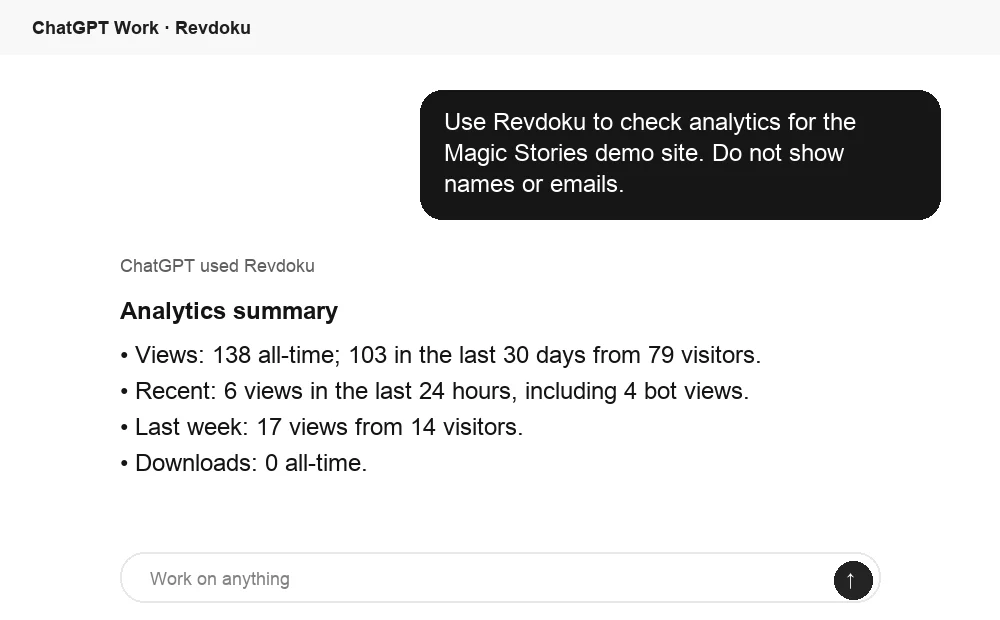
Ask ChatGPT to summarize link activity
After a Revdoku link is opened, ChatGPT can summarize the viewing activity from Revdoku analytics. Use it to decide whether to follow up and what context to mention.
Frequently asked questions
Can I know who clicked my link with a public URL?
No. You can track opens and engagement, but visitors remain anonymous.
Does a password identify the viewer?
No. It proves knowledge of a shared secret.
Does a tag identify the person?
It identifies the used URL; forwarding can transfer attribution.
Does Verified Email provide absolute proof?
No. It confirms email control, strong practical evidence, not legal identity verification.
Which link-tracking method should I use for a confidential proposal?
Use Verified Email when you need to connect activity to a confirmed email address. It offers stronger attribution than public, password-protected, or tagged links, although it confirms inbox control rather than legal identity.
Can a public link tell me exactly who opened it?
No. A public link can record opens, page views, clicks, and downloads, but it does not identify the visitor. Repeated visits and automated scanners may also increase the recorded activity.
Does password protection identify individual viewers?
No. It shows only that someone had both the URL and the shared password. Use separate passwords for different client groups, or switch to Verified Email when individual accountability is important.
What happens if someone forwards a tagged link?
Activity remains associated with the original tag, even if another person uses the forwarded URL. Tagged links are therefore best when forwarding is unlikely or when attribution to the assigned link is sufficient.
How should I interpret an open notification?
Treat it as a signal to review the broader engagement data, not proof that the recipient read the material. Page views, return visits, tracked clicks, downloads, and responses provide more useful context than a single open.
Can I update shared files without sending a new link?
Yes. Revdoku uses stable links for published buckets, so you can replace or update files while keeping the original URL. This is useful for evolving proposals, presentations, demos, and client deliverables.
What privacy steps should I take when tracking visitors?
Clearly explain any email collection or engagement tracking when required by law, contract, or company policy. Collect only data that supports a practical purpose, restrict access appropriately, and remove old activity when it is no longer needed.
Related Articles

GitHub Pages Password Protection and Privacy
Learn why private repositories do not protect Pages sites and compare secure access options for internal teams and external clients.

How to Password Protect a Vercel Deployment
Learn how to secure Vercel deployments with password protection, authentication, trusted access, or protected Revdoku hosting.

How to Password Protect a Website Made with Claude
Learn how to export, secure, publish, and test a Claude-made website using password protection or verified-email access.