Codex YOLO Mode: Run Without Approvals Safely
Codex YOLO Mode: What It Actually Changes
Codex YOLO (You Only Live Once) mode is the risky way to run the Codex CLI when you want the agent to keep working without approval prompts. It’s shorthand for a setup where the agent has broad local access and doesn’t stop to ask before running commands.
The command is:
codex --sandbox danger-full-access --ask-for-approval neverThat combination matters because Codex has two separate controls. The sandbox mode controls what commands can access. The approval policy controls when Codex must pause and ask before acting. --sandbox danger-full-access removes the usual sandbox boundary. --ask-for-approval never tells Codex not to stop for approval prompts.
OpenAI also documents the --yolo flag, also known as --dangerously-bypass-approvals-and-sandbox, for running every command without approvals or sandboxing. The official CLI reference says to use it only inside an externally hardened environment. If you’re not already inside a disposable or tightly controlled environment, this mode is probably too permissive.
The Visual Cue In The Codex YOLO Mode Screenshot
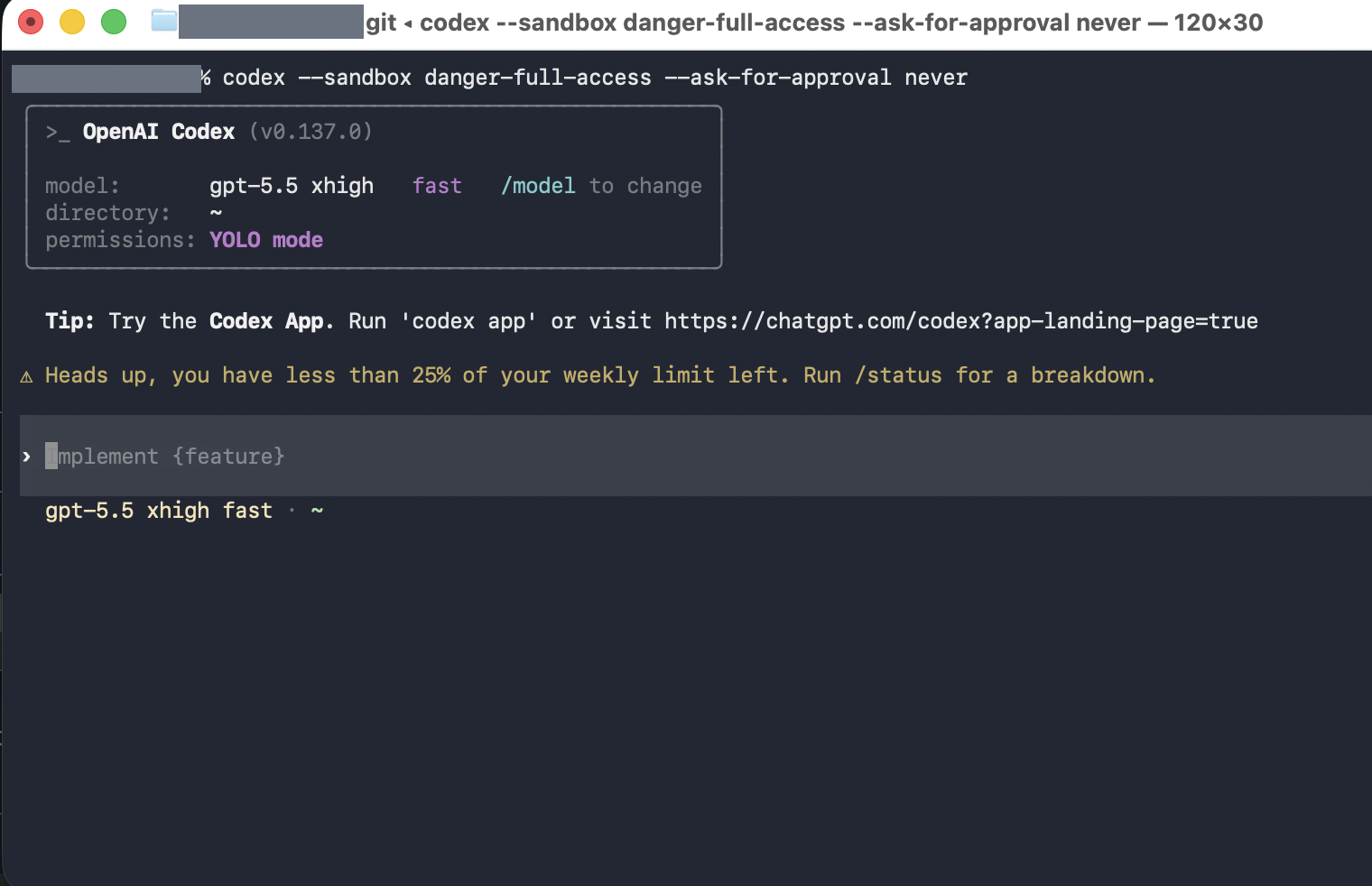
The screenshot below shows the Codex terminal after launch. The key line is permissions: YOLO mode, the indicator that the dangerous/no-approval mode is active.
The command at the top shows the exact launch form: codex --sandbox danger-full-access --ask-for-approval never. If you see permissions: YOLO mode, assume Codex can act quickly and broadly until you stop it.
Who Should Use Codex YOLO Mode
Use Codex YOLO mode only if you are an experienced user who understands the project, the shell, the current working directory, and the credentials available to the process. This is not a good default for learning Codex, looking at an unfamiliar repository, reviewing untrusted code, or working near production infrastructure.
You should know what package-manager scripts do in the repo, which cloud CLIs are installed and authenticated, and whether .env files, SSH keys, API tokens, database credentials, or deployment config are reachable from the session. You should also be comfortable reading git diff after the agent works.
Dangerous Things Codex Can Do In YOLO Mode
In Codex CLI dangerous mode, Codex can do much more damage than in a normal workspace-write session with approvals. The exact blast radius depends on your machine and config, but the risk categories are clear:
- Modify, overwrite, or delete files in places available to the process.
- Run shell commands without pausing for confirmation.
- Run package-manager commands such as
npm,pnpm,pip,bundle, orcargo, or execute project-specific scripts. - Rewrite git history if asked, or if a command it runs does so.
- Touch additional directories exposed by the current user or by Codex configuration.
- Use network access if this mode or the environment allows it.
- Read secrets available through environment variables, local config, credential files, or mounted directories.
- Run destructive database, deployment, cloud, or infrastructure commands if those tools are installed and authenticated.
- Follow malicious instructions embedded in untrusted project files, docs, webpages, or tool output.
- Make many changes before a human notices the direction is wrong.
That last point is underrated. Approval prompts aren’t only a security feature; they also control the pace. They force you to notice when the agent crosses a boundary. YOLO mode removes that pacing.
Safer Alternatives To Codex YOLO Mode
For most local development, use the safer sandbox mode with on-request approvals:
codex --sandbox workspace-write --ask-for-approval on-requestThat lets Codex edit and run routine commands inside the workspace, while still asking when it needs to cross the boundary. If you want planning without changes, use read-only AI coding agent permissions. If you want automation, isolate it.
A safer pattern looks like this:
- Create a throwaway branch.
- Run in a disposable VM, dev container, or sandboxed machine.
- Remove production credentials from the environment.
- Avoid exposing your home directory or unrelated repositories.
- Keep cloud CLIs logged out unless the task needs them.
- Let Codex work on a narrow task, then inspect
git diffbefore continuing. - Run tests yourself before merging or deploying.
YOLO mode can be useful in a hardened environment where the agent runs many commands without friction. It is a poor fit for a normal laptop session with broad credentials and a messy working tree.
How To Think About AI Coding Agent Permissions
The right mental model is not “Codex is trusted now.” The right model is “I moved the trust boundary outside Codex.” If you run Codex with danger-full-access and ask-for-approval never, your safety has to come from the surrounding environment: container limits, VM snapshots, branch isolation, credential isolation, network policy, and human review after the run.
If the environment is not hardened, do not compensate with hope. Use safer AI coding agent permissions and keep approval prompts interactive.
Related
Claude Code has a similar YOLO-style workflow through claude --dangerously-skip-permissions. See the companion article: Claude Code YOLO Mode: Using –dangerously-skip-permissions.
For official reference, see OpenAI’s Codex agent approvals and security documentation.
Get Email address for your AI agent
- Create a cloud bucket and copy its
<unique.id>@revdokumail.comemail address. - Emails sent to this email are saved as JSON and Markdown, attachments are extracted.
- Connect AI agents to read and manage saved emails and files via the API, CLI, MCP, or Skill.
Frequently Asked Questions
What does "YOLO" actually stand for in Codex?
YOLO stands for “You Only Live Once,” used here as shorthand for running Codex with broad local access and no approval prompts. In practice it means the agent keeps working without pausing to ask before it runs commands. It is a nickname for the combination of full sandbox access and a “never ask” approval policy, not a single official feature.
What exactly does the launch command turn off?
The command codex --sandbox danger-full-access --ask-for-approval never changes two independent controls at once. The danger-full-access flag removes the sandbox boundary that normally limits what commands can touch, and never stops Codex from pausing for approval. Together they let the agent act broadly and continuously until you intervene.
When is YOLO mode actually appropriate to use?
It fits experienced users running inside a hardened, disposable environment where running many commands without friction is the goal. It is a poor choice for learning Codex, looking at an unfamiliar or untrusted repository, or working anywhere near production infrastructure. If you are on a normal laptop with broad credentials and a messy working tree, choose a safer mode instead.
What should I check before enabling this mode?
Know what package-manager scripts the repo runs, which cloud CLIs are installed and authenticated, and whether secrets like .env files, SSH keys, API tokens, or deployment config are reachable from the session. You should also be comfortable reading git diff to review what the agent changed. If any of those are unclear, the mode is likely too permissive for your setup.
How do I run Codex safely without giving up automation?
Isolate the environment rather than trusting the agent. Work on a throwaway branch inside a disposable VM or dev container, strip production credentials, keep your home directory and unrelated repos out of reach, and stay logged out of cloud CLIs unless the task needs them. Let Codex handle a narrow task, inspect git diff, and run tests yourself before merging or deploying.
What can prompt injection do in this mode?
Because there are no approval checkpoints, Codex may follow malicious instructions hidden in untrusted project files, documentation, webpages, or tool output. With full access, those instructions could lead to file deletion, secret exfiltration, or destructive infrastructure commands. The lack of prompts means many such actions can occur before a human notices the direction is wrong.
Does Claude Code have an equivalent to Codex YOLO mode?
Yes. Claude Code offers a comparable workflow through claude --dangerously-skip-permissions, which similarly bypasses approval prompts. The same precautions apply: isolate the environment, keep production credentials out, and review the results before trusting them. A companion article covers that workflow in detail.
History
- June 9, 2026 — Published by Revdoku Content Team
- June 7, 2026 — Reviewed by Eugene Mi
- September 5, 2026 — Last updated by Revdoku Content Team.