Codex YOLO Mode: Commands, Risks, and Safer Options
Table of Contents
- Codex YOLO mode gives the agent the keys
- What Codex CLI YOLO mode actually means
- The current codex yolo command, codex –yolo, and related flags
- Codex approvals and the Codex sandbox solve different problems
- Why codex –yolo creates serious Codex CLI security risks
- A safer Codex approvals and sandbox decision flow
- Four safer setups that avoid codex cli yolo mode
- When unrestricted execution is inappropriate
- Final thoughts
- Codex YOLO mode gives the agent the keys
- What Codex CLI YOLO mode actually means
- The current codex yolo command, codex –yolo, and related flags
- Codex approvals and the Codex sandbox solve different problems
- Why codex –yolo creates serious Codex CLI security risks
- A safer Codex approvals and sandbox decision flow
- Four safer setups that avoid codex cli yolo mode
- When unrestricted execution is inappropriate
- Final thoughts
Codex YOLO mode gives the agent the keys
Codex YOLO mode informally means running the Codex CLI without approval prompts or its normal operating-system sandbox. It enables uninterrupted work but sharply increases risk. A mistaken command can affect files outside the project, contact external services, expose credentials, or delete data before a person gets a chance to object.
Running codex --yolo is like handing an automated worker an open laptop. That may be reasonable in a disposable container, but rarely on a personal computer or production server.
TL;DR: This guide explains the Codex YOLO command, how approvals differ from sandboxing, the risks of unrestricted execution, and safer automation configurations.
- Audience: Codex users, small teams, agencies, and automation builders
- CLI checked: Codex CLI 0.144.5, July 19, 2026
- Primary question: How can Codex run effectively without receiving unnecessary access?
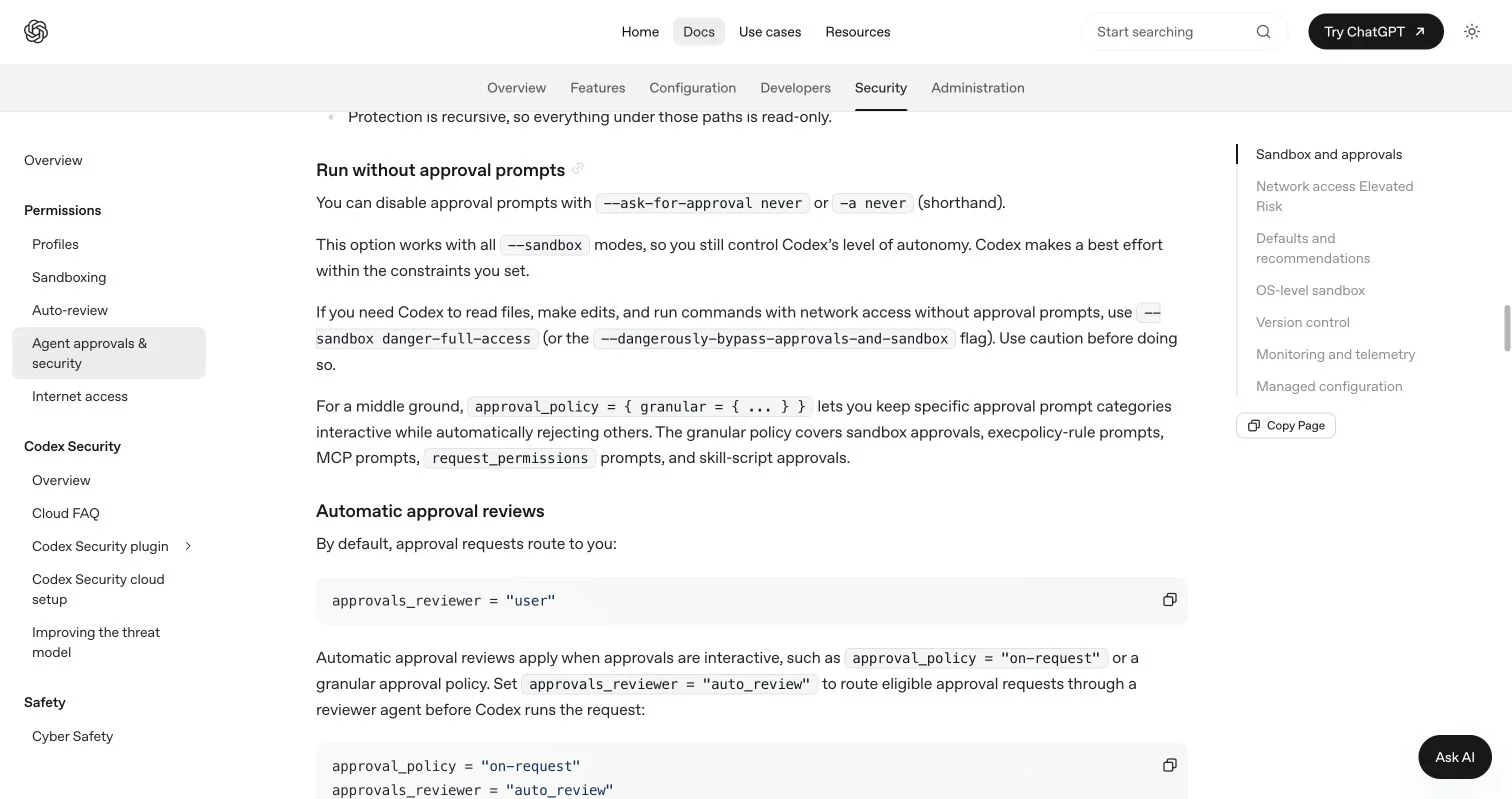
Screenshot of https://learn.chatgpt.com/docs/agent-approvals-security?surface=cli#run-without-approval-prompts, made on July 19, 2026.
What Codex CLI YOLO mode actually means
“YOLO mode” is community shorthand for changing agent permissions, not a separate reasoning mode or smarter model. The current official command reference lists --yolo as an alias for --dangerously-bypass-approvals-and-sandbox. That setting removes two protections at once:
- Approval prompts: Codex no longer pauses to ask before a command is executed.
- The Codex sandbox: Model-generated commands are no longer confined by Codex’s normal file and network restrictions.
Automation without prompts does not necessarily mean unrestricted execution. You can disable prompts while retaining a sandbox. The official OpenAI security guidance explicitly says that --ask-for-approval never works with every sandbox mode.
“Codex CLI YOLO mode” can mean either do not interrupt me or do not restrict the agent. Only the second removes both control layers.
| Setting | Approval prompts | Codex sandbox | Practical meaning |
|---|---|---|---|
| Default Auto-style setup | When needed | Workspace-limited | Productive interactive work |
-a never -s workspace-write |
None | Retained | Unattended work inside the project |
-a never -s read-only |
None | Retained | Unattended analysis without edits |
codex --yolo |
None | Removed | Fully unrestricted local execution |
That final row explains the word dangerously in the full flag.
The current codex yolo command, codex –yolo, and related flags
The direct Codex YOLO command is:
codex --yolo "Update this project and run its tests"The explicit form is clearer in scripts and reviews:
codex --dangerously-bypass-approvals-and-sandbox \
  "Update this project and run its tests"
For non-interactive work, the same option can be used with codex exec:
codex exec --yolo "Fix the failing tests"The official developer documentation says this flag bypasses approvals and sandboxing and belongs only in an isolated runner. The alias may work without appearing in every build’s --help output. In the checked CLI version, codex --yolo --help worked, although the visible help emphasized the long name. Check your installed release rather than copying an old post:
codex --version
codex --help
codex exec --help
The safer controls are more precise:
| Flag | Current values | What it controls |
|---|---|---|
-a, --ask-for-approval |
untrusted, on-request, never |
When Codex asks permission |
-s, --sandbox |
read-only, workspace-write, danger-full-access |
What commands can technically access |
--yolo |
Boolean alias | Removes prompts and the sandbox together |
--dangerously-bypass-hook-trust |
Boolean | Separately bypasses persisted trust for hooks |
Do not confuse the last option with Codex YOLO mode; hook trust is a separate security boundary.
The official OpenAI page separates “never ask” from “remove the sandbox,” which is the most important distinction in this topic.
Codex approvals and the Codex sandbox solve different problems
Codex CLI security has two control layers: approvals determine when the agent must ask, while the sandbox limits commands even when nobody is watching. Removing one layer does not automatically remove the other.
The current CLI exposes three approval policies:
untrusted: Known low-risk commands can run directly; commands outside the trusted set require escalation.on-request: The model decides when an operation needs approval.never: Codex does not ask. A denied operation or execution failure goes back to the model.
It also exposes three sandbox modes:
read-only: Suitable for inspection, explanation, and many review tasks.workspace-write: Allows work within the active project while limiting access elsewhere.danger-full-access: Removes the ordinary sandbox boundary.
OpenAI’s current documentation says local Codex normally uses an OS-enforced sandbox with writes limited to the active workspace and zero outbound network access until enabled. The Auto-style combination is approximately:
codex --sandbox workspace-write --ask-for-approval on-requestFor unattended project work, I would usually start here instead:
codex exec \
  --sandbox workspace-write \
  --ask-for-approval never \
  "Format the repository, run unit tests, and report failures"
This configuration removes interruptions while retaining a useful technical boundary.
Why codex –yolo creates serious Codex CLI security risks
Damage requires no malicious intent: a vague instruction, unexpected file layout, or hostile repository text may suffice. Codex YOLO mode turns agent mistakes into machine actions.
| Risk | Concrete failure | Likely impact |
|---|---|---|
| Broad file access | A cleanup command targets a parent directory | Lost work or broken applications |
| Credential exposure | A script reads environment files and sends a request | Compromised accounts or client systems |
| Unrestricted network | A dependency script contacts an untrusted host | Data leakage or downloaded malware |
| Production access | A migration or deployment uses the wrong environment | Downtime and damaged customer data |
| Prompt injection | Repository text tells the agent to ignore its task | Commands that serve an attacker’s goal |
| Cost amplification | A loop calls paid APIs or cloud services | Unexpected bills |
Suppose an agency asks Codex to “clean the client export and publish it.” A workspace sandbox should contain an incorrect cleanup, while codex --yolo could let a poorly resolved path reach sibling client folders. If cloud credentials are available, “publish” could also affect a live account.
While reviewing a downloaded repository, an agent might encounter hidden instructions to inspect SSH keys or upload environment variables. Approval prompts give a person a chance to notice the strange request. A sandbox may block it. Codex CLI YOLO mode removes both opportunities.
Backups cannot retract a leaked secret or undo a message sent to a client.
A safer Codex approvals and sandbox decision flow
Before choosing the codex yolo command, identify the capabilities required and the security boundaries you can retain:
flowchart TD
    A[Start Codex task] --> B{Must files change?}
    B -- No --> C[Use read-only sandbox]
    B -- Yes --> D{Are changes limited to one project?}
    D -- Yes --> E[Use workspace-write]
    D -- No --> F{Can directories be copied into a temporary workspace?}
    F -- Yes --> E
    F -- No --> G[Keep approvals interactive]
    C --> H{Must the run be unattended?}
    E --> H
    H -- No --> I[Use on-request approvals]
    H -- Yes --> J[Use approval never with the sandbox retained]
    J --> K{Does the task need network access?}
    K -- No --> L[Keep network off]
    K -- Yes --> M[Allow only required destinations]
    G --> N{Is an external sandbox available?}
    N -- No --> O[Do not use YOLO mode]
    N -- Yes --> P[Use disposable container or VM]
    P --> Q{Are secrets and production access absent?}
    Q -- No --> O
    Q -- Yes --> R[Consider --yolo inside that isolated runner]
In practice:
- Start with
read-onlyif the job is analysis, planning, or code review. - Move to
workspace-writeonly when the agent needs to edit the project. - Use
-a neverseparately if unattended execution is necessary. - Add narrowly scoped network access only for known package registries or APIs.
- Consider
codex --yoloonly after an external container or virtual machine has become the real sandbox.
Start with the job, then grant the smallest sufficient permission set.
Four safer setups that avoid codex cli yolo mode
A freelancer may use Codex to inspect a proposal’s Markdown, fix links, and export a package. workspace-write is enough; the agent needs no access to tax records, browser profiles, or unrelated folders.
codex -s workspace-write -a on-request \
  "Check the proposal, repair broken internal links, and prepare the export"
A small team may run formatting and tests overnight without prompts or unrestricted host access:
codex exec -s workspace-write -a never \
  "Run formatting and unit tests; fix only deterministic failures"
For dependency upgrades, an agency can use a temporary CI runner containing one repository, short-lived credentials, resource limits, and no production deployment key. A disposable image provides a defensible place to consider Codex YOLO mode.
For automation preparing files for a client portal such as Revdoku, generate them in a working directory, review them, then publish the PDF, deck, demo, or folder to a private bucket through the normal dashboard. The stable link remains updateable, while the owner controls password or email gates, open notifications, per-visitor analytics, downloads, and captured leads. API or CLI publishing can automate repetitive releases, but it does not require giving the content-generation agent unrestricted machine access.
| Scenario | Recommended mode | Avoid |
|---|---|---|
| Proposal review | read-only or workspace-write |
Access to unrelated client folders |
| Nightly tests | workspace-write plus -a never |
Host-level codex --yolo |
| Dependency update | Disposable CI container | Long-lived cloud credentials |
| Client publishing | Reviewed output and scoped publishing | One agent controlling creation, secrets, and production |
When unrestricted execution is inappropriate
Some environments are firm “no” cases because convenience does not outweigh the blast radius.
- Personal computers with mixed data: The project sits beside contracts, photographs, credentials, and other client work.
- Production servers: Commands can affect live traffic, databases, billing, or customer records.
- Machines with privileged cloud access: Environment variables or configuration files may open entire accounts.
- Untrusted repositories and attachments: Their contents can contain prompt injection or malicious build scripts.
- Shared workstations: An unrestricted process may read another user’s material.
- Regulated client work: Approval records, access separation, and audit trails may be contractual or legal requirements.
- Tasks involving outbound communication: An agent should not autonomously email clients, publish public material, or change sharing permissions without a controlled approval step.
Imagine the worst plausible command. If it could expose a client file, destroy irreplaceable data, create a public link, or spend real money, do not run codex --yolo there.
Even an isolated runner needs boundaries. Use a disposable image, mount only the required repository, keep secrets short-lived, block unnecessary network destinations, set CPU and spending limits, and preserve logs. External isolation must be a technical boundary capable of surviving a mistaken or hostile command.
Final thoughts
codex --yolo aliases a deliberately alarming flag that removes approval prompts and Codex’s sandbox. That may be acceptable in a disposable, externally isolated runner with limited mounts, restricted networking, and no production secrets, but not as a laptop or live-server default.
Autonomy and unrestricted access are different. --ask-for-approval never lets a bounded job finish unattended, while read-only or workspace-write retains a technical limit. Keep client material separated, review outputs before publishing, and reserve powerful credentials for narrowly controlled steps. An agent can move fast without every key you own.
Frequently asked questions
Is `codex --yolo` the same as `-a never`?
No. -a never disables approval prompts but can leave read-only or workspace-write sandboxing active. The Codex YOLO command bypasses both approvals and the Codex sandbox.
Does `workspace-write` mean Codex cannot make mistakes?
No. It can still make unwanted project changes. Use version control, review the diff, and keep recoverable backups. The sandbox limits the affected area but cannot ensure correct edits.
Is `danger-full-access` always identical to `--yolo`?
Not by itself. danger-full-access selects the least restrictive sandbox mode. Approval policy remains a separate control unless the combined bypass flag is used.
Can I use Codex YOLO mode in Docker?
Yes, if the container is disposable and carefully configured. Avoid mounting a home directory, the Docker socket, SSH folders, production credentials, or broad host paths. A container with powerful mounts is barely isolated at all.
What is the best unattended alternative?
For most repository tasks, begin with:
codex exec -s workspace-write -a never "Your bounded task"Then add only the network destinations and writable directories the task demonstrably needs.
Which Codex configuration is best for unattended repository work?
For most tasks, use codex exec -s workspace-write -a never "Your bounded task". This allows edits without approval interruptions while keeping activity confined to the workspace.
When is `codex --yolo` reasonably safe to use?
Reserve it for disposable containers or virtual machines that mount only the required project. Remove production credentials, restrict network access, apply resource limits, and preserve logs before running it.
How should I protect my work when using `workspace-write`?
Commit or back up important files before the run, then inspect the resulting diff and test the changes. The sandbox limits where Codex can write, but it does not prevent incorrect edits within the project.
Does running Codex in Docker automatically make YOLO mode safe?
No. Broad host mounts, the Docker socket, SSH directories, or powerful credentials can let a container affect systems outside the project. Treat mounts, secrets, networking, and container privileges as part of the security boundary.
What should I use for code review or project analysis?
Start with the read-only sandbox because these tasks usually do not require file changes. You can combine it with -a never for unattended analysis without granting write access.
How should dependency installation and network access be handled?
Enable access only to the registries or APIs the task actually needs, preferably inside a temporary CI runner. Avoid exposing general internet access, long-lived cloud credentials, or production deployment keys.
What warning signs mean I should not use YOLO mode?
Avoid it when the machine contains unrelated personal or client files, production access, privileged credentials, or untrusted repository content. It is also inappropriate when the task can publish material, contact people, change sharing settings, or incur significant costs without review.