How to Host a Lead Magnet Without WordPress
Table of Contents
- Host a Lead Magnet Without WordPress
- 1. Prepare Your Resource for Lead Magnet Hosting
- 2. Choose How to Host a Lead Magnet Without WordPress
- 3. Create a Lead Magnet Hosting Bucket and Upload Your Files
- 4. Publish Lead Magnet Content With Verified Email
- 5. Test the Email Gated PDF and Verified Email Download Experience
- 6. Share the Link and Read Visitor Activity
- 7. Update the Resource Without Sending a New Link
- 8. Apply Basic Privacy and Security Practices
- Final Thoughts on Lead Magnet Hosting Without WordPress
- Ask ChatGPT to summarize lead-magnet activity
- Host a Lead Magnet Without WordPress
- 1. Prepare Your Resource for Lead Magnet Hosting
- 2. Choose How to Host a Lead Magnet Without WordPress
- 3. Create a Lead Magnet Hosting Bucket and Upload Your Files
- 4. Publish Lead Magnet Content With Verified Email
- 5. Test the Email Gated PDF and Verified Email Download Experience
- 6. Share the Link and Read Visitor Activity
- 7. Update the Resource Without Sending a New Link
- 8. Apply Basic Privacy and Security Practices
- Final Thoughts on Lead Magnet Hosting Without WordPress
- Ask ChatGPT to summarize lead-magnet activity
Host a Lead Magnet Without WordPress
You do not need WordPress, plugins, or a custom backend to publish a useful lead magnet. A PDF, report, template, presentation, or small HTML page can open through a normal browser link behind verified email access.
This removes much of the usual setup. There is no theme to maintain, download script to debug, or page builder to master. You upload the resource, choose who may enter, and share one stable URL. When someone opens the protected link, you can see what they viewed or downloaded.
TL;DR: You can host a lead magnet without WordPress by uploading it to a private Revdoku bucket, enabling verified-email access, and sharing one stable URL. This tutorial covers the complete path:
- Prepare the resource.
- Create a private bucket.
- Upload and publish the files.
- Turn on verified-email access.
- Test, share, measure, and update the resource.
1. Prepare Your Resource for Lead Magnet Hosting
Good lead magnet hosting starts with the file. The gate may earn the click, but the resource must justify the exchange. A visitor who exchanges an email address for a vague five-page sales pitch will remember the disappointment.
Define one clear outcome. A freelance designer might publish a pricing worksheet. A consultant could offer a 12-page readiness report. An agency might share a campaign-planning template. A founder could publish a small HTML calculator with a downloadable explanation.
Check these items before uploading:
| Item | What to Check | Why It Matters |
|---|---|---|
| File name | Use a descriptive name such as proposal-pricing-guide.pdf |
Visitors can identify the file after downloading it |
| Opening page | State the problem and promised result | Readers can judge its relevance in seconds |
| Links | Test every internal and external link | Broken links make the resource feel neglected |
| File size | Compress large images and remove unused assets | A smaller download works better on mobile connections |
| Version details | Add a date or edition inside the document | Readers know whether the material is current |
| Contact path | Include one clear way to respond | Interested readers know what to do next |
For an email gated PDF, export selectable text rather than page images. Check the PDF on both phone and laptop. For a static HTML resource, keep its assets together and confirm relative paths work. A folder containing index.html, CSS, images, and downloadable files is easier to move than a page tied to local computer paths.
2. Choose How to Host a Lead Magnet Without WordPress
Lead magnet publishing systems solve different problems. WordPress offers flexibility but brings themes, plugins, hosting updates, security work, and conflicts. Cloud storage is quick, but a plain file link offers little control over identity or activity. A custom site offers complete freedom but requires someone to build and maintain the gate.
Compare the options:
| Approach | Setup Effort | Verified Access | Visitor Activity | Updating the File |
|---|---|---|---|---|
| WordPress plus plugins | Medium to high | Depends on plugins | Split across tools | May require page and media changes |
| Public cloud-storage link | Low | Usually none | Basic or unavailable | Often simple |
| Custom application | High | Fully customizable | Requires development | Depends on setup |
| Revdoku bucket | Low | One-time-code email access | Per-visitor views, clicks, and downloads | Replace files at the same link |
Revdoku describes a bucket as private file storage: files remain private until you publish a selected folder. A publication can be public, password-protected, or email-gated. The same link survives later updates, according to the Revdoku bucket overview.
This model suits quickly publishing a lead magnet while knowing who opened it. It is less suitable for membership sites with accounts, subscriptions, courses, or complex application logic. This is controlled sharing, not a replacement for every content-management feature.
3. Create a Lead Magnet Hosting Bucket and Upload Your Files
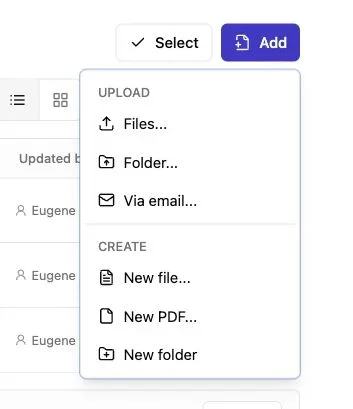
Note: Use the Add menu to upload files or a complete folder.
Create a bucket from the Revdoku dashboard. The bucket is a private workspace for source files, publication settings, versions, and activity. Creating it does not make the contents public.
Choose a name that will make sense in six months. 2026-tax-planning-guide is better than new-pdf. For several clients or campaigns, use one bucket per resource. This keeps access rules and visitor activity clear.
Then follow this sequence:
- Sign in to the Revdoku dashboard and create a new bucket.
- Give the bucket a descriptive internal name.
- Drag the PDF, presentation, template, or complete HTML folder into it.
- Wait for the upload to finish before leaving the page.
- Open the uploaded files and confirm that the expected pages and assets are present.
- Select the folder or content you want to publish.
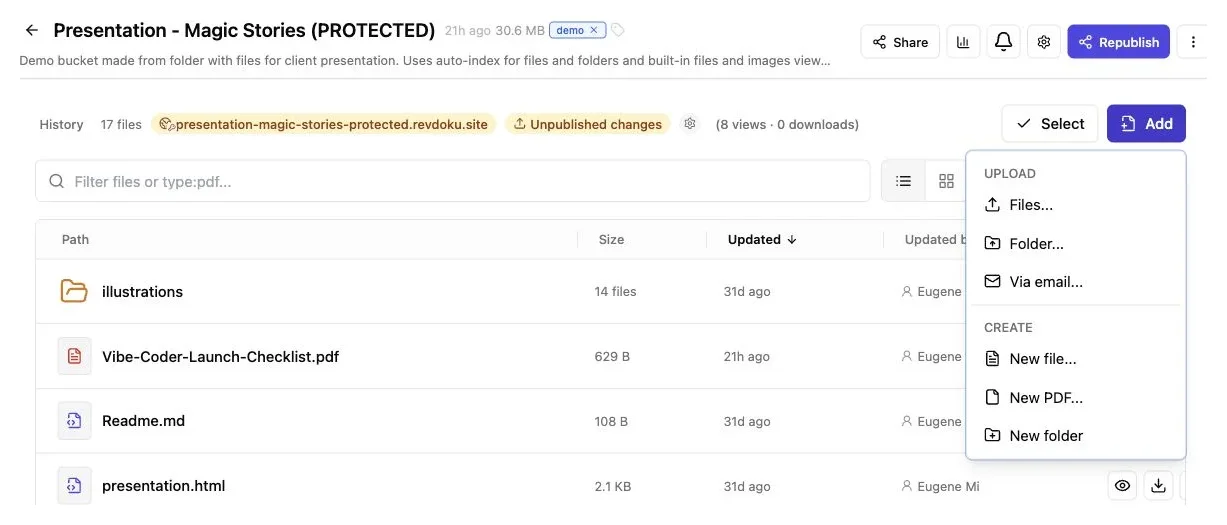
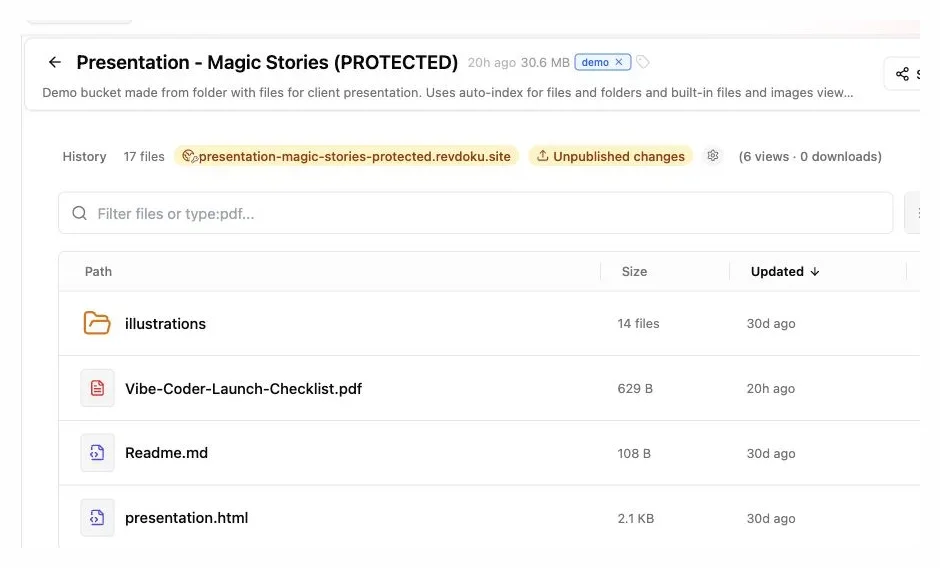
Upload the lead magnet as a file or folder, or create a new PDF directly inside the bucket.
You can publish a single PDF directly. A folder may contain Markdown, HTML, images, spreadsheets, PDFs, and supporting assets. Revdoku can generate browsable navigation and built-in viewers when there is no custom entry page, as shown in its document publishing example.
Do not place private working notes beside the public resource. Publish only the intended folder, then inspect the link. Files outside the selection remain private, but clear separation reduces mistakes.
4. Publish Lead Magnet Content With Verified Email
Publish the selected content with email protection. Verified-email access is more useful than accepting any typed address. With Revdoku’s one-time-code access, visitors must receive a code at the submitted address before entering. This creates a verified email download rather than a record of obvious fake addresses.
Configure the publication in this order:
- Open the bucket’s publishing or access settings.
- Choose the folder that contains the finished resource.
- Select email-gated access.
- Decide whether any verified address may enter or whether access should be limited to chosen addresses or a company domain.
- Add optional visitor questions only when the answers will affect your follow-up.
- Publish the resource and copy its live URL.
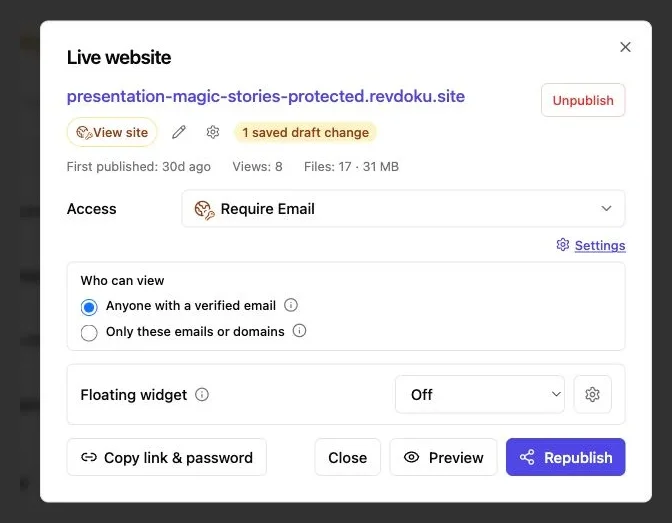
Require Email is selected here so visitors verify inbox access before opening the resource.
Optional visitor information may include a name, company, role, or short question. Do not ask for everything. Each extra field burdens the visitor and adds personal data to manage.
A practical gate for a general guide usually needs only the email address. A specialized agency report might also ask for a company name. A template intended for consultants could ask one short question such as, “What kind of client work do you deliver?” Keep the answer optional unless needed to provide the resource.
This gate proves current control of the inbox. It neither establishes legal identity nor grants permission for unrelated marketing. Treat those as separate matters.
5. Test the Email Gated PDF and Verified Email Download Experience
Never publish after testing only the owner view. Open the live link in a private window to follow a new visitor’s path. The process should be straightforward: open the link, enter an email, receive a code, and read or download the resource.
Test with an address you control:
- Gate: Is it immediately clear what the visitor will receive?
- Email: Does the one-time code arrive, and is the sender recognizable?
- Mobile: Can you enter the code and read the resource on a narrow screen?
- Preview: Does the PDF or document viewer load the correct content?
- Download: Does the downloaded file open with the intended name?
- Navigation: Do HTML pages, folders, images, and supporting links work?
- Recovery: Can a visitor request another code after a delay or typing mistake?
A verified-email download should feel simple. Avoid a long introduction, multiple required questions, and a confusing second call to action. State the offer in plain language: “Enter your email to open the 2026 Pricing Worksheet.”
For example, an independent consultant could send a 20-page benchmarking report. Visitors may read it in the browser, then download the PDF for later. An agency could publish an HTML campaign planner with a PDF brief inside the same folder. One link shows both resources without a collection of attachments.
Share the URL only after testing. A two-minute private-window check can catch the wrong access mode, missing assets, or an outdated document before prospects do.
6. Share the Link and Read Visitor Activity
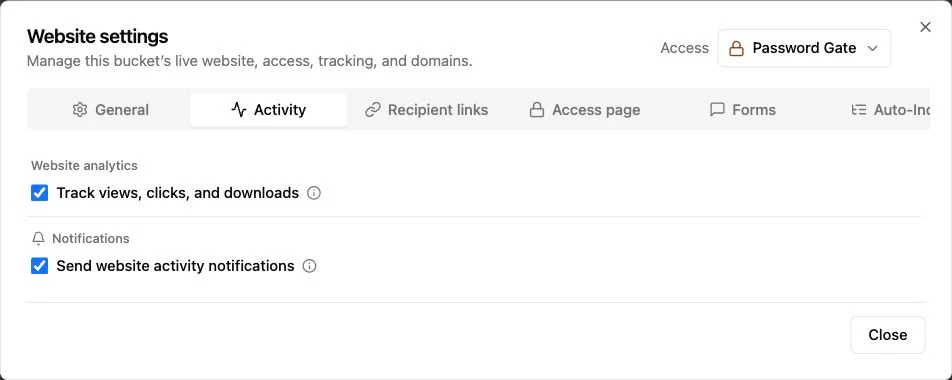
Note: Tracking and activity notifications are enabled from Website settings.
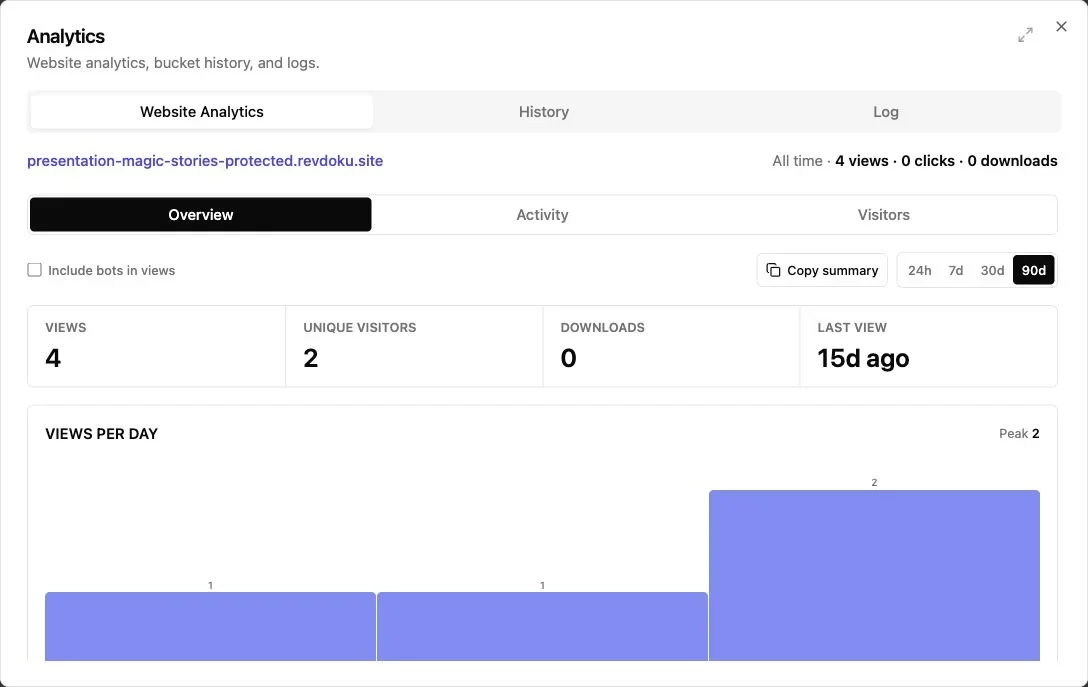
Note: The overview summarizes views, visitors, downloads, and recent activity.
After testing, place the stable link where your audience can find it. Add it to a portfolio, proposal, social profile, webinar follow-up, or direct message. Describe the result, not merely the format. “Estimate your project margin” is stronger than “Download our PDF.”
Revdoku reports activity for protected publications, including when a verified visitor enters, which pages they view, which links they click, and which files they download. Its product page describes notifications and per-visitor activity rather than vague traffic totals.
Use those signals with restraint:
| Activity | Reasonable Interpretation | Sensible Response |
|---|---|---|
| Opened once | The visitor reached the resource | No urgent action is required |
| Viewed several pages | The topic may be relevant | Prepare a useful, contextual follow-up |
| Downloaded the file | The visitor wanted an offline copy | Wait for an appropriate moment to contact them |
| Returned later | Interest may be continuing | Refer to the resource, not hidden tracking details |
| No activity | The link may have been missed | Check placement and offer clarity before blaming the content |
Notifications help with timing but cannot reveal intent. A download does not prove buying intent. Someone may save a report without reading it, while another may read it entirely without downloading.
Consider a small consultancy that publishes a project-scoping worksheet. A prospect who enters through verified email, reads the methodology, and downloads the worksheet gives the consultant more reason for a relevant note than an anonymous page view does. The follow-up can mention the worksheet’s problem without implying surveillance.
7. Update the Resource Without Sending a New Link
Lead magnets age. Prices change, screenshots become stale, links break, and a report written in January may be misleading by September. Traditional hosting often scatters copies across a media library, landing page, cloud drive, and old messages. Updating every copy is tedious and leaves outdated versions circulating.
A stable publication link simplifies updates. Update the bucket and republish at the existing URL. Revdoku states that bucket publications retain the same URL across updates and keep version history that can support rollback.
Use a simple update process:
- Edit the source document or static site locally.
- Export the revised PDF or rebuild the HTML folder.
- Give the internal edition a clear date or version number.
- Replace the old file in the bucket or upload the revised folder.
- Preview the publication before making the revision live.
- Republish at the existing URL.
- Open the live link in a private window and repeat the download test.
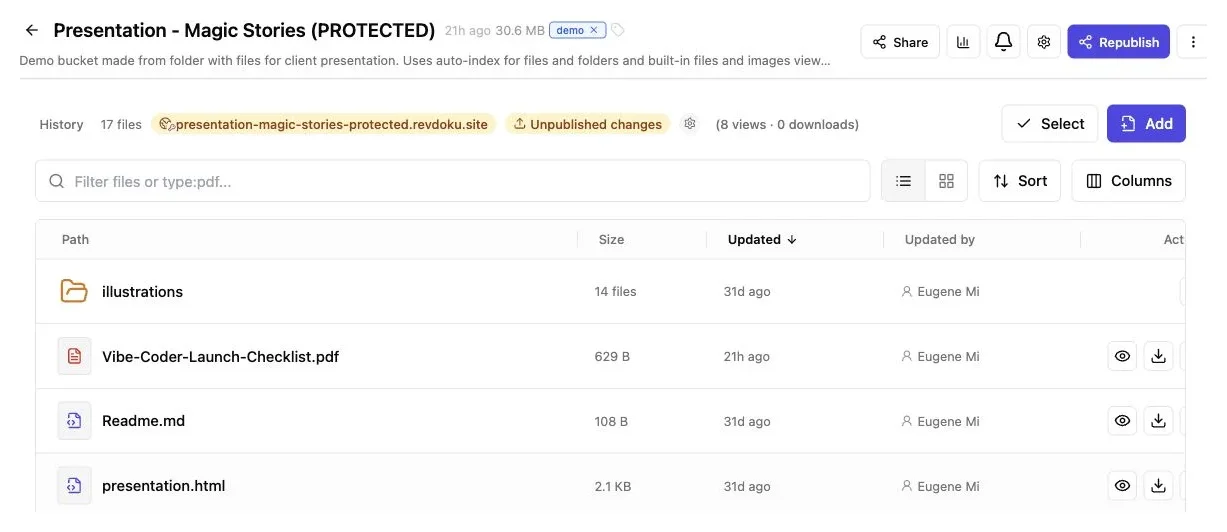
Replace or add files in the existing bucket and republish so the public URL remains unchanged.
A founder might publish a product-evaluation guide before a conference. Two weeks later, a comparison table needs correction. The founder can replace the guide without changing the link on event cards. An agency can do the same with a quarterly planning template embedded in months of client correspondence.
Keep the filename stable when continuity matters, but place the revision date inside the document. If an update changes the resource’s promise or purpose, review the gate copy. The link may remain, but visitors should receive what was offered.
8. Apply Basic Privacy and Security Practices
An email gate carries responsibility. Email addresses, access records, and visitor activity can be personal data. Collecting less is usually safest. The UK’s Information Commissioner’s Office describes data minimisation through three tests: information should be adequate, relevant, and limited to what is necessary. It also recommends periodic review and deletion of data that is no longer needed in its data minimisation guidance.
Apply that principle with this privacy review:
| Item | What to Check | Why It Matters |
|---|---|---|
| Purpose notice | Explain why the email is requested | Visitors should understand the exchange |
| Optional fields | Remove questions you will not use | Less collection means less exposure |
| Marketing consent | Keep resource access separate from promotional permission | A download is not blanket consent |
| Retention | Set a reasonable review or deletion schedule | Old lead records lose value and add risk |
| File contents | Remove confidential comments and metadata | Published files may travel beyond the gate |
| Access mode | Use an allowlist for restricted client material | A general lead gate is not suitable for every secret |
Revdoku’s privacy policy says bucket data is stored and processed in an EU data centre by default. It also notes that publication data, logs, analytics, technical information, and shared-link activity may be processed to operate the service. Bucket data can be deleted in the app, while some security, legal, backup, cached, or third-party copies may persist.
Never use confidential client documents as a general lead magnet. For a resource intended only for named recipients, limit access to approved email addresses or a company domain.
Remove tracked changes, hidden spreadsheet tabs, document comments, author details, and embedded source files before uploading. If you collect information across countries, seek appropriate legal advice rather than assuming one privacy notice fits every jurisdiction.
Final Thoughts on Lead Magnet Hosting Without WordPress
Host a lead magnet without WordPress as a controlled publication, not a miniature website. Prepare a focused resource, place it in a private bucket, publish the intended folder, and require verified email when visitor identity matters.
The strongest setup stays simple:
- Offer one clear result.
- Ask for only the information you need.
- Test the full gate and download path.
- Read activity as context, not certainty.
- Update the resource at the same stable link.
This method works for email-gated PDFs, reports, templates, presentations, and compact static HTML tools. It lets freelancers, consultants, agencies, and small teams publish, measure, and update lead magnets without maintaining WordPress or building a backend.
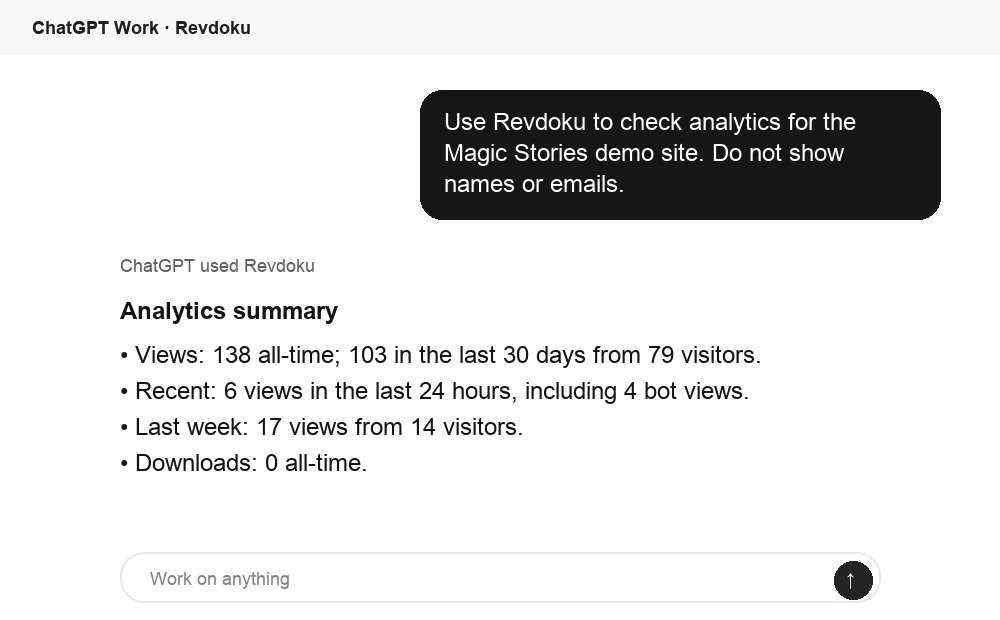
Ask ChatGPT to summarize lead-magnet activity
After the link is opened, ChatGPT can summarize Revdoku analytics for the published site. That turns viewing activity into a clearer follow-up or optimization signal.
Frequently asked questions
Can I publish more than a PDF?
Yes. Revdoku can publish folders containing HTML, Markdown, images, presentations, spreadsheets, PDFs, and related assets. A small static resource can include a browser page and downloads.
Do visitors need a Revdoku account?
Visitors receive a normal web link. With email-gated access, they use an emailed one-time code instead of creating a workspace account.
Is verified email the same as secure identity verification?
No. It confirms that the visitor can access the submitted inbox. It does not prove a legal name, employment status, or authority to receive highly confidential information.
Should every lead magnet require an email?
No. Use a public link when reach matters more than identification. Use a password for a known group that can safely share one secret. Use verified-email access when you need per-visitor attribution or want to restrict entry by address or domain.
Do I need the API, CLI, or an AI agent?
No. The dashboard is enough: create a bucket, add files, choose access settings, and publish. The API, command-line tools, and AI connections can automate repetitive publishing later.
What should I prepare before uploading a lead magnet?
Give the resource a descriptive filename, test every link, reduce unnecessary file size, and include a visible edition date. Also check it on both mobile and desktop, and remove comments, tracked changes, hidden data, and confidential metadata.
When should I use verified-email access instead of a public link?
Use verified email when you need to confirm inbox access, attribute activity to individual visitors, or limit entry by email address or company domain. Choose a public link when maximum reach matters more than knowing who opened the resource.
How much information should the access form request?
For most lead magnets, an email address is enough. Add a name, company, or short question only when the information will directly improve delivery or follow-up, and keep optional fields to a minimum.
How should I test the lead magnet before sharing it?
Open the live URL in a private browser window and complete the journey as a new visitor. Confirm that the verification code arrives, the preview works on mobile, downloads use the correct filename, and all pages, assets, and links load properly.
Can I update the resource without replacing links already shared?
Yes. Replace the file or upload the revised folder, preview it, and republish it at the existing publication URL. Keep the filename stable when useful, but place the new version or revision date inside the resource.
What does a visitor download or return visit tell me?
It suggests interest, but it does not prove that the visitor read everything or intends to buy. Use activity as context for a relevant follow-up, without referring to detailed tracking in a way that feels intrusive.
Is an email gate appropriate for confidential documents?
A general verified-email gate is suitable for controlled lead-magnet distribution, not highly confidential material. For restricted resources, use an allowlist or company-domain limitation, and never publish sensitive client documents as a general lead magnet.
Related Articles
Lead Magnet Hosting Without WordPress | Revdoku
Host lead magnets with verified email access, visitor insights, and a stable URL. Learn how to publish and update resources without WordPress.
Automate Daily AI Reports with Claude and Revdoku
Learn how to schedule a Claude routine, publish daily AI reports through Revdoku, and keep one durable bucket for updates.
Upload Files to a Revdoku Bucket by Email
Learn how to upload files to a Revdoku bucket by email, confirm processing, find imported attachments, and check the upload log.