Real Estate Listing Photo Requirements Checklist
Know the rules of your MLS
Each MLS (multiple listing service, the shared database of homes for sale) sets its own photo rules. The limits for file size, photo count and image size differ from one MLS to the next. Read the rules of your MLS before you upload. The examples below come from CRMLS, a California MLS, and from California law.
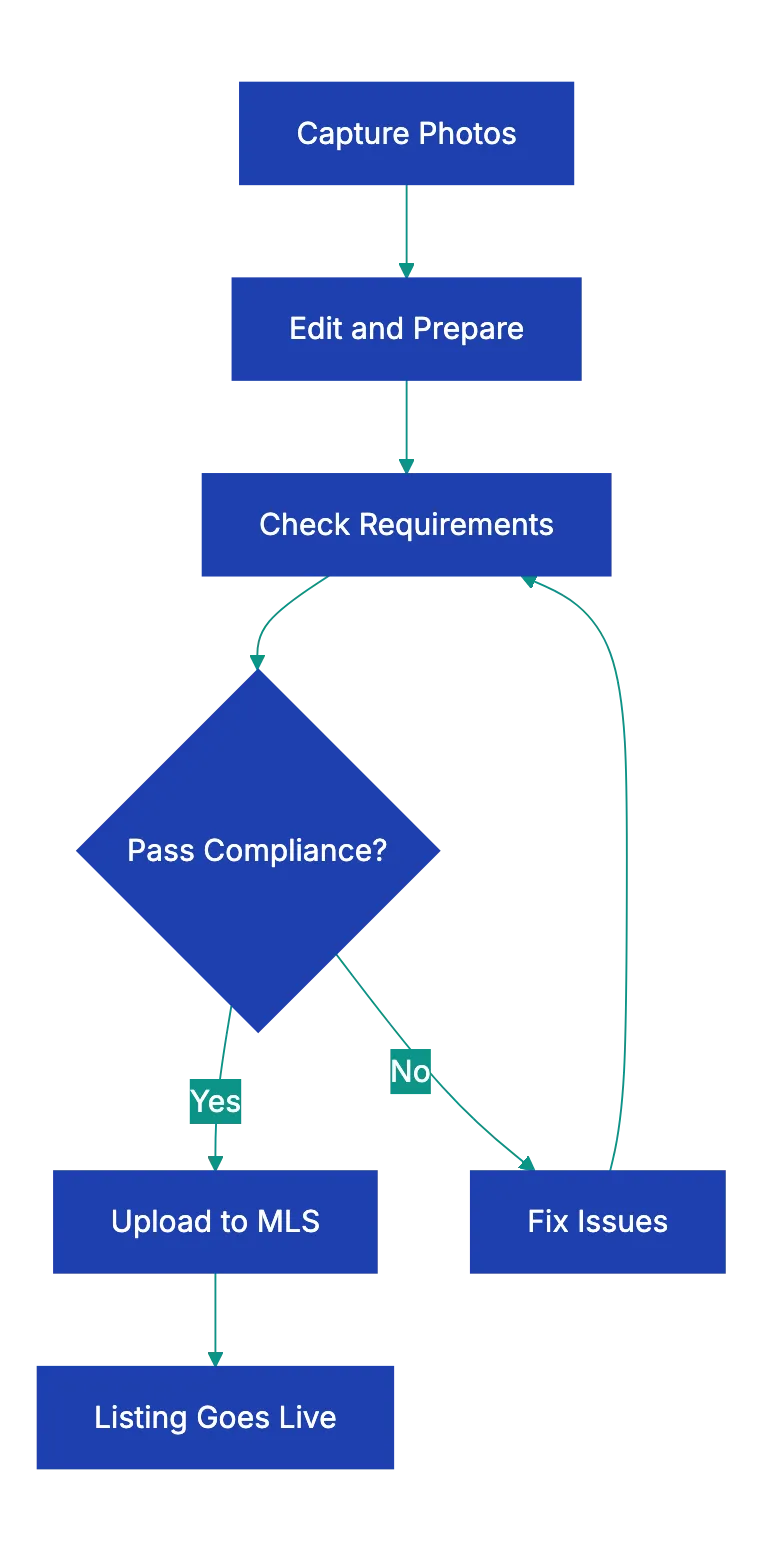
File and image quality checklist
- Each file is in a format that your MLS accepts. JPEG is the usual format. If your phone saves HEIC files and your MLS does not accept them, convert them to JPEG.
- Each photo meets the minimum image size and the maximum file size of your MLS.
- The number of photos stays within the limit of your MLS.
- The photos are horizontal (wider than tall). Most listing sites show photos in a wide frame.
- Vertical lines are straight. A wide-angle lens bends walls and door frames. Stand farther back, or correct the lens distortion in your editing software.
- All interior photos have a similar color. Set the white balance so that one room does not look blue and the next one orange.
- All lights are on, and the blinds and curtains are open.
MLS rules and compliance checklist
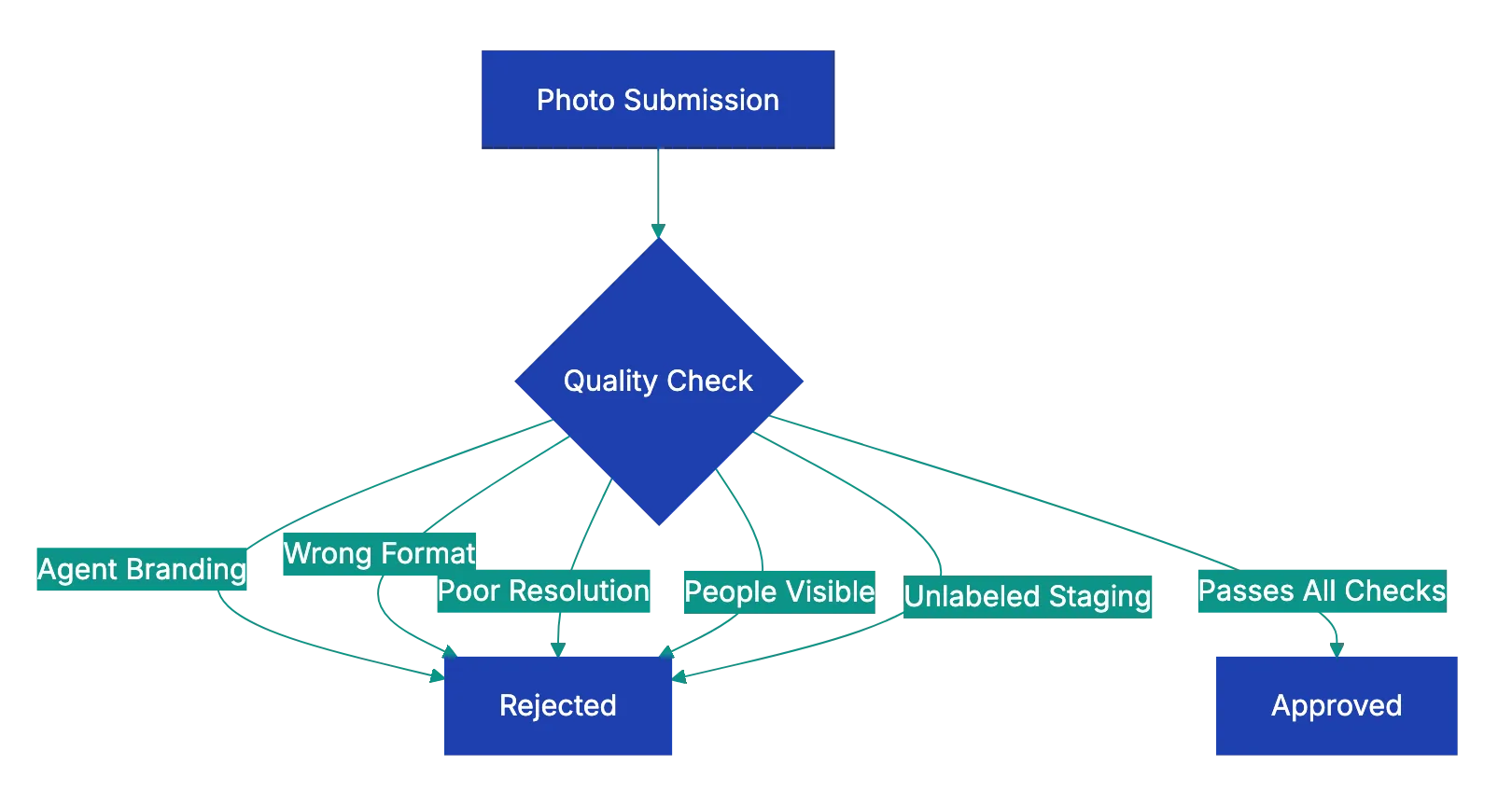
- At least one photo shows a large part of the exterior of the property. CRMLS requires this photo, but it does not have to be the first photo.
- The photos have no branding. CRMLS counts signs, contact information, identifiable persons, logos, slogans, external links and team names as branding. A “For Sale” sign also counts. At CRMLS, branding leads to removal of the photo, a citation and a fine.
- No identifiable people appear in the photos, also in mirrors and windows.
- You own the photos or have written permission to use them. For photos from a photographer or from the seller, get a written license. Do not copy images from Google, Bing or another listing.
- Each digitally altered photo has the disclosure that your MLS and your state require. Virtual staging counts as a digital alteration.
- No edit hides damage. If an edit adds, removes or changes furniture, flooring, walls or the view through a window, treat the photo as digitally altered.
- Personal items and private information are out of view: family photos, mail, names, security codes, medicines and valuables.
California has a law for this. Since January 1, 2026, Business and Professions Code section 10140.8 applies to real estate agents. If an agent uses a digitally altered image in an advertisement, the agent must disclose it and give a link to the original, unaltered image. Changes to lighting, sharpness or white balance alone do not count as alterations. The San Diego MLS summary explains how one MLS applies the law. If you use an AI tool to stage a room or remove objects, the result is a digitally altered image.
Room coverage checklist

- The front exterior, in daylight.
- The kitchen, from a corner, with the counters, the appliances and the layout in one shot.
- The living and dining areas. For an open floor plan, one wide shot shows how the rooms connect.
- The primary bedroom, with the bed made and the nightstands clear.
- Each bathroom, with the toilet lid down, toiletries put away, fresh towels and the lights on.
- The other bedrooms and the home office.
- Special features, for example a pool, an outdoor kitchen, a finished basement, a walk-in closet or a view.
- The back yard and other outdoor areas.
Photo order checklist
- The sequence starts with the front exterior or the strongest photo of the home. Buyers see the first photos first.
- The kitchen or the main living area comes next.
- The rest follows a walk through the home: the main floor, the upper floor, the basement, then outside.
- The set has no near-duplicate photos. Use fewer, better photos rather than many similar ones.
- Each photo has a caption if your MLS allows captions, for example “Primary bedroom with walk-in closet.”
Use this checklist with Claude or ChatGPT
You can use this checklist with a general AI assistant, such as Claude or ChatGPT. Upload the listing photos, paste this checklist and paste the photo rules of your MLS. Then ask the assistant to go through each item for each photo. Here is an example prompt:
Below are the photo rules of my MLS and a listing photo checklist.
I uploaded the photos for one listing, in the order I plan to use.
For each photo, list any problem: branding, signs, people or
reflections of people, personal items, crooked vertical lines, dark
rooms or signs of digital alteration.
Then list the rooms and features from the checklist that no photo
shows, and suggest a better order for the photos.
Look at the file format, the pixel size and the file size in the file properties on your computer. The assistant cannot always read them from an uploaded photo. Look at each flagged photo yourself before you change it. The assistant can miss a small logo or a reflection, and it can report a problem that is not there. Your MLS rules have the final word.
Upload only photos that you have the rights to use. Do not upload photos that show personal documents of the seller. The service keeps a copy of what you upload, so look at the data settings of your workspace.
A docs portal with Ask AI
and support tickets
Connect a repository, or describe your product to start. Each docs site has search, Ask AI, an API console, an MCP server and support tickets.
- Publishes from GitHub on every push
- Works with Mintlify repositories
- API console from your OpenAPI file
- MCP server and llms.txt for AI agents
- Ask AI and support tickets
- Analytics for people and AI agents
Frequently Asked Questions
Can I reuse photos from an earlier MLS listing of the same home?
Not on CRMLS. Its rules forbid photos copied from another listing, even with the permission of the owner. Get the original files from the photographer or the owner, with written permission to use them. Other MLSs have their own rules, so read yours.
Can the seller ask to keep photos off the MLS?
On CRMLS, yes. The seller must give written instructions, and CRMLS Compliance must receive them within two calendar days after the listing is entered. Other MLSs have their own process.
Related Articles

Boost eBay Sales with Quality Listing Photos
eBay listing photo rules: size, file formats, the 24-photo limit, what eBay does not allow, and a photo checklist to use before you publish.

Maximize Bookings with Great Airbnb Photos
An Airbnb listing photo checklist: the photo rules from Airbnb, a shot list for each room, and the items to look at before you upload.
Essential Rental Inspection Photo Checklist
A room-by-room rental inspection photo checklist for move-in and move-out, how to take the photos, and two examples of deposit rules.