
Invoice Verification: Protect Your Business From Errors
Invoice review checklist
Use this checklist before you approve a supplier invoice for payment. It is for the accounts payable (AP) team, the team that pays supplier invoices. A purchase order (PO) is your document that approves a purchase.

Vendor details
- The vendor name matches your vendor record exactly
- The address and the tax ID match your records
- The bank details match the bank details on earlier invoices
- A new vendor went through your setup process before the first payment
Invoice number and dates
- You did not pay this invoice number before
- The invoice number fits the usual pattern of the vendor
- The invoice date is not earlier than the delivery date
- The due date matches your payment terms, for example Net 30 (payment due 30 days after the invoice date)
- The delivery or service dates match your receiving records
- The invoice date is inside the validity period of the PO
Match with the PO and the receiving record
- A valid PO exists, and the invoice gives its number
- The items, quantities and unit prices match the PO
- The invoiced quantities match the quantities that you received
- For services, the hours or deliverables match the timesheets or a completion report
- The discounts and payment terms match the PO
Math and tax
- Each line total equals the quantity multiplied by the unit price
- The line totals add up to the subtotal
- Each discount is calculated correctly
- The tax rate is correct for the location and the type of goods or services
- Tax-exempt items have no tax
- The total equals the subtotal plus tax minus discounts
Red flags
- New or changed bank details
- Pressure for an urgent payment or a wire transfer
- Vague lines, such as “consulting services”, with no detail
- A vendor that you did not pay before
- A change in the usual pattern, for example weekly invoices from a vendor that bills monthly
- A round total, such as 5,000.00, with no line detail
If an invoice fails an item, do not pay it yet. Ask the vendor or the person who ordered the goods to explain the difference.
Stop the payment if the bank details changed
Business email compromise (BEC) is an email scam that redirects payments. The criminal pretends to be a vendor or an executive and asks for a payment to a new account. The FBI IC3 report for 2025 shows more than $3 billion in reported BEC losses for that year.
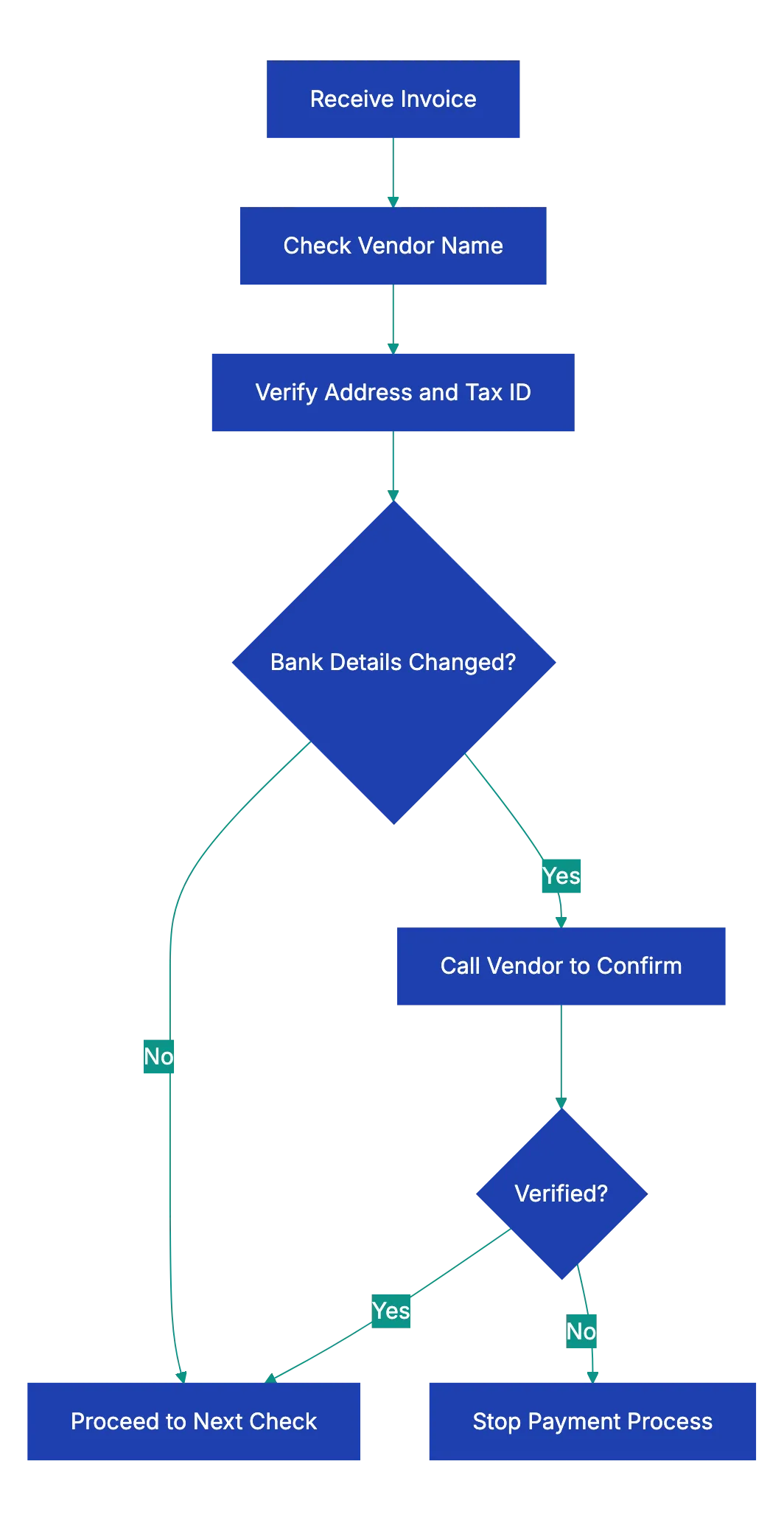
- If an invoice or an email shows new bank details, stop the payment.
- Call the vendor at a phone number from your own records.
- Do not use the phone number or the links in the email or on the invoice.
- Ask your known contact at the vendor if the change is real.
- Pay to the new account only after your known contact approves the change.
- Write down whom you called, when, and what the person said.
Three-way matching
Three-way matching compares three documents before you pay:
- The PO shows what you agreed to buy and at what price.
- The receiving record shows what arrived. Examples are a signed packing slip, a delivery receipt or a service sign-off.
- The invoice shows what the vendor asks you to pay.
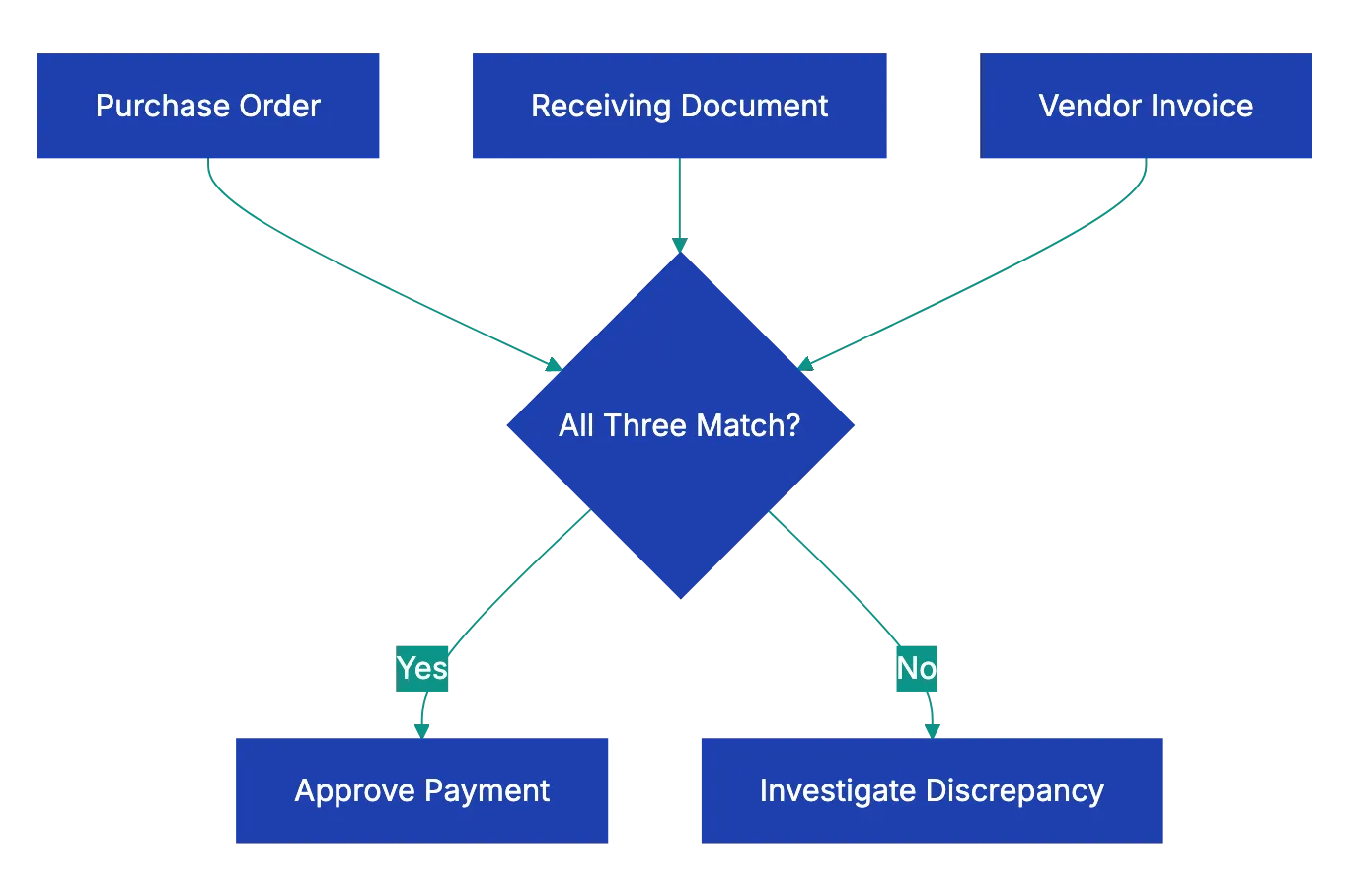
If all three documents match, you can approve the payment. If they do not match, investigate before you pay. Pay only for what you received. For example, if the invoice shows 100 units and the receiving record shows 87, pay for 87. Then ask the vendor for a corrected invoice.
Some teams use two-way matching (PO and invoice only) for small purchases. Other teams add an inspection report for a four-way match. Three-way matching also separates the duties. Purchasing creates the PO, the receiving team records the delivery, and AP pays.
Look closer at red flags
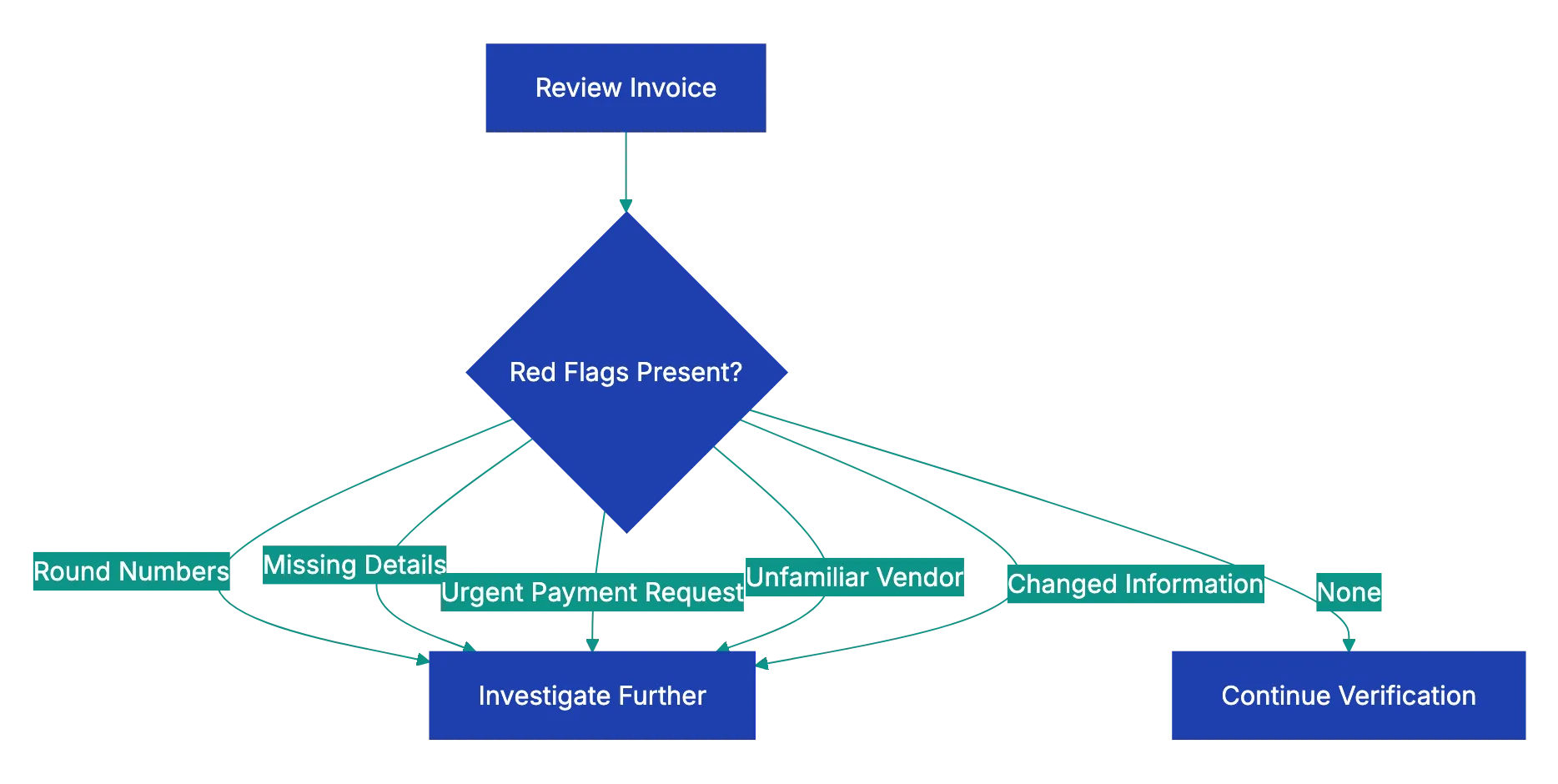
A red flag does not prove an error or fraud. It tells you to look closer before you pay. A round total can be correct, for example a fixed monthly fee. A new vendor can be real. In each case, get the missing detail or make sure that the vendor is real before you approve the payment.
Controls for your AP process
- Set approval limits by amount, for example one approver for small invoices and two approvers for large invoices.
- Review your vendor records at a fixed interval and remove old addresses and contacts.
- Write down how you made sure that each new vendor and each bank change was real.
- For US vendors that you report on Form 1099, collect a Form W-9 before the first payment.
- If you file information returns, use IRS TIN Matching to make sure that each name and taxpayer ID match.
- Audit a sample of paid invoices at regular intervals.
- Do not skip steps at month-end or because a senior manager asks for a fast payment.
- Follow up on small overcharges that repeat. Over many invoices, they add up.
Use this checklist with Claude or ChatGPT
Claude or ChatGPT can do a first comparison of an invoice with its PO and receiving record. Paste this checklist into a new chat. Add the invoice, the PO and the receiving record as text or PDFs. Then ask for a line-by-line match. For example:
Below is my invoice review checklist, a vendor invoice, our purchase
order and the packing slip. Match every invoice line to the PO and
the packing slip. List any difference in item, quantity, unit price,
discount, tax or dates. Recalculate all totals and show the math.
Mark each checklist item OK, MISSING or MISMATCH.
Before you approve the invoice, read these cautions:
- Recalculate the totals yourself. The AI can make arithmetic mistakes or misread a number in a scan.
- Do not use the AI to approve a change of bank details. The AI cannot know if the change is real. Call a known contact at the vendor instead.
- Remove bank account numbers and tax IDs before you upload documents. Also read the data settings of your workspace.
A docs portal with Ask AI
and support tickets
Connect a repository, or describe your product to start. Each docs site has search, Ask AI, an API console, an MCP server and support tickets.
- Publishes from GitHub on every push
- Works with Mintlify repositories
- API console from your OpenAPI file
- MCP server and llms.txt for AI agents
- Ask AI and support tickets
- Analytics for people and AI agents
Frequently Asked Questions
What does 2/10 net 30 mean on an invoice?
It is an early payment discount. You can take 2% off the invoice if you pay within 10 days. Otherwise, the full amount is due 30 days after the invoice date. Make sure that the discount on the invoice matches the terms on the PO.
How long do we keep paid invoices?
In the US, the IRS says to keep records for 3 years in most cases. Some cases need longer, for example 7 years for a bad debt deduction. Your state, your auditors or your contracts can require longer periods.
Related Articles
Invoice Line Item Sum Checklist
A step-by-step checklist for invoice line items. Test the row arithmetic, subtotal, tax and amount due, and run it with Claude or ChatGPT.

Comprehensive Expense Report Approval Checklist
An expense report approval checklist: completeness, receipts, business purpose, policy limits, math and red flags, with IRS receipt and timing rules.