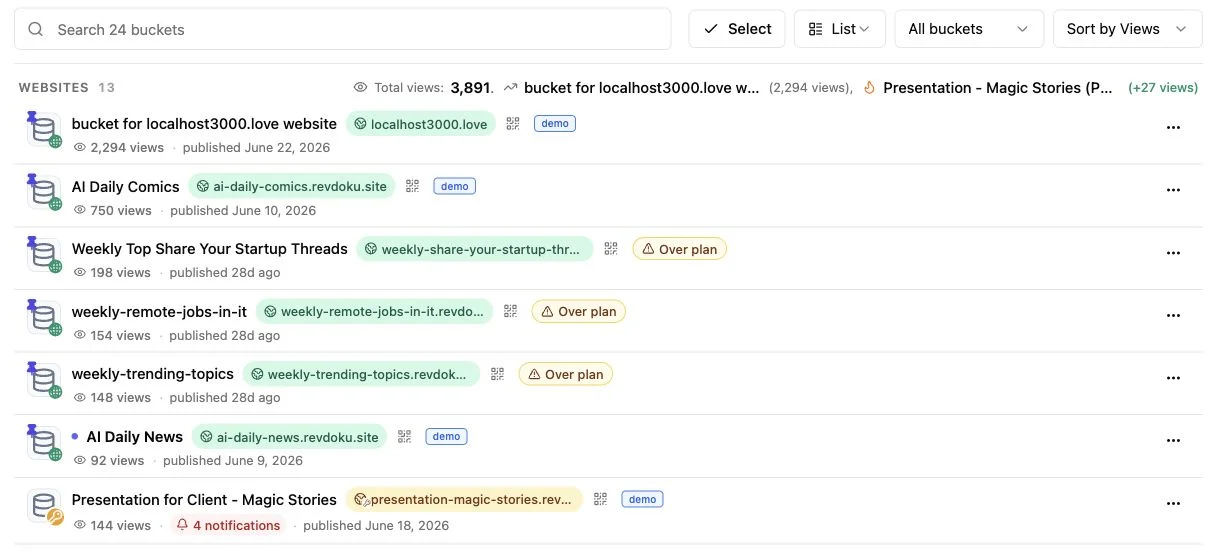
AI Agent Website Hosting: Runtime vs Static
Table of Contents
- AI agent website hosting starts with one distinction
- Agent runtime hosting versus static AI website hosting
- When you need agent runtime hosting for an AI agent website
- When static AI website hosting is enough
- How to publish from an AI agent to Revdoku
- Manual AI-generated website publishing remains the primary Revdoku path
- Four practical AI agent website hosting examples
- Protect the link, then use the viewing signals
- Common publishing mistakes and a final QA pass
- Final thoughts on AI agent website hosting
- AI agent website hosting starts with one distinction
- Agent runtime hosting versus static AI website hosting
- When you need agent runtime hosting for an AI agent website
- When static AI website hosting is enough
- How to publish from an AI agent to Revdoku
- Manual AI-generated website publishing remains the primary Revdoku path
- Four practical AI agent website hosting examples
- Protect the link, then use the viewing signals
- Common publishing mistakes and a final QA pass
- Final thoughts on AI agent website hosting
AI agent website hosting starts with one distinction
TL;DR: Use agent runtime hosting for live computation and static AI website hosting for finished files. AI agent website hosting covers two jobs: running an agent to call a model, use tools, store state, and answer new requests; or publishing its finished files at a live URL. Confusing them can mean the wrong host, exposed secrets, or an unwieldy client link.
This guide shows when to use agent runtime hosting, when static hosting is enough, and how to publish from an AI agent without treating Revdoku as compute. The simpler path is to put a PDF, deck, demo, or folder in a private Revdoku bucket, choose access, and share a stable link. Automation is optional.
Agent runtime hosting versus static AI website hosting
A runtime executes server-side code after deployment: receiving events, loading credentials, calling APIs, and perhaps reading or writing a database. AWS describes its Lambda runtime as a language-specific environment passing invocation events and responses between the service and your function, compute with a lifecycle and resource limits. AWS Lambda documentation gives a clear example.
Static publishing serves finished HTML, CSS, JavaScript, images, PDFs, and CSV exports. Browser JavaScript can still power filters, charts, or calculators. The host does not run your Python process, model loop, queue worker, or private API logic.
| Question | Agent runtime host | Static output publisher |
|---|---|---|
| What runs after a visitor arrives? | Server code, model calls, tools, or jobs | Files load; optional JavaScript runs in the browser |
| Where do secrets live? | Protected server environment | They must not be in published files |
| Typical state | Database, memory, queue, session | Versioned files and publication settings |
| Operations work | Logs, scaling, timeouts, dependencies | File updates, access rules, link analytics |
| Revdoku fit | No arbitrary runtime | Yes, for reviewed files and static sites |
Revdoku hosts the result, not the autonomous process that produced it.
When you need agent runtime hosting for an AI agent website
You need runtime hosting when a visitor’s action must trigger trusted server code, such as when a prospect asks a research agent a new question. The system must send the prompt to a model, retrieve private records, enforce permissions, and return a fresh answer, work a static folder cannot safely do.
You need runtime hosting:
- Live model calls: every user request needs a new model response.
- Private credentials: the application uses model, CRM, payment, or database keys.
- Server-held state: users have accounts, sessions, histories, or saved work.
- Background work: queues, scheduled jobs, webhooks, or long tasks continue without an open browser.
- Controlled actions: the agent sends messages, changes records, or triggers other systems.
Run that layer on a container platform, serverless function service, managed agent platform, or VPS, each with real compute limits. For example, Cloudflare Workers currently documents 128 MB of memory per isolate, while CPU allowances vary by plan and invocation type. Cloudflare’s limits show why runtime sizing, retries, logs, and failure handling matter.
Revdoku does not run Node.js, Python, containers, databases, or open-ended agent loops. It can publish a client-facing brief or static demo, but the runtime belongs elsewhere.
When static AI website hosting is enough
Static AI agent website hosting fits work completed before anyone opens the link: a deliverable, not a request for more computation. This covers much of what freelancers, consultants, agencies, and small teams send clients.
Good static outputs include:
- A proposal in PDF plus a short HTML cover page.
- A presentation with images, notes, and supporting spreadsheets.
- A browser demo built from HTML, CSS, and JavaScript.
- A generated report with charts, CSV data, and a methodology page.
- A documentation folder with Markdown, media, and downloadable files.
A static demo can offer browser-based tabs, local search, charts, form validation, and calculations. It cannot safely contain a private key or unrestricted backend credential.
Before publishing, test the output from a stranger’s perspective. Google’s Largest Contentful Paint target is 2.5 seconds or less for at least 75% of visits. Google’s LCP guidance is a useful target for image-heavy demos. WCAG 2.2 calls for at least 4.5:1 contrast for ordinary text and resizing to 200% without content loss. WCAG 2.2 applies whether a human or an agent wrote the page.
Static hosting is simpler because the risky compute step has already ended.
How to publish from an AI agent to Revdoku
Revdoku supports connections for agents with different file access. Create an account and choose the connection matching the output’s location.
-
Start with copied connection instructions. In the dashboard’s New menu, choose Copy Instructions for AI and paste the message into your supported AI tool.
-
Choose the right transport.
- Hosted MCP uses OAuth for cloud agents calling a remote connector.
- The local Revdoku client or stdio MCP lets command-line agents read local folders, including binary files.
- The REST API serves custom scripts, CI jobs, backend workers, and scheduled automation.
-
Create or select a bucket. Store its ID so later runs update the intended destination.
-
Upload and publish finished files. For a local folder, use the documented CLI form revdoku p followed by the directory. Because hosted MCP cannot browse your disk, use the local client for machine-only sources.
-
Republish after changes. Republishing keeps the live URL stable, avoiding another client email.
The Revdoku API and connection guide explains the current MCP endpoint, direct uploads, bucket operations, analytics, and OAuth flow. The connection publishes from an AI agent but does not make Revdoku its runtime. Never put an API key in a prompt, log, or published folder.
Manual AI-generated website publishing remains the primary Revdoku path
Revdoku requires no agent; for occasional client work, manual publishing is often shortest. It also lets you inspect exactly what will be shared.
- Create a bucket in the dashboard.
- Drag in a PDF, presentation, file set, or complete folder.
- Review files and choose public, password-protected, or email-gated access.
- Publish and send the generated link.
- Later, replace or add files and republish at that link.
- Check open notifications, visitor activity, downloads, and captured leads.
AI agent website hosting should not complicate a simple handoff: a designer sending one deck does not need MCP, and a consultant updating a quarterly report may need only drag and drop. An agency publishing the same preview daily may save time by connecting an agent.
Manual uploads, the CLI, hosted MCP, and the API all use Revdoku buckets and the same controlled sharing model. Revdoku’s document publishing guide shows how a folder can become a navigable site with built-in viewers. Start manually; automate when repetition justifies it.
Four practical AI agent website hosting examples
These are representative workflows, not named-customer claims. They mark where runtime ends and shared output begins.
| Scenario | What produces the work | What Revdoku publishes | Useful signal |
|---|---|---|---|
| Freelancer sends a 12-page proposal | An agent drafts copy; the freelancer reviews pricing | PDF plus an HTML introduction behind an email gate | Named open, pages viewed, and scope download |
| Agency shares a browser prototype | A coding agent builds static HTML, CSS, and JavaScript | Password-protected demo folder | Return visits and clicks before the review call |
| Consultant refreshes a Monday report | A scheduled agent runs elsewhere at 08:00, creates charts, and calls the API | Updated report in the existing bucket | Which client viewed the new pages |
| Founder offers a live support agent | A runtime host handles model calls, sessions, and private tools | A static sales page or recorded demo only | Page interest; the live agent remains on its runtime |
The third example shows the pattern: a scheduler wakes the agent on a compute service. The agent gathers data, generates static output, and updates a known bucket; Revdoku serves and measures that reviewed output at the same URL.
The fourth example draws the same boundary. When visitors expect a new answer, persistent memory, or a private system action, use runtime hosting, not a model key hidden in browser JavaScript.
Protect the link, then use the viewing signals
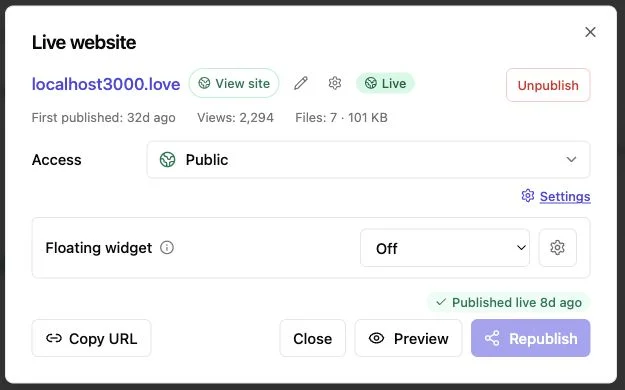
Match access to the audience and the work’s sensitivity.
- Public access suits material meant for broad discovery.
- Password access suits groups that can receive the shared secret separately.
- Email-gated access suits proposals, decks, and demos where identity and lead records aid follow-up.
Protected open notifications show when attention is fresh.
Per-visitor analytics show pages viewed, clicks, and downloads, more useful than generic page-view totals, but evidence of behavior rather than intent. A client who opens pricing twice and downloads the scope gives you reason to follow up, not an agreement to buy.
Built-in feedback and contact forms create a two-way exchange without your own backend. Form submissions stay with the bucket and can trigger notifications, as described in Revdoku’s no-backend form guide.
Treat agent access with the same care as visitor access. NIST defines least privilege as giving a user or process only the access needed for its assigned task. NIST’s definition supports a simple rule: connect an agent only to the buckets it needs, prefer OAuth or scoped credentials, and revoke access when the automation ends.
Common publishing mistakes and a final QA pass
Most mistakes come from choosing the wrong boundary or skipping review. A five-minute check can prevent public secrets, broken demos, or updates sent to the wrong client.
| Mistake | What goes wrong | Better action |
|---|---|---|
| Treating Revdoku as a runtime | Server code, model calls, or database features do not run | Put compute on a runtime host; publish only its static output |
| Publishing source instead of output | Visitors see project files or a blank page | Build first, then upload the finished dist, build, or public folder |
| Putting secrets in JavaScript | Anyone can inspect the browser bundle | Revoke the secret and move the call behind a trusted server |
| Giving an agent broad account access | A mistaken instruction can affect unrelated work | Use the narrowest bucket access and keep destructive actions human-approved |
| Creating a new bucket for every edit | Links fragment and clients open old versions | Update and republish the existing bucket ID |
| Trusting generated files without review | Claims, names, totals, links, or accessibility may be wrong | Check the live URL on desktop and mobile before sharing |
Static JavaScript can call APIs designed for browser access if it exposes no private credential. An agent can update the site by targeting and republishing the existing bucket. Revdoku cannot run the agent’s Python or Node process. That boundary simplifies the AI agent website hosting choice.
Final thoughts on AI agent website hosting
Separating ongoing computation from finished output makes AI agent website hosting easier to choose. Use a runtime platform for agents that must wake, call models, hold secrets, save state, or act on visitor requests; use static publishing for finished reports, decks, demos, documentation, or browser-ready sites.
Revdoku fits static publishing. It gives reviewed output a stable link, access controls, open notifications, per-visitor analytics, lead records, and built-in forms. Dragging files into a bucket remains the simplest starting point. For repetitive publishing, use supported MCP, CLI, or API connections to create and update the same buckets. The promise: publish from an AI agent when useful without confusing controlled sharing with an arbitrary agent runtime.
Frequently asked questions
How do I decide between runtime hosting and static hosting?
Use runtime hosting when visitors need fresh AI responses, private data access, saved sessions, or server-side actions. Choose static hosting when the agent has already produced finished files that only need to be displayed or downloaded.
Can Revdoku run my AI agent or backend code?
No. Revdoku publishes completed files and static websites, while Python, Node.js, model calls, databases, queues, and other backend processes must run on a separate compute platform.
Can a static website include interactive features?
Yes. Browser-side JavaScript can provide charts, search, tabs, validation, and calculations, provided those features do not require protected server credentials or trusted backend logic.
How should I handle API keys and other secrets?
Keep secrets in a protected server environment and never include them in uploaded files, browser JavaScript, prompts, or logs. If a credential is accidentally published, revoke it promptly and move the related operation behind a trusted backend.
Should I publish manually or automate the process?
Manual upload is usually best for occasional deliverables because it is simple and allows a final review. Use the CLI, MCP connection, or API when publishing is frequent, scheduled, or part of an established workflow.
Can I update published files without changing the client link?
Yes. Update the existing bucket and republish it so the live URL remains stable, rather than creating a new bucket for every revision.
What should I check before sharing a published AI-generated site?
Open the live URL on desktop and mobile, verify links and downloads, and review names, figures, claims, and accessibility. Confirm that only finished files are present, that no secrets are exposed, and that the access setting matches the intended audience.
Related Articles

GitHub Pages Password Protection and Privacy
Learn why private repositories do not protect Pages sites and compare secure access options for internal teams and external clients.

How to Password Protect a Vercel Deployment
Learn how to secure Vercel deployments with password protection, authentication, trusted access, or protected Revdoku hosting.

How to Password Protect a Website Made with Claude
Learn how to export, secure, publish, and test a Claude-made website using password protection or verified-email access.