Why SaaS Agreements Require More Than a Click
Table of Contents
- The SaaS agreement checklist
- Price
- Term, renewal, and cancellation
- Your data
- Security and privacy
- Service level and support
- Liability and changes
- How much review a purchase needs
- Price and renewal
- Automatic renewal and the cancellation window
- Data ownership and export
- Security and privacy
- Data processing agreement
- Breach notice
- Data location
- Audit reports
- Uptime and service credits
- Liability and indemnity
- Red flags
- Use this checklist with Claude or ChatGPT
The SaaS agreement checklist
Find the answer to each item before you click “I agree” or sign an order form. The answers are in four documents. They are the terms of service, the order form (your plan, price, and term), the service level agreement (SLA), and the data processing agreement (DPA). If you cannot find an answer, ask the vendor in writing.
The SLA is the promise of the vendor about uptime and support. The DPA is the contract about how the vendor handles personal data for you.
Price
- The total cost for one year at your real usage (users, seats, contacts, storage, or API calls)
- The overage charges (fees for usage over the plan limit) and the limits that start them
- One-time fees for setup, onboarding, training, or migration
- Paid add-ons that you need, for example premium support, single sign-on (SSO), API access, or extra environments
- Surcharges for a payment method
- The renewal price, and a cap on increases
Term, renewal, and cancellation
- The length of the first term
- Automatic renewal, and the length of the renewal term
- The notice period to cancel before renewal, and the method for the notice (in the app, by email, or by letter)
- Early termination fees
- The right to leave without a penalty after a missed SLA or a material change (a change that affects how you use the service)
Your data
- You own your data, and the vendor has only a license to use it to provide the service
- You can export all data in a standard format (CSV, JSON), with notes, history, attachments, and custom fields
- The time that the vendor keeps data after cancellation, and the deletion date
- Whether the vendor can use your data for other purposes, for example to train AI models
Security and privacy
- Where the vendor stores and processes data
- Encryption in transit and at rest
- An independent audit report, for example SOC 2 Type 2, or a certification, for example ISO/IEC 27001
- A DPA, if the vendor handles personal data for you
- A breach notification deadline in hours, not “within a reasonable time”
- A list of subprocessors (other companies that process your data for the vendor), and how the vendor tells you about changes
Service level and support
- The uptime commitment, and how the vendor measures uptime
- Service credits (discounts for missed uptime), and the cap on credits
- Scheduled maintenance windows (usually not counted as downtime)
- Support hours, channels, and response times for each severity level
Liability and changes
- The liability cap (the maximum that the vendor pays you for damages), and the exclusions from it
- An indemnity from the vendor against intellectual property claims (the vendor defends you and pays the costs)
- Whether the vendor can change terms, prices, or features during your term, with how much notice, and if you can leave after a change
How much review a purchase needs
Not every subscription needs a lawyer. Match the effort to the loss that a bad agreement can cause.
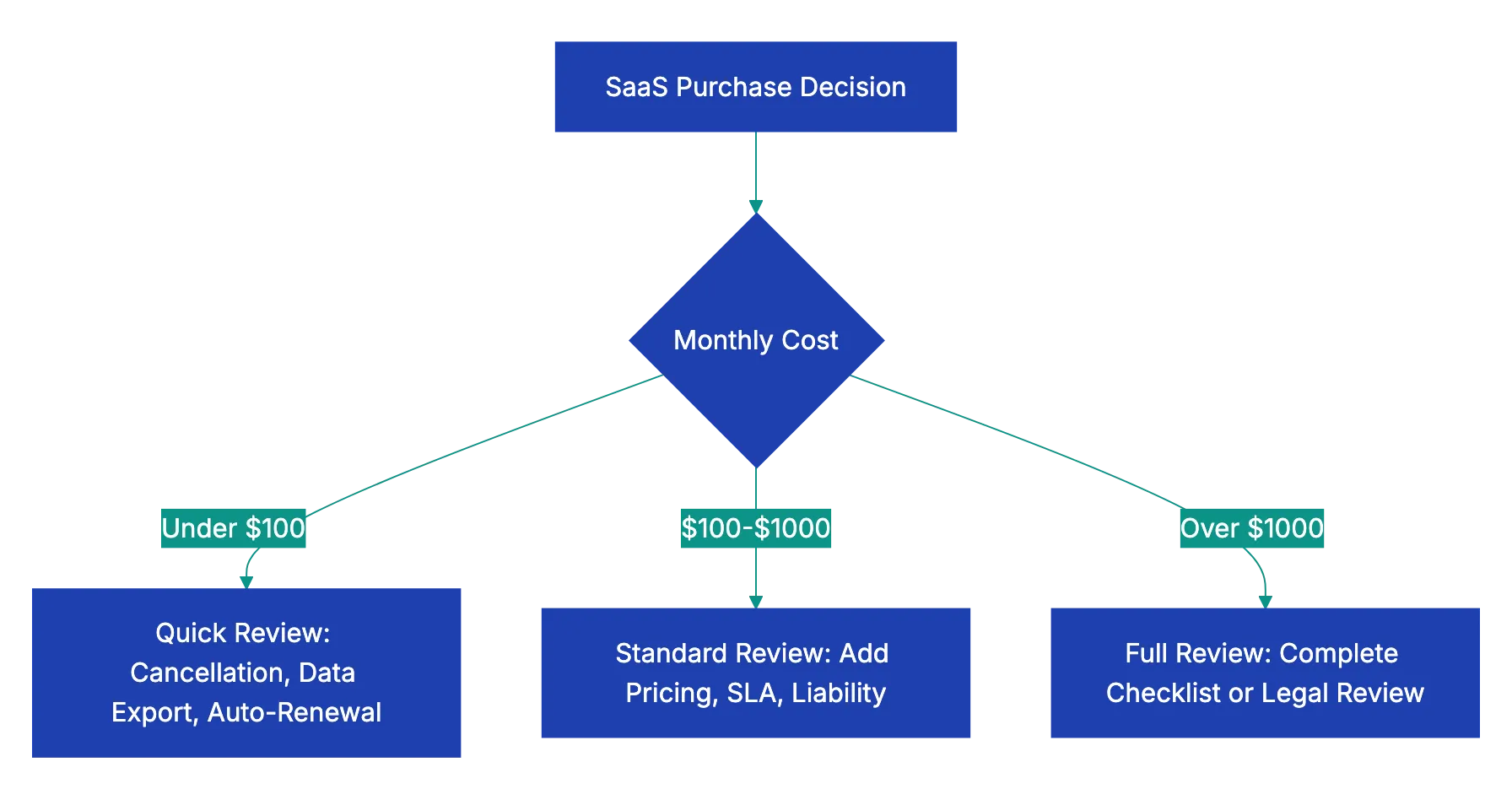
Use the full review for each tool that keeps sensitive or regulated data, at any price.
Price and renewal
Calculate the cost for your team. At $25 for each user each month, ten users cost $3,000 for one year. Then add the costs that the pricing page does not show: usage limits, overage rates, paid support, and setup fees. Your plan can include a fixed number of contacts or documents. If your business grows, the overage rate can be more important than the base price.
Look for a cap on renewal increases. Without a cap, the vendor can set any price for the next term. Automatic renewal can then lock you in before you see the new price.
Automatic renewal and the cancellation window
Many annual SaaS contracts renew automatically. The notice period decides if you can leave. For example, the contract requires 60 days of notice, and you cancel 50 days before renewal. You can then owe a full new term.
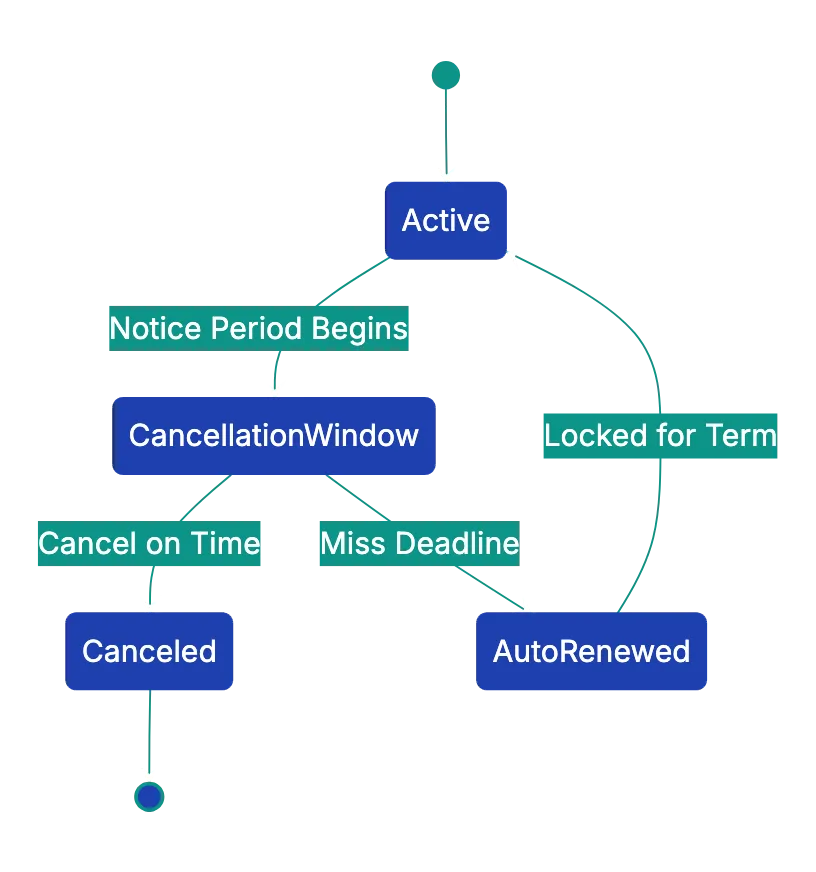
Find out how you must cancel. Some vendors let you cancel in the account settings. Other vendors require an email to a specific address, or a phone call. On the day that you sign, put the last day for notice in your calendar.
Data ownership and export
Ownership on paper does not help if you cannot get the data out. Before you sign, do a test export and look at the result. For example, a CRM (customer relationship management) export with contacts but without notes, activity history, or custom fields leaves a part of your records behind.

Also find the retention period after cancellation. This period is the time that you have to export your data. Then look for a clause that lets the vendor use your content to improve its products or to train AI models.
Security and privacy
The GDPR uses two roles. The controller decides why personal data is processed (you, the customer). The processor processes the data for the controller (the vendor).
Data processing agreement
If the vendor processes personal data for you and the GDPR applies to you, Article 28 requires a binding contract. The contract sets out the subject, duration, nature, and purpose of the processing. It also gives the types of personal data and the obligations of the two parties. Many vendors publish a standard DPA. If a vendor does not have one, ask for it before you sign.
Breach notice
Under Article 33, a controller must notify the supervisory authority of a personal data breach without undue delay. Where feasible, the controller must do this not later than 72 hours after it becomes aware of the breach. The processor must notify the controller without undue delay. A vendor promise in hours gives you time to meet your own deadline.
Data location
The GDPR does not require that data stays in the EU. Transfers to other countries are permitted to a country with an adequacy decision, or with safeguards such as standard contractual clauses. An adequacy decision is an EU decision that a country protects personal data well enough. Find the place of storage and processing in the agreement, and the transfer method that applies.
Audit reports
A SOC 2 report is an examination of the controls of a vendor by an independent firm of certified public accountants (CPAs). The controls cover security, availability, processing integrity, confidentiality, or privacy. A Type 2 report also tests if the controls operated effectively. Ask for the latest report, not only a badge on the website.
Uptime and service credits
Uptime percentages hide real hours. This table shows the allowed downtime for three common uptime levels:
| Uptime | Allowed downtime in a 30-day month | Allowed downtime in one year |
|---|---|---|
| 99.9% | About 43 minutes | About 8.8 hours |
| 99.5% | About 3.6 hours | About 43.8 hours |
| 99% | About 7.2 hours | About 3.65 days |
Service credits are usually a percentage of the monthly fee. They often have a cap, and they seldom pay for the real cost of an outage. Find out if scheduled maintenance counts as downtime, and when the maintenance occurs.
Liability and indemnity
SaaS contracts commonly cap the liability of the vendor, often at the fees that you paid in the previous 12 months. For example, you pay $200 each month, and a breach at the vendor costs you much more. The cap then limits your recovery to $2,400.
Small customers seldom change this clause. Know the cap before you put sensitive data in the tool. Find the exclusions from the cap. They often include indemnification, gross negligence, and willful misconduct. Also make sure that the vendor defends you if its software infringes a patent or a copyright.
Red flags
A red flag is a term that shows a high risk. Look for these red flags in the agreement:
| Area | Red flag |
|---|---|
| Pricing | No cap on renewal increases, or fees that show only on the invoice |
| Term | A long notice period, cancellation only by phone, or a high early termination fee |
| Data | No full export, vendor rights to your content, or no deletion date |
| Security | No encryption, no audit report, or no DPA when you need one |
| SLA | No SLA, or credits with a very small cap |
| Liability | A cap of one month of fees, or no indemnity for intellectual property claims |
| Changes | The vendor can change prices or remove features during the term with only a notice |
Keep a simple list of all your subscriptions. Include the vendor, the cost, the renewal date, the notice period, and the export method. Set a reminder before each notice deadline.
Use this checklist with Claude or ChatGPT
Claude or ChatGPT can find the answers in a long agreement for you. Paste the checklist. Then paste or attach the terms of service, the order form, the SLA, and the DPA. Ask the assistant to answer each item with a quote.
Below is a SaaS agreement checklist, followed by the vendor's terms of
service, SLA and data processing agreement. For each checklist item,
quote the clause that answers it, with its section number, and give a
one-line plain-English summary. If the documents do not answer an item,
write "Not found". Then list the five clauses that carry the most risk
for a small business, and the questions I should ask the vendor.

CHECKLIST:
[paste the checklist]

AGREEMENT:
[paste the documents]
Make sure that each quoted clause is in the original document before you use it. The assistant can miss a clause in a long contract, mix up documents, or state something that the text does not say.
If the agreement is under a non-disclosure agreement (NDA) or has confidential prices, read the data settings of your workspace before you paste it. For large contracts or regulated data, ask a lawyer to review the agreement. The AI summary is a start, not legal advice.
A docs portal with Ask AI
and support tickets
Connect a repository, or describe your product to start. Each docs site has search, Ask AI, an API console, an MCP server and support tickets.
- Publishes from GitHub on every push
- Works with Mintlify repositories
- API console from your OpenAPI file
- MCP server and llms.txt for AI agents
- Ask AI and support tickets
- Analytics for people and AI agents
Frequently Asked Questions
Can I negotiate a SaaS agreement?
For small self-service plans, vendors seldom change their standard terms. For larger purchases with an order form, you can often negotiate a cap on renewal increases, a shorter notice period, help with data export, and better service credits. Ask for each change in writing, and make sure that it is in the signed order form.
What happens to my data if the vendor closes?
The agreement can give you a period to export your data, or it can say nothing. Look for a clause about the end of the service and the return of data. Export your data on a schedule, so that you always have a recent copy.