Can ChatGPT Sites Show Up in Google? What site:chatgpt.site Reveals
Table of Contents
- What site:chatgpt.site shows in Google
- Useful searches for finding public ChatGPT Sites
- Not every ChatGPT Site is public
- Why a public ChatGPT Site is a poor client document portal
- How to review and restrict a ChatGPT Site
- Removing the page does not instantly erase Google’s result
- Use Revdoku for protected client sharing
- Try Revdoku for free
- What site:chatgpt.site shows in Google
- Useful searches for finding public ChatGPT Sites
- Not every ChatGPT Site is public
- Why a public ChatGPT Site is a poor client document portal
- How to review and restrict a ChatGPT Site
- Removing the page does not instantly erase Google’s result
- Use Revdoku for protected client sharing
- Try Revdoku for free
TL;DR: Public ChatGPT Sites can appear in Google. A search for site:chatgpt.site currently returns many individual sites, so a public ChatGPT Site is not a safe place for confidential client files. ChatGPT also offers private and limited sharing modes, but “Anyone with the link” is still not the same as password or verified-email protection.
This is a companion to our guide on ChatGPT shared links and Google indexing. Shared conversations and ChatGPT Sites use different URLs, but the practical privacy rule is the same: if a page is public, assume it can be found, copied, and retained.
What site:chatgpt.site shows in Google
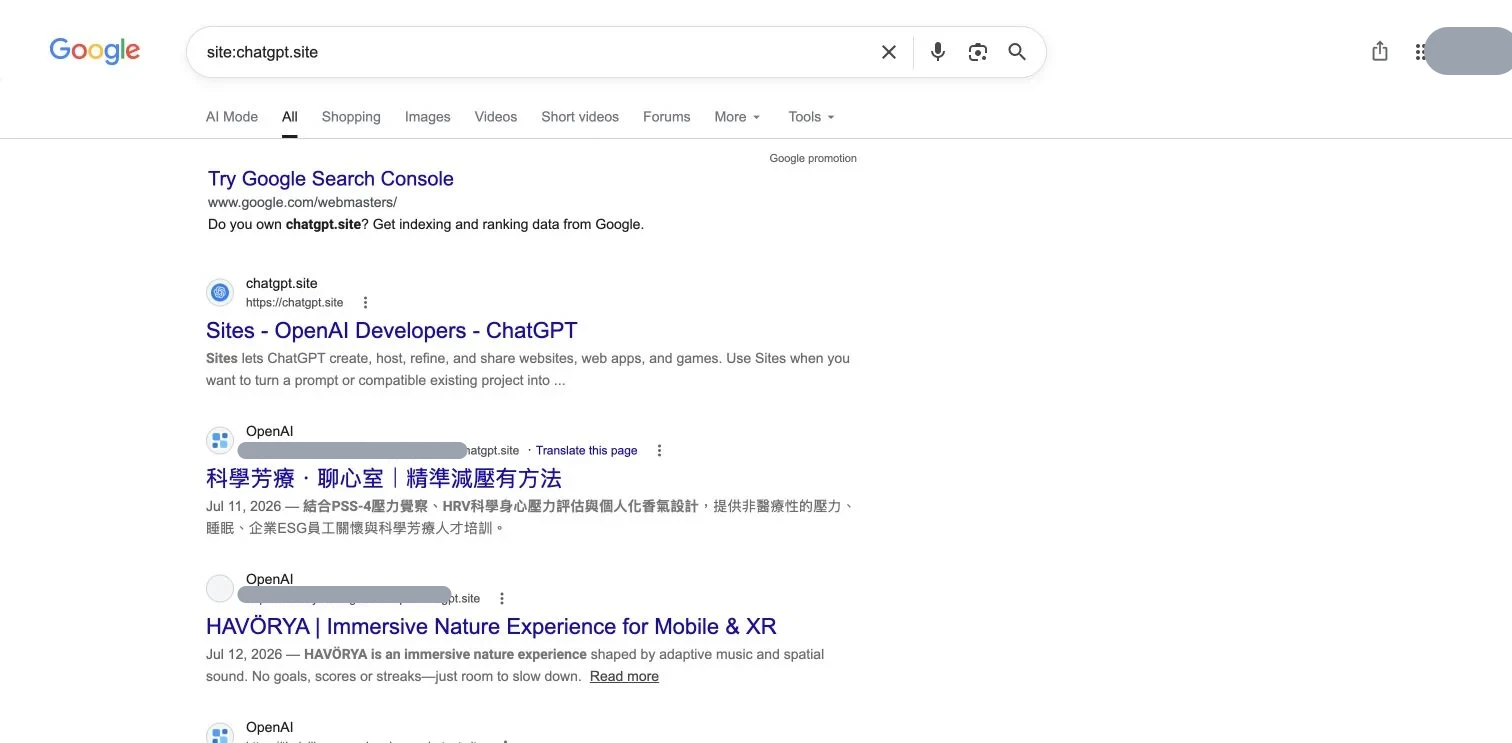
On August 1, 2026, we searched Google for:
site:chatgpt.siteThe first page contained multiple individual ChatGPT Sites. Google also offered page after page of additional results.
The screenshot keeps the official ChatGPT Sites result visible and masks only the unique subdomains and the signed-in account. Titles, dates, and snippets remain visible so you can see that Google has indexed several distinct ChatGPT Sites. The point is not to expose anyone’s work. The point is that Google has already discovered and indexed public pages on the domain.
The site: operator is useful evidence, but it is not a complete inventory. It shows pages Google currently returns for that domain. It does not prove that every ChatGPT Site is public, and it does not list every URL Google knows about.
Useful searches for finding public ChatGPT Sites
Start with the domain:
site:chatgpt.siteAdd a word or phrase to narrow the results:
site:chatgpt.site "proposal"
site:chatgpt.site "client"
site:chatgpt.site intitle:"report"
To focus on recent results, add a date:
site:chatgpt.site after:2026-07-26Change the date and keywords for your audit. Results vary by time, location, language, and Google’s current index.
Do not use this search to browse other people’s private-looking material. Use it to understand the exposure model and to look for your own public content.
Not every ChatGPT Site is public
ChatGPT Sites has access controls. In the personal account we inspected, the Share dialog offered Only you and Anyone with the link.
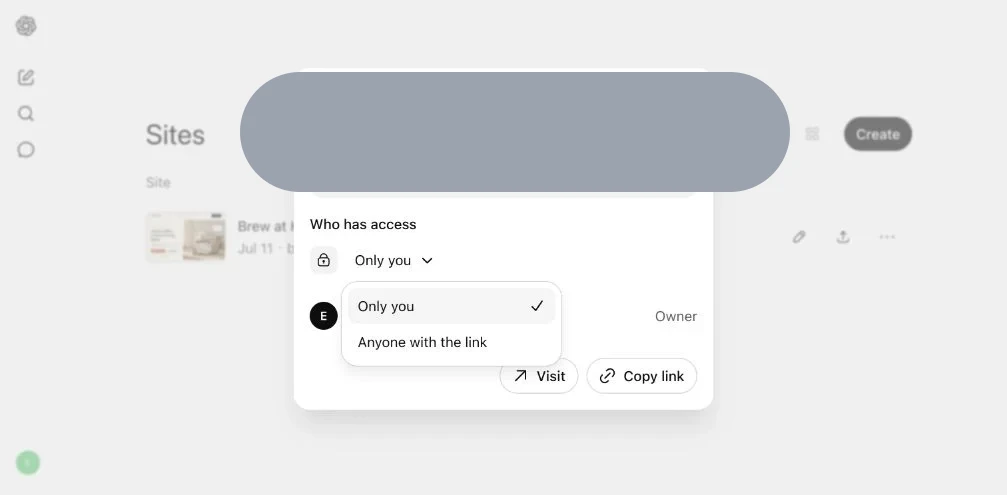
OpenAI’s ChatGPT Sites documentation describes additional options that can depend on the account and workspace, including selected users or groups, workspace access, and Anyone on the internet when public publishing is enabled.
That distinction matters:
- Only you is private to the owner and permitted workspace administrators.
- Selected users or workspace access can provide a narrower audience when the account supports it.
- Anyone with the link means possession of the URL can be enough to open the page. The link can be forwarded or pasted elsewhere.
- Anyone on the internet is public publishing. Public pages can be crawled and indexed.
A link that is difficult to guess is not an access-control policy. It is a bearer link. Once it is copied into a message, document, issue tracker, analytics system, browser history, or public page, control over who receives it becomes weaker.
Why a public ChatGPT Site is a poor client document portal
ChatGPT Sites is useful for public websites, lightweight apps, demos, and experiments. The risk appears when a public site is used as though it were a private delivery room.
Do not place these on a publicly reachable chatgpt.site URL:
- confidential proposals or pricing documents
- client reports and presentations
- prototypes containing private customer or company data
- contracts, financial documents, or internal PDFs
- folders of client deliverables
- files that should be visible only to named recipients
Search engines can fetch public pages and create titles and snippets. Other crawlers, monitoring tools, link previews, and archive services may also request public URLs. Some may retain a copy or reference. This does not mean every crawler saves every page, but it does mean that unpublishing later cannot recall every copy already made.
OpenAI also tells Site owners to review a Site before public publishing and avoid sharing confidential, sensitive, or third-party content without the appropriate rights. Its ChatGPT Sites Terms explain that published content is hosted and made available according to the sharing settings you select.
How to review and restrict a ChatGPT Site
Use ChatGPT’s own Sites inventory instead of relying on Google:
- Open ChatGPT.
- Open Sites from the sidebar or go to your Sites list.
- Find the Site and select Share.
- Change Who has access to Only you or the narrowest audience your account supports.
- Open Site settings if you need more access or publishing controls.
- If the Site should no longer exist, delete it and confirm the old address no longer loads.
- Test the old URL in a private browser window.
OpenAI’s official guide says you can restrict access through Share settings or permanently delete a Site. Deletion cannot be undone, so use a narrower access setting when you only need to stop public access temporarily.
Removing the page does not instantly erase Google’s result
After a page is restricted or deleted, Google may still show an old title or snippet until it recrawls the URL.
Google’s Refresh Outdated Content guidance explains that deleted or changed pages can temporarily remain in search results with outdated descriptions or cached information. Its removal guide recommends removing content at the source first, then using the appropriate refresh or removal tool.
A practical cleanup sequence is:
- Restrict or delete the ChatGPT Site.
- Confirm the old URL no longer exposes the content.
- Search Google for the exact URL and distinctive phrases.
- Request an outdated-content refresh if an old result remains.
- Assume any copy already downloaded by another person is outside your control.
Use Revdoku for protected client sharing
If the deliverable is intended for a client rather than the public web, publish it behind an actual access boundary.
Revdoku can host an AI-built website, exported HTML project, PDF, presentation, report, or folder with:
- password protection
- verified-email access
- email and domain allowlists
- visitor notifications and activity
- file updates without changing the shared URL
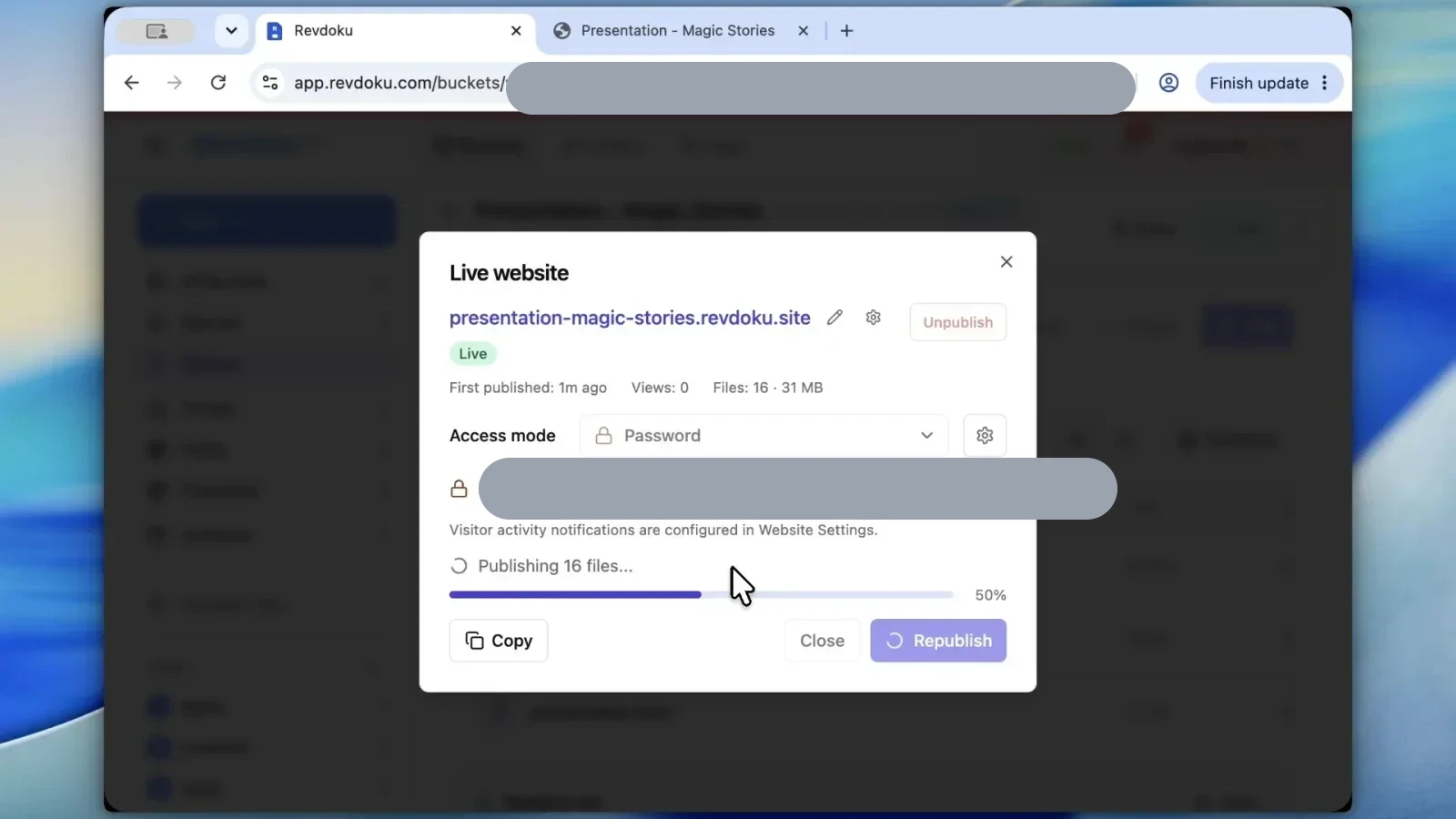
Protected content is not available to Google as a public page. You can give a client one stable link, update the files behind it, and keep the audience limited.
Try Revdoku for free
Use ChatGPT Sites for public work you want people to find. Use Revdoku when a specific client or approved audience should be able to open the result.
Create a protected Revdoku link or read the guide to password-protecting a website.
Frequently asked questions
Are all ChatGPT Sites indexed by Google?
No. A Google site:chatgpt.site search proves that some public ChatGPT Sites are indexed. It does not show every Site, and private Sites should not be treated as public pages.
Is “Anyone with the link” private?
It is narrower than public discovery, but it is not the same as a password or verified identity check. Anyone who receives the URL may be able to open and forward it.
Can Google keep showing a Site after I delete it?
Yes, temporarily. An outdated title or snippet can remain until Google recrawls the URL. Remove or restrict the source first, then use Google’s outdated-content tools if needed.
Should I publish client PDFs or reports on a public ChatGPT Site?
No. A public website is the wrong container for confidential client material. Use a protected sharing layer with an access gate and a controlled audience.
Can I update a file in Revdoku without sending a new link?
Yes. You can replace or update the PDF, website, or other files behind the existing Revdoku URL, so the client keeps using the same link.
History
- August 1, 2026 — Published by Revdoku Content Team
- August 1, 2026 — Reviewed by Eugene Mi
- August 1, 2026 — Last updated by Revdoku Content Team.
Related Articles

GitHub Pages Password Protection and Privacy
Learn why private repositories do not protect Pages sites and compare secure access options for internal teams and external clients.

How to Password Protect a Vercel Deployment
Learn how to secure Vercel deployments with password protection, authentication, trusted access, or protected Revdoku hosting.

How to Password Protect a Website Made with Claude
Learn how to export, secure, publish, and test a Claude-made website using password protection or verified-email access.