
Business Proposal Review Checklist
Business proposal review checklist
Use this checklist on the finished draft, before anyone signs it. It works for a reply to an RFP (request for proposal) and for an informal proposal. For an informal proposal, skip the RFP items and use the rest.

1. Compliance with the request
- A compliance matrix lists every requirement and question in the RFP. A compliance matrix is a table that maps each requirement to your answer.
- Each row of the matrix gives the page or section that answers it. No row is empty.
- The sections follow the order, headings and numbering that the RFP asks for.
- The page limit, font, file format (PDF or Word) and file name agree with the instructions.
- The proposal includes all required forms, signatures, certifications and attachments.
- Your team read every addendum (a later change to the RFP) from the buyer. The proposal acknowledges each addendum if the RFP asks for that.
- You know the submission method, the date, the time and the time zone.
2. Cover letter and executive summary
- The letter goes to the named contact, with the correct name and title.
- One or two sentences say what you will deliver and what changes for the buyer. For example: “We will rebuild your customer onboarding so that new accounts are active in 3 days instead of 14.”
- The text uses the name of the buyer and the problem that the buyer described. It does not say “your company.”
- It gives two or three reasons why you fit this job. Company history can wait.
- It gives the RFP number, if there is one.
- It fits on one page.
3. Scope of work
- Each deliverable is measurable. Not “improve website performance” but “pages load in under 2 seconds on mobile and get a Lighthouse score of 90 or higher.”
- The scope says what is not included.
- The timeline gives dates or durations and milestones, not “about two months.”
- The scope lists what you need from the client (content, access, approvals), with dates.
- Each deliverable says how the client accepts it.
- A change order process covers work outside the agreed scope. A change order is a signed agreement for extra work and its price.
4. Pricing
- A table breaks down the costs (labor, materials, licenses, expenses), with item, quantity, unit price and total.
- You calculated every total again. The same figures appear in the summary, the pricing table and any price form.
- The proposal gives the payment terms, for example net 30, a deposit, or payments at milestones.
- It says who pays for travel and other expenses, and how you bill them.
- It says if the prices include taxes.
- It says how long the quote is valid.
5. Qualifications
- One or two similar projects show the problem, your approach and a measurable result.
- The proposal names the people who will do the work, with their roles.
- The references have current contact details, and each reference agreed to a call.
- The proposal includes the licenses, certifications and insurance certificates that the buyer asked for.
6. Terms and conditions
- The contract type is clear. In a fixed-price contract, you pay for overruns. In time and materials, the client pays for actual hours. A retainer is a fixed fee for ongoing work.
- The terms cover ownership of intellectual property, confidentiality, termination, limitation of liability and dispute resolution.
- Your team changed any template terms to fit this project.
7. Final proofread
- The name of the buyer is correct everywhere. No name from an earlier proposal remains.
- The text has no typos, and the headings, fonts and numbering are consistent.
- A person who did not write the proposal compared it with this checklist.
Why proposals get rejected
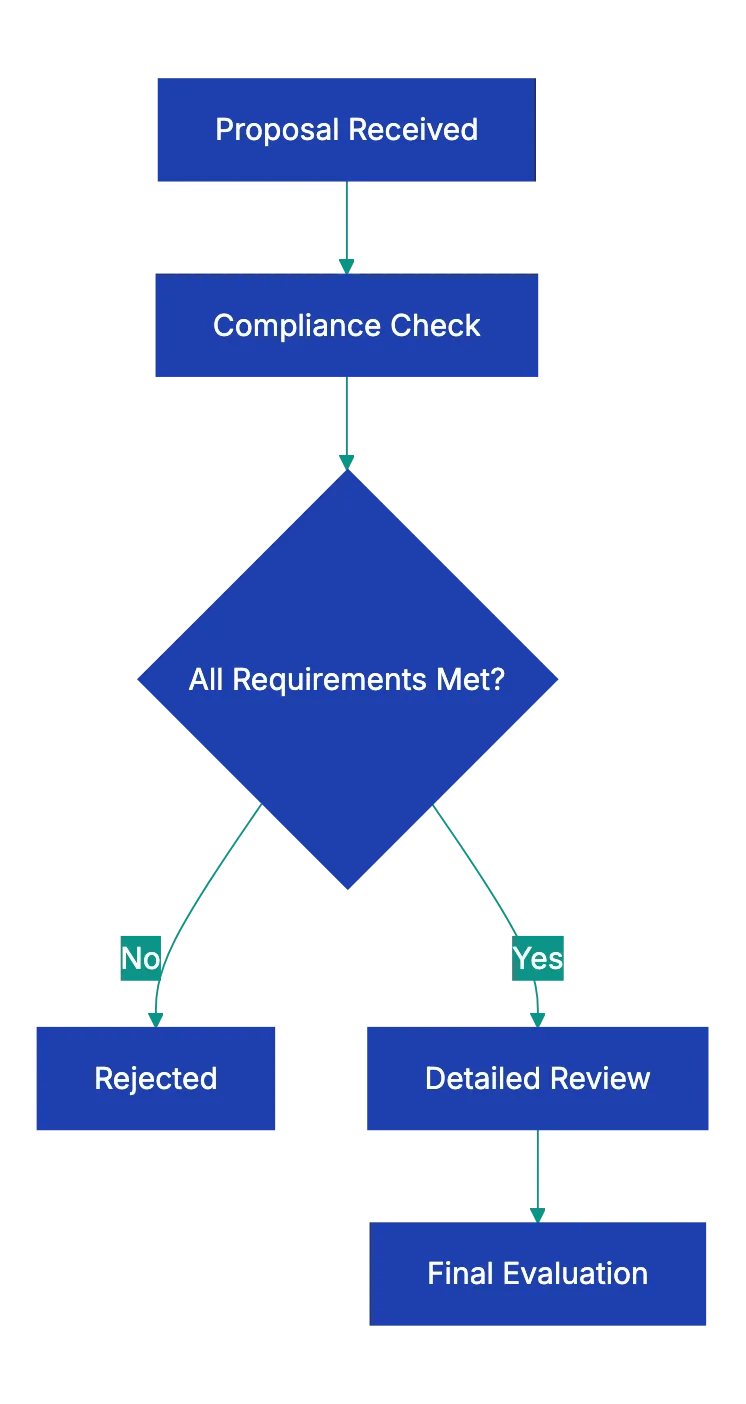
Many buyers look at compliance before they look at quality. If a required item is missing, the buyer can reject the proposal before anyone reads your approach. These are the usual causes:
- The proposal arrives late. Deadlines are usually strict. In US federal procurement, a proposal that arrives after the exact deadline is “late.” The government does not consider it, with few exceptions (FAR 15.208).
- Some questions have no answer. The buyer asks every bidder the same questions to compare the answers. A missing answer makes your proposal hard to score.
- The content is generic. If the text can go to any client, the buyer sees it.
- The math has errors. If a total does not agree with its line items, the buyer starts to doubt your budget.
- The text has typos or inconsistent formatting. One typo is not a problem. Several typos on a few pages look careless.
Leave time for the review
Plan the schedule back from the deadline. If the proposal is due on Friday, finish a complete draft by Tuesday. Then you have Wednesday and Thursday for review and corrections. Give the draft and this checklist to a colleague who did not write it. That person finds gaps that the writers no longer see.
A two-page proposal for a small project does not need the format of a large government RFP reply. It still needs a clear scope, pricing, a timeline and terms.
Use this checklist with Claude or ChatGPT
You can use this checklist with a general AI assistant, such as Claude or ChatGPT. Paste the checklist, the RFP (or the request from the buyer) and your draft. Then ask the assistant to go through each item and to list what is missing. Here is an example prompt:
Below are an RFP, a proposal review checklist and our draft proposal.
1. Make a table of every requirement and question in the RFP, with the
   section of our draft that answers it, or "MISSING".
2. Go through the checklist and mark each item Pass, Fail or Cannot tell.
   Quote the part of the draft that shows it.
3. List every price, date and total that appears in more than one place,
   and say if the values agree.
Compare each finding with the RFP and the draft before you act on it. The assistant can miss a requirement, and it can report a gap that does not exist. Do the pricing math again yourself.
Read the confidentiality terms of the RFP before you upload anything. Proposals often contain confidential prices and client details, and some RFPs limit who can see their contents. Remove what the assistant does not need, and look at the data settings of your workspace.
A docs portal with Ask AI
and support tickets
Connect a repository, or describe your product to start. Each docs site has search, Ask AI, an API console, an MCP server and support tickets.
- Publishes from GitHub on every push
- Works with Mintlify repositories
- API console from your OpenAPI file
- MCP server and llms.txt for AI agents
- Ask AI and support tickets
- Analytics for people and AI agents
Frequently Asked Questions
Can I ask the buyer questions about an RFP before I submit?
Usually, yes. Most RFPs name a contact and a deadline for written questions. The buyer often shares the answers with every bidder, sometimes as an addendum. Send your questions before that deadline, and use only the channel that the RFP names.
What if we cannot meet one of the RFP requirements?
Ask the buyer in the question period if the requirement can change. If it cannot, find out if the RFP accepts exceptions and how to list them. Some buyers reject a proposal that takes an exception to a mandatory term. Say clearly what you can offer instead.