# Static HTML Hosting Without Git: Upload Files & ZIPs
> Upload finished HTML websites from a folder or ZIP without Git. Learn about file paths, SPA routes, protected previews, and stable links.
## Static HTML hosting for files that are already finished
Your AI coding tool has produced a working folder of HTML, CSS, JavaScript, and images. Now you need a live link, but hosting guides often begin with Git, package managers, and deployment settings.
That machinery helps teams building software daily but adds friction when the finished website is already on your desktop.
**Static HTML hosting** publishes those files directly. With Revdoku, you can upload a website, share a stable link, control access, and replace files without a Git repository or build pipeline.
TL;DR: Upload a finished folder or ZIP without Git and share a protected, stable link. This guide covers:
- How to prepare and upload a folder or ZIP file
- Why `index.html` and relative paths matter
- How static pages differ from single-page applications
- How to run protected client reviews
- When Revdoku, GitHub Pages, Netlify, or Vercel is the better fit
## What static website hosting for finished files means
A static website contains files the host delivers directly for the visitor’s browser to render.
A typical project contains:
- **HTML** for structure and written content
- **CSS** for layout, typography, and visual design
- **JavaScript** for browser-side behavior
- **Images and fonts** used by the page
- **JSON or other assets** read by client-side scripts
This model suits landing pages, interactive prototypes, product tours, portfolios, documentation, and small marketing sites, especially AI-generated sites delivered as downloadable files.
Static does not mean dull: browser-side JavaScript can power tabs, calculators, animations, filters, forms, and charts. But finished-file hosting provides no private server runtime, application database, or secret API environment.
A Revdoku contact form can collect feedback without a backend, but custom JavaScript that writes to your database still needs an external service or API.
The lightweight approach can also help performance. The [2024 HTTP Archive Web Almanac](https://almanac.httparchive.org/en/2024/page-weight) measured a median page weight of **2,652 KB on desktop** and **2,311 KB on mobile**. A focused static site can avoid much of that weight when it uses modest images and only the JavaScript it needs.
| Good fit for static hosting | Needs another service |
|---|---|
| Portfolio or brochure site | Server-rendered application |
| Clickable HTML prototype | Private database queries |
| Product demonstration | User accounts managed by your code |
| Event or campaign page | Secret payment processing logic |
| Client presentation site | Long-running server tasks |
## How to upload an HTML website from a folder or ZIP without Git
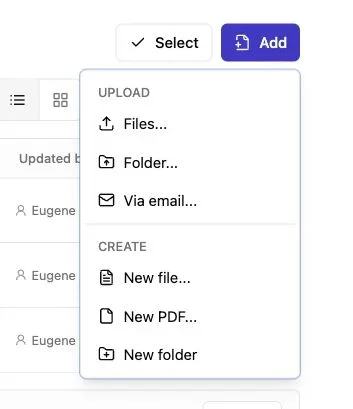
Note: Use the Add menu to upload files or a complete folder.
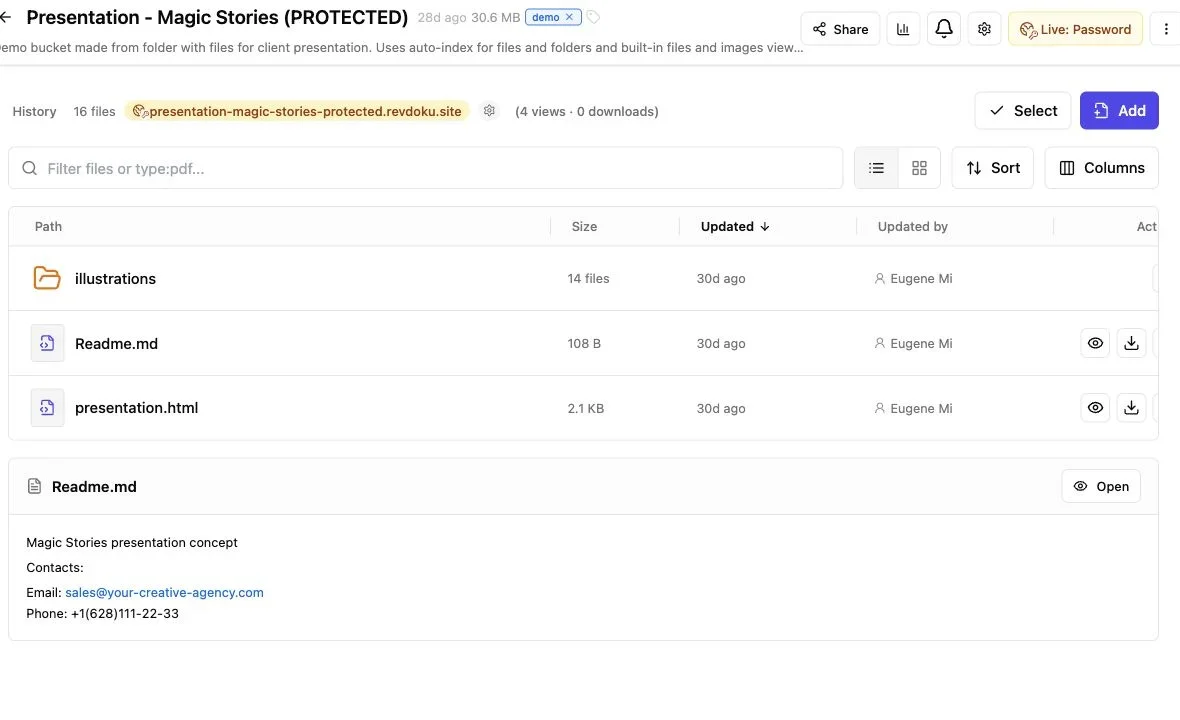
Note: A bucket keeps the published files, live URL, and owner controls together.
Before publishing, put the complete site in one project folder and preserve its working structure. Moving a stylesheet or image without updating its path can break the design.
A simple folder might look like this:
```text
client-preview/
├── index.html
├── about.html
├── css/
│ └── styles.css
├── js/
│ └── app.js
└── images/
├── logo.svg
└── hero.webp
```
Upload the website folder directly or as a ZIP file. In a ZIP, keep `index.html` at the project root, not inside a second folder.
Then publish through Revdoku:
1. Open the dashboard and create or select a bucket for the project.
2. Drag the site folder or ZIP file into the bucket.
3. Confirm that Revdoku recognizes the website entry point.
4. Open the generated link in a private browser window.
5. Test navigation, images, forms, and mobile layout.
6. Choose public, password-protected, or email-gated access before sharing.
This **HTML hosting without Git** workflow publishes the exported files without connecting a repository or configuring a build command.
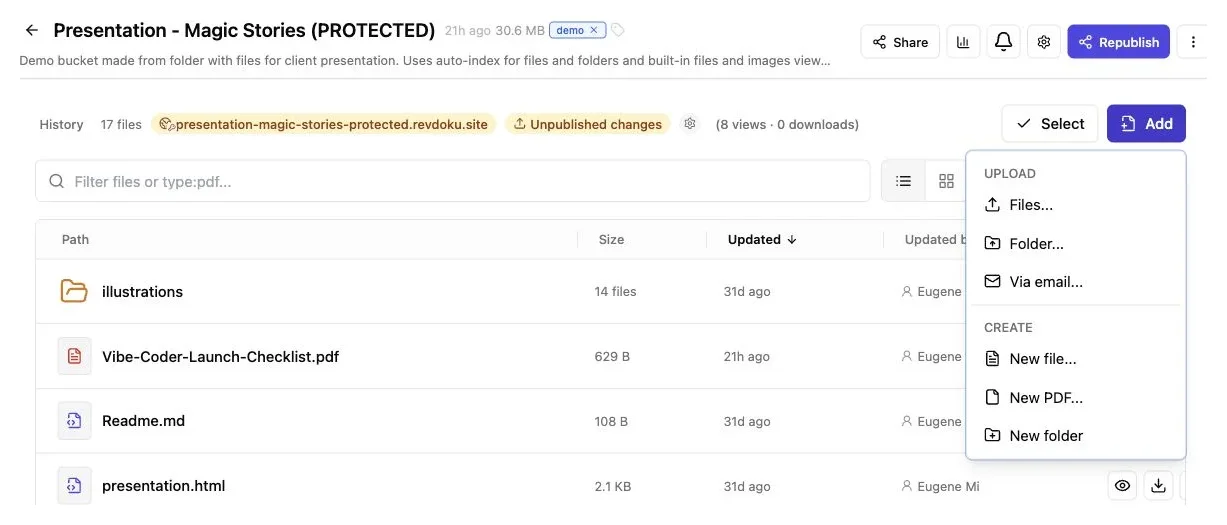
*Use Add → Folder to upload a finished static export while keeping its entry page and assets together.*
## Why index.html and file paths matter when you host an HTML file
Static hosting normally opens `index.html` at the site’s root. If it is missing, one directory too deep, or capitalized differently, visitors may see an error.
Use this pre-upload check:
| Item | What to check | Why it matters |
|---|---|---|
| **Entry file** | `index.html` is at the project root | Gives the root URL a page to open |
| **Capitalization** | Names match exactly | `Logo.svg` and `logo.svg` may be different files |
| **CSS paths** | Stylesheets load from their real location | Prevents an unstyled page |
| **Image paths** | Every image resolves inside the folder | Avoids broken visual assets |
| **Local references** | No links point to your computer | Paths such as `C:\Users\...` cannot work online |
| **Nested pages** | Links include the right filename or directory | Keeps navigation working after upload |
Relative paths are usually safest. `images/hero.webp` points within the uploaded project, while `/images/hero.webp` starts at the domain root and may behave differently below another path.
Test filename case: although a Mac or Windows computer may be forgiving, the host can treat `App.js` and `app.js` as separate names. An AI coding tool can audit the references.
To **host an HTML file** without supporting assets, name it `index.html`, upload it, and test the live address.
## Static HTML hosting versus single-page application behavior
A traditional static site has one HTML file per page, such as `about.html` or `about/index.html`. Each URL maps to an uploaded file, making the structure predictable on almost any static host.
A **single-page application**, or SPA, often uses one HTML file and JavaScript navigation. React, Vue, and similar tools can produce this output, changing the visible URL without requesting another HTML document.
The difference appears when refreshing a nested URL:
- `site.example/index.html` maps to a real file.
- `site.example/about.html` maps to another real file.
- `site.example/#/about` keeps routing information after a hash and normally returns `index.html`.
- `site.example/about` may require a host-level fallback that sends unknown paths to `index.html`.
With browser-history routing, opening `/about` directly can return a 404 without a configured host fallback. Hash routing is often safer for finished-file previews because the browser handles everything after `#`.
Before uploading an AI-generated website, determine whether the folder contains source files or production output. `package.json`, JSX components, and TypeScript may require a build; a finished export contains browser-ready HTML, CSS, JavaScript, and assets.
| Project behavior | Publishing approach |
|---|---|
| Separate HTML files | Upload them as supplied |
| SPA with hash routes | Upload finished output and test each route |
| SPA with history routes | Confirm fallback support before sharing |
| Framework source only | Build or export first, then upload the output folder |
## Protected client previews without building login screens
Public hosting suits launched sites, but client work may need privacy. A new campaign, product concept, or pitch should not always be indexed or shared without context.
Revdoku can protect previews with a password or email gate, giving freelancers and agencies control without authentication code.
Three common projects:
- **An agency landing-page review:** The agency uploads the finished HTML website and gives the client a password. Reviewers see the real responsive page instead of a flat screenshot.
- **A consultant’s interactive report:** The consultant gates access by email and can see which invited visitor opened the link, which pages they viewed, and what they clicked.
- **A founder’s product demo:** The founder shares a browser-based prototype with selected investors while keeping the unfinished concept away from a general public URL.
Protected links improve follow-up timing. An open notification confirms the recipient reached the work without another email asking whether the attachment arrived.
Built-in feedback and contact forms collect responses without a database or form-handling code. Keep requests focused: *Which version should we develop?* is more useful than an undirected comment box.
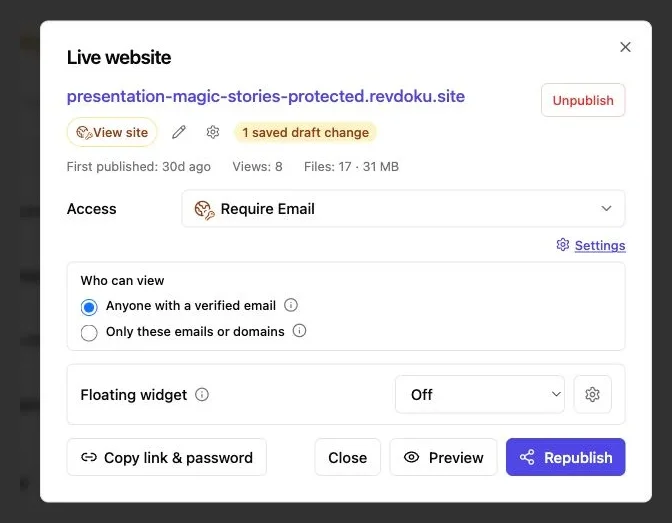
*The Access selector offers Public, Password Gate, and Require Email. This example shows Require Email selected.*
## Custom domains, analytics, and stable updates
A generated Revdoku link works for internal review, while a custom domain can polish a presentation or campaign. Use `preview.clientname.com` during approval, then move the final files after sign-off.
Domain setup usually requires copying the host’s DNS record to the domain’s DNS provider and allowing time for propagation. Do not delete working email records such as MX entries.
A stable link lets you replace copy, colors, or images in the same Revdoku bucket while clients keep using the original URL. No need to email `final-v4-really-final.zip`.
For continuing review:
1. Publish the first finished version.
2. Apply client feedback in the local project.
3. Test the revised folder on your computer.
4. Upload the replacement files to the same bucket.
5. Open the shared link in a private window and verify the revision.
6. Use visitor activity and feedback to plan the next response.
Per-visitor analytics show page views, clicks, and downloads, while an email gate records leads. These signals reveal whether the decision-maker opened the proposal, what drew attention, and whether the reviewer downloaded the file.
Use analytics to guide conversation, not create surveillance theater. Disclose collection, limit it to what you need, and follow applicable privacy rules.
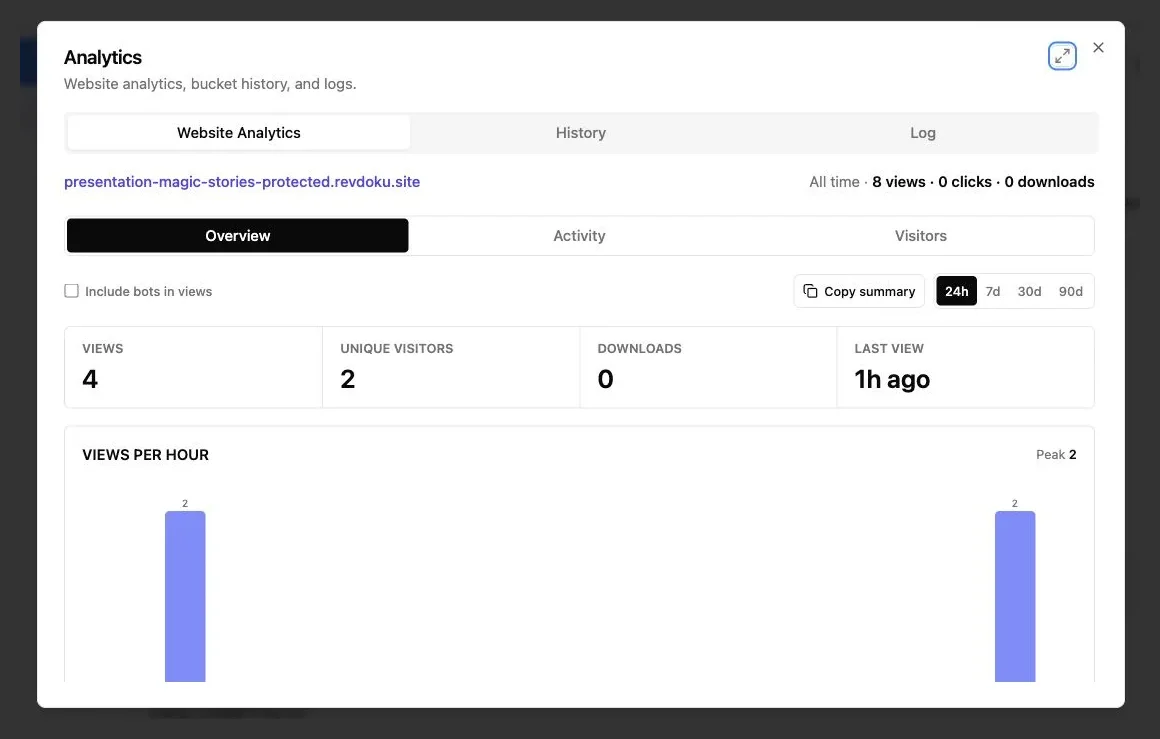
*The overview reports the activity that actually exists for the published site, including views, unique visitors, downloads, and popular paths.*
## Static HTML hosting: Revdoku compared with GitHub Pages, Netlify, and Vercel
All four services deliver static files but assume different workflows. The right choice depends on what happens before and after publishing.
| Service | Natural starting point | Strongest fit | Client-review consideration |
|---|---|---|---|
| **Revdoku** | Finished folder or ZIP | Controlled sharing of demos and deliverables | Password and email gates, notifications, visitor analytics, lead records, feedback, and stable updates |
| **GitHub Pages** | GitHub repository | Developer-owned sites tied to source control | Reviewers usually receive a public site rather than a client delivery workspace |
| **Netlify** | Git, CLI, or drag-and-drop files | Frontend deployment with broad platform options | Manual file publishing is available, but the product covers a larger development workflow |
| **Vercel** | Git or CLI deployment | Framework projects and application teams | Preview deployments center on development environments and deployment history |
GitHub says Pages sites have a recommended repository limit of **1 GB**, a published-site limit of **1 GB**, and a soft bandwidth limit of **100 GB per month**. Its documentation also describes source repositories and build activity, which suits people already working in Git. See the current [GitHub Pages limits](https://docs.github.com/en/pages/getting-started-with-github-pages/github-pages-limits).
Netlify is the closest alternative when the main requirement is manual upload. Its official [Netlify Drop guide](https://docs.netlify.com/start/quickstarts/netlify-drop-quickstart/) supports folders and ZIP files without a Git repository. Vercel’s [deployment documentation](https://vercel.com/docs/deployments/overview) lists Git, CLI, deploy hooks, and API workflows, with Git described as the most common method.
Choose Revdoku to deliver finished work to named people, control access, measure engagement, and collect responses.
## Common problems when you host an HTML file or website
HTML website uploads usually fail because of an incorrect export, an asset outside the folder, or a secret placed in browser-side code.
Review before sharing:
- **Open the local `index.html`:** Confirm that the exported version works outside the AI tool’s preview window.
- **Inspect browser errors:** Missing scripts and blocked requests usually appear in the developer console.
- **Remove secrets:** API keys embedded in JavaScript are visible to anyone who can load the file, even behind a gate.
- **Compress large images:** The HTTP Archive measured median image payloads of **1,054 KB on desktop homepages** and **900 KB on mobile homepages** in 2024. Resize images to their displayed dimensions and prefer WebP or AVIF when practical.
- **Test on a phone:** Wide fixed layouts and hover-only controls often fail on touch screens.
- **Check every direct URL:** Refresh nested pages and SPA routes rather than testing navigation only from the homepage.
- **Use HTTPS resources:** A secure page may block scripts or images requested over plain HTTP.
- **Keep an offline copy:** Save the exact published folder or ZIP so you know what was delivered.
Static JavaScript is public. A password gate controls site access but does not make browser code a secure server environment.
For repeated updates, Revdoku’s API, CLI, or an AI agent can update the same buckets. This optional automation is useful once you know the manual process.
## Final thoughts
A finished HTML, CSS, and JavaScript website needs no new delivery pipeline. Keep `index.html` at the project root, preserve the asset structure, upload the folder or ZIP, and test it.
Revdoku turns **static HTML hosting** into client delivery with protected previews, open notifications, visitor activity, feedback, and updates at the same link.
The boundaries:
- Browser-ready static files can be published directly.
- Framework source may need to be built first.
- Server runtimes, private databases, and secret backend logic need another service.
For vibe coders, designers, consultants, and small teams, that is enough infrastructure to share real work without making deployment another project.
Start publishing for free
Connect this AI to Revdoku so it can store files, create, update, and publish websites for me. Read and follow https://revdoku.com/prompt.md. A Revdoku account is required. If I do not have one, send me https://app.revdoku.com/users/sign_up?utm_source=revdoku.com&utm_medium=ai-chat&utm_campaign=connect_ai_first and wait until I confirm signup is complete. For ChatGPT, Claude, or another cloud AI, connect https://app.revdoku.com/mcp and complete Revdoku OAuth. For a local agent, use Revdoku's browser device sign-in and complete the connection in Revdoku. Never ask me for a password or API key in chat, or for a verification code. When Revdoku tools are connected, verify the connection, tell me you’re ready, and ask what I want to publish.
Copy Prompt
or
Create Free Account
## Frequently asked questions
### Can I publish a website directly from a ZIP file?
Yes, if the ZIP contains browser-ready HTML, CSS, JavaScript, and assets. Keep `index.html` at the ZIP’s root rather than inside an extra nested folder, and preserve the project’s directory structure.
### Why does my website work locally but break after uploading?
The most common causes are incorrect relative paths, filename capitalization differences, or references to files outside the uploaded folder. Check the browser console for missing resources and verify that every linked asset is included.
### Do React, Vue, or TypeScript projects need to be built first?
Usually, yes. Source files such as JSX, TypeScript, and framework components must typically be converted into production-ready HTML, CSS, and JavaScript before upload. Publish the generated output folder, often named `dist` or `build`, rather than the source project.
### How can I prevent nested SPA routes from returning a 404?
Browser-history routes such as `/about` require the host to send unknown paths to `index.html`. Confirm that the hosting service supports this fallback, or use hash-based routes such as `/#/about` for a more portable finished-file preview.
### Does password protection make API keys in JavaScript secure?
No. Any secret included in browser-delivered JavaScript can be inspected by a visitor who has access to the site. Keep private credentials and sensitive operations in a secure backend or external service.
### Can I update the website without changing the shared link?
Yes, when the replacement files are uploaded to the same Revdoku bucket. Test the revised project locally first, then verify the live version in a private browser window to avoid mistaking cached files for the latest update.
### When should I choose Revdoku instead of GitHub Pages, Netlify, or Vercel?
Revdoku is well suited to finished files that need controlled client sharing, engagement information, feedback, and updates at a stable link. GitHub Pages is a natural fit for repository-based sites, while Netlify and Vercel are better suited when broader deployment or framework workflows are central to the project.
---
[View the canonical page](https://revdoku.com/static-html-hosting/) · [Browse llms.txt](https://revdoku.com/llms.txt)